Professional streaming setups depend on fast, dependable control. The right panel can put scene changes, audio adjustments, lighting commands, shortcuts, and creative controls within easy reach.
We selected 10 options spanning dedicated stream decks, modular MIDI controllers, video switchers, lighting systems, and audio hardware so you can match your control surface to your studio workflow and production goals.
Best 10 Streaming Control Panels for Professional Studios Picks for 2026
Flexible Macro Hub

- 10 LCD keys with chained macros and custom icons
- Four RGB knobs, touch bar, and USB sound controls
- USB dock, stand, and 500+ plugin ecosystem
Best For: Creators needing customizable macros and multi-scene workflows
Precision Timeline Control
Grid TEK2 Modular MIDI Controller

- Two push-enabled jog wheels for scrubbing and tuning
- Eight pressure-sensitive Hall Effect buttons
- LED feedback, LUA scripting, and modular connectivity
Best For: Editors and producers seeking precise tactile control
Information-Rich Macro Deck
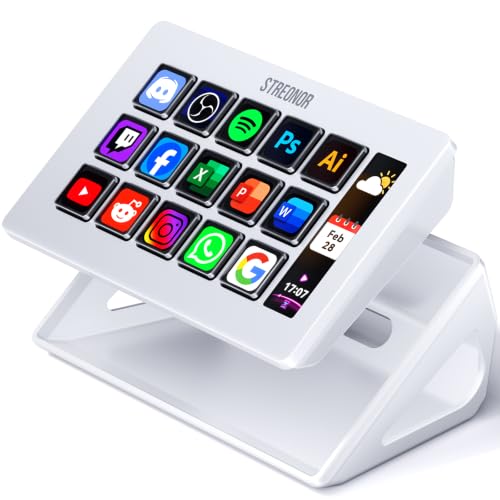
- 15 customizable LCD keys for shortcuts and OBS actions
- Three panels show system and status information
- Preset pages, action flows, and 100+ plugins
Best For: Streamers wanting dense controls and live status displays
Live Production Console
8-Channel Video Switcher Controller

- T-bar fader for smooth live transitions
- Four audio knobs and 24 programmable keys
- MIDI and keyboard modes for vMix, OBS, and more
Best For: Live producers needing tactile switching and audio control
Best Customizable Keypad
Yunseity 10-Key Stream Controller

- 10 customizable LCD keys
- Automatic dynamic profile switching
- PC and OS X compatible
Best For: Streamers needing visual shortcut and application control
Best Hybrid MIDI Surface
Grid PBF4 Modular MIDI Controller

- Four faders, knobs, and buttons
- 14-bit MIDI and HID mapping
- RGB indicators and modular expansion
Best For: Producers and editors wanting tactile parameter control
Best Lighting Control Kit

- Two adjustable 85W bi-color lights
- Boom arm and reinforced 91-inch stands
- Remote controls and weight bag included
Best For: Streamers needing flexible two-light studio illumination
Best Connected Key Light

- PC, Mac, iOS, and Android control
- 2900K–7000K with full dimming
- Clamp mount with flexible positioning
Best For: App-controlled desktop key lighting
Best Front-Panel Audio Hub

- 24-bit/192kHz recording support
- Physical gain, mix, loopback, and output controls
- XLR, TS, Hi-Z, and 48V microphone support
Best For: Hands-on streaming and recording audio control
Best Light-Shaping Accessory

- Shapes and directs Keylight output
- Helps reduce unwanted light spill
- Rail-guided mounting with adjustable positions
Best For: Directional lighting with compatible Elgato Keylight panels
Flexible Macro Hub – VSD N4 Pro Stream Controller
For creators comparing streaming control panels for professional studios, the VSD N4 Pro stands out as a programmable macro deck with 10 LCD keys, four RGB knobs, and an interactive touch bar. It supports chained actions, custom JPG/PNG/GIF icons, scene presets, sound-control commands, and USB-C connectivity for Windows 10+ and macOS 11.0+.
Best For: Streamers and editors who want customizable macros, visual key labels, audio controls, and multiple workflow presets.
Pros:
- 10 LCD keys support individual or multi-step programmable actions.
- Four RGB knobs and a touch bar provide additional hands-on control.
- Built-in USB dock, adjustable RGB lighting, and a foldable ergonomic stand add desk flexibility.
- Supports 500+ downloadable plugins and custom visual media.
Cons:
- It sends audio commands to the computer but has no built-in speakers.
- Compatibility is listed for Windows 10+ and macOS 11.0+, not Linux.
The N4 Pro is a versatile choice when a studio workflow benefits from layered macros and highly visible controls. Its broad customization is appealing, though buyers should account for the software and plugin setup involved.
Precision Timeline Control – Grid TEK2 Modular MIDI Controller
The Grid TEK2 takes a specialized approach to streaming control panels for professional studios, combining two push-enabled jog wheels with eight velocity- and pressure-sensitive Hall Effect buttons. Its LED rings and central display provide real-time feedback, while MIDI, HID, mouse, keyboard, and game-control protocols support customized DAW, editing, and streaming workflows.
Best For: Video editors, music producers, and advanced users who prioritize jog-wheel precision and scriptable control.
Pros:
- Dual endless jog wheels are suited to timeline scrubbing and fine parameter adjustments.
- Hall Effect buttons respond to velocity and pressure and support interchangeable keycaps.
- LED rings and the central display provide useful visual feedback.
- Modular magnetic design works with other Grid controllers and supports LUA scripting.
Cons:
- The eight-button layout is more specialized than a larger general-purpose macro deck.
- Its advanced customization depends on the Grid Editor and MIDI host applications.
Choose the TEK2 when tactile precision matters more than a large number of shortcut keys. It is particularly well matched to editing and DAW work, with enough protocol flexibility for customized studio setups.
Information-Rich Macro Deck – S15 Stream Controller
The STREONOR S15 is a practical option among streaming control panels for professional studios, offering 15 customizable LCD keys plus three non-touch status displays. Users can create separate pages for OBS, editing, office, or gaming tasks, and configure action flows, plugins, icons, and GIFs through the STREONOR software.
Best For: Streamers and multitasking creators who want many labeled shortcuts alongside at-a-glance system information.
Pros:
- 15 LCD keys provide ample space for shortcuts, app actions, and OBS controls.
- Three status panels can display information such as time, weather, CPU, GPU, and memory data.
- Preset pages help separate streaming, editing, office, and gaming workflows.
- Supports action flows, 100+ plugins, custom icons, and GIF customization.
Cons:
- Linux is not supported.
- Setup requires downloading the latest software and connecting directly to the computer.
- Some third-party integrations may require an account, subscription, or membership.
The S15 is a strong fit for users who value both shortcut density and desktop status information. Its software ecosystem adds flexibility, but buyers should review integration requirements before committing to a studio workflow.
Live Production Console – 8-Channel Video Switcher Controller
Designed for hands-on live production, this 8-channel console gives streaming control panels for professional studios a traditional switcher layout with a T-bar fader, four audio knobs, and dedicated production keys. It supports MIDI mode for vMix and OBS as well as standard keyboard mode for custom shortcuts, with USB-C plug-and-play operation on Windows, macOS, and Linux.
Best For: Live producers who need direct transition, audio, overlay, recording, and scene controls in one console.
Pros:
- Smooth T-bar fader supports professional-style transitions.
- Four precision knobs provide dedicated audio-mixing control.
- 24 programmable keys include production functions such as Record, Cut, and Auto.
- Dual MIDI and keyboard modes support vMix, OBS, and other applications.
Cons:
- The control layout is geared toward live production rather than general desktop macros.
- Its listed native software support centers on vMix, OBS, and MIDI 2.0-compatible software.
This controller makes the most sense for operators who prefer physical faders and knobs over a compact macro pad. Its aluminum panel, backlighting, and broad operating-system support suit a dedicated live-production desk.
Best Customizable Keypad – Yunseity 10-Key Stream Controller
For creators comparing streaming control panels for professional studios, the Yunseity Stream Controller Deck offers 10 customizable LCD keys for quick access to apps, shortcuts, audio controls, microphone muting, and lighting adjustments. Dynamic profile switching can change layouts based on the active application, making it useful for multitasking across production software.
Best For: Streamers and creators who want visual, application-aware shortcut control for PC or Mac.
Pros:
- 10 customizable LCD keys support personalized images and more than 100 shortcuts.
- Dynamic modes can automatically switch profiles for detected applications.
- Supports PC and OS X, with a premium ABS-and-metal construction.
- Useful for streaming, film editing, music production, and photography workflows.
Cons:
- Provides fewer physical controls than larger control surfaces.
- Its 90-day manufacturer warranty is relatively short.
This is a practical choice when one-touch software and studio commands matter more than faders or rotary controls. Its compact 10-key layout keeps common actions accessible without requiring a larger desk footprint.
Best Hybrid MIDI Surface – Grid PBF4 Modular MIDI Controller
The Grid PBF4 is a compact option among streaming control panels for professional studios, combining four 30mm faders, four rotary knobs, and four Hall effect switch buttons. Its MIDI, RGB, HID, and modular features give music, video, and streaming workflows a hands-on way to adjust levels, parameters, shortcuts, and software actions.
Best For: Music producers, video editors, and streamers who need physical faders, knobs, and programmable buttons in a compact controller.
Pros:
- Combines four faders, four knobs, and four buttons in one small surface.
- Supports 14-bit MIDI, SysEx, NRPN, LUA coding, and HID mapping.
- Individual RGB indicators help identify mappings in low-light settings.
- Works with Mac, Windows, Linux, and mobile platforms, with a magnetic modular interface.
Cons:
- Requires the Grid Editor or MIDI host applications for deeper programming.
- The compact layout offers fewer controls than a full-size studio console.
Choose the PBF4 when tactile level and parameter adjustment is more important than an LCD shortcut display. Its flexible programming and modular design make it especially suitable for customized production setups.
Best Lighting Control Kit – NiceVeedi 85W Softbox Set
For studios building a complete live-production setup, the NiceVeedi kit complements streaming control panels for professional studios with adjustable two-point lighting. Two 85W bi-color bulbs provide stepless brightness and color-temperature control, while the boom arm, reinforced stands, and remotes support flexible placement for streaming, portraits, and video production.
Best For: Live streamers, portrait photographers, and video creators who need adjustable two-light softbox coverage.
Pros:
- Two 85W bulbs offer 1%–100% brightness adjustment and 3000K–6000K color-temperature control.
- Reinforced tripods adjust from 36 to 91 inches for flexible positioning.
- The 53-inch boom arm supports overhead, side, and backlighting arrangements.
- Includes two infrared remotes, presets, a night mode, and a weight bag.
Cons:
- Remote operation requires a clear infrared path and compatible receiver.
- The kit is not water resistant.
- It is a lighting system rather than a software or device-control panel.
This kit is best viewed as a studio-lighting companion rather than a direct control-surface alternative. It adds adjustable, remotely controlled illumination and broad placement options to a professional streaming environment.
Best Connected Key Light – GL1 Streaming Light
The NEEWER GL1 is a practical choice for creators building streaming control panels for professional studios. Its PC, Mac, and mobile app control lets you adjust brightness and color temperature remotely, while the included clamp stand helps conserve desk space.
Best For: Streamers, remote workers, and video creators who want app-controlled key lighting in a compact desktop setup.
Pros:
- Bluetooth control through the NEEWER app, plus Windows and macOS computer control.
- Adjustable 2900K–7000K color temperature and 0–100% dimming.
- Bright, flicker-free output with 97+ CRI and a built-in diffuser.
- Clamp stand, ball head, and three 1/4-inch mounting points support flexible placement.
Cons:
- Computer control requires compatible Windows or macOS software.
- The C-clamp is intended for desks between 0.4 and 3 inches thick.
With broad color adjustment, remote controls, and a space-saving mount, the GL1 fits studios where lighting adjustments need to be accessible from the production desk.
Best Front-Panel Audio Hub – USB-C Audio Interface
For streaming control panels for professional studios that also need hands-on audio management, this USB-C interface puts key adjustments on the front panel. It combines dual XLR/TS inputs with gain, mix, loopback, and separate output controls for recording and live broadcasting.
Best For: Musicians and streamers who need a compact interface for microphones, guitars, monitoring, and loopback audio.
Pros:
- 24-bit/192kHz audio support with a transparent preamplifier and high dynamic range input.
- Dedicated controls for gain, low-cut filtering, mix, loopback, headphones, and main output.
- Supports condenser microphones with 48V power and instruments through the Hi-Z input.
- USB plug-and-play operation and an additional USB-C power connection.
Cons:
- The supplied details list a 90-day manufacturer warranty.
- Its control layout is focused on audio rather than broader studio device control.
This interface is a useful control surface for creators who prefer physical knobs and need straightforward audio routing for recording or streaming.
Best Light-Shaping Accessory – Honeycomb Control Grid
The Honeycomb Mesh Light Control Grid is a focused accessory for streaming control panels for professional studios built around compatible Elgato Keylight panels. Its rigid mesh helps narrow the beam, reduce spill, and create more controlled lighting for video production.
Best For: Studio users who want more directional light and less unwanted spill from compatible Elgato Keylight panels.
Pros:
- Honeycomb structure helps shape light direction for a more controlled look.
- Designed for compatibility with Elgato Keylight lighting systems.
- Rail-guided mounting supports stable placement with multiple mounting positions.
- Can reduce spill and improve directional focus.
Cons:
- It is a lighting accessory, not a standalone control panel or light.
- Compatibility is limited to select compatible Elgato Keylight systems.
- It is a third-party product and is not affiliated with or endorsed by Elgato.
When your studio already uses compatible Keylight panels, this grid can add physical control over beam spread and help produce a cleaner, more deliberate lighting setup.
How We Picked the Best Streaming Control Panels for Professional Studios
We evaluated these products by looking at control flexibility, compatibility, connection options, workflow speed, physical layout, and the types of studio tasks each device can simplify. Because “control panel” can mean different things in a production environment, this roundup includes programmable key decks, MIDI controllers, video switching hardware, lighting controls, and supporting audio equipment.
Priority went to products that offer practical hands-on control rather than requiring constant mouse and keyboard use. We also considered whether a device suits solo creators, broadcast teams, music producers, or hybrid studios handling video, audio, and lighting.
Quick Comparison
| Best For | Recommended Type | What to Look For |
|---|---|---|
| Scene and shortcut control | LCD stream deck | Custom keys, profiles, dynamic labels, and software support |
| Music and DAW workflows | Modular MIDI controller | Jog wheels, faders, knobs, switches, and MIDI mapping |
| Multi-camera production | Video switcher controller | Channel count, T-bar operation, audio controls, and vMix compatibility |
| Studio lighting | Smart LED or softbox system | Brightness, color adjustment, app or computer control, and mounting |
| Voice and instrument audio | USB audio interface | Input type, phantom power, monitoring, resolution, and latency |
Key Buying Factors for Streaming Control Panels for Professional Studios
Workflow Compatibility
Choose hardware that works with your main software, such as a DAW, vMix, OBS, streaming utility, or lighting application. Programmable devices are most useful when their buttons, faders, and encoders can be mapped reliably to the commands you use every day.
Control Type and Layout
LCD keys are useful for labeled scenes and changing commands, while physical faders and knobs provide more precise tactile adjustment for audio, lighting, and music production. Jog wheels and T-bar controls are especially helpful for timeline, playback, and switching tasks.
Connectivity and Expansion
Check whether the unit uses USB-C, MIDI, XLR, TRS, or another connection required by your system. Also consider available ports, cable length, driver requirements, and whether multiple controllers can operate together without creating conflicts.
Space, Mounting, and Reliability
Measure your desk or rack before buying. A compact keypad may be better for a small creator station, while a larger controller can improve access in a dedicated studio. Look for sturdy controls, clear labeling, dependable software, and easy profile switching.
Who Should Buy Which Streaming Control Panels for Professional Studios?
Choose an LCD stream controller if your priority is rapid access to scenes, macros, applications, and recurring shortcuts. Select a modular MIDI controller if you produce music or need hands-on control over a DAW. A video switcher controller is the better fit for multi-source live production and operators who want dedicated channel and transition controls.
For studios focused on visual quality, prioritize controllable LED panels or softbox lighting, and consider a diffuser grid when glare and light spill need tighter management. If audio is the limiting factor, a USB interface with suitable inputs and direct monitoring may deliver a larger improvement than another shortcut deck.
Finally, match the purchase to your workflow rather than buying the device with the most controls. The best setup may combine a compact command deck with dedicated lighting, switching, or audio hardware.