Your first podcast mic should make recording easier, not add another technical hurdle. The right choice depends less on impressive specifications than on where you record, how you connect, and how much setup you want to manage.
These 10 options cover plug-and-play USB mics, ready-to-record kits, and USB/XLR models that leave room for a future interface. Use the guide below to narrow the field before you buy.
Best 10 Podcast Microphones for Beginners Picks for 2026
Best Upgrade Path
MAONO HD300T USB/XLR Dynamic Microphone

- USB and XLR connections
- USB-mode headphone monitoring
- Desktop stand, pop filter, and cables included
Best For: Beginners who may add an audio interface later
Best for Gaming Streams
FIFINE AmpliGame AM8 USB/XLR Microphone

- Dynamic cardioid pickup
- USB mute, gain, and monitoring controls
- XLR cable sold separately
Best For: Podcasters who also stream games
Best Boom-Arm Kit
MAONO A04 USB Condenser Microphone

- Scissor arm and vocal accessories included
- Plug-and-play USB setup
- Desk clamp has a 2.1-inch thickness limit
Best For: Beginners building a boom-arm desk setup
Best for Mobile Flexibility
ZealSound K66 USB Podcast Microphone

- USB-C and Lightning adapters included
- Headphone monitoring and on-mic controls
- Selectable noise-reduction mode
Best For: Beginners recording across computers and mobile devices
Best for Easy Setup
Samson Q2U USB/XLR Microphone Pack

- USB-C and XLR connections
- Desktop stand, windscreen, and cables included
- Dynamic, unidirectional microphone
Best For: Beginners planning to move from USB to XLR gear
Best Compact Desktop Setup

- Plug-and-play USB Type-A setup
- Foldable tripod, shock mount, and pop filter
- One-click mute and volume control
Best For: Beginners seeking a compact desktop recording kit
Best for Comfort
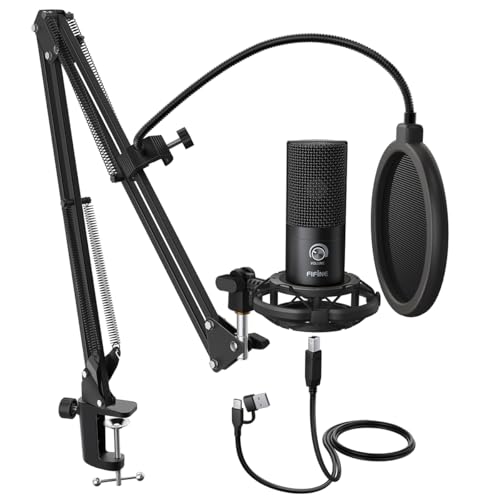
- Adjustable desk-mounted scissor arm
- Shock mount and double pop filter included
- Plug-and-play USB condenser mic
Best For: Beginners wanting an adjustable boom-arm setup
Simple Starter Kit

- Plug-and-play USB setup
- Tripod, pop filter, and shock mount included
- Cardioid pickup pattern
Best For: First-time podcasters seeking a desktop kit
Room to Grow
FIFINE AmpliTank K688CT Podcast Kit

- USB and XLR connectivity
- Boom arm, windscreen, and shock mount included
- USB-only mute, gain, and monitoring controls
Best For: Beginners planning a future XLR setup
Versatile Pickup

- Four selectable pickup patterns
- Onboard gain, mute, and headphone controls
- Adjustable stand and no-latency monitoring
Best For: Beginners recording solo and varied formats
Best Upgrade Path – MAONO HD300T USB/XLR Dynamic Microphone
Among podcast microphones for beginners, the MAONO HD300T is a practical pick if you want to start with USB and keep the option to connect through an XLR audio interface later. Its dynamic capsule focuses on your voice while helping reduce room noise.
Best For: First-time podcasters who want a ready-to-use desktop kit with room to upgrade their setup.
Pros:
- USB and XLR connections support both direct computer recording and interface-based setups.
- Headphone jack and volume control enable zero-latency monitoring in USB mode.
- Includes a desktop stand, shock mount, pop filter, USB cable, and XLR cable.
Cons:
- Zero-latency headphone monitoring is specified for USB mode, not XLR mode.
- Its included stand is a desktop stand rather than a boom arm.
The included accessories make it easy to get started, while dual connectivity leaves a clear path to a more flexible recording setup.
Best for Gaming Streams – FIFINE AmpliGame AM8 USB/XLR Microphone
The FIFINE AmpliGame AM8 suits beginners who record podcasts alongside gaming streams. Its USB connection gets you started quickly, while its XLR output offers another connection option when you add an interface or mixer.
Best For: New podcasters who also stream games and want on-mic controls during USB recording.
Pros:
- Cardioid dynamic design helps reject sound arriving from the sides.
- USB mode offers tap-to-mute, a mute indicator, mic gain, and headphone monitoring controls.
- USB/XLR connectivity and built-in stand threads provide setup flexibility.
Cons:
- An XLR cable is not included.
- RGB lighting and on-mic function keys are inactive over XLR.
For shoppers comparing podcast microphones for beginners, the AM8 makes the most sense when quick USB control matters now and XLR is a possible next step.
Best Boom-Arm Kit – MAONO A04 USB Condenser Microphone
The MAONO A04 bundles a USB condenser microphone with an adjustable scissor arm, making it a straightforward desk setup among podcast microphones for beginners. It plugs into a computer without an external sound card or driver installation.
Best For: Beginners who want a boom-arm recording setup in one package.
Pros:
- Includes a scissor arm, shock mount, pop filter, foam windscreen, and USB cable.
- Plug-and-play USB connection keeps initial setup simple.
- Supports 192kHz/24-bit sampling and uses a 16mm condenser capsule.
Cons:
- No XLR connection is listed for later interface-based use.
- The desk clamp fits desktops less than 2.1 inches thick.
- Not compatible with Xbox or Maono Link.
Choose this kit if having the mounting accessories ready from day one matters more than a future XLR upgrade.
Best for Mobile Flexibility – ZealSound K66 USB Podcast Microphone
If you switch between a computer and mobile devices, the ZealSound K66 is a flexible option among podcast microphones for beginners. This plug-and-play USB condenser mic includes USB-C and Lightning adapters and provides controls for adjusting your recording as you go.
Best For: Beginners who record on both desktop and compatible phones or tablets.
Pros:
- Included USB-C and Lightning adapters expand device connection options.
- Built-in 3.5mm jack provides zero-latency headphone monitoring with its own volume control.
- On-mic controls include mute, mic volume, echo adjustment, and a selectable noise-reduction mode.
Cons:
- Its condenser capsule may capture more room sound than a dynamic mic in a noisy space.
- No XLR connection is listed for use with an audio interface.
The K66 is most compelling when easy device switching and hands-on controls are priorities; its noise-reduction mode offers another option when background sounds become distracting.
Best for Easy Setup – Samson Q2U USB/XLR Microphone Pack
Among podcast microphones for beginners, the Samson Q2U is a practical choice if you want to record on a computer now and keep an XLR option for a later setup. Its dynamic, unidirectional design and included desktop accessories make it a flexible starting pack.
Best For: Beginners who want USB recording today and an XLR connection for future gear.
Pros:
- USB-C and XLR connections offer two ways to use the mic.
- Includes a desktop tripod, extension, mic clip, windscreen, and both cables.
- Unidirectional dynamic design suits voice-focused recording.
Cons:
- Its specified USB connection is USB-C, so check your computer’s ports.
- The included tripod is a desktop stand, not a boom arm.
The Q2U makes the most sense when connection flexibility matters more than getting a boom-arm setup in the box.
Best Compact Desktop Setup – TONOR TC-777 USB Microphone
If you want podcast microphones for beginners that require little setup or desk space, the TONOR TC-777 offers a plug-and-play USB connection and a compact tripod. Its cardioid pickup pattern is designed to capture your voice from the front.
Best For: New podcasters who want a small, ready-to-use desktop kit.
Pros:
- Plug-and-play USB setup requires no additional drivers.
- Includes a foldable tripod, mini shock mount, and pop filter.
- One-click mute and volume control are convenient during recording.
Cons:
- Not compatible with Xbox.
- Uses USB Type-A, so devices without that port need an adapter.
The TC-777 is a straightforward desktop pick; choose it for its compact included accessories rather than for an XLR upgrade path.
Best for Comfort – FIFINE T669 USB Microphone
For shoppers comparing podcast microphones for beginners, the FIFINE T669 stands out for the positioning gear included with its USB condenser mic. The adjustable scissor arm, shock mount, and double pop filter let you build a desk-mounted recording setup without buying those accessories separately.
Best For: Beginners who want a USB microphone with a desk-mounted boom arm.
Pros:
- Plug-and-play USB connection works without additional drivers.
- Includes an adjustable scissor arm, shock mount, and double pop filter.
- Cardioid pickup focuses on sound in front of the mic.
- Detachable 8.2-foot USB cable offers placement flexibility.
Cons:
- The supplied arm uses a desk mount or C-clamp, so plan for a suitable mounting spot.
- Not compatible with Xbox.
The T669 is the stronger fit when adjustable mic placement is a priority; its bundle is more involved than a simple tabletop tripod setup.
Simple Starter Kit – TONOR TC30 USB Microphone
Among podcast microphones for beginners, the TONOR TC30 keeps setup simple: connect it by USB, attach the included pop filter, and start recording on a compatible computer. Its cardioid pickup pattern is designed to favor your voice over sounds coming from other directions.
Best For: First-time podcasters who want a ready-to-use desktop kit without buying separate mounting accessories.
Pros:
- Plug-and-play USB connection supports Windows, macOS, and Linux.
- Includes a foldable tripod, pop filter, and shock mount.
- Cardioid pickup and shock mounting help limit unwanted room and desk noise.
Cons:
- Not compatible with phones or Xbox; iPad use requires an adapter.
- USB-only connection offers no XLR upgrade path.
The TC30 is a practical choice when ease of setup matters most. Check device compatibility before buying, particularly if you plan to record away from a computer.
For beginners comparing podcast microphones for beginners with longer-term flexibility, the FIFINE AmpliTank K688CT offers plug-and-play USB now and an XLR connection for use with a mixer or audio interface later. Its dynamic cardioid mic comes with a metal boom arm, windscreen, and shock mount.
Best For: New podcasters who want USB convenience plus the option to build an XLR recording setup.
Pros:
- USB and XLR connections accommodate different recording setups.
- Included boom arm, windscreen, and shock mount help position the mic and reduce handling noise.
- USB mode provides tap-to-mute, gain adjustment, and headphone monitoring controls.
Cons:
- On-mic controls do not work over XLR; adjustments must be made through a mixer or audio interface.
- The boom arm’s C-clamp fits desks under 2 inches thick.
Choose the K688CT if you expect your recording setup to evolve. For good input level, the supplied guidance recommends speaking roughly 2 to 6 inches from the mic.
Not all podcast microphones for beginners are limited to solo speech. The Blue Yeti connects by USB to a Mac or PC and offers four pickup patterns, giving you options for solo recording, conversations, and other audio projects without changing microphones.
Best For: Beginners who want one desktop USB mic for podcasting and varied recording formats.
Pros:
- Cardioid, omnidirectional, bidirectional, and stereo patterns add recording flexibility.
- Onboard gain, mute, headphone volume, and pattern controls are easy to access.
- Adjustable desktop stand and no-latency headphone monitoring support straightforward setup.
Cons:
- USB-only connection does not support an XLR workflow.
- At 3.5 pounds, it is heavier than the TONOR TC30 listed here.
The Yeti makes sense if you will use its multiple patterns and onboard controls. If you only record one voice, start with cardioid mode and consider whether those extra options are worth having.
How We Picked the Best Podcast Microphones for Beginners
We focused on accessible connection options, included accessories, straightforward controls, and practical fit for common recording spaces. The selection spans USB condenser microphones, USB/XLR dynamic microphones, and kits with stands or mounting accessories. This is a feature-based buying comparison, not a claim that every mic was tested under identical conditions; sound quality also depends on placement, room noise, and recording settings.
Quick Comparison: Which Type Fits Your Setup?
Want the simplest computer setup? A USB mic connects directly to your PC or Mac without a separate audio interface. Condenser options such as the MAONO A04, FIFINE T669, and Blue Yeti suit creators who can record in a reasonably quiet space.
Recording near fans, traffic, or other people? Consider a dynamic mic such as the Samson Q2U, MAONO HD300T, FIFINE AM8, or FIFINE K688CT. Used close to your mouth, a dynamic mic can make it easier to keep your voice prominent, though it will not erase background noise.
Planning to upgrade later? USB/XLR models let you start with USB and move to a compatible audio interface or mixer when you are ready. Check what cables and accessories come in the specific bundle before ordering.
Key Buying Factors for Podcast Microphones for Beginners
Connection and Recording Workflow
USB is the easiest starting point for solo computer recording. XLR requires an interface or mixer and gives you a path toward a more flexible setup. A USB/XLR microphone offers both routes, but the two connections may not expose the same controls or features.
Microphone Type and Room Sound
Condenser microphones can capture crisp detail, including more of the room around you. Dynamic microphones generally reward close speaking and are often a practical choice for less-treated rooms. Neither type fixes echo by itself: soft furnishings, a quiet location, and consistent mic distance matter.
Monitoring, Controls, and Accessories
A headphone jack for direct monitoring can help you hear problems while recording. On-mic mute and gain controls are convenient, but confirm how they work over your chosen connection. Also budget for a stable stand or boom arm, a pop filter or windscreen, headphones, and the correct cable. An included kit may be better value than a lower-priced mic that needs several add-ons.
Who Should Buy Which Podcast Microphones for Beginners?
For a fast first episode: Choose a USB kit with the mounting accessories you need; compare the MAONO A04, FIFINE T669, and TONOR bundles against your available desk space. For a noisy home setup: Start your shortlist with a close-talk dynamic USB/XLR model such as the Samson Q2U, MAONO HD300T, FIFINE AM8, or FIFINE K688CT. For creators who want to experiment with pickup patterns: Look at the Blue Yeti, while remembering that pattern options do not replace good mic placement. Whichever you choose, make a short test recording in your actual room before committing to a full episode.