An HDMI video encoder turns a camera, computer, or other HDMI source into a stream your network or streaming platform can use. The right choice depends less on the longest feature list and more on where your video needs to go.
These 10 options cover compact single-input units, 4K-capable models, and multichannel hardware. Use the guide below to narrow them down by workflow, output format, and connection requirements.
Best 10 Hdmi Video Encoders Picks for 2026
Best for 4K Multi-Platform Streaming

- Up to 4K/30fps H.265/H.264 encoding
- Up to four simultaneous streams
- Overlays and two audio-input options
Best For: 4K streaming to multiple network destinations
Best for NDI Workflows
ZowieBox 4K HDMI Encoder/Decoder

- NDI|HX3, HX2, and HX support
- HDMI passthrough and IP-to-HDMI decoding
- PoE, USB-C power, and web controls
Best For: NDI|HX production and standalone game streaming
Best for 1080p Multi-Stream Distribution

- Up to 1080p/60fps encoding
- Up to four simultaneous streams
- SRT, RTMP(S), RTSP, HLS, and ONVIF
Best For: Full HD streaming across several protocols
Best for Compact 1080p Setup

- 1080p/60fps H.265/H.264 encoding
- Browser-based configuration
- Compact body with broad protocol support
Best For: Compact Full HD installations with browser-based control
Flexible Single-Source Pick
URayCoder 4K HDMI to IP Encoder
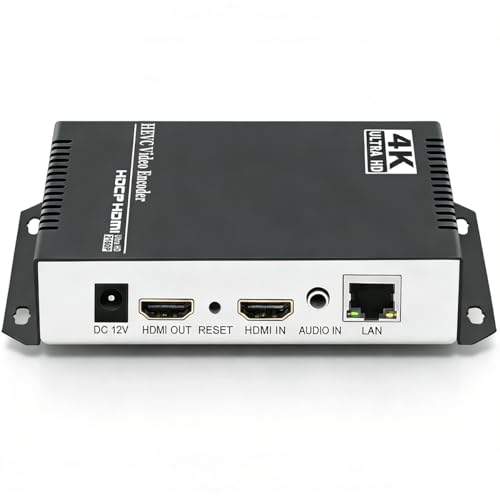
- 4K at up to 30 fps
- Four simultaneous streams
- Broad protocol and overlay options
Best For: One HDMI source streamed to several destinations
Multi-Input Pick
ORIVISION Four-Channel 4K Encoder

- Four HDMI inputs and audio jacks
- Up to 16 output feeds
- Two 4K/30 and two 1080p/60 channels
Best For: Four-source live streaming or IPTV setups
Compact Network Pick
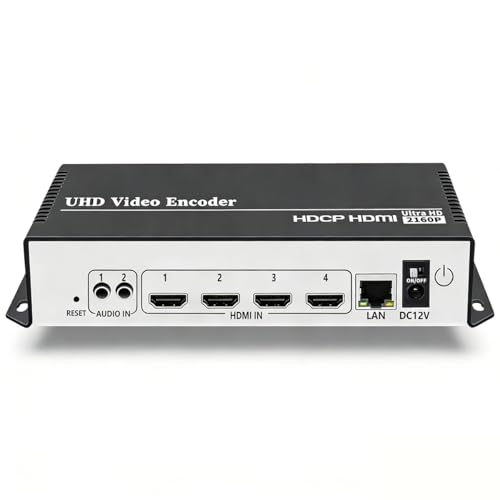
- Single HDMI input; four streams
- 4K at up to 30 fps
- Compact with broad protocol support
Best For: Space-conscious, single-source IP streaming
Best for Compact Setups
ORIVISION EH1211 Mini HDMI Encoder

- 1080p/30 HDMI input with loop-out
- Records to USB drive or TF card
- Two output feeds with resolution limits
Best For: Space-constrained setups needing local recording
Best for Dual-Stream Flexibility

- Two streams per HDMI input
- Broad streaming-protocol support
- Adjustable video settings and overlays
Best For: Sending 1080p feeds to separate servers
Best for 4K Streaming
URayCoder 4K HDMI to IP Encoder

- 4K input and output up to 30 fps
- Four simultaneous video streams
- H.265/H.264 with extensive settings
Best For: Multi-destination 4K HDMI-to-IP streaming
Best for 4K Multi-Platform Streaming – URayCoder 4K HDMI Encoder
Among HDMI video encoders for 4K sources, this URayCoder model offers H.265/H.264 encoding at up to 4K/30fps. It is geared toward sending one HDMI source to several network destinations.
Best For: Streamers who need 4K input and multiple simultaneous IP streams.
Pros:
- Supports up to 4K/30fps, with higher frame rates at 2K and below.
- Outputs up to four streams and supports protocols including SRT, RTMP(S), RTSP, and HLS.
- Offers logo, caption, and timestamp overlays plus HDMI or line-in audio.
Cons:
- 4K output tops out at 30fps.
- Its listed configuration has one HDMI input.
Choose it when flexible distribution and on-stream customization matter more than 4K/60fps. Check that your source and destination protocols fit your planned workflow.
Best for NDI Workflows – ZowieBox 4K HDMI Encoder/Decoder
The ZowieBox stands out among HDMI video encoders because it can encode HDMI for NDI|HX workflows or decode an IP stream back to HDMI. Its compact body, status display, and HDMI passthrough also suit setups where desk space is limited.
Best For: Game streamers and production teams working with NDI|HX video.
Pros:
- Supports NDI|HX3, HX2, and HX alongside SRT, RTMP(S), and RTSP.
- Provides HDMI passthrough for gameplay while encoding a stream.
- Offers a web interface, PoE or USB-C power, and a tripod mount.
Cons:
- Encoder and decoder modes cannot operate simultaneously.
- Full-bandwidth NDI is not supported.
- USB capture card functionality is not currently supported.
This is the more specialized pick if NDI|HX integration is central to your setup. Confirm its mode and NDI limitations before planning a two-way or full-NDI workflow.
Best for 1080p Multi-Stream Distribution – URayCoder 1080p HDMI Encoder
If your source is Full HD rather than 4K, this URayCoder unit is one of the HDMI video encoders to consider for network distribution. It encodes H.265/H.264 at up to 1080p/60fps and can send multiple streams using different protocols.
Best For: 1080p live streaming or IPTV setups that need several output formats.
Pros:
- Supports 1080p/60fps input and output.
- Outputs up to four streams, with support for SRT, RTMP(S), RTSP, HLS, and ONVIF.
- Includes text, logo, and timestamp overlays and accepts HDMI or 3.5mm line-in audio.
Cons:
- Limited to 1080p rather than 4K.
- Its listed configuration has a single HDMI input.
Its strength is protocol flexibility for an existing Full HD source. Buyers expecting a 4K upgrade path should look at a model with 4K input and output instead.
Best for Compact 1080p Setup – UNISHEEN JM1000 HDMI Encoder
For buyers who want a small, browser-configured device, this UNISHEEN model brings 1080p/60fps H.265/H.264 encoding to the HDMI video encoders shortlist. Its stated protocol support covers both live platforms and IP distribution workflows.
Best For: Space-conscious 1080p installations that need browser-based setup.
Pros:
- Hardware H.265/H.264 encoding at up to 1080p/60fps.
- Supports SRT, RTMP(S), RTSP, HLS, WebRTC, and other listed protocols.
- Provides browser setup, HDMI or 3.5mm audio input, and text, logo, or timestamp overlays.
Cons:
- Does not list 4K encoding.
- Advanced streaming configuration may require basic networking knowledge.
The compact design is useful behind a monitor or in a crowded equipment area. Browser access simplifies setup, but plan for some IP and protocol configuration when connecting it to a custom streaming system.
Flexible Single-Source Pick – URayCoder 4K HDMI to IP Encoder
For a single HDMI source that needs to reach several destinations, this is one of the more flexible hdmi video encoders in the lineup. It supports H.265 and H.264 encoding up to 4K at 30 fps and can output four streams using different protocols.
Best For: Streaming one 4K HDMI source to multiple platforms or network destinations.
Pros:
- Supports RTMP(S), SRT, RTSP, HLS, WebRTC, and other listed protocols.
- Offers text, logo, and timestamp overlays plus cropping and image adjustments.
- Accepts HDMI embedded audio or line-in audio.
Cons:
- 4K encoding tops out at 30 fps.
- A single HDMI source is less suitable for a multi-camera setup.
Choose this model when protocol choice and stream customization matter more than having multiple physical HDMI inputs.
Multi-Input Pick – ORIVISION Four-Channel 4K Encoder
Among these hdmi video encoders, the ORIVISION is the option for handling several sources in one box. Its four HDMI inputs, four external audio jacks, and built-in status screen suit a larger live-broadcast or IPTV setup.
Best For: Multi-source streaming installations that need up to four HDMI inputs.
Pros:
- Supports two 4K/30 Hz channels alongside two 1080p/60 Hz channels.
- Can output up to four feeds per channel, for a stated maximum of 16 feeds.
- Supports H.265, H.264, MJPEG, and protocols including RTMP(S), SRT, RTSP, and HLS.
- LCD screen shows operating status on the device.
Cons:
- Not all four channels support 4K simultaneously; two are specified at 1080p/60 Hz.
- Four-channel configuration may be more than a single-source streamer needs.
This is the practical step-up if input count is the priority; check the mixed-resolution limit against your source lineup before buying.
Compact Network Pick – URayCoder UHE265-4-4K Encoder
This compact URayCoder model is worth considering among hdmi video encoders when one HDMI source needs several IP stream formats. It supports H.265/H.264 encoding up to 4K at 30 fps, with four simultaneous video streams described in its specifications.
Best For: A single-source network stream that needs flexible protocol and on-screen branding options.
Pros:
- Supports protocols including HTTP, RTSP, RTMP(S), SRT, HLS, and WebRTC.
- Allows logos, captions, timestamps, cropping, rotation, and mirroring.
- Compact listed dimensions of 4.72 x 3.94 x 1.18 inches.
Cons:
- Only one physical HDMI port is listed.
- 4K output is limited to 30 fps.
Its appeal is format flexibility in a small box, not simultaneous capture from multiple HDMI devices.
Best for Compact Setups – ORIVISION EH1211 Mini HDMI Encoder
Among hdmi video encoders, the ORIVISION EH1211 stands out when space is tight and local recording matters. Its 4.92 × 2.83 × 0.98-inch body combines a 1080p/30 HDMI input, HDMI loop-out, and recording to a USB drive or TF card.
Best For: Classrooms, conference rooms, and signage setups that need a small encoder with local recording.
Pros:
- Records RTSP streams or direct HDMI input to external storage.
- Supports H.265, H.264, multiple streaming protocols, and two output feeds.
- Offers video cropping, rotation, mirror flip, and text or logo overlays.
Cons:
- Input and output top out at 1080p/30; this is not a 4K option.
- Only one of the two output channels can reach 1080p.
Choose this model for its compact hardware and recording flexibility rather than maximum resolution. Check the output limits against your planned two-stream workflow.
Best for Dual-Stream Flexibility – URayCoder 1080p HDMI Encoder
If you need hdmi video encoders that can send one HDMI source to different destinations, this URayCoder model is worth a look. It outputs two video streams per HDMI input, with a different streaming protocol available for each stream.
Best For: 1080p live-streaming workflows that need simultaneous feeds to separate streaming servers.
Pros:
- Supports protocols including RTMP(S), RTSP, SRT, HLS, UDP, and RTP.
- Lets you adjust resolution, frame rate, bitrate, audio, and on-screen text or logos.
- Includes SDK, API, and CGI control documentation for secondary development.
Cons:
- Described as a 1080p HD encoder, so it is not the pick here for a stated 4K workflow.
- Its 7 × 5 × 1.5-inch chassis is larger than the mini ORIVISION model in this roundup.
The appeal is control over two feeds from each HDMI input, especially when your destinations call for different protocols. Confirm your intended stream settings before building a workflow around it.
Best for 4K Streaming – URayCoder 4K HDMI to IP Encoder
For buyers comparing hdmi video encoders with 4K capability, this URayCoder unit lists up to 3840 × 2160 input and output at 30 fps. It supports H.265 and H.264 encoding and can output four video streams using different protocols.
Best For: 4K HDMI-to-IP workflows that need multiple simultaneous streams and configurable presentation.
Pros:
- Supports 4K input and output at up to 30 fps.
- Offers four simultaneous streams and protocols including RTMP(S), SRT, HLS, RTSP, and WebRTC.
- Provides adjustable resolution, frame rate, bitrate, overlays, cropping, and audio input options.
Cons:
- 4K frame rate is capped at 30 fps in the supplied specifications.
- The range of protocols and settings may take planning to configure for a specific destination.
Pick this one when 4K support and four separate outputs matter more than a basic single-stream setup. Its controls offer useful flexibility, but match the resolution and protocol settings to each destination.
How We Picked These Hdmi Video Encoders
We compared the listed input capabilities, supported codecs, network protocols, channel counts, and practical extras such as HDMI loop-out and NDI support. Those specifications help identify which devices fit common livestreaming, IPTV, and production workflows. Product names alone cannot establish image quality, sustained reliability, or real-world latency, so confirm those details through current documentation and testing before a critical deployment.
Quick Comparison by Use Case
For a single camera feeding a streaming platform, start with a one-input H.264/H.265 model that explicitly supports your destination’s ingest method, commonly RTMP or RTMPS. For contribution across an unreliable network, prioritize SRT support at both ends. An IPTV or local-network setup may call for RTSP, UDP, or multicast instead. If several HDMI sources must stream simultaneously, a multichannel encoder is more relevant than buying solely on maximum resolution. The NDI encoder/decoder is a distinct option for an NDI-based production workflow; check whether its particular NDI implementation works with your existing equipment and software.
Key Buying Factors for Hdmi Video Encoders
Input Resolution Versus Stream Resolution
Check both the HDMI signal a device accepts and the resolution and frame rate it can actually encode. A listing that mentions 4K input and 1080p output is not the same as one that produces a 4K stream. Match frame rate to your source as well: 1080p60 matters for fast motion, while 1080p30 may be sufficient for presentations.
Codecs and Destination Protocols
H.264 is a sensible compatibility-first choice. H.265 can reduce bandwidth for a comparable stream but requires compatible receiving devices and services. A supported protocol is equally important: RTMP/RTMPS, SRT, RTSP, HLS, WebRTC, UDP, and NDI serve different purposes and are not interchangeable. Check whether the encoder can send to every required destination at the same time, not just whether each protocol appears on its specification sheet.
Latency, Audio, and Network Setup
For interactive production, request measured end-to-end latency with your intended protocol; a low-latency label alone is not enough. Confirm how HDMI audio is embedded, whether external audio inputs are needed, and whether audio settings match the receiving service. Review wired-network requirements, configuration tools, security options, and whether remote management will work on your network.
Who Should Buy Which Hdmi Video Encoders?
Choose a compact single-channel unit for a fixed camera, lecture, or simple livestream. Pick an HDMI loop-out model if a local monitor must show the source without an additional splitter. Consider a multichannel unit for several feeds, but verify simultaneous encoding limits at your target resolution and frame rate. Choose 4K output only when your distribution path and viewers benefit from it. For NDI production, evaluate the dedicated NDI option against your exact workflow rather than assuming a conventional IP streaming encoder can replace it. Before ordering any of these Hdmi Video Encoders, verify current firmware features, destination compatibility, and return terms.