When sync matters, the right recorder can save hours in post. External video recorders with timecode help keep audio and video aligned while giving you more reliable recording options than a camera alone.
Below, we focus on practical picks for creators who need dependable timecode support, flexible inputs, and workflows that make production smoother from set to edit.
Best 10 External Video Recorders with Timecode Picks for 2026
Compact Timecode Field Recorder
TASCAM FR-AV2 32-Bit Float Recorder

- Built-in timecode IN/OUT and sync
- 32-bit float recording with dual ADCs
- Dual XLR/TRS inputs plus 3.5 mm input
Best For: Videographers who want a compact recorder with internal timecode and no-clip audio capture.
Rackmount SDI Recorder
Blackmagic HyperDeck Studio HD Mini
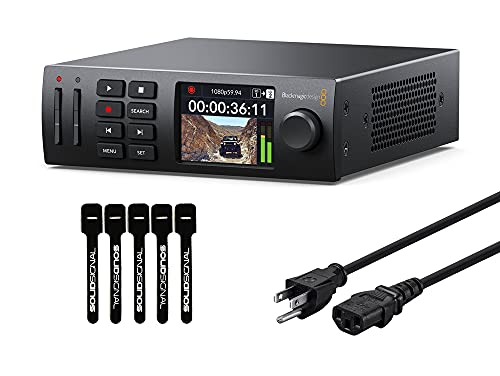
- Includes timecode and reference generators
- Records H.264, ProRes, or DNxHD
- 3G-SDI in/out plus HDMI output
Best For: Video teams that need a compact SDI recorder with timecode, reference, and multiple codec options.
Wireless Timecode Bundle

- Built-in timecode generation with sync
- Wireless monitoring and Atomos sync support
- Remote control through Recorder Connect app
Best For: Videographers who want internal timecode plus wireless monitoring and sync options in one bundle.
HDMI Capture DVR

- 4K pass-through with 1080p60 recording
- HEVC H.265 for efficient storage use
- Standalone operation with multiple storage options
Best For: Users who want an easy standalone HDMI recorder for cameras, consoles, or digitizing video.
Professional Field Audio Recorder
Zoom F8n Pro 8-Input 10-Track Recorder
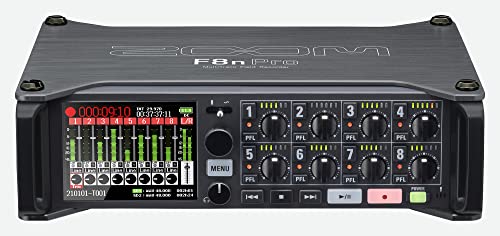
- 0.2ppm timecode accuracy for tight sync
- 32-bit float with dual AD converters
- Dual SD slots for redundant recording
Best For: Film crews needing precise timecode and multi-track audio capture
Direct USB Video Capture Recorder
MYPIN 1080P HDMI Game Recorder
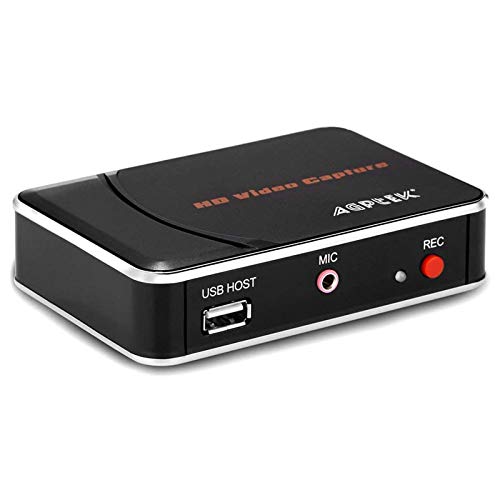
- Records 1080P HDMI video to USB storage
- No PC required for standalone recording
- Mic-in supports external commentary
Best For: Standalone HDMI capture without a computer
Timecode Sync Cable
Canon R5C C400 to Tentacle and Zoom F6 Cable

- Bidirectional timecode signal support
- Right-angle connectors for easier routing
- Works with compatible Canon and Tentacle/Zoom devices
Best For: Short, dependable timecode linking for compatible cameras and sync gear
Standalone Capture Hub
ClonerAlliance Box Pro 1080p60 Recorder

- Standalone recording to USB with no PC
- HDMI, RCA, component, and VGA support
- TV playback plus schedule recording
Best For: People archiving tapes or capturing sources directly to USB
Precision Sync Adapter

- TCXO timecode accuracy within 0.5 frames over 24 hours
- 3.5mm TRS timecode I/O for syncing
- Made for compatible Zoom field recorders
Best For: Zoom recorder owners who need precise sync
All-in-One Media Duplicator
Emerson EMT-1200 Multimedia Recorder

- Records video, music, and photos to USB or SD
- Built-in 3.5-inch screen for preview
- Supports VHS, DVD, audio cassette, HDMI, and RCA
Best For: Home media conversion and simple preservation
Compact Timecode Field Recorder – TASCAM FR-AV2 32-Bit Float Recorder
If you need external video recorders with timecode support that keep setup simple, the TASCAM FR-AV2 is built for fast, reliable field capture. It combines 32-bit float recording with built-in timecode generation, so you can work efficiently without adding an external timecode box.
Best For: Videographers who want a compact recorder with internal timecode and no-clip audio capture.
Pros:
- Built-in timecode IN/OUT and timecode generation/sync reduce extra gear.
- 32-bit float recording with dual ADCs helps with worry-free capture.
- Two XLR/TRS combo inputs plus a 3.5 mm input offer flexible connectivity.
- Compact body is easy to fit into a video production kit.
Cons:
- Wireless monitoring requires the optional AK-BT2 adapter.
- Bluetooth functionality is only compatible with AK-BT2.
The FR-AV2 is a practical choice when you want timecode integration and no-clip recording in a small recorder. It is especially appealing for videographers who value speed, accuracy, and fewer moving parts on set.
Rackmount SDI Recorder – Blackmagic HyperDeck Studio HD Mini
For studios and crews comparing external video recorders with timecode, the Blackmagic Design HyperDeck Studio HD Mini brings deck-style recording in a compact rack-friendly form. It records to SD/UHS-II cards or external USB disks and includes timecode and reference generators for integrated video workflows.
Best For: Video teams that need a compact SDI recorder with timecode, reference, and multiple codec options.
Pros:
- Includes timecode and reference generators for synced production workflows.
- Records H.264, ProRes, or DNxHD to SD/UHS-II cards or USB disks.
- 3G-SDI in/out plus HDMI out support a range of video setups.
- Front panel controls and color display make operation straightforward.
Cons:
- Designed around SDI and HDMI sources, so it is less universal than HDMI-only recorders.
- Single-channel design may not suit larger multi-input recording needs.
This HyperDeck fits best in a studio or broadcast-style setup where timecode, reference, and codec flexibility matter. Its compact rack-mountable design makes it a strong utility recorder for controlled environments.
Wireless Timecode Bundle – TASCAM FR-AV2 with AK-BT2
If you want external video recorders with timecode that also support wireless workflow features, this TASCAM FR-AV2 bundle adds the AK-BT2 adapter for more flexible operation. Along with internal timecode generation, it supports wireless audio monitoring, wireless timecode sync with supported Atomos gear, and remote control from a mobile app.
Best For: Videographers who want internal timecode plus wireless monitoring and sync options in one bundle.
Pros:
- Built-in timecode generation helps integrate with standard videography gear.
- AK-BT2 enables wireless audio monitoring and wireless timecode sync.
- Recorder Connect app allows mobile remote control on iOS, iPad OS, and Android.
- Dual wired and wireless monitoring can support two users simultaneously.
Cons:
- Wireless features depend on the included AK-BT2 adapter.
- Wireless timecode sync is limited to supported Atomos products.
This bundle is a good fit when you want the FR-AV2 core recorder plus the extras that streamline multi-camera work. It is especially useful for crews that want fewer cables and faster coordination on set.
HDMI Capture DVR – AVerMedia EZRecorder 330G
Among external video recorders with timecode, the AVerMedia EZRecorder 330G is more of a capture-and-record box than a timecode-centric field unit. It records 1080p60 video with 4K pass-through, supports direct recording from camcorders and DSLRs, and works without a PC for simple standalone use.
Best For: Users who want an easy standalone HDMI recorder for cameras, consoles, or digitizing video.
Pros:
- 4K pass-through lets you watch in 4K while recording full HD.
- Records 1080p60 and uses HEVC H.265 for efficient storage use.
- No-PC operation is convenient for direct recording and streaming.
- Works with external hard drives, micro SD cards, or NAS storage.
Cons:
- No timecode feature is listed in the supplied product details.
- HDCP or encrypted content cannot be recorded.
- Recording tops out at full HD rather than 4K capture.
This model is best if your priority is simple HDMI capture, pass-through, and flexible storage rather than timecode syncing. It suits everyday recording jobs where standalone convenience matters more than pro post-production workflow features.
Professional Field Audio Recorder – Zoom F8n Pro 8-Input 10-Track Recorder
If you need external video recorders with timecode for on-set production, the Zoom F8n Pro is built for capture-first workflows where audio sync matters. Its 0.2ppm timecode accuracy, 32-bit float recording, and dual SD card redundancy make it a strong fit for filmmakers who want dependable, clip-free recording alongside camera work.
Best For: Film crews and location recordists who need precise timecode, redundant storage, and multi-input audio capture.
Pros:
- Industry-leading 0.2ppm timecode accuracy helps keep audio aligned with picture.
- 8 inputs and 10 tracks give you room for complex production setups.
- 32-bit float with dual AD converters helps avoid clipped takes.
- Dual SD slots support redundant recording for added security on set.
Cons:
- It is primarily an audio field recorder, so it is not a camera-facing video recorder.
- Its feature set is geared toward professional workflows rather than casual use.
Overall, this is a serious production recorder for teams that care about sync accuracy and reliable capture. If your workflow depends on precise timecode and backup recording, it stands out as a practical centerpiece.
Direct USB Video Capture Recorder – MYPIN 1080P HDMI Game Recorder
For buyers comparing external video recorders with timecode-style workflows, this MYPIN unit is a simpler HDMI recorder focused on direct capture rather than pro sync features. It records 1080P video straight to a USB flash drive or external HDD, which makes it useful when you want an easy standalone way to save HDMI source video without a PC.
Best For: Users who want a basic standalone HDMI recorder for gameplay or other source capture without relying on a computer.
Pros:
- Records 1080P HDMI video directly to USB storage or an external hard drive.
- No PC is required for recording.
- One-touch recording keeps operation simple.
- Mic-in support allows external commentary during capture.
Cons:
- It does not support live streaming.
- It is not designed for OBS Studio, VLC, or YouTube workflows.
- Party chat is not recorded through the microphone input.
This is best viewed as a straightforward recorder for direct HDMI capture, not a professional timecode device. If your priority is easy standalone recording to USB media, it does the job with minimal setup.
Timecode Sync Cable – Canon R5C C400 to Tentacle and Zoom F6 Cable
This timecode cable is a practical accessory for external video recorders with timecode when you need to connect compatible cameras and sync devices. It supports bidirectional timecode signals between a 3.5mm TRS source such as a Tentacle or Zoom F6 and devices with a DIN 1.0/2.3 input, making it useful for jam-sync and camera sync workflows.
Best For: Filmmakers and video teams needing a short, right-angle timecode cable for compatible Canon cameras and sync devices.
Pros:
- Bidirectional timecode support works between compatible source and destination devices.
- Right-angle connectors make it easier to connect and remove in tight setups.
- Designed for syncing Tentacle, Zoom F6, and compatible Canon R5C/C400 devices.
Cons:
- It is a cable only, so it does not record video or audio on its own.
- Compatibility is limited to devices with the listed connector types.
As a sync accessory, this is a focused solution rather than a standalone recorder. It is a sensible buy if your production workflow depends on a short, dependable timecode link between supported devices.
Standalone Capture Hub – ClonerAlliance Box Pro 1080p60 Recorder
If you need one of the more flexible external video recorders with timecode-like workflow features for everyday capture, the ClonerAlliance Box Pro is built around simple standalone recording. It can save HDMI, RCA, composite, component/YPbPr, and VGA sources directly to USB without a PC, which makes it practical for archiving tapes, capturing set-top boxes, or recording gameplay and conference video.
Best For: Users who want an easy standalone recorder for analog-to-digital conversion, TV playback, and scheduled capture.
Pros:
- Records up to 1080p at 60fps to USB storage with no PC required
- Supports HDMI, RCA, composite, component/YPbPr, and VGA inputs
- Can playback recordings on TV with the included remote
- Includes schedule recording and low-latency passthrough
Cons:
- Does not support HDCP-protected sources
- Free video edit/conversion software is Windows-only
- Smart TVs and TV antennas cannot be used as video sources
The Box Pro is a strong fit if you want a beginner-friendly recorder for mixed modern and legacy gear. Its main advantage is convenience: capture, save, and review on a TV without a computer in the middle of the process.
Precision Sync Adapter – Zoom TCA-1 Timecode Adapter
For creators looking at external video recorders with timecode support, the Zoom TCA-1 is a dedicated sync accessory rather than a recorder itself. It adds accurate timecode generation and 3.5mm TRS I/O to compatible Zoom field recorders, making it easier to keep audio and video aligned in film, video, and field recording workflows.
Best For: Zoom recorder users who need reliable timecode sync for camera, slate, or external generator workflows.
Pros:
- TCXO-based design is rated for accuracy within 0.5 frames over 24 hours
- 3.5mm TRS timecode input and output for flexible syncing
- Attaches directly to compatible Zoom recorders for a compact setup
- Supports H6studio, H5studio, H6essential, H4essential, H2essential, and F3
Cons:
- Only works with specific Zoom recorders
- Requires latest firmware on supported models
- Not a standalone video recorder or capture device
This adapter makes sense if your workflow already centers on compatible Zoom recorders and you want dependable time alignment. It is a specialized tool, but that focus is exactly what makes it useful for production teams that need clean sync.
All-in-One Media Duplicator – Emerson EMT-1200 Multimedia Recorder
The Emerson EMT-1200 is a straightforward choice if you want external video recorders with timecode-style practicality focused on preserving old media rather than production sync. It can record and convert VHS, DVD, and audio cassette sources, while also taking input from HDMI, RCA, and USB for saving directly to USB drives or SD cards.
Best For: Home users who want an easy media converter with built-in preview and direct-to-storage recording.
Pros:
- Records video, music, and photos to USB or memory card
- Built-in 3.5-inch TFT screen for previewing recordings
- Multiple inputs including RCA, HDMI, and USB
- Designed for converting VHS, DVD, and audio cassettes
Cons:
- Does not list advanced sync or timecode features
- Screen is small compared with full-size monitoring setups
- Primarily aimed at media conversion, not pro recording workflows
The EMT-1200 is best viewed as a practical preservation tool. If your priority is moving older media into modern digital files with minimal setup, its built-in screen and direct storage recording make the process simple.
How We Picked the Best External Video Recorders with Timecode
We prioritized devices and accessories that fit real production workflows, not just spec sheets. That means strong timecode support, dependable recording behavior, useful input/output options, and features that reduce drift, clipping, or sync headaches. We also looked at whether a product works best as a recorder, a timecode tool, or an accessory that completes a broader setup.
Quick Comparison
Not every option here serves the same role. Some are dedicated field recorders with built-in timecode features, others are video recorders or capture devices, and a few are adapters or cables that support a timecode-based workflow. If you need an all-in-one production hub, focus on field recorders. If you need archive-style video capture, look at the video recorder and capture options. If you already own a compatible recorder or camera, a timecode adapter or cable may be the smarter buy.
Key Buying Factors for External Video Recorders with Timecode
Timecode Compatibility
Check whether the unit generates, outputs, or accepts timecode, and whether it supports the connectors your camera or recorder uses. Compatibility matters more than the feature list on its own.
Audio Quality and Track Count
For filmmaking, clean audio is often just as important as sync. Look for 32-bit float recording, low-noise preamps, enough inputs for your microphones, and enough tracks for your shoot style.
Recording Format and Media
Dual card slots, dependable file formats, and easy file transfer can make a big difference on busy sets. If you record long takes, media redundancy is worth prioritizing.
Connectivity and Monitoring
USB, HDMI, XLR, TRS, and Bluetooth each solve different problems. A good setup should make monitoring, syncing, and routing simple rather than forcing workarounds.
Workflow Fit
The best choice depends on how you work. Small crews may want compact, battery-friendly gear. Larger productions may need more inputs, more control, and stronger integration with existing timecode gear.
Who Should Buy Which External Video Recorders with Timecode?
Choose a field recorder if your main priority is production audio with reliable sync. Choose a video recorder or capture device if you need to archive HDMI or analog sources. Choose a timecode adapter or cable if you already have a recorder or camera and only need to improve synchronization. For most buyers comparing External Video Recorders with Timecode, the best option is the one that matches your camera system, audio needs, and editing workflow with the fewest compromises.