Choosing the right rackmount external video recorder can simplify capture, improve reliability, and keep your setup organized. The best options balance channel count, storage, connectivity, and workflow speed.
This roundup focuses on models built for racks, control rooms, broadcast environments, and security systems, so you can match the recorder to your actual workload—not just the spec sheet.
Best 10 Rackmount External Video Recorders Picks for 2026
Enterprise 2U NVR
96TB Rackmount Surveillance Server

- 96TB RAID6 storage, 72TB usable
- 8 IP Professional licenses included
- Supports up to 150 camera connections
Best For: Large surveillance systems needing redundant rackmount recording
Compact Studio Deck
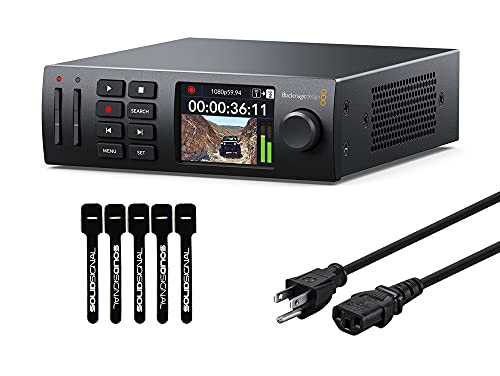
- Records H.264, ProRes, or DNxHD
- 1/3 rack-mountable design
- Supports SD/UHS-II and USB recording
Best For: Studio and streaming setups needing a compact rack recorder
Standalone Rack NVR

- 32-channel standalone NVR
- 300 Mbps recording throughput
- Supports external iSCSI storage
Best For: Mid-to-large security systems needing rackmount network recording
Rack Studio Monitor
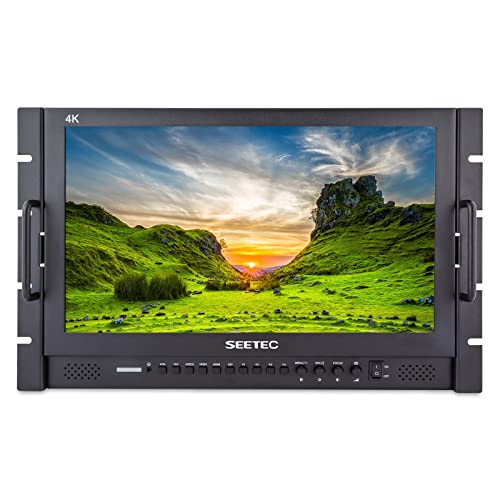
- 7RU rackmount monitor design
- Full HD IPS with Rec.709 color
- 3G-SDI, HDMI, and YPbPr inputs
Best For: Studio racks that need a professional monitoring display
Rackmount NVR
ACTi ZNR-423 32-Channel 1U Recorder

- 32-channel standalone NVR
- 4-bay 1U rackmount design
- Up to 8MP recording with MP4 export
Best For: Multi-camera security systems in a compact rack setup
Rackmount Monitor-Recorder
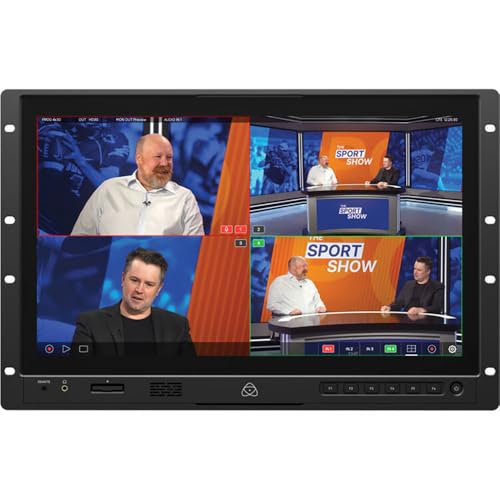
- 19-inch 4K HDR touchscreen
- 12G-SDI, HDMI, and NDI|HX3 support
- ISO recording with professional monitoring tools
Best For: Live production and studio racks that need monitoring plus recording
Compact DVR Recorder
AVerMedia EZRecorder 330G HDMI

- 4K pass-through and 1080p60 recording
- No PC required
- Works with external drives, micro SD, or NAS
Best For: Standalone HDMI recording from consoles, cameras, and set-top boxes
Portable Standalone Recorder
ViewPro 1080p@60fps HDMI Recorder
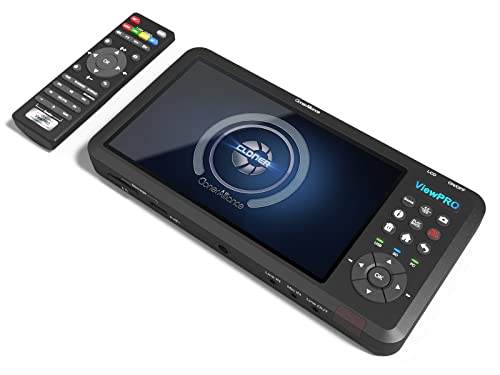
- Records up to 1080p@60fps to USB or SD
- 7" LCD with built-in speaker for playback
- HDMI, AV, VGA, and YPbPr input support
Best For: portable HDMI recording and analog conversion
Premium 4K Standalone Pick
ZowieREC 4K HDMI Video Recorder

- Records up to 4K@30fps without a PC
- HDMI pass-through with 4Kp60 input and loop-out
- Pause/resume plus schedule recording support
Best For: premium standalone HDMI recording with pass-through
Analog-to-Digital Workhorse
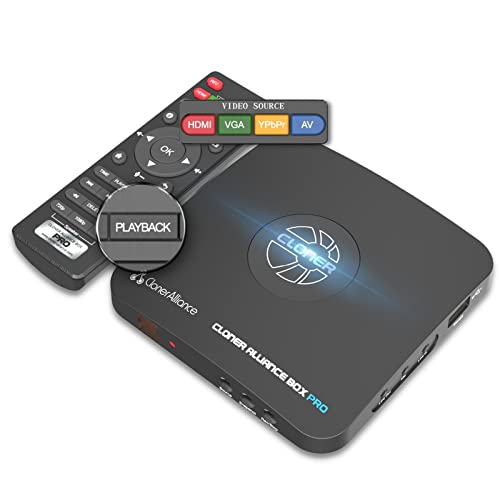
- Standalone 1080p@60fps capture with TV playback
- Supports HDMI, RCA, composite, component, and VGA
- Schedule recording and ultra-low latency support
Best For: analog conversion and broad-source recording
Enterprise 2U NVR – 96TB Rackmount Surveillance Server
If you need rackmount external video recorders for a large camera deployment, this 2U NVR is built for serious storage and uptime. It combines 96TB total RAID6 capacity, 8 pre-installed IP Professional licenses, and a front-load redundant design for a clean enterprise install.
Best For: Enterprise surveillance teams that want high-capacity rackmount recording with room to scale.
Pros:
- 96TB total storage with 72TB usable in RAID6 for protected footage retention
- 8 IP Professional licenses included, with expansion up to 150 camera connections
- 2U rackmount, frontload design simplifies access and serviceability
- Powered by exacqVision software for professional surveillance management
Cons:
- Designed for enterprise use, so it may be more than smaller systems need
- At 40 pounds, it is not a lightweight installation
- Uses Ethernet/IP camera connectivity rather than standalone consumer recording workflows
This is the strongest pick in the group if storage resilience and rack-friendly deployment matter most. Its RAID6 setup and scalable camera licensing make it a practical backbone for larger security systems.
Compact Studio Deck – 1/3 Rackmount Mini Recorder
For buyers looking at rackmount external video recorders in a production or streaming setup, this HyperDeck Studio HD Mini is a compact option with pro video features. It records H.264, ProRes, or DNxHD to SD/UHS-II cards or external USB disks, and it supports SD/HD formats up to 1080p60.
Best For: Compact broadcast, streaming, and studio workflows that need flexible recording and playback.
Pros:
- 1/3 rack-mountable design saves space in tight racks
- Records to SD/UHS-II cards or external USB disks
- Supports H.264, ProRes, and DNxHD up to 1080p60
- Includes 3G-SDI, HDMI out, timecode, and reference connections
Cons:
- Single-channel device, so it is not suited to multi-camera surveillance
- Designed for SD/HD formats rather than higher-resolution production needs
- Uses card or USB media instead of built-in large-capacity storage
This is a specialized recorder for video workflows, not a surveillance NVR. If your priority is compact rack integration, codec support, and straightforward external recording, it fits well.
Standalone Rack NVR – 32-Channel 4-Bay Recorder
This ACTi unit is a strong fit if you are comparing rackmount external video recorders for a mid-to-large surveillance deployment. It offers 32 channels, a 4-bay rackmount chassis, 300 Mbps recording throughput, and support for external storage via iSCSI.
Best For: Security installs that need a standalone rackmount NVR with network storage support.
Pros:
- 32-channel standalone NVR handles substantial camera counts
- 300 Mbps recording throughput supports demanding surveillance loads
- External storage support via iSCSI adds flexibility
- Includes HDMI, USB video export, audio, and remote access features
Cons:
- 14TB listed storage is modest compared with higher-capacity competitors
- No warranty is listed in the supplied details
- Best suited to ACTi-based ecosystems for full compatibility
For users who want a self-contained rack NVR with practical expansion and export options, this model covers the essentials well. Its combination of channel count, throughput, and iSCSI support makes it useful for serious security work.
Rack Studio Monitor – 17.3" Full HD 7RU Display
This is not a recorder, but it can still matter in a rackmount video workflow because it gives you a professional monitoring screen beside your rackmount external video recorders. The 17.3-inch IPS panel, 3G-SDI and HDMI support, and 7RU rack design make it suitable for studio and production racks.
Best For: Directors, editors, and production teams who need a rackmount monitoring display.
Pros:
- 7RU rackmount design integrates into studio or post-production racks
- Full HD 1920×1080 IPS panel with Rec.709 color standard
- Includes focus assist, image freeze, and image flip tools
- Supports multiple inputs including 3G-SDI, HDMI, and YPbPr
Cons:
- It is a monitor, not a video recorder
- At 300cd/m2 brightness, it is more studio-oriented than field-oriented
- Requires a rack workflow to take full advantage of the 7RU format
If your buying decision includes monitoring alongside recording, this display fills that role cleanly. It pairs well with rack-based production gear, but it should be chosen as a companion screen rather than a recorder replacement.
Rackmount NVR – ACTi ZNR-423 32-Channel 1U Recorder
If you’re shopping for rackmount external video recorders for a multi-camera setup, the ACTi ZNR-423 is built around standalone NVR duties rather than PC-based capture. It offers 32 channels, a 4-bay 1U rackmount design, and support for up to 8MP resolution, making it a practical fit for surveillance installations that need compact rack integration and exportable recordings in MP4.
Best For: Multi-camera security systems that need a compact 1U rackmount NVR with high channel count.
Pros:
- 32-channel support for larger camera arrays
- 4-bay 1U rackmount chassis for rack installation
- Up to 8MP maximum resolution
- MP4 video export format for easy file handling
Cons:
- No warranty is listed in the supplied details
- Focused on NVR use rather than general video recording features
- Details do not specify included storage drives
Overall, the ZNR-423 is the most straightforward choice here if your priority is dense camera support in a rack-friendly recorder. Its strengths are channel count, resolution support, and compact 1U sizing, but it’s best viewed as a surveillance NVR rather than a flexible media recorder.
Rackmount Monitor-Recorder – Atomos Shogun AV-19 4K HDR
Among rackmount external video recorders, the Atomos Shogun AV-19 stands out as a monitor-recorder-switcher aimed at live production and studio workflows. It combines a 19-inch 4K HDR touchscreen with 12G-SDI, HDMI, NDI|HX3 support, and ISO recording, so it suits setups that need monitoring, switching, and recording in one rack-friendly unit.
Best For: Live production, broadcast, and studio teams needing a rackmount 4K HDR monitor-recorder-switcher.
Pros:
- 19-inch 4K HDR touchscreen for monitoring and control
- 12G-SDI, HDMI, and NDI|HX3 video support
- ISO recording to CFexpress or USB-C
- Built-in monitoring tools, LUTs, and quad split/fullscreen views
Cons:
- Large 7 RU rack size may require significant rack space
- Batteries are required according to the supplied details
- More specialized for production than simple recording tasks
The Shogun AV-19 is a strong fit when recording is only one part of a broader monitoring and switching workflow. Its feature set is clearly aimed at professional production environments, so it makes sense if you need a rackmount centerpiece rather than a basic recorder.
Compact DVR Recorder – AVerMedia EZRecorder 330G HDMI
If you’re comparing rackmount external video recorders with more flexible standalone capture options, the AVerMedia EZRecorder 330G is a compact no-PC DVR for HDMI sources. It records in 1080p60 while passing through 4K, supports external hard drives, micro SD cards, or NAS storage, and can be used with consoles, camcorders, DSLRs, and set-top boxes.
Best For: Simple standalone HDMI recording from consumer and prosumer video sources without using a PC.
Pros:
- 4K pass-through with 1080p60 recording
- No PC required for recording or streaming
- Supports external drives, micro SD cards, and NAS storage
- Includes remote control and IR blaster for convenience
Cons:
- HDCP and encrypted content recording is not supported
- Only HDMI input is listed in the supplied details
- Not a rackmount unit like the other products in this roundup
The EZRecorder 330G is best when you want a simple standalone recorder rather than a rack-integrated system. It trades rackmount format and pro studio I/O for easier consumer-friendly operation, flexible storage, and broad device compatibility.
Portable Standalone Recorder – ViewPro 1080p@60fps HDMI Recorder
If you want a practical rackmount external video recorder alternative for desk or portable use, the ViewPro is built around standalone capture, playback, and scheduling. It records HDMI at up to 1080p@60fps, supports 4K@30fps input, and can also convert analog sources to digital MP4 files without needing a TV.
Best For: Users who need a portable recorder for HDMI capture, analog conversion, and scheduled recording.
Pros:
- Standalone 1080p@60fps recording to USB storage or SD card
- 7″ LCD and built-in speaker for preview and playback without a TV
- Supports HDMI plus AV, VGA, and YPbPr inputs for analog-to-digital conversion
- Includes schedule recording and bundled Windows streaming software
Cons:
- Does not support HDCP-protected content
- Streaming and capture software is Windows-only
- More portable than rackmount, so it may not suit permanent installation setups
The ViewPro makes sense if you need a flexible recorder for mixed sources and occasional live capture, but its strengths are in portability and versatility rather than rack integration. For buyers prioritizing on-device preview and broad input support, it covers a lot of ground.
Premium 4K Standalone Pick – ZowieREC 4K HDMI Video Recorder
For shoppers comparing rackmount external video recorders, the ZowieREC stands out as a compact standalone option with 4K recording, pass-through, and scheduled capture. It records without a PC, supports HDMI sources from cameras and consoles, and can replay footage on a TV with its included remote.
Best For: Buyers who want a premium standalone HDMI recorder with 4K support and pass-through.
Pros:
- Standalone recording up to 4K@30fps without a PC
- HDMI pass-through supports 4Kp60 input and loop-out
- Pause, resume, stop, and schedule recording functions
- Supports TF card and USB storage for flexible recording media
Cons:
- Protected or copyrighted HDMI sources are not supported
- AV-to-HDMI adapter is not included
- Record output is down-graded to 1080p60 for certain higher-input modes
This is a strong fit if you want a polished recorder with more control than a basic capture box. The aluminum design and scheduling features add value, while the HDMI-only focus keeps it aimed at modern source devices.
Analog-to-Digital Workhorse – Box Pro 1080p@60fps Recorder
If your shortlist of rackmount external video recorders includes a unit that can handle old and new sources, the Box Pro is built for that job. It records up to 1080p@60fps, works without a PC for standalone capture and playback, and supports HDMI plus RCA, component, composite, and VGA inputs.
Best For: Users who need a straightforward recorder for analog conversion, HDMI capture, and TV playback.
Pros:
- Standalone 1080p@60fps capture with no PC required
- Wide input support: HDMI, RCA, composite, component, YPbPr, and VGA
- Records to USB storage and plays back on TV with the included remote
- Schedule recording, ultra-low latency, and included Windows editing software
Cons:
- Does not support HDCP-protected sources
- Free video edit/conversion software is Windows only
- Smart TV and TV antenna cannot be used as video sources
The Box Pro is the most source-flexible option here, especially if you need to digitize older equipment alongside HDMI devices. It is a practical choice for buyers who value broad compatibility and simple, TV-based operation.
How We Picked These Rackmount External Video Recorders
We prioritized rack-friendly designs, recording stability, input and output flexibility, storage expandability, and features that matter in real installations. That includes multi-channel support, redundant or high-capacity storage options, monitoring tools, remote access, and practical export workflows.
Because Rackmount External Video Recorders serve very different use cases, we also considered whether a model is better suited to surveillance, live production, or simple HDMI capture and playback.
Quick Comparison
At a high level, the list breaks into three groups: enterprise NVR-style systems for security and large camera counts, rackmount monitor-recorder solutions for production control, and compact HDMI recorders for smaller AV or desktop workflows. The right choice usually comes down to channel count, source type, and how much storage or monitoring you need in one chassis.
Key Buying Factors for Rackmount External Video Recorders
Channel Count and Input Type
Start with the number of sources you need to record now and in the near future. IP-based NVRs are the best fit for camera systems, while HDMI, SDI, or mixed-input recorders make more sense for broadcast, presentation, or AV capture.
Storage Capacity and Redundancy
For continuous recording, look closely at drive bays, maximum supported capacity, and RAID options. Higher-capacity systems are better for longer retention, while redundancy helps protect footage if a drive fails.
Recording Quality and Throughput
Make sure the recorder can sustain the bitrate of your sources without dropped frames. For higher-resolution workflows, verify 4K or 8MP support, maximum frame rates, and total recording throughput.
Monitoring, Export, and Remote Access
Built-in displays, HDMI monitoring, USB export, and remote management can save time during setup and review. These features are especially useful when the recorder is installed in a rack away from the operator.
Who Should Buy Which Rackmount External Video Recorders?
If you need a dependable security backbone, choose an NVR with enough channels, storage, and network throughput for your camera count. If your priority is live production, presentation capture, or field recording, look for a rackmount recorder with the right video inputs, monitoring tools, and easy playback.
For smaller AV jobs, a compact HDMI recorder can be the most cost-effective option. In short, the best Rackmount External Video Recorders are the ones that match your source type, retention needs, and workflow—not just the biggest feature list.