If you need fast, dependable label output, the right printer can keep inventory moving without bottlenecks. This roundup focuses on high-volume barcode printers for inventory that balance speed, durability, and easy integration.
From industrial-grade models to compact desktop options, these picks are suited for warehouses, fulfillment teams, and growing e-commerce operations that need consistent barcode printing day after day.
Best 10 High Volume Barcode Printers for Inventory Picks for 2026
Entry-Level Industrial Option

- 6 ips printing at 203 dpi
- Direct thermal and thermal transfer in one printer
- Ethernet and USB connectivity
Best For: Warehouses needing a network-ready industrial label printer
Budget Desktop Pick

- 203 dpi thermal transfer printing
- USB-only desktop label printer
- Basic, reliable Zebra engineering
Best For: Light inventory labeling on a budget
High-Resolution Workflow Choice
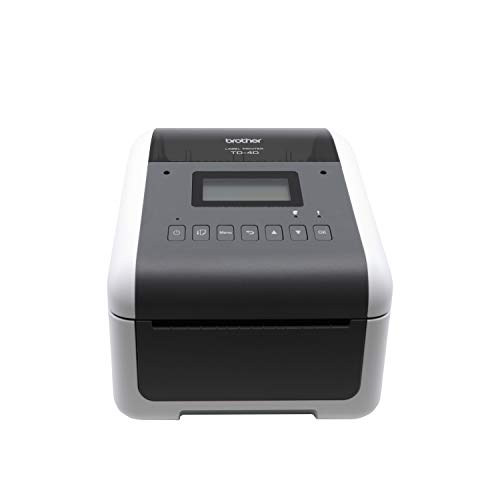
- 300 dpi for crisp labels and mini barcodes
- Up to 6 ips print speed
- Bluetooth, network, USB, and serial connectivity
Best For: Teams needing sharp barcode output and flexible integration
Compact High-Speed Barcode Printer
Godex RT200i Desktop Bar Code Label Printer

- Up to 7 ips printing speed
- 203 DPI thermal transfer or direct thermal
- USB, Ethernet, and serial connectivity
Best For: Small inventory teams needing a compact desktop barcode printer
Industrial Heavy-Duty Barcode Printer
Zebra ZT411 600 dpi Thermal Transfer
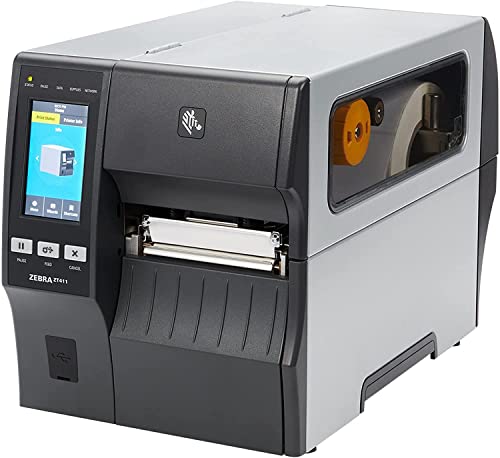
- All-metal industrial frame
- Up to 14 ips with 600 dpi output
- USB, Ethernet, Bluetooth, and serial
Best For: Large inventory and warehouse teams needing rugged high-speed labeling
Affordable Shipping Label Workhorse
Westinghouse Thermal Shipping Label Printer

- 203 DPI direct thermal printing
- Up to 6 ips for steady output
- Works with Windows, macOS, and Linux
Best For: Ecommerce and warehouse shipping stations
Classic High-Volume Shipping Workhorse
Zebra ZP450 Direct Thermal Label Printer

- 5 ips direct thermal printing for fast label jobs
- USB, serial, and parallel connectivity
- Great for 4 x 6 shipping and inventory labels
Best For: E-commerce shipping and warehouse label workflows
Compact Budget Shipping Printer

- 5 ips direct thermal printing at 203 dpi
- USB, serial, and parallel connectivity
- No toner or ribbon needed for operation
Best For: Budget-conscious shipping and receiving stations
Entry-Level Industrial Option – Brother TJ-4010TN
If you need high volume barcode printers for inventory and want a straightforward industrial model, the Brother TJ-4010TN is built around speed, durability, and flexible media support. It handles direct thermal and thermal transfer printing in one unit, making it practical for warehouses or back-room inventory workflows that may need different label types.
Best For: Inventory teams that want a network-ready industrial printer with both direct thermal and thermal transfer support.
Pros:
- Prints at up to 6 ips with 203 dpi resolution.
- Supports both direct thermal and thermal transfer printing.
- Includes Ethernet and USB connectivity for flexible setup.
- Backed by a 5-year limited warranty.
Cons:
- 203 dpi is solid for standard labels, but not ideal for the finest detail.
- Maximum media size is limited to 4 x 6 inches.
- Designed for labels only, with no broader office print functions.
The TJ-4010TN fits well where dependable throughput matters more than extra desktop features. For teams standardizing on inventory labels and wanting a network-ready industrial printer, it offers a practical balance of speed, versatility, and support.
Budget Desktop Pick – Zebra ZD220
The Zebra ZD220 is a basic barcode printer for inventory tasks where simple, reliable label output matters more than advanced features. As one of the more affordable high volume barcode printers for inventory, it focuses on standard desktop thermal transfer printing with a compact footprint and USB-only connectivity.
Best For: Small offices or light inventory setups that need a simple Zebra desktop label printer.
Pros:
- Zebra-branded engineering with a basic, reliable design.
- 203 dpi thermal transfer printing for standard labels.
- Compact desktop unit with USB connectivity.
- Affordable entry-level feature set.
Cons:
- USB-only connectivity limits deployment flexibility.
- Rated at 1 page per minute in the supplied details.
- Limited to basic print-only functionality.
This is a practical no-frills choice if you mainly need dependable label output and do not require network or mobile workflow options. It is best suited to straightforward inventory labeling rather than high-feature environments.
High-Resolution Workflow Choice – Brother TD-4550DNWB
For buyers comparing high volume barcode printers for inventory, the Brother TD-4550DNWB stands out with 300 dpi output and workflow-friendly connectivity. It is designed for shipping, supply chain, and inventory management use, with support for labels, tags, and receipts in a compact desktop form.
Best For: Inventory and shipping teams that need sharper print quality and flexible connectivity.
Pros:
- 300 dpi resolution for crisp barcodes and small text.
- Prints up to 6 ips for fast label production.
- Connectivity includes Bluetooth, network, USB, Ethernet, and serial interface.
- Spindle-less media loading makes replacement easier.
Cons:
- Maximum media size is limited to 4 inches wide.
- Compact desktop design may not suit very large label rolls.
- More connectivity and print quality can mean more setup choices to manage.
This model is a strong fit when barcode clarity matters as much as throughput. If your inventory process includes small fonts, mini barcodes, or multi-device integration, it delivers a well-rounded desktop solution.
Compact Industrial Runner – iDPRT iD880
The iDPRT iD880 is aimed at warehouses and logistics users who need high volume barcode printers for inventory without moving to a huge industrial system. It offers direct thermal printing, 203 dpi output, and speeds up to 6 ips, while supporting labels from about 1.18 inches to 4.09 inches wide.
Best For: Warehouses, logistics teams, and small businesses needing a compact high-speed label printer.
Pros:
- Prints up to 6 ips with 203 dpi resolution.
- Supports USB and Ethernet connectivity.
- Handles a wide label range from 1.18″ to 4.09″ wide.
- Includes 32 MB DDR3 RAM and 128 MB flash memory for heavier jobs.
Cons:
- 203 dpi is suitable for standard barcodes, not premium fine-detail printing.
- Direct thermal printing means no ribbon-based thermal transfer option.
- Setup depends on downloading the driver from the QR code or support page.
Overall, the iD880 is a practical fit for teams that want a compact but capable inventory printer. Its wider media support and network options make it useful for busy workspaces that need dependable throughput.
Compact High-Speed Barcode Printer – Godex RT200i Desktop Bar Code Label Printer
If you need high volume barcode printers for inventory, the Godex RT200i is a strong desktop pick for crisp, reliable labels without taking up much counter space. Its 203 DPI thermal transfer or direct thermal output, 7 ips print speed, and flexible USB, Ethernet, and serial connectivity make it a practical fit for busy labeling stations.
Best For: Small warehouses, stock rooms, and office inventory workflows that need fast desktop barcode printing.
Pros:
- Prints up to 7 inches per second for faster label runs
- 203 DPI output is suited to barcodes and other crisp label text
- Supports thermal transfer and direct thermal printing
- USB, Ethernet, and serial connections add setup flexibility
Cons:
- Limited to a 2.36-inch maximum media width
- Not as rugged as an industrial metal-frame printer
- Best suited to desktop-scale use rather than heavy-duty floor operation
Overall, the RT200i balances speed, clarity, and connectivity in a compact footprint. It makes sense for inventory teams that want dependable barcode labels without jumping to a larger industrial machine.
Industrial Heavy-Duty Barcode Printer – Zebra ZT411 600 dpi Thermal Transfer
For high volume barcode printers for inventory in tougher environments, the Zebra ZT411 stands out with an all-metal frame, 4-inch print width, and up to 14 ips speed. Its 600 dpi resolution, side-loading supplies path, and broad connectivity options make it a strong choice when label quality and durability both matter.
Best For: Industrial inventory labeling, shipping stations, and demanding warehouse environments.
Pros:
- All-metal construction is built for durable, reliable use
- Up to 14 inches per second supports high-throughput printing
- 600 dpi resolution is ideal for sharp barcode detail
- USB, Ethernet, Bluetooth, and serial connectivity options
Cons:
- Ribbon sold separately for thermal transfer use
- Large and heavy compared with desktop label printers
- 4-inch print width may be limiting for wider labels
The ZT411 is the most industrial option here, aimed at teams that print a lot and need equipment that can keep up. If your inventory operation needs fast, durable barcode output with advanced features, this is the strongest heavy-duty pick.
Affordable Shipping Label Workhorse – Westinghouse Thermal Shipping Label Printer
If your search for high volume barcode printers for inventory leans toward shipping and fulfillment, this Westinghouse model is built for practical daily use. It offers 203 DPI direct thermal printing, up to 6 ips speed, and support for 4×6 labels across Windows, macOS, and Linux environments.
Best For: Shipping-heavy inventory workflows, ecommerce packing stations, and small business label printing.
Pros:
- Direct thermal printing means no ink ribbons or toner
- Up to 6 inches per second for steady label output
- Supports Windows, macOS, Linux, and ZPL software
- Includes starter labels and setup accessories
Cons:
- Not Bluetooth-capable
- Maximum print resolution is 203 DPI, not ideal for ultra-fine detail
- Primarily optimized for 4×6 shipping labels rather than wider formats
This is a straightforward commercial-grade printer for teams that need consistent shipping labels more than advanced industrial features. It fits best when inventory moves through a packing workflow and speed, simplicity, and compatibility matter most.
Classic High-Volume Shipping Workhorse – Zebra ZP450 Direct Thermal Label Printer
If you need high volume barcode printers for inventory and shipping, the Zebra ZP450 is built around fast, direct thermal label output for steady everyday use. It handles common 4 x 6 transport labels well and focuses on simple, durable operation for warehouses, e-commerce, and retail environments.
Best For: E-commerce shipping, warehouse teams, and stores printing lots of 4 x 6 shipping labels.
Pros:
- Prints at up to 5 ips and can finish a 4 x 6 label in about 1.2 seconds.
- Supports USB, serial, and parallel connectivity for flexible setup.
- Direct thermal printing keeps operation simple and toner-free.
- Works with UPS, FedEx, and other common label types.
Cons:
- Limited to 203 dpi resolution, so it is built for labels rather than detailed graphics.
- Best fit is fixed 4 x 6 shipping labels, not wide-format media.
- No wireless connectivity is listed.
This is a practical option if your priority is fast, dependable label printing with low ongoing cost. It is especially appealing when you want a proven desktop printer for repetitive inventory and shipping workflows.
Flexible Small-Business Labeler – iDPRT SP310 Thermal Label Printer
For high volume barcode printers for inventory, the iDPRT SP310 offers a flexible desktop setup with support for labels from 1 inch to 3.35 inches wide. It is designed for small businesses and offices that need fast, reliable barcode and label printing without locking into proprietary supplies.
Best For: Small businesses, home offices, and inventory tracking setups that need broad label-width support.
Pros:
- Supports a wide 1″ to 3.35″ label range for mailing, filing, UPC, and inventory labels.
- Prints at 4 ips, or up to 80 sheets of 2 x 3 labels per minute.
- Unlocked system works with third-party thermal labels to help lower supply costs.
- USB setup includes drivers for Windows, macOS, Linux, ChromeOS, and Raspberry Pi.
Cons:
- USB-only connection may be limiting if you want wireless printing.
- Its 203 dpi output is practical, but not meant for highly detailed print work.
- Best suited to desktop workflows rather than large industrial operations.
This printer stands out when you want flexibility and low operating costs in a compact desktop unit. It is a strong pick for inventory labels, serial barcodes, and general office label production.
Compact Budget Shipping Printer – Zebra ZP450 Barcode Printer
If you want high volume barcode printers for inventory or shipping without adding toner or ribbon costs, this Zebra ZP450-based model keeps the setup simple. It is a compact, durable desktop printer that focuses on fast, direct thermal label output for office, shipping, and retail use.
Best For: Shipping rooms, receiving desks, and retail counters that need an economical desktop label printer.
Pros:
- Prints at up to 5 ips with 203 dpi resolution.
- USB, serial, and parallel connections make integration straightforward.
- Direct thermal printing avoids toner and ribbon replacement.
- Compatible with UPS, FedEx, and other common label types.
Cons:
- Positioned for low-volume environments rather than very large industrial runs.
- Resolution is basic at 203 dpi, which is fine for labels but not advanced graphics.
- Warranty is only 90 days on this renewed model.
Overall, this is a practical pick when you want an affordable, no-fuss barcode printer for routine label jobs. Its value comes from simple operation, broad connection options, and low consumable cost.
How We Picked the Best High Volume Barcode Printers for Inventory
We prioritized printers that can handle repeated daily label runs, support common connectivity options, and work with standard inventory and shipping workflows. For high-volume barcode printers for inventory, reliability and consumables efficiency matter as much as raw print speed.
Quick Comparison
Industrial models are best when uptime, durability, and larger label runs are the priority. Desktop thermal printers are a better fit for smaller workstations, light warehouse stations, or mixed shipping and inventory tasks. Direct thermal models are simpler to maintain, while thermal transfer printers are better when you need longer-lasting labels.
Key Buying Factors for High-Volume Barcode Printers for Inventory
Daily Print Volume
Match the printer to your busiest shift, not your average day. If you print thousands of labels, look for industrial construction, higher duty cycles, and faster output so queues do not build up.
Print Technology
Direct thermal is convenient for shipping and short-term inventory labels because it avoids ribbons. Thermal transfer is worth considering when labels need better durability, especially in cold storage, warehousing, or rough-handling environments.
Resolution and Speed
203 dpi is usually enough for standard barcodes and shipping labels. Higher resolution is useful for small text, dense labels, or detailed graphics, while speed becomes more important as volume increases.
Connectivity and Software Compatibility
USB is fine for a single workstation, but Ethernet, Bluetooth, and serial support are valuable in shared or networked environments. Make sure the printer works with your label software, marketplace tools, ERP system, or warehouse platform.
Label Size Support
Check the supported media width and roll capacity before buying. A printer that handles your most common labels without frequent reloads will save time during busy inventory cycles.
Who Should Buy Which High Volume Barcode Printers for Inventory?
Choose an industrial printer if you manage a warehouse, distribution center, or high-traffic fulfillment area. Choose a desktop model if you need dependable labeling at a packing station, office, or small stockroom. If your priority is simple shipping and basic inventory labeling, a compact direct thermal printer may be the most cost-effective choice. The best high-volume barcode printers for inventory are the ones that fit your workload, label type, and workflow today, while leaving room to scale tomorrow.