Frequent CNC work demands more than a compact footprint. The right desktop router should combine dependable motion, a useful cutting area, straightforward setup, and enough rigidity for your typical materials.
This roundup compares 10 machines across several sizes and configurations, from beginner-friendly engravers to larger all-metal routers designed for repeated workshop use.
Best 10 Desktop CNC Routers for Frequent Use Picks for 2026
Best for Efficient Precision

- Closed-loop motors help reduce step loss
- 400 x 300 x 110mm working area
- 400W spindle for wood, plastics, and soft metals
Best For: Frequent small-business and hobby projects needing repeatable results
Best for Large-Format Sessions

- 500W brushless spindle for extended sessions
- 600 x 600mm work area with 100mm Z clearance
- Dedicated port for plug-and-play rotary engraving
Best For: Frequent larger-format carving and milling
Best for Expandable Control
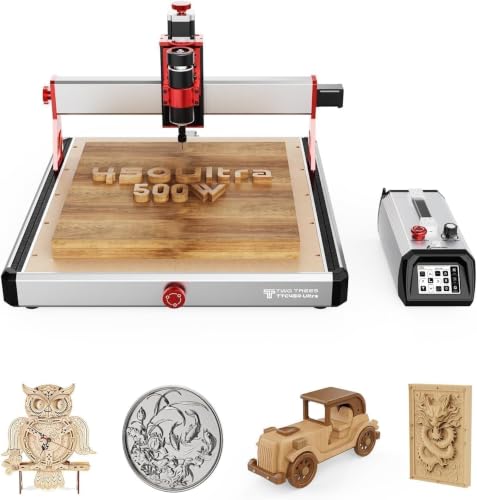
- 500W spindle supports varied materials
- All-metal frame with precision linear rails
- Touchscreen and offline operation included
Best For: Frequent mixed-material work with upgrade plans
Best for Metal-Capable Upgrades

- 800W trim router for wood and light metal work
- Dual guides support rigid cutting
- Wi-Fi and multiple upgrade paths
Best For: Frequent home-shop projects requiring upgrade flexibility
Compact Precision Pick

- All-metal Z-axis with stated 0.1mm positioning accuracy
- Compact 15-pound frame for desk use
- Includes cutters, collet, spindle, and tools
Best For: DIY, education, and compact small-business projects
Large-Capacity Metalworking Pick

- 300 x 600 x 73mm effective processing area
- 800W router with 8,000–24,000 RPM range
- Wi-Fi control and multiple upgrade options
Best For: Frequent larger-format wood and metal work
Powerful All-Metal Pick
Genmitsu 3020-PRO Ultra CNC Router

- 710W spindle with speeds up to 30,000 RPM
- All-metal frame and reinforced linear motion components
- 60mm steppers rated at 7.3Nm torque
Best For: Frequent compact projects requiring rigidity and cutting power
Large-Format Workhorse

- 460 x 460 x 80 mm work area
- All-metal frame with reinforced Z-axis
- Ports for fourth-axis and laser upgrades
Best For: Frequent larger-format workshop projects and future expansion
Quick-Setup Workshop Pick

- 400 x 400 x 60 mm work area
- Pre-wired assembly designed for quick setup
- Compatible with multiple spindle sizes
Best For: DIY routing and recurring hobby projects with upgrade plans
Compact High-Power Option

- 500W spindle with up to 12,000 RPM
- 80 mm Z-axis travel and all-metal frame
- Six limit switches plus emergency stop
Best For: Frequent small-format cutting, engraving, and mixed-material work
Best for Efficient Precision – Genmitsu PROVerXL 4030 V2
The Genmitsu PROVerXL 4030 V2 is a practical choice among desktop CNC routers for frequent use, combining closed-loop stepper motors, a 400W spindle, and a rigid motion system. Its 400 x 300 x 110mm work area suits repeat projects involving wood, plastics, acrylic, MDF, PCBs, and soft metals.
Best For: Hobbyists, DIY users, and small businesses that need reliable repeatability and efficient cutting in a compact format.
Pros:
- Closed-loop NEMA 23 motors help reduce step loss and operating noise.
- 1204 ball screws and an improved Z-axis structure support precise movement.
- GRBL control works with software such as Candle and Universal Gcode Sender.
- Hybrid T-slot table accommodates varied workholding needs.
Cons:
- The 400 x 300mm work area is better suited to small and medium projects than oversized workpieces.
- The 400W spindle is intended for the listed materials rather than heavy industrial machining.
For frequent desktop routing where repeatability, low maintenance, and straightforward USB control matter, the PROVerXL 4030 V2 offers a balanced combination of speed and versatility.
Best for Large-Format Sessions – FoxAlien Masuter Pro MAX
The FoxAlien Masuter Pro MAX stands out among desktop CNC routers for frequent use with a 500W brushless spindle and a spacious 600 x 600mm work area. Its reinforced X-axis is designed to limit vibration during extended cutting, while the control system supports future upgrades and rotary engraving.
Best For: Users who regularly process larger panels, thicker materials, or a range of wood, acrylic, plastic, and soft-metal projects.
Pros:
- 500W brushless spindle is designed for quieter, efficient, continuous operation.
- 600 x 600mm work area handles larger workpieces than many desktop CNC machines.
- Strengthened X-axis extrusion improves rigidity and repeatability at higher speeds.
- Dedicated A-axis port simplifies adding a rotary attachment.
Cons:
- Its larger footprint and 26kg weight require substantial bench space.
- Closed-loop motors are an upgrade option rather than included equipment.
The Masuter Pro MAX is a strong fit when frequent use means longer sessions and larger projects. Its brushless spindle, reinforced frame, and expansion-ready controls make it more adaptable as your workflow grows.
Best for Expandable Control – Twotrees TTC450 Ultra
The Twotrees TTC450 Ultra is a versatile option among desktop CNC routers for frequent use, pairing a 500W spindle with an all-metal chassis, linear rails, and a 465 x 465mm work area. Its touchscreen, offline operation, and broad expansion options make it convenient for repeated jobs across wood, acrylic, MDF, nylon, aluminum, and other listed materials.
Best For: Makers and small workshops that value material flexibility, touchscreen control, and a machine that can be expanded over time.
Pros:
- 500W spindle supports speeds from 8,000 to 30,000 RPM and accepts 0.5–7mm tools.
- All-metal construction, MGN12H rails, and T8 lead screws emphasize stability.
- 3.5-inch touchscreen supports offline TF-card and USB operation.
- Interfaces are provided for fourth-axis, Wi-Fi/Bluetooth, handwheel, and tool-setting upgrades.
Cons:
- The 465 x 465mm work area may not accommodate very large panels.
- Some advanced functions and expanded spindle capacity require additional upgrades.
With 90% pre-assembly and included accessories, the TTC450 Ultra reduces setup friction while retaining useful expansion potential. It is particularly appealing for frequent users who want both accessible controls and precise mechanical hardware.
Best for Metal-Capable Upgrades – CNC Router 3030-Evo Max
The 3030-Evo Max is a compact choice among desktop CNC routers for frequent use when cutting capability and upgrade flexibility are priorities. It includes an 800W trim router, dual steel linear guides, and a 3030 work format, with support for materials including aluminum, brass, stainless steel, wood, acrylic, MDF, and plastics.
Best For: Home users and makers who need a rigid small-format machine for light-duty metal work and want room to upgrade the spindle, table, or motors.
Pros:
- 800W router offers six speed settings from 8,000 to 24,000 RPM.
- MGN-15 dual linear guides on all axes provide rigidity for higher-load work.
- Upgradeable to a 1.5kW spindle, 1204 ball screws, and closed-loop motors.
- 32-bit GRBL_ESP32 control supports Wi-Fi, rotary-axis functions, and multiple software options.
Cons:
- The included trim router requires manual dial adjustment for speed changes.
- The machine is described for light-duty work despite its metal-cutting capability.
- Several performance enhancements are optional upgrades rather than standard equipment.
The 3030-Evo Max is best viewed as an upgrade-friendly workhorse rather than a fully industrial machine. Its rigid guides, capable included router, and modern control board make it a useful platform for frequent home-shop production.
Compact Precision Pick – TTC3018 Pro CNC Router
For shoppers comparing desktop CNC routers for frequent use in a small workspace, the TTC3018 Pro emphasizes compact dimensions, an all-metal Z-axis, and straightforward wired GRBL control. Its 300 x 180 x 40mm work area suits smaller projects rather than large-format production.
Best For: DIY makers, classrooms, and small businesses producing nameplates, signs, and other compact wood, acrylic, MDF, or nylon projects.
Pros:
- All-metal Z-axis with T8 backlash-eliminating lead screws and stated 0.1mm positioning accuracy.
- Compact 15-pound design fits conveniently on a desk.
- Includes cutters, ER11 collet, spindle motor, and assembly tools.
- Compatible with GRBL, ArtCam, Fusion360, and Windows or Mac systems.
Cons:
- Limited to a 300 x 180 x 40mm working area.
- Uses USB wired file transfer only; it has no Bluetooth, Wi-Fi, or built-in TF card slot.
- The 775 spindle is rated at 7,000–9,000 RPM, making it less suited to heavier cutting than the larger machines here.
The TTC3018 Pro is a practical entry point for frequent light-duty work when desk space and included accessories matter most. Choose a larger, more powerful router if your projects regularly involve bigger stock or demanding metal cuts.
Large-Capacity Metalworking Pick – CNC Router 3060-Evo Max
Among desktop CNC routers for frequent use, the 3060-Evo Max stands out for its 300 x 600 x 73mm effective work area, 800W trim router, and rigid all-metal guide system. It is designed for users who need more capacity and upgrade potential for wood and metal projects.
Best For: Frequent cutting and engraving of larger workpieces, including aluminum, brass, stainless steel, wood, acrylic, MDF, and plastics.
Pros:
- Long 300 x 600mm table and 73mm effective processing height support larger or multiple pieces.
- 800W router offers six speed settings from 8,000 to 24,000 RPM.
- Dual MGN-15 linear guides and upgradeable ball screws provide a rigid upgrade path.
- ESP32-based GRBL 1.3a control adds Wi-Fi, macro buttons, SD-card operation, and support for advanced accessories.
Cons:
- At 21kg, it is substantially less portable than compact desktop models.
- Router speed adjustment requires manual dial control.
- The 1.5kW spindle and closed-loop motor are upgrades rather than included equipment.
The 3060-Evo Max is the strongest choice here for users prioritizing work area, metal-cutting capability, and future expansion. Its larger footprint and heavier frame make it better suited to a dedicated bench than a casual desktop setup.
Powerful All-Metal Pick – Genmitsu 3020-PRO Ultra CNC Router
The Genmitsu 3020-PRO Ultra is a compelling option for desktop CNC routers for frequent use when rigidity and cutting power are priorities. Its all-metal frame, 710W spindle, and 60mm stepper motors are aimed at demanding work within its 3020-sized work envelope.
Best For: Makers cutting solid wood, acrylic, PCB material, carbon fiber, aluminum, and other supported materials in a compact all-metal machine.
Pros:
- 710W spindle provides adjustable 6,500–30,000 RPM operation with constant torque control.
- All-metal construction, dual X-axis linear rails, and reinforced components support stable cutting.
- 60mm stepper motors deliver stated 7.3Nm torque and can cut aluminum up to 1.5mm in one pass.
- Modular design supports multiple spindle and laser-module mounting options.
Cons:
- Its 3020 work area is smaller than the 3060-Evo Max’s 300 x 600mm processing area.
- The machine weighs 15.3kg, so it is not especially portable once installed.
- The included spindle holder and adapters add flexibility, but expanded capabilities require compatible modules or spindles.
The 3020-PRO Ultra balances a compact footprint with substantially more power than a basic hobby router. It is a strong fit for repeat work on smaller parts, especially when an all-metal structure and accessory flexibility matter.
Large-Format Workhorse – Twotrees TTC450 Pro
For makers seeking desktop CNC routers for frequent use, the Twotrees TTC450 Pro emphasizes a rigid all-metal build, a large work area, and expansion options. Its 460 x 460 x 80 mm workspace and reinforced Z-axis suit larger signs, panels, reliefs, and repeated workshop projects.
Best For: Small workshops, makerspaces, educational settings, and users who need a larger cutting area with upgrade potential.
Pros:
- Large 460 x 460 x 80 mm working area for panels, signage, and batch work.
- Alloy and stainless-steel construction with XYZ limit switches supports stable operation.
- Expansion ports support a fourth axis, laser module, and 500W spindle control.
- GRBL compatibility works with ArtCAM, Fusion 360, Easel, and Carveco Maker across Windows, macOS, and Linux.
Cons:
- Assembly requires installing the appropriate CH340 or CH341 computer driver.
- The included 775 brushed spindle motor may not match users specifically seeking a 500W spindle out of the box.
- Its larger frame and 20.5 kg weight require more bench space than compact 3018-style machines.
The TTC450 Pro is a strong choice when frequent use involves larger workpieces and future expansion. Its broad software support and sturdy construction make it more workshop-oriented than a basic starter router, though setup and bench space deserve planning.
Quick-Setup Workshop Pick – FoxAlien Masuter Pro
The FoxAlien Masuter Pro is a practical option among desktop CNC routers for frequent use when straightforward setup and a stable metal frame matter. Pre-wired components, a 400 x 400 x 60 mm work area, and spindle compatibility make it adaptable for recurring wood, acrylic, MDF, and nylon projects.
Best For: Hobbyists and DIY users who want quick assembly, a stable 3-axis platform, and room to upgrade.
Pros:
- All-aluminum structure and linear-rail Z-axis support stability for detailed work.
- Pre-assembled, pre-wired parts can reduce setup time to approximately 10–15 minutes.
- Includes 52 mm and 65 mm spindle clamps, with additional upgrade compatibility.
- Optional Y-axis extension kit can accommodate larger projects.
Cons:
- The included configuration is a 60W spindle setup, so higher-power routing requires upgrades.
- The 400 x 400 x 60 mm work area is smaller than the Twotrees TTC450 Pro’s workspace.
- The 69 mm spindle clamp is sold separately.
The Masuter Pro balances accessible setup with a durable all-metal design. It is a sensible frequent-use choice for hobby production and DIY routing, especially if you value upgrade flexibility more than maximum spindle power.
Compact High-Power Option – LUNYEE 3018 PRO MAX
The LUNYEE 3018 PRO MAX targets buyers comparing desktop CNC routers for frequent use in a compact footprint. It combines a 500W spindle, all-metal construction, 80 mm Z-axis travel, six limit switches, and an emergency stop for repeatable cutting and engraving across wood, acrylic, MDF, plastic, and some metals.
Best For: Users who need higher spindle power, safety hardware, and versatile spindle or carving modes in a compact machine.
Pros:
- 500W spindle offers up to 12,000 RPM and supports demanding cutting tasks.
- All-metal frame with reinforced aluminum profiles is designed for durability and stability.
- 80 mm Z-axis travel and 12 mm optical axis provide useful depth and motion capability.
- Six limit switches, an emergency-stop button, and manual handwheels support controlled operation.
Cons:
- The 300 x 180 x 80 mm work area is relatively limited for large panels or signs.
- The dedicated 12 mm-axis upgrade kit is sold separately.
- Installation and wiring require following the supplied videos and instructions.
The LUNYEE is compelling when compact size and spindle power take priority over workspace. Its safety features and two-in-one spindle/carving capability suit repeat projects, while the smaller bed makes it better for parts and smaller stock than large-format work.
How We Picked the Best Desktop CNC Routers for Frequent Use
We focused on the features that matter when a machine runs regularly: frame rigidity, linear motion components, stepper-motor performance, work-area dimensions, spindle or router power, control options, safety features, and upgrade potential. We also considered whether each router is better suited to engraving, woodworking, plastics, or occasional nonferrous-metal work.
Because “frequent use” can mean anything from several projects per week to near-daily production, the list includes different size and price categories rather than assuming one machine fits every workshop. Always verify the current specifications, included accessories, software compatibility, and manufacturer support before buying.
Quick Comparison
| Best For | What to Prioritize |
|---|---|
| Small engravings and compact workspaces | Low footprint, simple controls, and adequate rigidity |
| General woodworking and maker projects | Larger work area, dependable guides, and upgradeable components |
| Repeated production jobs | Closed-loop or robust stepper systems, limit switches, and reliable cooling |
| Aluminum and brass projects | All-metal construction, low-vibration motion, conservative feeds, and suitable tooling |
Key Buying Factors for Desktop CNC Routers for Frequent Use
Frame Rigidity and Motion
A rigid all-metal frame helps reduce chatter, dimensional errors, and rough edges. Dual linear guides, properly supported axes, and low-backlash lead screws are especially valuable when cutting repeatedly or working with harder materials.
Work Area and Machine Footprint
Choose a cutting envelope that accommodates your common stock without making the machine unnecessarily difficult to place. Larger routers offer more flexibility, but they also need a sturdier bench, more clearance, and usually more time for setup and calibration.
Motor, Spindle, and Material Capability
Advertised power does not guarantee cutting performance. Match the router or spindle to the tooling, chip evacuation, and feed rates required by your materials. Many desktop machines excel at wood, acrylic, MDF, and plastics; aluminum generally requires shallow passes, secure workholding, and careful tuning.
Controls, Safety, and Maintenance
Limit switches, emergency-stop controls, offline operation, dust management, and accessible replacement parts can make a major difference during frequent use. Closed-loop stepper systems may also help reduce missed-step problems in demanding jobs, although they do not replace proper calibration.
Who Should Buy Which Desktop CNC Routers for Frequent Use?
Choose a compact 3018-style router if you primarily engrave small parts and need an affordable machine for a limited workspace. A 3020- or 3030-class model is a better middle ground for users who want more rigidity and capacity without moving to a large benchtop footprint.
For larger signs, panels, and repeated woodworking projects, look at the 4030- or 3060-class options, provided your bench can support them. Makers who regularly cut aluminum or brass should prioritize the most rigid all-metal design available, use appropriate tooling, and confirm realistic material guidance rather than relying on marketing claims.
If production consistency is the main goal, favor a machine with dependable limit switches, robust guides, accessible service parts, and a control system you can troubleshoot easily. The best choice among these Desktop CNC Routers for Frequent Use is ultimately the one that matches your work envelope, materials, available space, and willingness to tune and maintain the machine.