Finding a desktop CNC router that is powerful enough for your projects without creating a setup headache can be challenging. The right machine should balance assembly time, software support, work area, cutting ability, and room to grow.
We compared 10 beginner-friendly CNC routers across compact 3018 machines, enclosed designs, and larger all-metal models. Use the guide below to narrow your options by project type, material, workspace, and budget.
Best 10 Desktop CNC Routers with Easy Setup Picks for 2026
Best Entry-Level Pick

- Pre-assembled gantry and spoilboard
- Beginner-friendly setup under an hour
- Supports multiple materials and upgrades
Best For: Beginners creating small artwork, gifts, and DIY projects
Fastest Assembly Choice

- Pre-wired setup in 10–15 minutes
- Stable all-aluminum construction
- Large 400-by-400mm work area
Best For: Hobbyists needing quick setup and generous engraving space
Best Power Upgrade

- 710-watt spindle for stronger cuts
- 130mm pass height for taller work
- Modular setup takes about 20 minutes
Best For: Users wanting higher power, precision, and expanded clearance
Best Compact Starter Kit

- Lightweight, space-saving 15-pound design
- Includes cutters and starter tools
- All-metal Z-axis with 0.1mm accuracy
Best For: Small-space DIY, education, and personalized projects
Precision-Ready Pick

- All-metal frame with dual rails and ball screws
- 800W router reaches 24,000 RPM
- Pre-assembled components and setup support
Best For: Makers seeking precision and material versatility
High-Capacity Choice
Genmitsu 4040-PRO MAX CNC Router

- 710W digital-display compact router
- Reinforced spoilboard with integrated T-track
- 100mm pass height for taller materials
Best For: DIY projects needing clearance and flexible workholding
Beginner-Friendly Option
Genmitsu Cubiko Enclosed CNC Router

- Factory-assembled for faster startup
- Enclosure helps reduce dust and noise
- Supports auto Z-probing and height mapping
Best For: Beginners and hobbyists making small creative projects
Best for Metal-Capable Power

- 710W spindle with 6,500–30,000 RPM range
- All-metal frame with reinforced motion components
- Two-step modular assembly and expansion options
Best For: Compact, higher-power cutting across wood, acrylic, carbon fiber, and compatible metals
Best Beginner-Friendly Value

- Simplified assembly for first-time CNC users
- 300 x 180 x 45 mm working area
- GRBL control plus included offline controller
Best For: Learning CNC on small wood, acrylic, PCB, PVC, and soft-aluminum projects
Best for Larger Desktop Projects
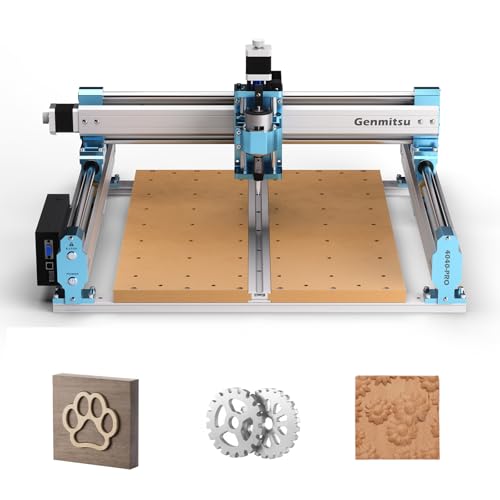
- Pre-assembled modules support roughly 15-minute assembly
- 435 x 400 x 80 mm working area
- Reinforced spoilboard and rigid lead-screw motion
Best For: Larger signs, reliefs, prototypes, and woodworking projects
Best Entry-Level Pick – Genmitsu 3018-PROVer V2
For shoppers seeking desktop CNC routers with easy setup, the Genmitsu 3018-PROVer V2 is a beginner-friendly starting point. Its main gantry parts and one-piece aluminum spoilboard arrive pre-assembled, while clear cable management helps you get started in under an hour.
Best For: Beginners making artwork, personalized gifts, and small projects from wood, plastic, acrylic, MDF, PVC, PCB, carbon fiber, and soft metals.
Pros:
- Pre-assembled main parts support a straightforward setup.
- Includes a Z-probe, limit switches, and emergency stop.
- Supports add-ons such as extension kits, a stronger spindle, and offline control.
- Works with common CAD/CAM options including Carveco, Fusion 360, and Easel.
Cons:
- Its compact 3018 format limits project size.
- The supplied 24-volt, 10,000-rpm configuration is aimed at entry-level work.
The 3018-PROVer V2 keeps the learning curve manageable while leaving room for upgrades. It is a practical choice when simple assembly and broad beginner material compatibility matter more than a large work area.
Fastest Assembly Choice – FoxAlien Masuter Pro
The FoxAlien Masuter Pro stands out among desktop CNC routers with easy setup because its main parts are pre-assembled and pre-wired. The manufacturer describes a 10-to-15-minute setup, giving hobbyists a quick path from unboxing to engraving.
Best For: DIY users and hobbyists who want a stable aluminum machine with a relatively large 15.75-by-15.75-by-2.36-inch work area.
Pros:
- Pre-wired components and a step-by-step manual simplify assembly.
- All-aluminum construction and a linear-rail Z-axis support stability.
- Includes 52mm and 65mm spindle clamps for customization.
- Optional Y-axis extension kit can support larger projects.
Cons:
- The 69mm spindle clamp is sold separately.
- Its included 60-watt configuration is less powerful than higher-powered upgrade options.
With a sturdy frame, accessible emergency-stop and home buttons, and quick assembly, the Masuter Pro is well suited to makers who want more workspace without a complicated initial build.
Best Power Upgrade – Genmitsu PROVerXL 4030S
For buyers who want desktop CNC routers with easy setup without giving up cutting performance, the Genmitsu PROVerXL 4030S offers a modular pre-assembled design that reduces setup to about 20 minutes. Its 710-watt spindle, heavy-duty structure, and 130mm pass height suit more demanding projects.
Best For: Users seeking higher-power routing, taller work clearance, and repeatable precision for wood, acrylic, aluminum, relief carving, or curved-surface engraving.
Pros:
- 710-watt spindle provides stronger cutting performance.
- 130mm pass height accommodates taller objects and thicker materials.
- Upgraded linear guideway and heavy-duty structure support stability.
- 32-bit controller and up to 5000mm/min operation support smoother toolpaths.
Cons:
- At 33kg, it is substantially heavier than compact beginner machines.
- The optional Wi-Fi module is purchased separately.
- Its larger footprint requires more dedicated workspace.
The 4030S is the performance-focused option in this group. Its quick modular assembly helps reduce the initial hassle, while the higher-power spindle and increased clearance give experienced users more room to grow.
Best Compact Starter Kit – TTC3018 Pro CNC Router
The TTC3018 Pro is a compact option for desktop CNC routers with easy setup, particularly when space and included tools are priorities. Its all-in-one kit includes standard cutters, an ER11 collet, a 775 spindle motor, and professional tools, with a stated first-project setup time of about 10 minutes.
Best For: Desk-based DIY, personalized nameplates, small-business production, STEM education, and maker training.
Pros:
- Compact 15-pound design fits smaller workspaces.
- All-metal Z-axis with T8 lead screws supports 0.1mm positioning accuracy.
- Includes 10 cutters and an ER11 collet to start creating.
- Compatible with GRBL, ArtCam, Fusion 360, and Windows or Mac OS.
Cons:
- USB wired connection is required; Bluetooth, Wi-Fi, and a built-in TF card slot are not supported.
- The 300-by-180-by-40mm work area is intended for smaller projects.
- Its 775 spindle reaches up to 9000 rpm, limiting it compared with higher-power machines.
The TTC3018 Pro makes a sensible small-space choice for learners and makers who value a complete starter package. Its wired workflow is less convenient than wireless control, but the compact frame and included accessories keep the entry point simple.
Precision-Ready Pick – 4030-Evo Ultra 2 CNC Router
For desktop CNC routers with easy setup, the 4030-Evo Ultra 2 combines major pre-assembled components with a rigid all-metal design. Its dual linear rails, ball screws, and 800W trim router make it a strong option for users who want to work across wood, acrylic, PCB, aluminum, and brass.
Best For: Makers who prioritize rigidity, precision, material versatility, and upgrade-friendly controls.
Pros:
- Dual HGH-15 linear rails and 1204 ball screws support stable, precise motion.
- 800W router offers six speed settings and speeds up to 24,000 RPM.
- GRBL 1.3a firmware supports laser engraving, a fourth axis, coolant control, and touch probing.
- Pre-assembled major components, cable management, and setup videos simplify assembly.
Cons:
- Router speed adjustments require manual dial control.
- At 38 kg, it is less convenient to move than lighter desktop machines.
- Its broad feature set may be more than beginners need.
The 4030-Evo Ultra 2 stands out when easy initial assembly matters but long-term precision and expansion options matter too. It is a substantial machine for a desktop workshop rather than a lightweight starter tool.
High-Capacity Choice – Genmitsu 4040-PRO MAX CNC Router
The Genmitsu 4040-PRO MAX is a practical choice among desktop CNC routers with easy setup, especially for users who want a reinforced work surface and increased clearance. Its linear guideway structure and 710W digital-display trimmer support stable cutting and engraving on wood, acrylic, and suitable metals.
Best For: DIY users who need a larger working area, stronger spoilboard support, and room for taller materials.
Pros:
- Advanced X- and Z-axis linear guideways improve motion stability and precision.
- Reinforced MDF spoilboard includes an integrated aluminum support bar and T-track.
- 710W compact router provides high-power cutting and engraving performance.
- 100mm pass height accommodates taller materials than the PRO version.
Cons:
- The 24 kg machine is not as lightweight as compact entry-level routers.
- The supplied notes do not specify pre-assembly or included setup videos.
- Its fixed-base design may require a dedicated workspace.
Choose the 4040-PRO MAX if workholding flexibility and material clearance are central to your projects. The reinforced spoilboard and reduced-vibration design make it well suited to repeatable workshop use.
Beginner-Friendly Option – Genmitsu Cubiko Enclosed CNC Router
The Genmitsu Cubiko is one of the more approachable desktop CNC routers with easy setup because it ships factory-assembled and includes a protective enclosure. It is designed for learning, prototyping, and light-duty work in wood, acrylic, plastics, PCB boards, and selected soft metals.
Best For: Beginners, hobbyists, and makers who want an enclosed, pre-assembled machine for small creative projects.
Pros:
- Factory-assembled design reduces setup time for new CNC users.
- Enclosure helps contain dust and reduce operating noise.
- Supports auto Z-probing and height-mapping workflows with proper calibration.
- Compatible with the Genmitsu App, Fusion 360, Candle, Easel, and Carveco.
Cons:
- Its 75W power rating suits light-duty projects rather than demanding cutting.
- Automatic probing requires correct calibration and a conductive probe connection.
- The compact enclosed format may limit larger workpieces.
The Cubiko is a sensible starting point for users who value convenience, dust control, and guided learning over heavy-duty production. Its pre-assembled format lowers the barrier to entry while retaining useful probing and software support.
Best for Metal-Capable Power – Genmitsu 3020-PRO Ultra
The Genmitsu 3020-PRO Ultra is a strong option when you want desktop CNC routers with easy setup and enough power for demanding materials. Its modular assembly, all-metal frame, and 710W spindle make it suitable for makers who want a compact machine with room to expand.
Best For: Users working with wood, acrylic, PCB materials, carbon fiber, and compatible metals who prioritize rigidity and cutting power.
Pros:
- 710W spindle offers adjustable speeds from 6,500 to 30,000 RPM.
- Solid all-metal construction with reinforced motion components supports stable cutting.
- Modular design is intended to make installation straightforward, with assembly completed in two steps.
- Supports multiple spindle and laser-module mounting options.
Cons:
- Its 11.8 x 8.1 x 3.1-inch work area is smaller than the 4040-PRO’s.
- The machine weighs 15.3 kg, so it is not especially lightweight for a desktop tool.
Choose this model if you want easy initial assembly without giving up a rigid frame or higher spindle power. It is particularly appealing for small, tougher cutting jobs and future accessory upgrades.
Best Beginner-Friendly Value – Genmitsu 3018-PRO
The Genmitsu 3018-PRO is a practical starting point for shoppers comparing desktop CNC routers with easy setup. Its compact footprint, simplified assembly, GRBL control, and included offline controller make it approachable for learning CNC carving, engraving, and milling.
Best For: Beginners, students, and home makers working on small projects in wood, acrylic, PVC, plastic, PCB, and soft aluminum.
Pros:
- Upgraded assembly reduces setup complexity for first-time CNC users.
- 300 x 180 x 45 mm working area suits signs, engraving, PCB work, and prototypes.
- Open-source GRBL control and Candle software provide a widely supported workflow.
- Offline controller allows basic operation without a continuously connected computer.
Cons:
- Its 120W motor is intended for lighter materials and smaller projects.
- The compact work area limits the size of signs and other larger pieces.
- Soft aluminum requires suitable bits and cutting settings.
This is the most approachable choice of the three for learning CNC fundamentals. It offers useful control flexibility and a manageable footprint, though users planning heavier or larger work may need a more powerful machine.
Best for Larger Desktop Projects – Genmitsu 4040-PRO
The Genmitsu 4040-PRO combines a larger work area with a notably quick assembly process, making it a strong pick among desktop CNC routers with easy setup. Pre-assembled modules, a reinforced spoilboard, and rigid lead-screw-driven motion are designed for more consistent results on larger projects.
Best For: Makers who need more room for signs, reliefs, prototypes, and woodworking projects in wood, acrylic, MDF, nylon, or carbon-fiber composites.
Pros:
- Pre-assembled modules can reduce build time to about 15 minutes.
- 435 x 400 x 80 mm working area accommodates larger desktop projects.
- Reinforced hybrid spoilboard and center support bar help reduce bed sagging.
- 32-bit controller with silent Toshiba drivers supports quieter, stable operation.
Cons:
- At 20.84 kg, it is the heaviest machine in this comparison.
- The larger frame requires more bench space than the 3018-PRO.
- Material results depend on using appropriate bits and cutting settings.
The 4040-PRO is the best fit when workspace and rigidity matter more than minimal size. Its approximately 15-minute assembly and accessible Z-probe port also make the setup process easier for a larger-format desktop router.
How We Picked the Best Desktop CNC Routers with Easy Setup
We focused on Desktop CNC Routers with Easy Setup for hobbyists, beginners, makers, and small workshops. Our comparison considered assembly requirements, frame construction, included or compatible spindle and router options, work area, Z-axis clearance, material capability, controller usability, and the availability of replacement parts and accessories.
The selection spans compact 3018-class machines for engraving and light cutting, mid-size 3020 and 4030 models for more demanding work, and larger 4040 machines for users who need additional workspace. Enclosure options were also considered because they can simplify dust management, noise control, and safer operation in a home workspace.
Quick Comparison
| Best For | Recommended Type | Why It Stands Out |
|---|---|---|
| First-time users | Compact 3018 or enclosed desktop model | Lower cost, manageable footprint, and simpler learning curve |
| Wood and acrylic projects | 3018, 3020, or 4030 router | Good balance of work area, speed, and versatility |
| Larger signs and panels | 4040-class CNC router | More usable cutting area for bigger workpieces |
| Aluminum and tougher materials | Rigid all-metal model with stronger routing hardware | Improved stability and cutting capacity |
| Cleaner home setup | Enclosed CNC router | Helps contain chips and reduce operating noise |
Key Buying Factors for Desktop CNC Routers with Easy Setup
Assembly and Software
Check whether the machine arrives mostly assembled or as a full kit. Clear manuals, labeled wiring, limit switches, and common GRBL control support can reduce the initial learning curve. Confirm that your preferred design and sender software works with the controller before buying.
Frame Rigidity and Work Area
A rigid aluminum frame and supported linear motion system help reduce vibration and improve consistency. Match the cutting area to your typical projects rather than choosing solely by the machine’s outside dimensions. A larger work area is useful, but it also requires more bench space and may increase setup and maintenance demands.
Spindle, Router, and Materials
Small spindles are suitable for engraving, signs, thin wood, plastics, and light-duty work. Higher-powered spindle or trim-router configurations provide more capability, but they can produce more noise, dust, and heat. Cutting aluminum requires conservative feeds, suitable tooling, secure workholding, and a rigid machine; no desktop router should be treated as fully automatic or maintenance-free.
Safety and Dust Control
Look for an emergency stop, protective enclosure compatibility, reliable grounding, and accessible replacement parts. Always use eye protection, secure the stock, manage dust with appropriate extraction, and supervise cutting. An enclosure does not eliminate the need for ventilation and safe operating practices.
Who Should Buy Which Desktop CNC Routers with Easy Setup?
Choose a compact 3018-style machine if you are learning CNC, making small signs, engraving, or working with limited bench space. A 3020 or 4030 model is a better fit for makers who want more rigidity and room for wood, acrylic, MDF, and occasional light metal work. Select a 4040 machine when larger panels or repeated production justify the extra footprint.
Beginners who value a tidier workspace should prioritize an enclosed design. Buyers focused on aluminum or tougher materials should favor an all-metal frame, stronger linear guides, ball screws where available, and a more capable router—while budgeting for better tooling and workholding. Before ordering, verify voltage, included accessories, software compatibility, and the manufacturer’s current specifications.