As remote work continues to shape how we communicate, having the right tools is essential. High-quality video conferencing cameras can make a significant difference in your virtual interactions. In 2025, several models stand out for their impressive 4K capabilities and advanced features. With options tailored for various settings, you’ll want to know which ones rise to the top. Let’s explore these standout choices and what makes them essential for your professional setup.
EMEET NOVA 4K Webcam for PC

The EMEET NOVA 4K Webcam for PC is perfect for professionals seeking high-quality video conferencing solutions. With its stunning 4K performance and 30FPS, you’ll experience unmatched clarity during meetings, online classes, or streaming. The built-in software lets you switch to 4K easily, while the fast autofocus and automatic light adjustments enhance your visuals. Plus, dual microphones with noise-cancelling tech guarantee your voice is heard clearly, even in busy environments. Its compatibility with major platforms and plug-and-play setup make it user-friendly. The privacy cover adds a layer of security, making this webcam an essential tool for any professional setup.
Best For: Professionals and educators seeking high-quality video conferencing and streaming solutions with advanced features.
Pros:
- Unparalleled Video Quality: Delivers 4K resolution and 30FPS for crystal-clear visuals.
- Noise-Cancelling Audio: Dual microphones ensure clear sound even in noisy environments.
- User-Friendly Setup: Plug-and-play compatibility with major platforms and no drivers required.
Cons:
- Limited 4K Use: Default resolution is 1080P, requiring manual switching for 4K.
- Fixed Cable Length: The 1.5m cable may limit placement options for some setups.
- No Wireless Connectivity: Relies solely on physical connections, which may be less convenient for some users.
EMEET C960 4K Webcam for PC

Looking for a webcam that delivers exceptional clarity for your remote business meetings? The EMEET C960 4K Webcam is your perfect choice. With a 4K UHD Sony sensor and PDAF auto-focus, you’ll enjoy sharp visuals every time. Its dual AI noise-cancelling mics guarantee your voice comes through clearly, while auto light correction adapts to any environment. Plus, the plug-and-play setup makes installation a breeze. Compatible with platforms like Zoom, Teams, and Google Meet, this versatile webcam fits various devices. With an impressive average rating of 4.4 stars, it’s a reliable and budget-friendly option for seamless virtual interactions.
Best For: Professionals and remote workers seeking high-quality video and audio clarity for virtual meetings.
Pros:
- True 4K resolution provides ultra-clear visuals without false upscaling.
- Dual AI noise-cancelling microphones ensure clear audio in various environments.
- Easy plug-and-play setup compatible with multiple platforms and devices.
Cons:
- Some users have reported audio dropouts during use.
- Compatibility issues may arise with specific devices.
- Limited advanced features compared to higher-end models.
Logitech BRIO Ultra HD Webcam for Video Conferencing

For professionals seeking top-tier video quality during virtual meetings, the Logitech BRIO Ultra HD Webcam stands out with its impressive 4K image sensor. It offers 5X digital zoom and multiple resolutions, ensuring you look your best in any lighting, thanks to RightLight 3 with HDR. The advanced optics provide razor-sharp video with autofocus and a 90-degree field of view. Weighing only 8.8 ounces, it’s easy to set up. Although its dual omnidirectional mics offer noise cancellation, they transmit mono audio. For peak performance, use a USB 3.1 or 3.2 cable, as some users faced issues with the original cable.
Best For: Professionals seeking high-quality video for virtual meetings and conferencing.
Pros:
- Exceptional 4K image quality with a 90-degree field of view for clear video.
- RightLight 3 with HDR optimizes performance in various lighting conditions.
- Lightweight and easy to set up, making it suitable for on-the-go professionals.
Cons:
- Dual mics transmit only mono audio, lacking stereo output.
- Performance may be limited by the original USB cable; recommended to use USB 3.1 or 3.2 for optimal functionality.
- Refurbished product does not come with tech support, leading to potential user dissatisfaction.
4K Conference Room Camera System with AI Auto-Tracking
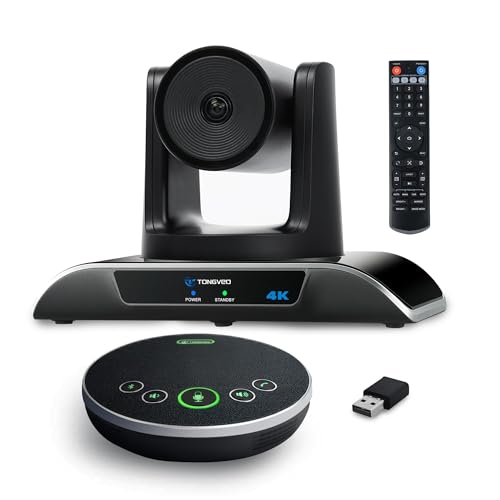
Ideal for businesses and educational institutions, the TONGVEO 4K Conference Room Camera System with AI Auto-Tracking guarantees seamless communication and collaboration. With its 4K AI PTZ camera, you’ll enjoy stunning video quality and a wide-angle field of view. The auto-tracking feature, controlled by intuitive gestures, guarantees everyone stays in focus. Plus, the multi-connection speakerphone provides crystal-clear audio, enhancing your meetings. Installation is a breeze, whether mounted on a desk or ceiling. Compatible with popular software like Zoom and Skype, this system offers flexibility and performance. Elevate your conferencing experience with TONGVEO’s innovative technology.
Best For: The TONGVEO 4K Conference Room Camera System is best for businesses and educational institutions seeking advanced video conferencing solutions with high-quality audio and video capabilities.
Pros:
- Excellent video quality with 4K resolution and wide-angle FOV for immersive meetings.
- Intuitive gesture controls for auto-tracking enhance user experience during conferences.
- Multi-connection speakerphone with noise reduction ensures clear audio for all participants.
Cons:
- Some users report issues with auto-tracking not stopping, which can disrupt meetings.
- Limitations with remote control functionality when managing multiple cameras.
- Lack of wireless connectivity options may hinder flexibility for some setups.
Logitech Brio 4K Webcam

The Logitech Brio 4K Webcam stands out as a top choice for professionals seeking exceptional video quality in their virtual meetings. With ultra 4K HD resolution, you’ll enjoy crystal-clear visuals at 30 frames per second. Its adjustable field of view lets you choose between 90°, 78°, or 65°, ensuring the perfect framing for any setting. Dual omni-directional microphones provide excellent audio, while the auto light adjustment keeps you looking your best. Plus, the privacy shade adds peace of mind. Weighing just 11.8 ounces, it’s easy to mount and compatible with major platforms like Zoom and Microsoft Teams.
Best For: Professionals and content creators looking for high-quality video and audio in virtual meetings and streaming.
Pros:
- Excellent sound quality with dual omni-directional microphones and noise-canceling technology.
- Crystal-clear video quality with ultra 4K HD resolution and adjustable fields of view.
- Autofocus and auto light correction enhance user experience in various lighting conditions.
Cons:
- Construction quality of accessories may be inconsistent.
- Some users find the price to be on the higher side.
- Limited adjustability of camera position without using a tripod.
Logitech MX Brio Ultra HD 4K Webcam

With its stunning 4K resolution and advanced AI-enhanced features, the Logitech MX Brio Ultra HD 4K Webcam stands out as the perfect choice for professionals and streamers who demand high-quality video. You’ll appreciate the sharp image quality from its ultra HD sensor and dual beamforming microphones that guarantee clear audio. It offers customizable settings, including adjustable field of view and fine-tuning for lighting. Compatible with major platforms like Zoom and Microsoft Teams, this webcam’s versatile mounting options make installation a breeze. While some users report issues with the adhesive mount, most find this camera a worthwhile investment for exceptional performance.
Best For: Professionals and streamers who demand high-quality video and audio for their virtual meetings and broadcasts.
Pros:
- Exceptional 4K video clarity and AI-enhanced features for optimal image quality.
- Dual beamforming microphones effectively reduce background noise for clear audio.
- Versatile mounting options and compatibility with major platforms like Zoom and Microsoft Teams.
Cons:
- Some users report issues with the adhesive mount’s strength.
- Limited microphone adjustments available through the Logi Options+ software.
- Installation may require additional adapters for older devices.
Logitech Brio 4K Webcam
For professionals seeking exceptional video quality, the Logitech Brio 4K Webcam stands out with its ultra HD capabilities, delivering stunning visuals at 30 frames per second. You’ll appreciate the autofocus and 5x digital zoom for precise framing. With RightLight 3 technology, the webcam automatically adjusts exposure and contrast, ensuring ideal lighting in any environment. Dual omnidirectional microphones capture clear audio while minimizing background noise. Plus, you can choose from three field of view presets to best fit your setup. Compatible with popular platforms like Zoom and Microsoft Teams, it’s easy to integrate into your workflow for seamless communication.
Best For: Professionals and content creators seeking high-quality video streaming and recording for meetings or content production.
Pros:
- Ultra HD 4K video quality at 30 fps for stunning clarity.
- Dual omnidirectional microphones with noise-canceling technology for clear audio.
- Adjustable field of view presets to fit various setups and environments.
Cons:
- Higher price point compared to standard webcams.
- Requires sufficient lighting for optimal performance despite RightLight 3 technology.
- Limited compatibility with some older systems or less common software.
AnkerWork C310 4K Webcam
AnkerWork C310 4K Webcam stands out as an ideal choice for professionals who demand exceptional video quality during virtual meetings. With its 12-megapixel resolution and 1080p at 60FPS HDR capabilities, you’ll enjoy true-to-life images. The AI-powered autofocus and framing guarantee you’re always perfectly centered, while the AI noise-canceling mic delivers clear audio. Its built-in privacy cover adds peace of mind, and the adjustable field of view lets you customize your setup. Easy to install and compatible with major platforms, it’s perfect for seamless communication. Weighing just 5 ounces, it’s a lightweight yet powerful addition to your workspace.
Best For: Professionals seeking high-quality video and audio for virtual meetings and video conferencing.
Pros:
- High Resolution: Delivers stunning 4K quality and excellent low-light performance for true-to-life images.
- AI Features: Equipped with AI-powered autofocus and framing, ensuring you stay centered and focused in every call.
- Easy Setup: Plug-and-play compatibility with major platforms and simple installation via USB-C to USB-A.
Cons:
- Limited Resolution: Requires a USB 3.1 connection for full 4K capabilities; otherwise, it defaults to 1080p.
- No “Follow Me” Feature: Lacks a tracking function that some users may expect for dynamic framing.
- Audio Echo Issues: Certain audio settings may lead to echo problems during use.
j5create 4K Wide Angle Webcam with Microphone for Video Conferencing

The j5create 4K Wide Angle Webcam (JVU430) stands out as an excellent choice for professionals and educators seeking high-quality video conferencing solutions. With Ultra HD 4K resolution and an 8MP sensor, you’ll enjoy smooth video and rich detail. Its built-in dual microphones guarantee clear audio, while the F/2.0 aperture improves low-light performance. The 360-degree swivel design and USB-C connectivity make it versatile for various setups. While it captures a wide area for group calls, be mindful of adjustments for solo users. Overall, this webcam offers a budget-friendly alternative to higher-end options without sacrificing quality.
Best For: Professionals and educators seeking a cost-effective, high-quality video conferencing solution.
Pros:
- Ultra HD 4K resolution ensures smooth video and rich detail for clear communication.
- Built-in dual microphones provide clear audio, enhancing the overall video conferencing experience.
- Versatile design with a 360-degree swivel and multiple connectivity options (USB-C and USB Type-A) for flexible setups.
Cons:
- May require adjustments when used by a single user due to the wide-angle feature.
- Some users report grainy images in low light, despite the enhanced low-light performance.
- Echo may occur in non-treated rooms, affecting audio quality during calls.
Jabra PanaCast 20 4K Video Conferencing Camera

Equipped with AI-powered intelligent zoom and ideal lighting, the Jabra PanaCast 20 4K Video Conferencing Camera is perfect for professionals seeking a seamless video conferencing experience. Its 13-megapixel camera delivers stunning 4K Ultra-HD images, ensuring you look your best. The intelligent zoom keeps you centered as you move, while real-time lighting optimization enhances image quality, even in dim settings. Weighing just 4.8 ounces, it’s incredibly portable. Compatible with major UC platforms like Microsoft Teams and Zoom, setup is straightforward. Although some users report minor microphone issues, the overall experience remains highly rated for professional use.
Best For: Professionals seeking high-quality video conferencing solutions that enhance remote communication.
Pros:
- Excellent 4K image quality and intelligent zoom functionality.
- Seamless integration with major conferencing software like Microsoft Teams and Zoom.
- Compact and portable design with easy plug-and-play setup.
Cons:
- Higher price point compared to standard webcams.
- Limited USB-C connectivity may necessitate additional adapters.
- Some users experienced reduced image quality during zooming.
Factors to Consider When Choosing 4k Video Conferencing Cameras
When you’re choosing a 4K video conferencing camera, several key factors can make a big difference. You’ll want to evaluate video quality resolution, audio performance, and compatibility with your existing software. Additionally, think about privacy options and how flexible the mounting solutions are for your setup.
Video Quality Resolution
Choosing the right 4K video conferencing camera means prioritizing video quality resolution, as it directly impacts the clarity and detail of your image. With 4K resolution, you get four times the pixel count of standard HD, resulting in sharper visuals. Look for cameras that support video at 30 frames per second (FPS) to guarantee smoother motion during your presentations. Features like auto-focus and light adjustment can greatly enhance image quality, especially in varying lighting conditions. Consider the field of view (FOV), as options range from narrow to wide angles, allowing you to frame individuals or groups flexibly. High-quality sensors in 4K cameras also improve low-light performance, assuring clear images even in dim environments.
Audio Performance Features
While video quality is essential, audio performance features are equally important when selecting a 4K video conferencing camera. Look for webcams equipped with dual or multiple microphones featuring noise-canceling technology to enhance audio clarity and reduce background noise. Consider models with an audio pick-up range of up to 16.4 feet, especially useful in larger conference settings. Evaluate the frequency response of built-in microphones; an ideal range of 100 Hz to 10 kHz guarantees a fuller sound. Pay attention to systems offering full duplex audio, allowing simultaneous speaking and listening without feedback. Finally, verify the camera’s audio capabilities seamlessly integrate with various conferencing software for the best performance during your meetings.
Compatibility With Software
Ensuring compatibility with software is essential for a smooth video conferencing experience. First, make sure your camera works with major platforms like Zoom, Microsoft Teams, and Google Meet for seamless integration during meetings. Next, check compatibility with operating systems—Windows, macOS, and Chrome OS—so it fits your device setup. Look for plug-and-play functionality to skip complex driver installations, allowing quick setup across different devices. Additionally, features that enable personalization of video settings through accompanying software can enhance adaptability to various conferencing environments. Finally, confirm the camera connects via standard interfaces like USB-A or USB-C, ensuring ease of connectivity across a wide range of devices and setups, making your video conferencing hassle-free and effective.
Privacy and Security Options
When you select a 4K video conferencing camera, prioritizing privacy and security options is essential to protect your meetings from unauthorized access. Look for cameras with built-in privacy covers that block the lens when not in use, ensuring your device isn’t recording unintentionally. Choosing models with USB connections can eliminate the risk of wireless signal interception, providing a safer data transfer method. Some webcams even offer Windows Hello integration, allowing secure login via facial recognition. Additionally, privacy settings in software applications can give you control over video feeds, restricting access to certain users or groups. Finally, cameras with noise-canceling microphones improve audio clarity while reducing the risk of capturing unintended background sounds.
Mounting and Flexibility
With privacy and security features in place, it’s time to contemplate how you’ll set up your 4K video conferencing camera. Versatile mounting options like adjustable clips, tripod threads, and wall mounts can help you find the best placement for your space. Look for models that offer 360-degree rotation and vertical tilt adjustments, allowing you to capture a wider field of view, which is vital for different room layouts. The adjustable fields of view with presets let you customize the perspective for solo or group calls. Plus, features like built-in privacy covers enhance functionality and security when the camera’s not in use. Consider these factors to guarantee your setup meets your communication needs effectively.
Connectivity Types Available
Choosing the right connectivity type for your 4K video conferencing camera can greatly affect your experience. Many cameras offer USB connectivity, including USB-A and USB-C ports, ensuring compatibility with various devices. For peak performance, look for USB 3.0 or higher, as it provides the bandwidth needed for smooth 4K video transmission. While some models include wireless options, keep in mind that these can introduce latency and are often less reliable than wired connections. It’s also essential to check compatibility with operating systems like Windows, macOS, and Chrome OS for seamless integration. If you need flexibility, consider cameras that support multi-connection capabilities, allowing you to connect via USB and other interfaces simultaneously.
User-Friendly Setup Process
A user-friendly setup process can make a significant difference in your overall experience with 4K video conferencing cameras. Look for webcams that feature plug-and-play technology, which allows for quick setup without additional drivers or software installations. Guarantee compatibility with major video conferencing platforms, simplifying connections across various devices and operating systems. Opt for models with versatile mounting options, like adjustable clips or tripod threads, to help you position the camera easily. Choose webcams that offer USB connectivity, especially USB-C, for faster data transfer speeds and optimized performance. Finally, consider devices with built-in privacy covers, providing you better control over camera activation and enhancing your user experience when the camera’s not in use.