When it comes to streaming and video calls, having the right webcam and microphone bundle can make all the difference. You want clear visuals and crisp audio, whether you’re connecting with colleagues or chatting with friends. With a range of options available, it’s essential to know what features will enhance your experience. Explore the top choices that cater to both casual users and professionals, and find out which bundle might suit your needs best.
Logitech Brio 101 Full HD 1080p Webcam

If you’re looking for a reliable webcam that won’t break the bank, the Logitech Brio 101 Full HD 1080p Webcam is an excellent choice for casual video calls and meetings. It offers full HD clarity, ensuring you look your best while chatting. The built-in microphone delivers clear audio, although you might want an external mic for higher quality. With Auto-Light Balance, your image stays bright, even in dim conditions. Plus, its privacy shutter adds a layer of security. Installation’s a breeze; just plug it in, and you’re good to go. Overall, it’s perfect for those seeking functionality at an affordable price.
Best For: Casual users seeking an affordable webcam for video calls and meetings without the need for high-end features.
Pros:
- Easy plug-and-play installation with compatibility across major platforms.
- Built-in microphone and Auto-Light Balance for improved audio and video quality.
- Integrated privacy shutter for enhanced security when not in use.
Cons:
- Microphone quality may not meet the standards for professional use; an external mic is recommended.
- Image quality is decent but not suitable for high-end content creation.
- Some users report minor stability issues with attachment on thin monitors.
NexiGo N60 1080P Webcam with Microphone

The NexiGo N60 1080P Webcam with Microphone stands out as a fantastic choice for remote workers and streamers seeking a budget-friendly solution without compromising quality. With its 1080p FHD resolution and adjustable field of view up to 110°, you’ll enjoy clear visuals during video calls. The built-in noise-canceling microphone enhances audio, making communication seamless. Setup is a breeze—just plug it in, and you’re ready to go. While some users report minor image quality issues, overall feedback is positive, with a solid 4.3-star rating. Plus, its privacy cover adds an extra layer of security when you’re not using it.
Best For: Remote workers and streamers looking for an affordable webcam that delivers quality video and audio performance.
Pros:
- 1080p FHD resolution provides clear visuals for video calls.
- Built-in noise-canceling microphone enhances sound quality during communication.
- Easy plug-and-play setup allows for quick installation without additional drivers.
Cons:
- Some users report minor image quality issues such as graininess or lag.
- Stability of the included mini tripod may not meet all users’ expectations.
- Occasional complaints about image flickering after extended use.
Logitech C920x HD Pro Webcam

For those seeking high-quality video for streaming or video conferencing, the Logitech C920x HD Pro Webcam stands out with its impressive Full HD 1080p resolution at 30 frames per second. This webcam delivers crisp, detailed video, even in low-light settings thanks to its HD light correction. You’ll enjoy natural audio with its dual microphones capturing clear sound during calls. Plus, it’s compatible with various platforms like Skype, Zoom, and Facetime. With advanced capture software and a 3-month XSplit VCam license for background manipulation, you can easily enhance your video content. It’s perfect for both PC and Mac users.
Best For: Those looking for a reliable webcam for high-quality streaming and video conferencing with excellent audio and video clarity.
Pros:
- Crisp Full HD 1080p resolution at 30 fps for vibrant video quality.
- HD light correction provides bright images even in low-light conditions.
- Dual microphones capture natural sound, enhancing call and recording experiences.
Cons:
- May require additional software for advanced features like background manipulation.
- Limited to 30 fps which may not satisfy users looking for higher frame rates.
- Compatibility issues may arise with certain older operating systems or devices.
EMEET 1080P Webcam with Microphone (C960)

Looking for a reliable solution for professional video streaming? The EMEET 1080P Webcam with Microphone (C960) offers Full HD resolution, ensuring sharp images with its 5-layer anti-glare lens. It’s easy to set up—just plug it in, and you’re good to go, without needing any drivers. The built-in noise-reduction microphones enhance your voice clarity, filtering out background distractions. Plus, its automatic low-light correction guarantees great performance even in dim settings. Weighing only 5.6 ounces, it’s portable and compatible with popular apps like Zoom and Google Meet. With a 4.4-star rating, it’s a solid choice for clear video calls.
Best For: Those seeking a budget-friendly webcam for professional video streaming and online meetings.
Pros:
- Easy plug-and-play setup without the need for drivers.
- Excellent low-light performance with automatic adjustments for optimal image quality.
- Built-in noise-reduction microphones for enhanced audio clarity.
Cons:
- Some users report occasional audio dropouts during use.
- A few customers express dissatisfaction with the image quality in certain conditions.
- Issues reported with the refund process for returns.
Live Video Streaming Kit with 1080p Webcam and RGB Microphone

Ideal for content creators and remote workers, the Live Video Streaming Kit combines a 1080p webcam with an RGB microphone to elevate your streaming experience. The high-definition webcam offers stunning visuals at 30 frames per second, perfect for gameplay and presentations. You’ll appreciate the noise-canceling microphone that captures clear audio while minimizing background noise. Plus, the adjustable LED light enhances your setup with various lighting modes, ensuring you look your best. Compatible with most operating systems, this kit is versatile for any streaming or work-from-home scenario—just keep in mind it doesn’t work with consoles. Get ready to shine!
Best For: Content creators, remote workers, and anyone looking to enhance their video streaming and communication experience.
Pros:
- High-definition 1080p webcam delivers stunning visuals at 30fps for clear and detailed streaming.
- Noise-canceling RGB microphone effectively minimizes background noise, ensuring high-quality audio.
- Adjustable LED light with multiple modes enhances your appearance and overall video quality.
Cons:
- Not compatible with gaming consoles like PS5 or Xbox, limiting usage options.
- The adjustable LED light is powered by a battery, which may require recharging during extended use.
- Limited to specific operating systems, which may exclude some users.
4K Webcam for PC with Microphone & Light
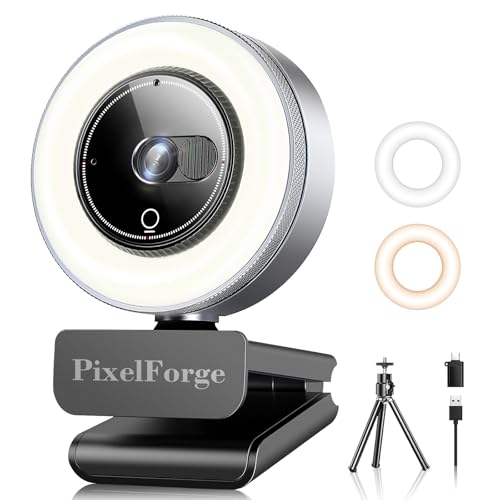
The K Webcam for PC with Microphone & Light stands out as the perfect choice for content creators and professionals seeking high-quality streaming solutions. With 4K Ultra HD resolution, you’ll capture every detail in your video calls and presentations. The integrated adjustable ring light offers three brightness settings, ensuring you look your best in any lighting. Plus, the noise-canceling microphone filters background sounds for clear audio, even in busy environments. Its plug-and-play functionality makes setup a breeze, and it’s compatible with major platforms like Zoom and Skype. For privacy, the sliding cover enhances security when you’re not using the camera.
Best For: Content creators and professionals seeking high-quality video and audio solutions for streaming and video calls.
Pros:
- 4K Ultra HD resolution ensures sharp and clear video quality for professional presentations.
- Integrated adjustable ring light with multiple brightness settings enhances your appearance in different lighting conditions.
- Plug-and-play functionality allows for easy setup without the need for additional software.
Cons:
- Limited compatibility with certain older operating systems may hinder usage for some users.
- Price point may be higher compared to standard webcams, making it less accessible for budget-conscious consumers.
- Integrated light may not suffice for very dark environments, requiring additional lighting equipment for optimal results.
Logitech Brio 4K Webcam with Noise-Cancelling Mic

For streamers seeking superior video quality, the Logitech Brio 4K Webcam with Noise-Cancelling Mic stands out with its ability to capture ultra HD video at 30 fps. Its autofocus and 5x digital zoom guarantee you look sharp, while RightLight 3 adjusts exposure for perfect lighting. The dual omnidirectional microphones pick up clear audio from up to 1.2 meters away, effectively reducing background noise. You can customize your view with three adjustable field of view settings. Plus, it’s compatible with popular platforms like Zoom and Microsoft Teams. With Windows Hello support and a privacy shutter, security is also a top priority.
Best For: Streamers and professionals seeking high-quality video and audio for online communication and content creation.
Pros:
- Ultra HD video quality at 30 fps ensures clear and sharp visuals.
- Noise-canceling microphones effectively reduce background noise for crisp audio.
- Adjustable field of view settings allow customization for different setups and environments.
Cons:
- Price point may be higher than standard webcams.
- Limited frame rate at 4K (30 fps) compared to lower resolutions.
- Requires compatible software for full functionality, such as the Logi Options+ app.
Logitech Group Video Conferencing Bundle

Designed specifically for larger meeting rooms, the Logitech Group Video Conferencing Bundle is perfect if you regularly host video calls with up to 20 participants. It includes an HD video camera, speakerphone, and expansion mics, ensuring crystal clear communication. With 1080p video, a 90-degree field of view, and an extended audio range of 28 feet, everyone in the room will be heard and seen. It’s compatible with both Mac and PC, making setup a breeze via USB. Customers rave about its sound quality and ease of installation, making it a great choice for any business looking to enhance their conferencing experience.
Best For: Businesses hosting video conferences with up to 20 participants in larger meeting rooms.
Pros:
- High-quality HD video with 1080p resolution and a wide 90-degree field of view for clear visuals.
- Extended audio range of 28 feet with expansion microphones, ensuring everyone is heard.
- Easy setup with plug-and-play USB connection, compatible with both Mac and PC.
Cons:
- Bluetooth connectivity issues reported by some users.
- Camera sensitivity to motion can be a concern during video calls.
- Microphone performance has had some complaints, along with limited troubleshooting support from Logitech.
Full HD Webcam with Built-in Microphone and Rotatable Tripod

Looking for a seamless streaming experience? The Full HD Webcam with a built-in microphone and rotatable tripod is your go-to solution. With 1080p video quality and a wide-angle lens, it delivers smooth visuals at 30 frames per second. The automatic light correction adjusts brightness and color, ensuring you always look your best. Its noise-canceling microphone enhances audio clarity, cutting through background noise during calls. Plus, it’s plug-and-play with USB compatibility across multiple devices and operating systems. The detachable tripod offers flexible setup, while the privacy cover keeps your lens protected. Elevate your streaming game effortlessly!
Best For: Anyone looking for an affordable and high-quality webcam for video conferencing, live streaming, or content creation.
Pros:
- Full HD 1080p video ensures clear and professional-looking visuals.
- Built-in noise-canceling microphone provides excellent audio quality by reducing background noise.
- Plug and play functionality makes it easy to set up on various devices without the need for additional drivers.
Cons:
- Limited frame rate of 30 frames per second may not meet the needs of high-motion video applications.
- The tripod may not be as sturdy as dedicated camera tripods, affecting stability in some setups.
- Automatic light correction may not always effectively adjust in extremely low-light conditions.
Logitech C920e HD 1080p Webcam

The Logitech C920e HD 1080p Webcam stands out as an excellent choice for professionals seeking crystal-clear video calls and seamless compatibility with major platforms like Zoom and Microsoft Teams. With a 78° fixed field of view, it guarantees balanced framing, while two integrated omnidirectional microphones capture audio clearly from up to one meter. The built-in HD autofocus and automatic light correction enhance visibility in any setting. Plus, the attachable privacy screen gives you control over when you’re on camera. Its sturdy, adjustable clip makes mounting easy, assuring it fits perfectly on your laptop or monitor for any video call.
Best For: Professionals and remote workers seeking high-quality video and audio for virtual meetings and presentations.
Pros:
- High-definition 1080p video quality with built-in HD autofocus for clear visuals.
- Integrated omnidirectional microphones provide clear audio capture up to one meter.
- Features an attachable privacy screen for added security and control over camera usage.
Cons:
- Fixed 78° field of view may not suit users needing a wider angle for group calls.
- The webcam lacks advanced features like background blur or virtual backgrounds found in higher-end models.
- Limited compatibility with some specialized video conferencing applications beyond the major platforms.
Factors to Consider When Choosing Webcam and Microphone Bundles
When choosing a webcam and microphone bundle, you need to contemplate several key factors. Video quality and audio clarity are vital for a professional streaming experience, but compatibility and ease of setup can save you time and frustration. Don’t forget to weigh the price against performance to get the best value for your needs.
Video Quality Standards
Choosing the right webcam and microphone bundle means considering several video quality standards that can greatly impact your streaming experience. First, pay attention to resolution; options like 720p, 1080p, and 4K offer varying levels of clarity, with higher resolutions providing sharper images. Next, frame rate matters—30 fps is the minimum for decent quality, but 60 fps gives you that smooth, fluid feel everyone loves. Don’t overlook lighting; webcams with automatic light correction can greatly improve visibility in dim settings. Finally, consider the field of view (FOV); a wider FOV captures more surroundings, perfect for group calls or presentations. By focusing on these standards, you’ll guarantee a more engaging and professional streaming experience.
Audio Clarity Importance
While video quality standards lay the groundwork for a successful streaming experience, audio clarity plays an equally important role. Effective communication hinges on clear audio, enhancing the overall user experience. Built-in microphones in webcams can deliver decent sound, but for superior clarity and noise reduction, external microphones are generally the best choice. Look for options with noise-canceling technology, as they markedly filter out background noise, making conversations clearer even in bustling environments. User feedback often emphasizes microphone performance as a key factor in satisfaction with webcam bundles, so it’s essential to assess audio capabilities before making your purchase. A good microphone captures natural sound and voice clarity, which is critical for professional settings where every detail matters.
Compatibility With Devices
Selecting the right webcam and microphone bundle hinges on compatibility with your devices. First, verify the bundle works with your operating system, whether it’s Windows, macOS, or Linux, as each may have unique requirements. Next, check the connection type—USB Type-A or Type-C—to match your device’s ports for smooth operation. It’s also crucial that the webcam supports popular video conferencing applications like Zoom, Microsoft Teams, or Skype, guaranteeing peak performance during calls. Look for bundles labeled as plug-and-play, meaning they’re easy to install without needing extra drivers. Finally, confirm compatibility with specific devices, like tablets or gaming consoles, since not all bundles will function across different platforms. This way, you’ll avoid any frustrating surprises!
Ease of Setup
When you’re diving into the world of streaming, ease of setup can make all the difference in your experience. Look for webcams that offer plug-and-play functionality; this means you can connect and start using them without any additional drivers or software. Opt for models with USB Type-A or Type-C connections to guarantee compatibility with various devices. User feedback is essential—aim for models that report a setup time of around one minute for a hassle-free experience. Additionally, webcams with adjustable features or downloadable software allow for customization while maintaining straightforward installation. Finally, consider models with built-in privacy covers, adding security and simplifying the process of confirming your camera’s inactive when not in use.
Price vs. Performance
Finding the right balance between price and performance is essential when choosing webcam and microphone bundles. Higher-priced options often deliver superior video resolution, like 4K capabilities, and better audio quality with noise-canceling features. If you’re on a budget, 1080p webcams suffice for casual calls but may lack advanced features such as low-light correction. Customer feedback can guide your decision, as many users find that bundles priced between $60 and $100 offer satisfactory performance for remote work. If you’re a professional, consider investing in a bundle with adjustable lighting to enhance video quality in dim environments. Ultimately, align your choice with your specific needs—casual use might not require the high-end models that content creators and business presenters need.