Finding the right scanner can make book digitizing dramatically faster and less frustrating. The best models reduce curved pages, shadows, and finger marks while keeping text sharp and readable.
This roundup focuses on practical options for home users, students, offices, libraries, and archive work, with attention to image quality, OCR, portability, and workflow speed.
Best 10 Book Scanners with Automatic Page Flattening Picks for 2026
AI Auto-Flatten Scanner
CZUR Aura Pro Book & Document Scanner

- AI flattening and deskew for curved pages
- 2-second scans with JPG, PDF, Word, searchable PDF
- Portable foldable design with glare-free LED lighting
Best For: Portable book scanning with fast AI page flattening
Large-Format Page Flattening Scanner
VIISAN DL16 A3 Overhead Scanner

- A3 overhead scanner for books and large documents
- Auto page flattening with anti-glare LED lighting
- 16MP camera with up to 300 DPI capture
Best For: A3 book and archive scanning at home, office, or library
Professional OCR Flattening Scanner

- Patented flattening for curved book pages
- 18MP camera with A3 capture and fast scanning
- OCR to PDF, Word, Excel, and searchable files
Best For: High-volume book scanning with strong OCR support
4K AI Flattening Scanner

- 24MP 4K capture with AI auto-flattening
- Finger erasing and asymmetric lighting for cleaner pages
- Cloud export plus OCR and searchable formats
Best For: Premium book scanning, OCR, and sharing workflows
Premium Curve-Flattening Workhorse

- 38MP sensor with A3 capture support
- Laser curve-flattening for bound books
- OCR for 180+ languages
Best For: High-volume book and document scanning with maximum detail
Versatile Desk Scanner with AI Flattening

- AI auto-flattening and finger erasing
- 18MP 4K capture with A3 landscape support
- OCR, searchable PDF, and cloud export
Best For: Teaching, presentations, and office scanning
Portable Auto-Flattening Scanner
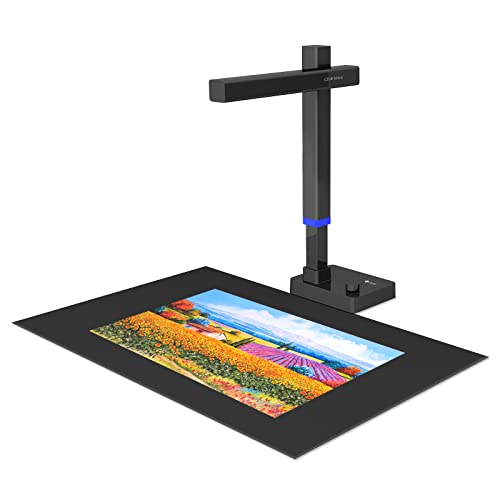
- 24MP scanner with A3 support
- Portable foldable design at 2 lb
- Flattening plus OCR to Word/Excel
Best For: Portable scanning for home, school, and remote work
Editor’s Pick
CZUR Aura Pro Portable Book Scanner

- Three-laser auto-flattening for curved pages
- 2-second-per-page scanning with auto page detect
- OCR supports 180+ languages
Best For: Fast, all-around scanning with strong page flattening
High-Resolution Choice
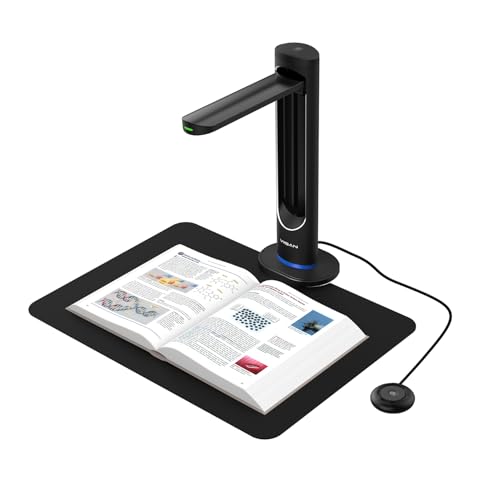
- 48MP sensor with 600 DPI capture
- AI page smoothing reduces curvature and shadows
- Laser positioning with auto-scan support
Best For: High-detail book digitization and OCR workflows
Large-Format Pick

- A2/A3 overhead capture for large materials
- Auto-flattens pages and splits double spreads
- Up to 26MP with OCR output support
Best For: Oversized books, journals, and archival pages
AI Auto-Flatten Scanner – CZUR Aura Pro Book & Document Scanner
If you want book scanners with automatic page flattening that also stay compact, the CZUR Aura Pro is built for quick overhead digitizing of curved pages. It uses AI-assisted software, three laser lines, and 2-second-per-page scanning to help capture books, documents, and large pages with less manual cleanup.
Best For: Users who want a foldable, portable overhead scanner for books, documents, and searchable files on Windows or Mac.
Pros:
- Auto-flatten and deskew technology is designed to replicate curved book pages more cleanly.
- Fast 2-second-per-page scanning with output to JPG, Word, PDF, and searchable PDF.
- Supports OCR in 180+ languages for broad text-recognition use.
- Foldable, portable design with glare-free LED lighting and app-controlled lamp settings.
Cons:
- Thai, Hebrew, and Arabic OCR are not supported according to the notes.
- Requires a USB connection rather than wireless use.
- Best results still depend on correct page positioning and lighting setup.
The Aura Pro is a practical choice if you value speed, portability, and software-driven page flattening in a desktop book scanner. It is especially appealing for mixed scanning needs where books and documents both matter.
Large-Format Page Flattening Scanner – VIISAN DL16 A3 Overhead Scanner
The VIISAN DL16 is aimed at buyers looking for book scanners with automatic page flattening for larger materials. Its A3 overhead design, 16MP camera, and anti-glare LED lighting make it a straightforward option for digitizing bound books, archives, artwork, and oversized documents.
Best For: Libraries, offices, and home users who need A3 overhead capture for books and large documents.
Pros:
- Auto page flattening helps with bound books and other curved page materials.
- A3 overhead format is suited to books, sheet music, artwork, and large documents.
- 16MP camera with up to 300 DPI delivers clear capture for text and details.
- Anti-glare LED lighting helps reduce shadows and improve page visibility.
Cons:
- 300 DPI is lower than some higher-resolution competing document cameras.
- No detailed OCR language or output-format list is provided in the notes.
- USB-connected desktop setup is less flexible than portable handheld options.
The DL16 keeps the focus on reliable large-format overhead capture rather than extra software features. If your priority is scanning oversized books cleanly, it is a sensible, no-frills pick.
Professional OCR Flattening Scanner – CZUR ET18 Pro
The CZUR ET18 Pro is a strong fit if you are comparing book scanners with automatic page flattening for regular document digitizing. It combines a 18MP HD camera, A3 support, and patented flattening tech with OCR tools that turn scans into editable files like PDF, Word, and Excel.
Best For: Users who want a higher-resolution overhead scanner for books, office documents, and searchable files on Windows or Mac.
Pros:
- Patented curved-page flattening is designed to complete book-page correction after pixel transformation.
- 18MP camera and 4896 x 3672 resolution support detailed document capture.
- OCR can convert scans into editable PDF, Word, Excel, and more, with 180+ language support.
- About 2-second-per-page scanning keeps the workflow fast once you are set up.
Cons:
- Very glossy papers are not recommended in the notes.
- Requires cable connection only; Wi-Fi is not supported.
- OCR language support has some limitations, including Arabic behavior depending on OS.
The ET18 Pro is the most feature-rich option here for users who want page flattening plus serious OCR workflows. It is best suited to people who scan often and want editable outputs, not just image files.
4K AI Flattening Scanner – IRIScan Desk 7 Business
If you want book scanners with automatic page flattening and a higher-end document camera feel, the IRIScan Desk 7 Business stands out. It pairs 24MP 4K capture with AI auto-flattening, asymmetric lighting, and finger erasing tools for books, documents, and A3 landscape materials.
Best For: Users who want a feature-rich desktop scanner for books, teaching, presentations, and cloud-based document workflows.
Pros:
- 24MP 4K output gives high-resolution capture for books and documents.
- AI auto-flattening and finger erasing are built into the workflow.
- Supports multiple export formats, including searchable PDF, PDF-A, Office documents, and image files.
- Cloud export options include FTP, Dropbox, OneDrive, and email.
Cons:
- Feature set is broad, so setup may feel more complex than simpler scanners.
- USB Type-C connection means it is not a wireless solution.
- Some advanced capabilities are software-driven, so workflow depends on the included apps.
The Desk 7 Business leans into premium scanning tools rather than basic capture alone. It is a smart choice when you want page flattening, OCR, and sharing options in one desktop unit.
Premium Curve-Flattening Workhorse – CZUR ET MAX 38MP
If you want book scanners with automatic page flattening for large, high-detail jobs, the CZUR ET MAX is built for speed and accuracy. Its laser curve-flattening system helps reduce page distortion on bound books, while the 38MP sensor and A3 support make it a strong fit for archival-style document capture.
Best For: Users who need fast, high-resolution scanning of books and oversized documents across Windows, Mac, or Linux.
Pros:
- 38MP sensor with 7168 × 5376 resolution for detailed captures
- Automatic curve-flattening technology for bound pages
- Scans up to A3 size and can finish a page in about 1.5 seconds
- OCR support for 180+ languages with editable/searchable output
Cons:
- Not recommended for glossy or highly reflective materials
- Arabic OCR is limited to ET Series under Windows, and Thai/Hebrew are not supported
- Linux support is limited to Ubuntu 20.04 to 24.04
Overall, the ET MAX is the most heavy-duty option here if your priority is clean page flattening, high resolution, and fast batch scanning. It is especially compelling for users handling mixed book and document workloads.
Versatile Desk Scanner with AI Flattening – IRIScan Desk 7 Pro
Among book scanners with automatic page flattening, the IRIScan Desk 7 Pro stands out for its AI flattening, asymmetric lighting, and 18MP 4K capture. It is designed for practical everyday use, with desktop cropping up to A3 landscape size and built-in OCR for searchable files and text-to-speech workflows.
Best For: Teachers, presenters, and office users who want a flexible book and document scanner with strong software features.
Pros:
- AI auto-flattening plus finger erasing for cleaner book scans
- 18MP camera with 4K output and high-brightness LED lighting
- Supports A3 landscape capture without a black scan mat
- OCR, searchable PDF, cloud export, and text-to-speech options
Cons:
- Desktop-focused design is less portable than compact scanners
- Language support is broad, but specific OCR limits may matter for some users
- Best results still depend on careful page placement and setup
This model is a strong pick if you want more than just flattening: it also doubles well as a document camera for teaching and live projection. The software bundle gives it a polished edge for productivity-minded buyers.
Portable Auto-Flattening Scanner – CZUR Shine Ultra Pro 24MP
If you need book scanners with automatic page flattening in a lighter, more portable format, the CZUR Shine Ultra Pro is a smart middle ground. It uses pixel transformation to flatten curved book pages and adds a 24MP camera, A3 support, and broad compatibility for home, remote work, and classroom use.
Best For: Buyers who want a portable book scanner for regular document digitizing and remote learning setups.
Pros:
- Auto-flattening for curved book pages after pixel transformation
- 24MP camera with up to 5696 × 4272 resolution
- Portable 90° foldable design and 2 lb weight
- Exports to JPG, PDF, searchable PDF, Word, and Excel
Cons:
- Glossy materials are not recommended
- OCR does not support Thai, Hebrew, or Arabic
- CZUR notes the ET series is better for professional-level scanning
The Shine Ultra Pro is a practical choice if portability matters as much as page flattening. It offers solid scanning versatility without the heavier, more specialized footprint of a full professional setup.
Editor’s Pick – CZUR Aura Pro Portable Book Scanner
If you’re looking for book scanners with automatic page flattening, the CZUR Aura Pro is built for fast, practical digitizing of curved book pages and mixed document stacks. Its three-laser flattening system, automatic page-turn detection, and 2-second-per-page scanning make it a strong fit for home offices, classrooms, and anyone who wants cleaner scans with less manual correction.
Best For: Users who want a speedy overhead scanner with automatic flattening, OCR, and desk-friendly versatility.
Pros:
- Three laser lines help replicate curved book pages as flat scans.
- Auto-detects page turns and can trigger scans automatically.
- Fast 2-second-per-page capture for single sheets and double-page books.
- Multi-language OCR supports 180+ languages, with side lights to reduce glare.
Cons:
- OCR does not support Thai, Hebrew, or Arabic.
- Requires compatible Windows or macOS versions to use.
- Sound-controlled lamp features can be affected by ambient noise.
The Aura Pro stands out for combining automatic flattening with speed and broad OCR support, making it a practical choice if you want efficient scanning without heavy post-processing. It’s especially appealing when you need one device that can handle books, documents, and light office use.
High-Resolution Choice – VIISAN K48 Book Scanner
The VIISAN K48 is a strong option in book scanners with automatic page flattening if you care most about image detail and digitization quality. With a 48MP Sony CMOS sensor, AI-assisted page smoothing, laser positioning, and automatic page-turn capture, it’s designed for high-resolution scans that need minimal cleanup.
Best For: Digitizing books, magazines, and archival materials where clarity and OCR-ready output matter most.
Pros:
- 48MP sensor delivers detailed captures at 600 DPI.
- AI-assisted smoothing flattens curved pages and removes shadows.
- Laser positioning and auto-scan help speed up high-volume work.
- Supports OCR plus searchable and editable output formats.
Cons:
- Requires Windows 10/11 or macOS 10.15+.
- Best suited to USB-connected setups rather than portable use.
- Advanced features depend on the bundled software workflow.
Overall, the K48 is a compelling pick when resolution and page correction are the priority. It’s especially useful for users building searchable archives or needing cleaner results from books with curved pages and mixed materials.
Large-Format Pick – VIISAN S21 A2/A3 Book Scanner
If you need book scanners with automatic page flattening for oversized materials, the VIISAN S21 is built around A2/A3 flexibility and overhead capture. Its bundled software can digitally flatten curved pages, erase fingers, split double-page spreads, and support OCR output, making it a practical option for large books, journals, newspapers, and maps.
Best For: Scanning large-format books and documents where page correction and format flexibility are important.
Pros:
- A2-size scanning is ideal for journals, manuscripts, newspapers, and maps.
- Software can flatten pages, remove fingers, and split spreads automatically.
- Up to 26MP capture with software-enhanced 600 DPI support.
- Built-in LED lighting helps in darker environments.
Cons:
- Bundled software is not compatible with ARM-based devices.
- Glary papers are not recommended.
- Best results depend on using the VIISAN scanning software.
The S21 is the most format-flexible pick here, especially if your scanning projects go beyond standard books. For oversized pages and mixed archival work, it offers a useful mix of flattening tools and capture area.
How We Picked These Book Scanners with Automatic Page Flattening
We prioritized models that combine reliable page-flattening tools with strong real-world scanning performance. That means useful OCR, good capture size for books and documents, solid lighting control, and a setup that won’t slow you down during long scanning sessions.
We also looked for scanners that make common problems easier to solve, including page curvature, glare, uneven book spines, and accidental finger intrusion. For buyers comparing Book Scanners with Automatic Page Flattening, the goal is not just cleaner images, but a smoother workflow from capture to export.
Quick Comparison: What Matters Most
Not every scanner is built for the same job. Some are better for portability and occasional use, while others are designed for high-volume digitization and more demanding OCR needs. Higher resolution helps with small text and archival work, but a well-tuned flattening system often matters just as much as raw megapixels.
Best for Portability
Choose a foldable or compact overhead scanner if you need to move between rooms, pack it away after use, or scan at a desk with limited space.
Best for Speed and Office Use
Look for faster capture, strong anti-glare lighting, and dependable deskew features if you process stacks of books or mixed document jobs regularly.
Best for Archives and Small Print
Favor higher-resolution cameras, larger format support, and accurate OCR if you scan reference books, old materials, or text-heavy pages that need searchable output.
Key Buying Factors for Book Scanners with Automatic Page Flattening
Image quality: Resolution influences how well text, diagrams, and fine details survive compression and OCR. For most users, a balance of resolution and stable capture is more useful than chasing specs alone.
Flattening and deskew: These tools help correct curved pages and angled placement. Strong software can save time on re-scans and reduce manual cleanup later.
Lighting and glare control: Books with glossy pages or dark covers can be difficult to scan cleanly. Anti-glare illumination and consistent LED lighting improve results.
OCR support: If you want searchable PDFs or editable text, check language coverage and OCR accuracy. This matters especially for multilingual libraries and office archives.
Book size and capture area: Make sure the scanner can handle the largest pages you expect to digitize. A3 coverage is enough for many books, but larger formats are better for oversized materials.
Workflow and compatibility: Software support, export options, and OS compatibility can be more important than people expect. Smooth integration saves time when scanning dozens or hundreds of pages.
Who Should Buy Which Book Scanners with Automatic Page Flattening?
Students and home users: A compact, portable model with automatic flattening is usually enough for textbooks, handouts, and reference material.
Teachers and office teams: Pick a faster overhead scanner with strong OCR and reliable glare reduction for repeat daily use.
Libraries and archivists: Go for higher resolution, larger capture size, and better text recognition to preserve detail and support searchable archives.
Frequent travelers or shared workspaces: A foldable, lightweight scanner makes more sense than a heavy desktop unit.
In short, the best choice depends on how often you scan, how large the materials are, and how much editing you want to avoid after capture. If you focus on those three factors, it becomes much easier to choose the right scanner for your workflow.