Choosing the right label printer can save time, reduce waste, and keep your shipping or inventory workflow moving smoothly.
This roundup focuses on models that help with faster setup, cleaner output, and smarter label handling for home offices, small businesses, and busy shipping stations.
Best 10 Thermal Label Printers with Automatic Label Detection Picks for 2026
Professional Label Maker
Brother PT-D610BT Connected Business Label Maker
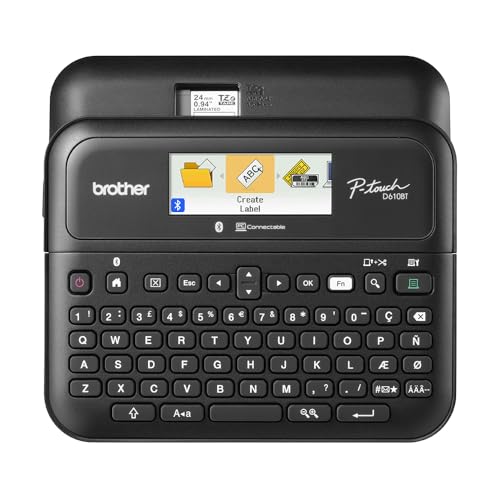
- Bluetooth and USB for mobile or desktop use
- Color LCD preview reduces label mistakes
- Automatic cutter plus memory speeds repeat jobs
Best For: custom business labels, inventory, and asset tracking
Label Recognition Office Pick
DYMO LabelWriter 550 Automatic Recognition Printer

- Automatic Label Recognition shows size and quantity
- Works only with DYMO-branded labels
- 300 DPI output for barcodes and text
Best For: office labeling with DYMO-branded rolls
Network-Ready Label Printer
Brother QL-820NWB Fast Multi-Connection Printer

- Bluetooth, Ethernet, Wi-Fi, and USB support
- Prints up to 110 address labels per minute
- LCD enables standalone use
Best For: busy offices that need flexible connections and speed
Commercial-Grade USB Pick
Westinghouse 4x6 Shipping Label Printer

- USB and Ethernet connectivity for desktop workflows
- Supports fanfold labels or roll labels up to 4x6
- Includes starter labels and setup accessories
Best For: Small businesses and ecommerce shipping labels
Wide-Format Wireless Pick
Brother QL-1110NWB Wide Label Printer

- Prints labels up to 4 inches wide
- Bluetooth, Ethernet, and wireless connectivity
- Barcode crop function for barcode-heavy workflows
Best For: Wide-format labels and wireless office use
Compact High-Resolution Pick
HP 4x6 Thermal Shipping Printer

- 300 DPI output for sharper text and barcodes
- Compact USB-only desktop design
- Handles fanfold labels or rolls up to 4 inches wide
Best For: Home offices and small sellers needing compact 4x6 printing
Wide-Format Label Pro

- Prints labels up to 4 inches wide.
- Barcode crop function supports templates on Windows.
- Plug & label feature helps avoid software setup on Windows.
Best For: Desktop shipping and barcode labeling with wide-format output.
Bluetooth Auto-Feed Pick

- Automatic label identification reduces manual adjustment.
- Bluetooth printing works with iOS and Android via the app.
- Supports label widths from 0.98 to 4.37 inches.
Best For: Mobile shipping and label printing with automatic feed detection.
High-Resolution Workflow Hub
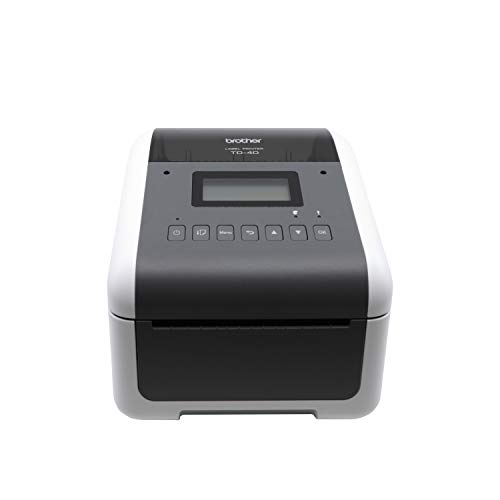
- 300 dpi output keeps text and mini barcodes crisp.
- Fast printing up to 6 ips suits higher-volume jobs.
- Connectivity includes USB, Ethernet, Wi-Fi, and Bluetooth.
Best For: Business label, barcode, and receipt workflows that need strong connectivity.
Auto-Detect Shipping Pick – Phomemo D421R Bluetooth Shipping Label Printer
If you want thermal label printers with automatic label detection for a busy shipping workflow, the Phomemo D421R is built to reduce setup friction. It automatically recognizes label dimensions when loaded, and the built-in screen shows remaining label percentage so you can keep track of supplies without guessing.
Best For: Small businesses and home office sellers who want fast setup, visible supply tracking, and Bluetooth shipping-label printing.
Pros:
- Automatic size detection helps reduce manual setup errors and wasted labels.
- Built-in screen shows real-time paper level at a glance.
- Slide-rail design makes label loading simpler and less fiddly.
- 203 DPI output at up to 150 mm/s supports scan-ready shipping labels.
Cons:
- Recognition requires D421R exclusive HD RFID labels.
- Prints only, so it is not meant for copying or multifunction office tasks.
Overall, this is a practical pick if you want an easy-to-use shipping printer with automatic detection and clear supply visibility. It is especially appealing if you print Amazon, Etsy, USPS, UPS, or FedEx labels regularly.
Professional Label Maker – Brother PT-D610BT Connected Business Label Maker
Brother P-Touch PT-D610BT Business Professional Connected Label Maker with Bluetooth®
Check Price On AmazonFor shoppers comparing thermal label printers with automatic label detection, the Brother PT-D610BT takes a different approach: it is a connected label maker focused on organized, custom labels rather than auto-sizing shipping rolls. It pairs Bluetooth or USB printing with a color LCD preview, so you can design and check labels before printing.
Best For: Businesses that need custom, professional labels for inventory, assets, and organization.
Pros:
- Bluetooth and USB connectivity support printing from mobile devices and computers.
- Preview on the 20-character, 2-line color LCD helps reduce errors.
- Automatic label cutter and built-in memory improve workflow speed.
- Wide design library includes fonts, frames, symbols, and business templates.
Cons:
- Uses Brother TZe tapes, so it is not a standard 4×6 shipping label printer.
- Best suited to label design and organization, not high-volume parcel shipping.
This model is a strong fit if you want a professional label maker for inventory tracking or customized branding. It emphasizes control, preview, and flexibility over automatic roll detection.
Label Recognition Office Pick – DYMO LabelWriter 550 Automatic Recognition Printer
The DYMO LabelWriter 550 is a focused option for thermal label printers with automatic label detection, using DYMO-branded labels only. Its Automatic Label Recognition feature identifies label size, type, and remaining quantity, which helps cut down on misprints and wasted labels.
Best For: Office users who want fast, accurate label printing with DYMO-branded rolls.
Pros:
- Automatic Label Recognition displays size, type, and remaining quantity.
- Optimized direct thermal printing is designed for clean barcodes, text, QR codes, and images.
- High-speed output and 300 DPI resolution support efficient office labeling.
- Plastic-free packaging and recycled materials are a plus for sustainability-minded buyers.
Cons:
- Works exclusively with DYMO-branded labels.
- USB-only connectivity may be limiting for wireless-first setups.
If you already use DYMO labels, this printer offers one of the most streamlined auto-recognition experiences in the category. The tradeoff is brand-locking, so it makes the most sense when you are comfortable staying within the DYMO ecosystem.
Network-Ready Label Printer – Brother QL-820NWB Fast Multi-Connection Printer
The Brother QL-820NWB is a flexible thermal label printer for users who need multiple ways to connect, but it does not emphasize automatic label detection like some shipping-label models. Instead, it focuses on speed, network readiness, and standalone convenience with a monochrome LCD screen.
Best For: Multi-device offices that need a fast, network-ready label printer with Bluetooth, Ethernet, and USB.
Pros:
- Bluetooth, Ethernet, Wi-Fi, and USB host connectivity give it broad setup flexibility.
- Prints up to 110 standard address labels per minute.
- LCD screen supports standalone operation without always relying on a computer.
- Can print black/red labels with compatible DK tape.
Cons:
- It is oriented toward label printing speed and connectivity, not automatic roll detection.
- Best results depend on Brother DK media rather than general-purpose label rolls.
This is a strong choice when connectivity matters more than auto-detection. For offices that want a fast, adaptable label printer across several devices, the QL-820NWB is well equipped.
Commercial-Grade USB Pick – Westinghouse 4×6 Shipping Label Printer
If you want thermal label printers with automatic label detection support through a straightforward desktop setup, this Westinghouse model is built for shipping labels and everyday ecommerce workflows. It works with fanfold or roll labels, supports Windows, macOS, and Linux, and is aimed at users who need dependable 4×6 output without ink or toner.
Best For: Small businesses and ecommerce sellers who need a durable USB/Ethernet thermal printer for 4×6 shipping labels.
Pros:
- Prints up to 4×6 labels with a 4.25″ max print width.
- Direct thermal printing means no ribbons or toner.
- Fast 6 ips speed and 203 DPI resolution for sharp text and graphics.
- Includes starter labels, holder, USB flash drive, USB cable, and power accessories.
Cons:
- No Bluetooth connectivity.
- Ethernet support is limited to router speeds under 1 GHz.
- Setup depends on proper driver installation and a print test.
This is a practical commercial-grade choice if your priority is consistent shipping-label production over wireless convenience. It focuses on the core essentials: broad OS support, direct thermal simplicity, and enough media flexibility for common package-label jobs.
Wide-Format Wireless Pick – Brother QL-1110NWB Wide Label Printer
For buyers comparing thermal label printers with automatic label detection features in a wider-format class, the Brother QL-1110NWB is built for mailing labels, postage, barcodes, and badges. It supports labels up to 4 inches wide, adds Bluetooth, Ethernet, and wireless connectivity, and includes Brother’s barcode crop function for easier template-based printing.
Best For: Offices and sellers that want wide-format labels, wireless printing, and barcode-oriented workflows.
Pros:
- Prints wide-format labels up to 4″ for shipping, postage, and badges.
- Offers Bluetooth, Ethernet, and Wi-Fi connectivity.
- Barcode crop function helps print barcodes and UPCs from templates.
- Includes Plug & Label support and free SDKs for integration.
Cons:
- Barcode crop function is Windows only.
- Media is limited to Brother’s 4-inch label ecosystem.
- At 3.9 pounds, it is less portable than compact desktop models.
This is the strongest pick here if you need broader label formats and flexible connectivity in one machine. It is especially appealing when barcode handling and network-ready printing matter as much as raw label output.
Compact High-Resolution Pick – HP 4×6 Thermal Shipping Printer
If you’re shopping for thermal label printers with automatic label detection support in a compact shipping setup, this HP model is designed for straightforward 4×6 label work. It uses direct thermal printing, accepts fanfold labels or rolls, and pairs a small footprint with 300 DPI output for sharper barcodes and text.
Best For: Home offices and small sellers who want a compact 4×6 thermal printer with higher-resolution output.
Pros:
- 300 DPI resolution for clear, detailed labels.
- Supports labels up to 4″ wide with adjustable media holder guides.
- Compact desktop design with USB connectivity.
- Includes power cord, AC adapter, USB cable, and quick start guide.
Cons:
- No wireless or Bluetooth connectivity.
- Maximum sheet capacity is listed at 6.
- Designed for print-only use.
This HP printer is a good fit if you want a compact machine that emphasizes print clarity over extra features. It keeps the setup simple while still handling the common shipping-label formats most online sellers use every day.
Wide-Format Label Pro – Brother QL-1100
If you need thermal label printers with automatic label detection for mailing and inventory tasks, the Brother QL-1100 is built around speed and wide-format output. It prints labels up to 4 inches wide, making it a strong fit for shipping labels, postage, address labels, and badge printing when you want a simple USB-connected desktop unit.
Best For: Offices, packing stations, and businesses that need wide 4-inch labels and barcode printing on Windows, Mac, or Linux.
Pros:
- Prints on wide-format labels up to 4 inches for shipping, postage, and badges.
- Barcode crop function helps print barcodes and UPCs from templates on Windows.
- Plug & label feature supports label creation on Windows PCs without installing software.
- USB host interface can work with peripheral devices like a scanner.
Cons:
- No built-in wireless connectivity; it relies on USB and related interfaces.
- Automatic label detection is not listed in the supplied product notes.
- Some features, like barcode crop, are Windows only.
This is a practical pick for users who prioritize wide labels and reliable barcode printing over wireless convenience. If your workflow is desktop-based and you want a compact thermal printer that handles larger shipping formats, the QL-1100 is well suited.
Bluetooth Auto-Feed Pick – Rongta RP425
For shoppers comparing thermal label printers with automatic label detection, the Rongta RP425 stands out because it automatically detects, grabs, and feeds labels to reduce manual adjustment. It prints 4×6 shipping labels as well as smaller round, barcode, and QR code labels, and its Bluetooth setup makes it easy to use with iPhone and Android devices through the RLabel app.
Best For: Mobile sellers and home-office users who want automatic label detection plus Bluetooth printing from phones and tablets.
Pros:
- Automatic label identification detects, grabs, and feeds labels.
- Supports Bluetooth printing with iOS and Android through the RLabel app.
- Handles a wide label range from 0.98 inches to 4.37 inches.
- Compact and portable design fits easily on a desk or in a drawer.
Cons:
- Uses 203 dpi resolution, which is lower than 300 dpi models.
- Bluetooth printing depends on the app workflow for mobile devices.
- Official driver setup is needed for Windows, Mac, and Chrome OS.
This is a strong value choice if automatic feeding is a priority and you want flexible label sizes without manual fuss. It is especially appealing for shipping workflows where compact size and phone-based printing matter.
High-Resolution Workflow Hub – Brother TD-4550DNWB
The Brother TD-4550DNWB is aimed at businesses that need thermal label printers with automatic label detection-style convenience in a larger workflow system, but the supplied notes focus more on fast, accurate output than on automatic detection specifically. With 300 dpi resolution, up to 6 ips print speed, and broad connectivity, it is built for labels, barcodes, receipts, and tags in office and supply-chain environments.
Best For: Businesses that need crisp 300 dpi thermal printing with Ethernet, Wi-Fi, Bluetooth, and USB connectivity.
Pros:
- 300 dpi output produces clean details for small fonts and mini barcodes.
- Prints up to 6 ips for high-volume labeling jobs.
- Multiple connectivity options include USB, Serial, Ethernet LAN, Wi-Fi, and Bluetooth.
- Spindle-less design makes media replacement easier.
Cons:
- There is only one tray, so it is not designed for multi-media loading.
- Built for business workflows, so it is more printer than portable gadget.
- Automatic label detection is not mentioned in the supplied product notes.
If you care most about dependable label quality and flexible integration, this Brother model is the most workflow-ready option in the group. It makes sense for teams that need a thermal desktop printer that can scale with volume and stay connected in multiple ways.
How We Picked the Best Thermal Label Printers with Automatic Label Detection
We focused on printers that make day-to-day labeling easier, especially models with automatic label recognition, straightforward setup, and dependable connectivity. Priority also went to printers that handle common use cases like shipping, barcodes, retail labels, and office organization without unnecessary complexity.
Quick Comparison
Not all Thermal Label Printers with Automatic Label Detection are built for the same job. Some are best for 4×6 shipping labels, others are better for narrow product labels, receipts, or high-volume barcode printing. Connectivity also matters: Bluetooth and Wi-Fi are convenient for mobile use, while USB and network options suit fixed workstations.
Key Buying Factors for Thermal Label Printers with Automatic Label Detection
Label Size and Media Compatibility
Make sure the printer supports the label widths and formats you actually use. A wide-format model is better for shipping and postage, while a compact unit may be enough for address labels or office organization. If you want less trial and error, look for automatic label detection or recognition features that help the printer identify supported media.
Print Speed and Resolution
Speed matters if you print in batches, but resolution is equally important for barcodes, logos, and small text. Higher DPI can produce sharper labels, while faster print speeds help larger teams keep up with order volume.
Connectivity and Workflow
Bluetooth is useful for phones and tablets, Wi-Fi supports more flexible placement, and USB or Ethernet can offer a more stable desktop setup. Choose the connection type that fits your daily workflow rather than paying for extras you will not use.
Software and Platform Support
Check compatibility with your shipping apps, marketplace tools, and operating system. Some printers work best in a branded ecosystem, while others are more open and flexible across platforms.
Who Should Buy Which Thermal Label Printers with Automatic Label Detection?
If you ship mostly 4×6 parcels, choose a fast shipping-focused printer with simple setup and automatic size detection. If you need retail, barcode, or warehouse labels, look for stronger resolution and broader media support. For mobile or shared workspaces, wireless models are usually the most convenient. The best choice among Thermal Label Printers with Automatic Label Detection is the one that matches your label size, volume, and software needs without adding extra steps to your process.