Scanning an A2 drawing or a large, delicate book calls for a different setup than scanning a stack of office paper. The five models in this roundup use overhead cameras to capture oversized pages without feeding them through rollers.
Camera resolution matters, but so do readable text, even lighting, page-flattening software, and enough desk space. Here’s what to check before choosing one for your projects.
Best 5 A2 Document Scanners Picks for 2026
Accessible Archiving Pick
VIISAN S48 Duo A2 Overhead Scanner

- Overhead capture up to A2
- Dual 48MP cameras; up to 600 DPI
- OCR, text-to-speech, and UVC sharing
Best For: Delicate books and accessible digital archives
Adjustable Capture Pick

- Adjustable A2/A3 overhead capture
- 26MP; software-enhanced up to 600 DPI
- OCR exports and facing-page splitting
Best For: Large documents on compatible x64 or x86 computers
Distance-Education Pick
VIISAN S48 Duo A2 Book Scanner
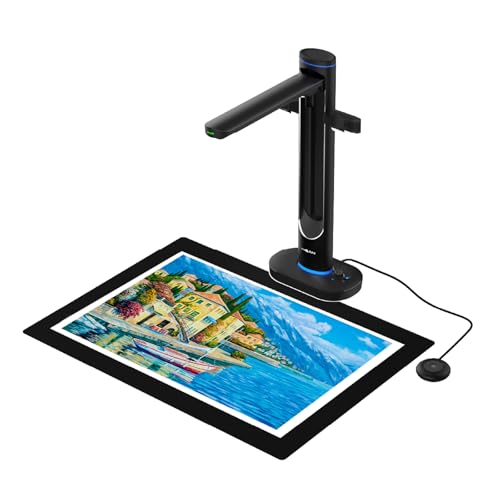
- A2 overhead capture for bound originals
- Dual 48MP cameras; up to 600 DPI
- OCR, text-to-speech, and UVC mode
Best For: Large-format archiving and remote instruction
Fast Large-Format Pick
VIISAN 23MP A2 Document Scanner

- Captures sheets up to A2
- Under 1.5 seconds per page, per listing
- 300 dpi listed resolution
Best For: Quick captures of newspapers and maps
Book-Digitizing Pick
S21 Pro 26MP A2/A3 Book Scanner

- Switches between A2 and A3 coverage
- Book flattening and 180+ language OCR
- 600 dpi output is software-enhanced
Best For: Books and large documents needing OCR
Accessible Archiving Pick – VIISAN S48 Duo A2 Overhead Scanner
Among a2 document scanners, the VIISAN S48 Duo suits projects where books and other bound originals should stay open without being pressed flat. Its overhead design captures materials up to A2, while OCR and text-to-speech add options for searching and accessing scanned content.
Best For: Libraries, classrooms, and archives digitizing oversized or delicate bound materials.
Pros:
- Dual 48MP cameras capture text, fine lines, and color detail at up to 600 DPI.
- Image processing helps flatten curved pages, remove finger marks, and correct edges.
- Can also serve as a UVC camera for live sharing on Zoom or Teams.
Cons:
- Requires a USB connection and a compatible computer.
- The stated minimum system requirements include 4GB RAM and 20GB of available drive space.
Choose this model when accessible digital copies and live presentation use matter alongside A2 book capture. Check your computer against the listed requirements before buying.
Adjustable Capture Pick – VIISAN S21 A2 Book Scanner
The VIISAN S21 is an adjustable-height option among a2 document scanners, with overhead capture for materials up to 594 × 420 mm. Its foldable hinge lets you switch between A2 and A3 setups, and the bundled software supports common book-scanning tasks.
Best For: Scanning large journals, newspapers, maps, and bound pages from a compatible Windows or macOS computer.
Pros:
- Captures up to 26MP with software-enhanced resolution up to 600 DPI.
- Software can flatten curved pages, remove fingers, split facing pages, and export OCR results.
- Three-level LED lighting helps when ambient light is limited.
Cons:
- Bundled OfficeCam software supports x64 and x86 systems, not ARM-based devices such as Surface Pro X.
- Built-in LEDs are not recommended in bright conditions, and very glossy paper is not recommended.
The S21 offers useful capture flexibility and file-export options, but software compatibility and reflective originals deserve a check before purchase.
Distance-Education Pick – VIISAN S48 Duo A2 Book Scanner
For buyers comparing a2 document scanners for both digitization and remote instruction, this VIISAN S48 Duo combines overhead A2 capture with UVC live sharing. It scans bound materials without pressing down on their pages or bindings.
Best For: Educators and archivists who need to scan large bound materials and share them during remote sessions.
Pros:
- Dual 48MP cameras capture fine detail at up to 600 DPI.
- Image processing helps flatten page curves, remove finger marks, correct edges, and clean backgrounds.
- OCR and text-to-speech support searchable files and audio-ready content.
- UVC camera mode supports live sharing through Zoom, Teams, and similar platforms.
Cons:
- Requires USB and a computer meeting the stated system requirements.
- The listed item weight is 2.8 kg, which may matter if you frequently move your setup.
This is a practical fit when the same station must handle A2 books and live teaching. Its listed weight and computer requirements are worth considering when planning the workspace.
Fast Large-Format Pick – VIISAN 23MP A2 Document Scanner
For shoppers comparing a2 document scanners, this VIISAN USB camera is a straightforward option for capturing large pages. Its adjustable height and 90-degree foldable hinge accommodate A2 sheets as well as smaller A3 documents.
Best For: Quickly digitizing newspapers, maps, and other large-format pages.
Pros:
- Captures items up to A2 size (16.54 x 23.39 inches).
- Listed capture speed is under 1.5 seconds per page.
- Supports Windows 7–11 and macOS 10.12 or later.
Cons:
- USB connection requires a compatible computer.
- Listed resolution is 300 dpi.
This is the simpler choice when A2 coverage and quick page capture matter more than specialized book-processing features.
Book-Digitizing Pick – S21 Pro 26MP A2/A3 Book Scanner
Among a2 document scanners, this 26MP book scanner stands out for its document-processing software. Its telescopic arm and 90-degree hinge switch between A2 coverage for maps and newspapers and A3 coverage for books and documents.
Best For: Digitizing books and large documents into searchable or editable files.
Pros:
- Software can flatten curved pages, remove visible fingers, and split two-page spreads.
- OCR supports more than 180 languages and exports to formats including searchable PDF, Word, and Excel.
- Foldable design includes a three-level LED lamp; compatible with Windows 7–11 and macOS 10.15 or later.
Cons:
- Advertised 600 dpi output is software-enhanced; stated optical equivalent is 320 dpi.
- Not recommended for highly glossy or glare-prone paper.
- Not compatible with ARM-based devices such as Surface Pro X.
Choose this model when page correction and OCR are priorities, while keeping its optical-resolution and paper-finish limits in mind.
How We Picked These A2 Document Scanners
We focused on the five selected overhead models because their listed capture areas reach A2 and their features address common large-format jobs: books, drawings, posters, and archival documents. We compared stated camera resolution, advertised OCR and image-processing tools, and the practical demands of an overhead setup. Specifications are a starting point, not proof of scan quality; check sample captures and current software compatibility before buying.
Quick Comparison: Where Each Option Fits
These are all camera-style scanners rather than sheet-fed machines. The two VIISAN S48 Duo listings suit shoppers interested in a dual-camera setup; the listing that specifies dual 48MP cameras, 600 DPI, OCR, and text-to-speech gives the clearest feature detail. The VIISAN 26MP model and the other listed 26MP book scanner emphasize auto-flattening and finger-removal tools for open books. The VIISAN 23MP USB document camera is a simpler option to consider if your priority is capturing A2-sized material. Verify the exact model and included software when comparing sellers, especially where listings look similar.
Key Buying Factors for A2 Document Scanners
Capture Area and Workspace
Confirm that the usable capture area—not just the product name—covers your largest originals. A2 measures 420 × 594 mm, and you will also need room for the stand, lighting, and any book supports. Check how the camera is positioned: an uneven or poorly aligned original can produce distortion even when it fits in the frame.
Detail and Output Quality
Megapixels describe camera resolution, while advertised DPI may describe the exported image; neither guarantees legible fine print or crisp drawing lines. Look for full-size sample images of material like yours, particularly near page edges. Stable mounting, consistent illumination, and sensible exposure settings matter just as much as a higher number on the box.
Software and Workflow
OCR can make captured text searchable, but accuracy depends on focus, contrast, language support, and page condition. Auto-flattening may improve curved book pages, while finger-removal tools can clean up images when you hold a page open. Check supported operating systems, output formats, and whether key features require the supplied software. If you scan many pages, look at the capture and export steps—not just the time needed to take one photo.
Who Should Buy Which A2 Document Scanners?
Choose a model with book-flattening tools if bound volumes are your main workload. For fine-detail archives, start with the higher-resolution S48 Duo listing, then judge its full-size samples against your originals. For occasional plans, posters, or classroom demonstrations, a straightforward A2-capable USB camera may be enough. If your work is primarily loose sheets in high volumes, consider whether a dedicated large-format sheet-fed scanner would be a better workflow before buying an overhead model.