If you’re an illustrator, you know the importance of capturing every detail of your artwork. Choosing the right large format scanner can make a significant difference in preserving those intricate elements. With various options available, it’s essential to find one that fits your specific needs. Explore the top picks that combine speed and quality, and discover which models stand out regarding performance and features. The right choice could elevate your digitization process.
Colortrac SmartLF 36-inch wide color scanner
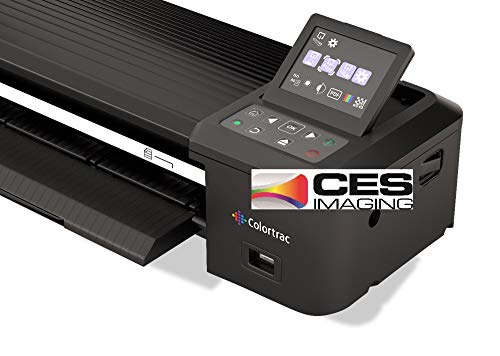
The Colortrac SmartLF 36-inch wide color scanner is an ideal choice for illustrators seeking versatility and portability. It operates as a self-contained unit, eliminating the need for a PC. You can easily scan to USB, internal memory, PC, or even cloud storage. With its durable, wheeled carrying case, transporting this scanner is a breeze. The patented SingleSensor CIS technology guarantees high-quality scans with bi-directional LED lighting. You’ll appreciate the 24-bit sRGB color space and scan speeds of 4.5 ips for grayscale and 3 ips for full color. Weighing just 15.4 lbs, it’s perfect for artists on the go.
Best For: Illustrators and artists seeking a portable, high-quality scanning solution without the need for a PC.
Pros:
- Self-contained operation eliminates the need for a connected PC, enhancing portability.
- Versatile scanning options allow you to save scans directly to USB, internal memory, PC, or cloud storage.
- Lightweight and portable design with a durable wheeled carrying case makes it easy to transport for on-the-go use.
Cons:
- Scan speeds may be slower compared to some high-end scanners for large volumes of documents.
- Limited to 24-bit sRGB color space, which may not meet the needs of professionals requiring higher color depth.
- Weight of 15.4 lbs may still be heavier than some ultra-portable options available on the market.
VIISAN VF3240 Large Format Flatbed Scanner

For illustrators seeking a reliable way to digitize their artwork, the VIISAN VF3240 Large Format Flatbed Scanner stands out with its impressive maximum optical resolution of 2400 x 2400 DPI. This scanner handles A3-size documents up to 297 x 420 mm and operates at a swift 4 seconds per scan at 200 DPI. Its frameless design and intuitive four-panel buttons make scanning easy, while the auto-scan function streamlines the process. Compatible with both Windows and MacOS, it’s perfect for photos, magazines, and CAD drawings. Just remember, it’s not suitable for three-dimensional items.
Best For: Illustrators, photographers, and professionals who need to digitize large format documents and artwork efficiently.
Pros:
- High optical resolution of 2400 x 2400 DPI for detailed scans.
- Fast scanning speed of 4 seconds at 200 DPI, enhancing productivity.
- User-friendly design with intuitive buttons and an auto-scan function.
Cons:
- Not suitable for scanning three-dimensional items like clothes or CDs.
- Limited scanning area at 2400 DPI, only allowing for smaller sections equivalent to B5 size.
- Users may need to clean the scanner to avoid white lines during scanning.
VIISAN Large Format Book & Document Scanner

Designed specifically for artists and illustrators, the VIISAN Large Format Book & Document Scanner excels in capturing intricate details from large journals and manuscripts. With a remarkable 26MP resolution and software-enhanced scanning up to 600 DPI, you’ll achieve stunning clarity. Its height-adjustable design and 90-degree foldable hinge make it easy to scan anything from maps to 3D objects. The bundled intelligent software offers features like auto flattening and OCR, converting files to PDF or Word. Plus, the built-in LED light control guarantees quality captures, even in low light. With a 1-year warranty and solid customer reviews, it’s a reliable choice.
Best For: Artists and illustrators looking to capture intricate details from large journals, manuscripts, and 3D objects.
Pros:
- High-resolution scanning at 26MP with software-enhanced capabilities up to 600 DPI for stunning clarity.
- Intelligent software features like auto flattening, fingerprint removal, and OCR for easy file conversion.
- Height-adjustable design and built-in LED light control for versatile scanning in various lighting conditions.
Cons:
- Not compatible with ARM-based devices like Surface Pro X, limiting some users.
- Performance may be affected in bright light or on very glary papers.
- Weighs 2.2 pounds, which might be considered heavy for portable use.
Plustek OpticPro A320E A3 Flatbed Scanner

If you’re an illustrator working with large-format pieces, the Plustek OpticPro A320E A3 Flatbed Scanner is an excellent choice. It features a 12″ x 17″ scanning area and a speedy 7.8 seconds per scan. You can easily handle A3-sized materials, from maps to large books. The batch scanning capability lets you scan multiple images at once, saving you time. With Doc Action, you can quickly save scans to various formats, while the OCR function makes PDFs searchable. Plus, it’s compatible with both Windows and Mac, ensuring seamless integration into your workflow. This scanner truly enhances your artistic process.
Best For: Illustrators and professionals needing to scan large-format documents, artwork, and books efficiently.
Pros:
- High scanning area of 12″ x 17″ accommodates various large materials.
- Fast scanning speed of 7.8 seconds per scan improves productivity.
- Batch scanning capability allows multiple images to be processed simultaneously.
Cons:
- Limited compatibility with operating systems; only supports 64-bit Windows and specific Mac OS versions.
- SANE driver availability for Linux users must be confirmed, potentially complicating use for Linux systems.
- Physical size may require ample workspace for setup and use.
Plustek Wide-Format Color Duplex Document Scanner S30

The Plustek Wide-Format Color Duplex Document Scanner S30 is an ideal choice for illustrators and creatives who need to digitize large artworks with precision and efficiency. It scans documents up to 12 inches wide and 200 inches long, making it perfect for various types of artwork. With its 100-sheet duplex auto document feeder, you can quickly handle high-volume tasks. The scanner automatically detects sizes and optimizes images, ensuring quality results. Its compact design takes up minimal space, and you can store it upright when not in use. Enjoy user-friendly features like the job button for one-touch scanning simplicity.
Best For: Illustrators and creatives looking to digitize large artworks with precision and efficiency.
Pros:
- Fast and efficient scanning with a 100-sheet duplex auto document feeder.
- Automatically optimizes images and detects document sizes for high-quality results.
- Compact design allows for upright storage, saving space in your workspace.
Cons:
- Limited to scanning documents up to 12 inches wide, which may not accommodate larger formats.
- Customer feedback indicates mixed experiences, with an average rating of 4.0 out of 5 stars.
- Relatively heavy at 20.6 pounds, which may be cumbersome for some users to move.
Epson FastFoto FF-680W Wireless Photo and Document Scanning System

Looking for a fast and efficient way to digitize your artwork and photos? The Epson FastFoto FF-680W is the world’s fastest personal photo scanner, zipping through thousands of images at one per second. You can batch-scan up to 36 photos, ensuring maximum efficiency. With features like auto enhancement and SafeTouch Technology, your delicate images are preserved beautifully. Plus, it supports various formats for flexibility in scanning. The included Epson ScanSmart software makes it easy to convert scans into readable text, while wireless connectivity allows for seamless sharing and backing up to Dropbox or Google Drive.
Best For: Individuals and families looking to efficiently digitize and preserve their photo collections with high-quality scanning capabilities.
Pros:
- World’s fastest personal photo scanner, capable of scanning thousands of photos at 1 photo per second.
- Versatile scanning options for different formats and resolutions, allowing for both sharing and archiving.
- Includes advanced software features like optical character recognition (OCR) and easy connectivity for seamless backup and sharing.
Cons:
- Higher initial cost compared to standard photo scanners.
- Limited to certain photo sizes (up to 8 x 10 inches), which may not accommodate larger artwork.
- Wireless connectivity may require setup, which could be challenging for less tech-savvy users.
Plustek OpticSlim 1680 High Speed Large Format Flatbed Scanner

For illustrators seeking efficiency and quality, the Plustek OpticSlim 1680 stands out with its impressive scanning speed. You’ll appreciate how it scans tabloid-sized documents in just 3 seconds at 300dpi in Gray mode and 5 seconds in Color mode. Its user-friendly design features four pre-configured buttons for quick access to file types and destinations. Plus, the intuitive interface offers dual view advanced settings for easy image adjustments. Compatible with Windows and MacOSX, you’ll find it works seamlessly with various software. Download the latest driver from the Plustek website to guarantee peak performance for your artistic projects.
Best For: Illustrators and professionals who require high-speed, high-quality scanning of large format documents.
Pros:
- High-speed scanning capability, with 3 seconds for 300dpi in Gray mode and 5 seconds in Color mode.
- User-friendly design with four pre-configured buttons for easy operation and quick access to settings.
- Compatible with both Windows and MacOSX, ensuring versatility with various software applications.
Cons:
- Limited to tabloid-sized documents, which may not meet the needs of users requiring larger formats.
- Some users may find the dual view advanced settings complex if they are not tech-savvy.
- Potential dependence on downloading drivers from the website for optimal performance, which may be inconvenient for some users.
Plustek OS1180 Flat Scanner for A3 Documents

With its ability to scan A3 documents in just about 9 seconds, the Plustek OS1180 Flat Scanner is a game-changer for illustrators and professionals in libraries and schools. You’ll appreciate the maximum scan size of 11.7 x 17 inches, perfect for large format artwork. The scanner offers 48-bit color and 16-bit grayscale options, ensuring your illustrations maintain their vibrant details. Plus, the energy-saving LED light source means no warm-up time, allowing quick access to your projects. With a powerful software bundle, including ABBYY for enhanced OCR accuracy, sharing files becomes effortless and efficient for your workflow.
Best For: The Plustek OS1180 Flat Scanner is best for illustrators, educators, and office professionals who require efficient large format scanning for documents and graphics.
Pros:
- High scanning speed of approximately 9 seconds for A3 documents.
- Supports vibrant 48-bit color and 16-bit grayscale scanning for detailed artwork.
- Energy-efficient LED light source eliminates warm-up time, enabling quick access.
Cons:
- May be overkill for users only needing to scan standard letter-sized documents.
- Limited to A3 format, which may not suit all users’ needs.
- The initial cost might be higher compared to basic scanners.
CZUR ET24 Pro Professional Book Scanner

The CZUR ET24 Pro Professional Book Scanner is an ideal choice for illustrators and creatives who need to digitize large-format artwork and documents efficiently. With its 24MP HD camera and upgraded flattening technology, it captures images with stunning clarity. You can easily scan A3-sized documents, and thanks to ABBYY’s OCR, convert JPG files into editable formats like PDF and Word. The scanner is compatible with multiple operating systems and offers real-time previews on a 2.0-inch display. Plus, enhanced lighting guarantees you’ll get sharp scans, free from reflections. This tool streamlines your workflow and elevates your digital art preservation.
Best For: Illustrators, creatives, and professionals looking to efficiently digitize large-format artwork and documents with high clarity.
Pros:
- High-resolution 24MP camera with upgraded flattening technology for clear scans.
- Supports multiple operating systems and offers real-time preview on a 2.0-inch display.
- Equipped with optimal lighting to minimize reflections and enhance scan quality.
Cons:
- Requires conversion for TIFF files from scanned JPG images.
- May have a steeper learning curve for users unfamiliar with OCR technology.
- Some Linux distributions have limited compatibility compared to Windows and macOS.
VIISAN A3 Flatbed Scanner

Artists and designers seeking a reliable solution for scanning large artworks will appreciate the VIISAN A3 Flatbed Scanner‘s impressive 1200 DPI optical resolution, which captures intricate details and vibrant colors. With a generous scanning size of 11.7″ x 16.7″, it’s perfect for everything from photos to CAD drawings. You’ll love the auto-scan function that simplifies the process, allowing you to start scanning with the lid closed. Plus, its frameless design guarantees you maximize your scanning area. Compatible with both Windows and MacOS, the VIISAN makes digital publishing a breeze, all while being energy efficient and easy to maintain.
Best For: Artists and designers who need a reliable scanner for large artworks and intricate details.
Pros:
- High optical resolution of 1200 DPI ensures vibrant colors and intricate details are captured.
- Frameless design maximizes the scanning area for larger documents.
- Auto-scan function allows for easy scanning with the lid closed, streamlining the workflow.
Cons:
- CIS sensor limits scanning to flat paper images, not suitable for 3D objects.
- WIA driver support is limited to 600 DPI, restricting high-resolution scanning on certain systems.
- Cleaning required if white lines appear during scanning, which may require additional maintenance.
Factors to Consider When Choosing Large Format Scanners for Illustrators
When choosing a large format scanner, you need to evaluate several key factors to find the right fit for your needs. Think about your scanning resolution requirements, speed, and how compatible the scanner is with your documents. Also, user-friendly features and optical character recognition can make a big difference in your workflow.
Scanning Resolution Requirements
Choosing the right scanning resolution is crucial for illustrators who want to capture every intricate detail of their artwork. For general purposes, a resolution of 600 DPI is often adequate, but if you’re aiming for high-quality reproductions of large format illustrations, consider 1200 DPI or higher. The maximum optical resolution of your scanner plays a critical role in the clarity and sharpness of your images, especially for larger documents. Don’t overlook color depth either; a 24-bit or 48-bit scan can greatly enhance the richness and accuracy of your colors. Additionally, scanners with software-enhanced scanning capabilities can achieve higher effective resolutions, which is particularly useful for preserving the quality of your detailed illustrations. Choose wisely!
Speed and Efficiency
After establishing the right scanning resolution, the speed and efficiency of your large format scanner become vital for maintaining a smooth workflow. Scanning speed varies considerably, with some scanners handling color documents at speeds from 3 inches per second to an impressive 45 pages per minute. High-speed scanning can help you digitize large volumes of artwork quickly, which is essential for meeting deadlines. If you’re working on projects with multiple illustrations, consider models with automatic document feeders for batch processing. Additionally, keep in mind that the type of scanning technology—like CIS or CCD—can affect both speed and image quality. Choosing a scanner that balances speed with resolution will optimize your workflow and enhance your productivity.
Document Compatibility
To guarantee your large format scanner meets your artistic needs, compatibility with various document types is vital. Look for scanners that accommodate A3 and custom sizes to fit different projects. High optical resolutions, like 2400 x 2400 DPI, are critical for capturing detailed illustrations accurately. Make certain the scanner can handle a range of media, including flat paper images, books, magazines, and CAD drawings, to cover diverse scanning requirements. Software compatibility is another factor; choose models that support TWAIN and WIA drivers for easy integration with graphic design programs you use. Finally, confirm the scanner offers a 48-bit color depth to produce rich, vibrant images that do justice to your artwork.
User-Friendly Features
When selecting a large format scanner, considering user-friendly features can make a significant difference in your workflow. Look for one-touch buttons that streamline the scanning process, enabling quick operations without complex setups. Automatic scanning functions, activated by closing the scanner lid, allow for hands-free scanning, letting you focus on your artwork. An intuitive interface with dual view settings makes it easy to access image adjustments, enhancing your experience while fine-tuning scans. Additionally, frameless designs simplify scanning larger documents, eliminating the need for precise alignment. Finally, energy-efficient LED light sources mean no warm-up time, so you can jump right into scanning and minimize downtime during busy projects. These features can elevate your creative process.
Optical Character Recognition
Optical Character Recognition (OCR) technology can be a game-changer for illustrators who want to enhance their workflow. With OCR, you can convert scanned documents into editable formats like PDF, Word, and Excel, making edits a breeze. Look for high-quality OCR software that supports multiple languages, especially if you’re working on international projects. Remember, the effectiveness of OCR largely depends on the resolution of your scanned images; aim for at least 300 DPI for the best text recognition. Some advanced scanners even include built-in OCR capabilities, allowing you to convert images to text seamlessly during the scanning process. Features like image enhancement, including de-skewing and noise reduction, can greatly improve OCR accuracy, ensuring clearer text extraction from your documents.
Portability and Design
Portability and design are vital factors for illustrators selecting a large format scanner. When you’re on the go, consider models weighing between 11.5 to 15.4 lbs, as they’re easier to transport in a durable carrying case. Opt for self-contained designs that don’t require a PC; this allows you to scan directly to USB or cloud storage, enhancing convenience. Look for features like wheeled carrying cases and compact storage options to simplify transport as you travel between locations. Scanning large formats, such as A3 or wider, while keeping the design lightweight is essential for capturing detailed artwork. Finally, energy-efficient LED light sources not only reduce warm-up time but also support a more user-friendly experience.
Software and Connectivity Options
Choosing the right software and connectivity options can greatly enhance your experience with a large format scanner. First, verify the scanner supports TWAIN and WIA drivers, which offer compatibility with a variety of software applications. Look for bundled software that includes OCR (Optical Character Recognition) to convert scanned images into editable formats like PDF and Word. Connectivity is essential, so consider options like USB and Ethernet for seamless integration into your workflow. Additionally, check if the scanner supports cloud storage for easy file backup and sharing, promoting better collaboration. Finally, make certain the scanner’s software is compatible with both Windows and macOS, catering to different user preferences and facilitating smooth operation in any environment.