Eye tracking can add more natural interaction and, in supported games, help direct rendering detail where you look. But a headset’s tracking features matter only if they work with your games, software, and PC setup.
These eight listings cover standalone-capable headsets, wired PC VR bundles, and high-resolution options aimed at simulation. Several are configurations of the same headset, so compare what comes in the box—not just the name.
Best 8 Vr Headsets with Eye Tracking Picks for 2026
Best for Mixed Reality Work
- Full-color mixed reality passthrough
- Expressive avatars and Touch Pro controllers
- Multiple resizable virtual screens
Best For: Standalone collaboration and mixed reality work
Best Standalone and PC VR Hybrid

- Built-in eye and low-light hand tracking
- Standalone and PC VR options
- 2448 × 2448 pixels per eye
Best For: Social VR and gaming across standalone and PC setups
Best for High-Resolution Simulations

- Eye tracking and inside-out tracking
- 3840 × 3840 pixels per eye
- 140° field of view
Best For: PC flight and racing simulators
Best for Gaze Analytics

- Precision eye tracking
- Heatmapping and gaze analysis
- Foveated rendering support
Best For: PC VR research and simulation analysis
Best Micro-OLED Clarity
Pimax Crystal Super Micro-OLED

- 3840 × 3552 pixels per eye
- 116° horizontal field of view
- Eye tracking and inside-out 6DOF tracking
Best For: Detail-focused PC VR flight and racing sims
Best Standalone-to-PC Flexibility
HTC VIVE Focus Vision Wired Bundle
- Built-in eye tracking and auto-IPD
- Standalone and DisplayPort PC VR modes
- 2448 × 2448 pixels per eye
Best For: Switching between standalone VR and wired PC gaming
Best Ultrawide View
- 140° horizontal field of view
- 3840 × 3840 pixels per eye
- Eye tracking and automatic IPD
Best For: Wide-view PC VR flight and racing simulation
Best for Facial Expression Capture
HTC VIVE Focus Vision Facial Tracker Bundle

- Facial tracker included
- Built-in eye tracking
- DisplayPort PC streaming kit included
Best For: Expressive VR avatars and character animation
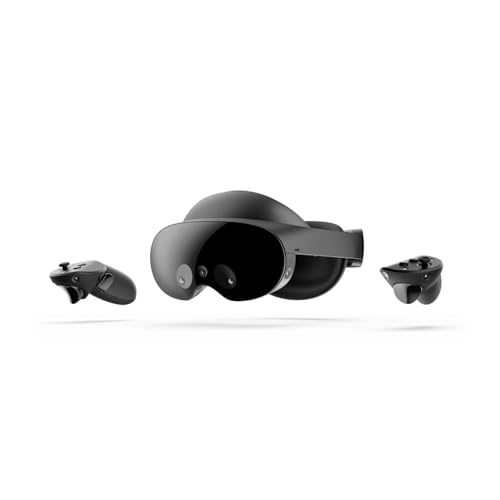
Best for Mixed Reality Work – Meta Quest Pro
Among VR headsets with eye tracking, Meta Quest Pro is a practical choice for buyers who also want mixed reality workspaces and expressive avatars. Its full-color passthrough lets you see your surroundings while using virtual screens.
Best For: Standalone mixed reality work, collaboration, and social VR.
Pros:
- Multiple resizable screens support multitasking.
- Facial-expression tracking brings natural reactions into Meta Avatars.
- Pancake lenses, local dimming, and quantum dot technology support clear visuals.
- Self-tracking Touch Pro controllers capture detailed hand actions.
Cons:
- A Meta account is required.
- The supplied notes do not specify eye-tracking analytics or foveated-rendering features.
Choose it for the combination of passthrough, collaboration tools, and avatar expression rather than for a documented gaze-analysis workflow.
Best Standalone and PC VR Hybrid – HTC Vive Focus Vision
HTC Vive Focus Vision — Mixed Reality and PC VR Headset + Controllers — Consumer Edition
Check Price On AmazonHTC Vive Focus Vision stands out among VR headsets with eye tracking because it supports both standalone use and PC VR. Built-in eye tracking, low-light hand tracking, and a 2448 × 2448-per-eye display make it a versatile option for social VR and gaming.
Best For: Buyers who want eye-tracked social VR without giving up PC VR access.
Pros:
- Built-in eye tracking and low-light hand tracking support lifelike interactions.
- DisplayPort mode provides a direct PC connection for high-fidelity visuals.
- Auto-IPD adjustment helps align the lenses with your pupils.
- A hot-swappable main battery supports longer sessions when you have a spare.
Cons:
- PC VR requires a PC connection or a suitable streaming setup.
- Face and body tracking require supported accessories.
This is the flexible pick if your priorities span VRChat, standalone apps, and PC games; check which connection and accessories your preferred experiences need.
Best for High-Resolution Simulations – Pimax Crystal Super
For simulation fans comparing VR headsets with eye tracking, the Pimax Crystal Super prioritizes visual detail and peripheral view. Its listed 3840 × 3840 resolution per eye, aspherical lenses, and 140° field of view are aimed at flight and racing setups.
Best For: PC-based flight and racing simulation where resolution and wide field of view matter most.
Pros:
- Eye tracking is listed among its features.
- QLED and Mini-LED display with local dimming targets sharp images and strong contrast.
- 140° field of view provides a wider peripheral view.
- Inside-out tracking does not call for external base stations.
Cons:
- Wired DisplayPort and USB connections require a PC setup.
- The supplied notes do not describe specific eye-tracking software functions.
It is the display-focused choice in this lineup, but verify that your PC and preferred simulator can support the headset and the performance settings you want.
Best for Gaze Analytics – HTC Vive Pro Eye
HTC Vive Pro Eye is one of the VR headsets with eye tracking aimed explicitly at gaze analysis. Its listed capabilities include eye-movement tracking, heatmapping, and foveated rendering for PC VR simulations and user-experience work.
Best For: Teams studying where users look in VR simulations and experiences.
Pros:
- Precision eye tracking supports gaze-based analysis.
- Heatmapping helps reveal how users interact with VR content.
- Foveated rendering can concentrate graphic fidelity in the user’s line of sight.
- Fit is designed for a range of head sizes and vision types.
Cons:
- It is a PC VR system, not a standalone headset.
- The supplied specifications list 1440 × 800 display resolution, below the per-eye figures listed for some other products here.
Consider this model when documented eye-tracking analysis matters more than choosing the newest display specifications; confirm that its tools fit your intended workflow.
Best Micro-OLED Clarity – Pimax Crystal Super Micro-OLED
Among VR headsets with eye tracking, this Pimax Crystal Super configuration prioritizes fine detail for PC-based flight and racing simulations. Its Micro-OLED displays offer 3840 × 3552 pixels per eye, with a stated 116° horizontal field of view.
Best For: PC VR sim players who want high-resolution Micro-OLED visuals and built-in eye tracking.
Pros:
- 3840 × 3552 resolution per eye for detailed cockpit views.
- 116° horizontal field of view and 90 Hz refresh rate.
- Inside-out 6DOF tracking; bundle includes Studioform face cushion covers.
Cons:
- Designed for PC VR with a DisplayPort connection, not standalone use.
- Its stated field of view is narrower than the ultrawide Crystal Super configuration listed here.
Choose this version if display sharpness and Micro-OLED are higher priorities than the widest available view. Confirm your PC and DisplayPort setup before buying.
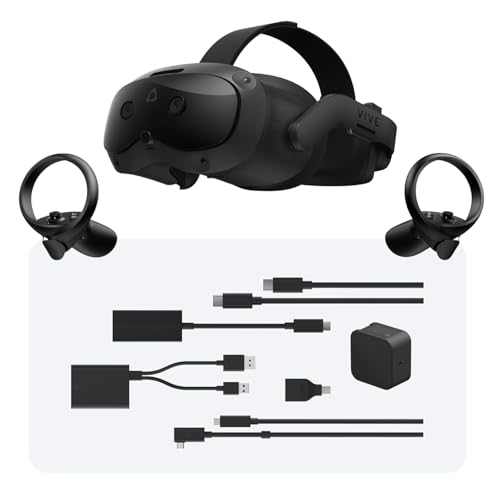
Best Standalone-to-PC Flexibility – HTC VIVE Focus Vision Wired Bundle
HTC Vive Focus Vision Wired Bundle — XR Headset with DisplayPort PC VR Streaming Kit
Check Price On AmazonIf you want VR headsets with eye tracking that can handle both standalone sessions and PC VR, the VIVE Focus Vision Wired Bundle is a versatile option. Its DisplayPort kit enables a direct PC connection, while the headset also supports hand tracking and mixed reality.
Best For: Buyers who want built-in eye tracking, standalone flexibility, and wired PC VR in one headset.
Pros:
- Built-in eye tracking and automatic IPD adjustment.
- 2448 × 2448 pixels per eye, up to 120° field of view, and 90 Hz refresh rate.
- DisplayPort PC VR mode, base station-free tracking, and a hot-swappable main battery.
Cons:
- Wireless PC VR streaming calls for a PC connected to the router by Ethernet.
- Facial tracking requires supported accessories rather than being listed as part of this bundle.
This is the practical pick if you switch between standalone VR and PC games. Choose the facial-tracker bundle below if facial expression capture is central to your plans.
Best Ultrawide View – Pimax Crystal Super Ultrawide
For sim players comparing VR headsets with eye tracking, this Crystal Super Ultrawide puts peripheral view front and center. The listed 140° horizontal field of view pairs with 3840 × 3840 pixels per eye and QLED+MiniLED displays with local dimming.
Best For: PC VR flight and racing sim players who prioritize a wide view alongside high resolution.
Pros:
- 140° horizontal field of view and 3840 × 3840 resolution per eye.
- Eye tracking and automatic IPD adjustment from 58 to 72 mm.
- QLED+MiniLED displays with local dimming; 72 Hz and 90 Hz refresh options.
Cons:
- Wired, Windows-based PC VR rather than standalone VR.
- Lighthouse tracker support is described as limited; check your intended tracking setup.
Pick the Ultrawide if a broader cockpit view matters more to you than the Micro-OLED display type of the other Crystal Super configuration. Verify connection and tracking compatibility with your rig.
Best for Facial Expression Capture – HTC VIVE Focus Vision Facial Tracker Bundle
Among VR headsets with eye tracking, this VIVE Focus Vision bundle stands out for including a facial tracker as well as the wired DisplayPort PC streaming kit. It suits buyers interested in more expressive avatars or digital character animation without sourcing the facial tracker separately.
Best For: VRChat users and creators who want eye tracking plus an included facial tracker.
Pros:
- Includes the VIVE Focus Vision headset, facial tracker, and DisplayPort cable.
- Built-in eye tracking, with facial tracking for expression capture.
- 2448 × 2448 pixels per eye, up to 120° field of view, and 90 Hz refresh rate.
Cons:
- Its display resolution is lower per eye than either Pimax configuration listed here.
- Check app support before buying specifically for facial tracking; the notes list Unity, Unreal, and Native support.
If expression capture is the deciding feature, the included tracker makes this bundle more targeted than the standard wired VIVE package. If you do not need facial tracking, compare that package first.
How We Picked These Vr Headsets with Eye Tracking
We organized the eight selected listings around the decisions that matter most: connection type, display priorities, included hardware, and likely use case. Some listings are bundles or payment variants of the same underlying headset, not eight distinct headset models. Treat this as a shortlist for comparing configurations rather than a claim that each offers a different VR experience.
Eye-tracking capability alone is not enough to guarantee a benefit in every app. Before buying, check current support for gaze input, eye-tracked foveated rendering, or avatar animation in the specific games and software you use.
Quick Comparison
For standalone-capable use: Meta Quest Pro and HTC Vive Focus Vision are the places to start. Check whether your preferred apps use their eye-tracking features and whether you need a separate PC connection kit.
For wired PC VR: Compare the HTC Vive Pro Eye system with the Focus Vision wired bundles. The Focus Vision listings differ in included accessories; one adds a facial tracker, which is separate from eye tracking.
For flight and racing sims: The Pimax Crystal Super listings emphasize high pixel density or a wide field of view. The 3840 × 3840-per-eye ultrawide listings and the 3840 × 3552-per-eye Micro-OLED listing target different visual preferences. Confirm the exact configuration and what its price includes; the two ultrawide listings may differ by payment terms rather than hardware.
Key Buying Factors for Vr Headsets with Eye Tracking
Software Support
Ask what the eye tracking actually does in your intended software. Gaze-based controls, analytics, social eye contact, and foveated rendering are different features. A compatible headset does not mean every game enables them.
Connection and Setup
Decide whether you want standalone use, PC streaming, or a wired DisplayPort connection. Check the required PC specifications, ports, cables, tracking equipment, and play-space setup. A bundle can be better value than a cheaper headset listing if it includes the equipment you would otherwise buy separately.
Visuals and Comfort
Resolution, perceived sharpness, field of view, panel type, and refresh rate affect different parts of the experience. Sim users may prioritize readable instruments; active games also make fit, weight balance, and reliable tracking important. If possible, consult measurements and return terms rather than choosing on resolution alone.
Total Cost
Compare the final price after controllers, connection kits, prescription lens inserts, and any needed PC upgrades. Read listing terms carefully, especially where similar Pimax names refer to different displays or payment options.
Who Should Buy Which Vr Headsets with Eye Tracking?
Choose a standalone-capable model if flexibility and a simpler starting setup matter most. Choose a Focus Vision wired bundle if DisplayPort PC VR is your priority, and consider its facial-tracker bundle only if your apps can use facial tracking. Consider the Vive Pro Eye if it fits an existing compatible setup and your software supports its eye tracking. For simulation-first PC VR, compare the Pimax Crystal Super configurations by field of view, display type, GPU demands, and complete delivered price—not the headline resolution alone.