Phone-based VR can be an affordable way to try immersive videos and simple VR experiences with an iPhone. The catch: a headset that holds your phone may not support every iOS app or controller.
These 10 picks cover adjustable viewers, family-oriented options, and controller bundles. Start with your iPhone’s dimensions, then check the content you want to use.
Best 10 Vr Headsets for Iphone Picks for 2026
Best With Controller
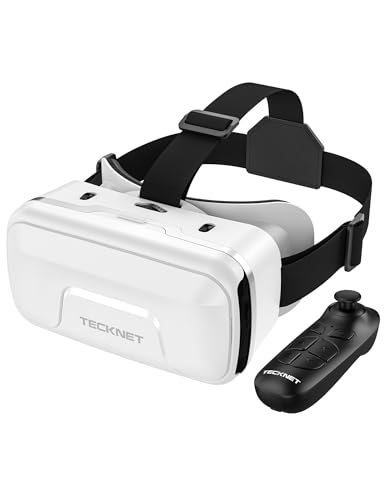
- Includes Bluetooth controller
- Fits 4.7- to 7.2-inch phones
- Adjustable focus and pupil distance
Best For: iPhone users wanting a bundled controller
Best No-Controller Pick

- Fits 4.7- to 7.2-inch phones
- Adjustable focus and lens spacing
- Requires 3D or panoramic content
Best For: iPhone users seeking an adjustable viewer without a bundled remote
Best for Larger Phones
TECKNET VR Headset with Bluetooth Controller

- Fits stated 4.7–7.2-inch screens
- Bluetooth controller included
- Adjustable focus and pupil distance
Best For: Larger iPhones and controller-based phone VR
Best for Glasses Wearers

- Space for glasses up to 5.9 × 2.3 inches
- Built-in interaction button
- Adjustable pupil distance
Best For: iPhone VR viewers who wear prescription glasses
Best for Smaller Phones
LamTrancail VR Headset with Controller

- Adjustable lenses and headband
- Controller included
- Phones must fit 6.3-by-3.3-inch limit
Best For: Compatible smaller iPhones for kids ages 8+ and adults
Best for Broad Phone Compatibility

- Fits listed 4.7- to 7.2-inch phones
- Adjustable pupil distance and focus
- Requires VR-ready or panoramic content
Best For: Sharing across compatible phones of different sizes
Best Simple Pick
Wennedalyn VR Headset with Remote

- Extra room for prescription glasses
- Adjustable focus and pupil distance
- Remote included; phone-size limit unspecified
Best For: Glasses wearers seeking smartphone VR controls
Best With Controller – TECKNET VR Headset for Phone
Among vr headsets for iphone, this TECKNET model is worth considering if you want a Bluetooth controller in the box. It accepts phones with 4.7- to 7.2-inch screens and offers adjustable lenses for dialing in the view.
Best For: iPhone owners who want a phone-based VR viewer with a bundled controller.
Pros:
- Includes a Bluetooth controller for supported games and video apps.
- Adjustable pupil distance and focal length help tailor the image.
- Lightweight 268 g design has an adjustable headband and breathable face padding.
Cons:
- Controller features depend on the app and phone.
- VR content requires a compatible app or video on your phone.
The 90°–110° field of view and included controller make this the more interaction-focused TECKNET option here. Check your preferred iPhone apps for controller support before buying.
Best for Movie Browsing – DESTEK V5 VR Headset
If you are comparing vr headsets for iphone primarily for videos, the DESTEK V5 offers a 110° field of view, headset touch buttons, and links to a curated VR app list. Its advertised 50,000-plus free-movie experience is described specifically for Android phones, so iPhone buyers should not assume the same access.
Best For: iPhone users who mainly want compatible VR videos and simple on-headset controls.
Pros:
- Fits smartphones with 5.5- to 7.2-inch screens.
- Touch buttons provide interaction without relying solely on the controller.
- Soft, breathable padding and a 110° field of view support comfortable viewing.
Cons:
- On iOS, the Bluetooth controller is limited to music playback and YouTube video controls.
- Full interactive controller functions and the promoted free-movie experience are described for Android.
This is a reasonable iPhone video viewer if your chosen content works with it, but its strongest advertised content and controller features favor Android users.
Best No-Controller Pick – TECKNET VR Headset
For shoppers looking at vr headsets for iphone who do not need a bundled remote, this TECKNET viewer covers 4.7- to 7.2-inch phones. Its independent pupil-distance and focus adjustments give you more ways to tune the picture than a fixed-lens holder.
Best For: iPhone users who prefer an adjustable viewer for VR videos and virtual tours.
Pros:
- Adjustable lens spacing and focal length accommodate different viewing needs.
- 90°–110° stated field of view.
- 268 g design includes an adjustable headband and breathable foam mask.
Cons:
- No controller is listed among the included accessories.
- Does not convert ordinary images into 3D; you need 3D or panoramic content.
Choose this over the controller-equipped TECKNET version if lens adjustment and phone fit matter more to you than bundled input. Download suitable VR content before your first session.
Best Beginner Kit for Kids – FEEBZ 3D VR Headset
This FEEBZ kit takes a beginner-friendly approach to vr headsets for iphone, with links to VR apps and videos plus a how-to tutorial. It also includes face padding, larger lenses, and a built-in button for basic interaction.
Best For: Families introducing kids to phone-based VR on an iPhone or Android phone.
Pros:
- Includes beginner-oriented app and video links and a setup tutorial.
- Padded face area and larger lenses are intended to improve the viewing experience.
- Comes with a cleaning cloth and fabric case.
Cons:
- The included remote is specified as an Android remote, so iPhone users should not count on remote control.
- Supplied details do not specify an exact supported phone-size range.
The included guidance makes this approachable as a first VR viewer. Confirm that your particular iPhone fits, and treat the Android remote as a bonus only if you also use an Android phone.
Best for Larger Phones – TECKNET VR Headset with Bluetooth Controller
Among vr headsets for iphone, the TECKNET is worth considering if you have a larger phone: it lists support for 4.7- to 7.2-inch screens and includes a Bluetooth controller. Its adjustable lenses and lightweight build offer useful flexibility for shared viewing.
Best For: iPhone users who want a phone-based headset with a separate controller and broad stated screen-size support.
Pros:
- Includes a Bluetooth controller for compatible VR content.
- Adjustable pupil distance and focus help users tune the image.
- Weighs a stated 268g and has an adjustable headband and breathable foam mask.
Cons:
- Requires VR-formatted apps or videos; it does not turn ordinary images into 3D.
- Phones with screens of 6.2 inches or larger may require removing the headset’s screen frame.
This is the most flexible choice here for stated phone-screen size, but check your iPhone’s fit and available VR content before buying.
Best for Simple Media Controls – Haptique 3D VR Headset
If you are comparing vr headsets for iphone mainly for movies and basic interaction, this Haptique model includes a phone-connected remote described for playback and volume controls. It fits stated screen sizes from 4.5 to 6.7 inches and has a soft, wipe-clean PU leather face mask.
Best For: Viewers who want basic media controls without reaching for their phone.
Pros:
- Included remote provides stated play, pause, and volume controls.
- Soft, breathable PU leather mask is easy to clean.
- Supports a stated 4.5- to 6.7-inch phone-screen range.
Cons:
- The notes describe media controls but do not establish that the remote works with every VR game.
- The listed screen-size range is narrower than some phone headsets.
Choose this one for straightforward viewing controls, while checking your iPhone’s screen size and the controls required by your preferred apps.
Best for Glasses Wearers – BrobiDerleta Phone VR Headset
For glasses wearers shopping for vr headsets for iphone, this BrobiDerleta headset provides stated clearance for frames up to 5.9 by 2.3 inches. It pairs a pupil-distance adjustment with a built-in interaction button, so basic supported actions do not require reaching for the phone.
Best For: People who want to keep their prescription glasses on while viewing phone-based VR.
Pros:
- Accommodates glasses within the stated 5.9-by-2.3-inch limit.
- Built-in button supports in-app actions where compatible.
- Adjustable pupil distance, aspheric lenses, and an adjustable headband.
Cons:
- No separate controller is listed; interaction relies on the headset button.
- Weighs a stated 13 ounces, about 368g.
The glasses clearance is its clearest advantage. Check your frame dimensions and whether your preferred VR apps support button-based interaction.
Best for Smaller Phones – LamTrancail VR Headset with Controller
Among vr headsets for iphone, this LamTrancail model is worth considering if you have a phone that fits its stated 6.3-by-3.3-inch limit. It pairs adjustable lenses and a headband with an included controller for smartphone VR games and videos.
Best For: Kids ages 8 and up and adults using a compatible, smaller iPhone.
Pros:
- Adjustable pupil distance, focus, and headband help tailor the fit and view.
- Includes a controller and lists a 110-degree field of view.
- Supports a range of listed iPhone and Android models.
Cons:
- Not compatible with phones longer than 6.3 inches; the listed exclusions include several Plus and Pro Max iPhones.
- Phone fit must be checked by dimensions, not just model name.
The size restriction is the deciding factor here. Confirm your phone’s dimensions before choosing this adjustable headset over a roomier option.
Best for Broad Phone Compatibility – TECKNET VR Headset
If you’re comparing vr headsets for iphone across different phone sizes, the TECKNET headset lists compatibility with 4.7- to 7.2-inch smartphones. Its adjustable optics and lightweight, padded design make it a practical choice for mobile VR videos, tours, and games.
Best For: Households sharing a smartphone VR headset across different compatible phones.
Pros:
- Lists a broad 4.7- to 7.2-inch phone compatibility range.
- Adjustable pupil distance and focal length help customize the image.
- Weighs 268 grams and has a breathable foam mask, adjustable headband, and soft nose rest.
Cons:
- Does not convert ordinary images to 3D; compatible 3D or panoramic content is needed.
- Its 36-month warranty is specified for registered users only.
This is the most flexible listed size range of the three, but phone compatibility alone does not provide VR content. Plan to use suitable apps or videos.
Best Simple Pick – Wennedalyn VR Headset with Remote
For shoppers looking at vr headsets for iphone who want to keep their prescription glasses on, this Wennedalyn headset offers extra glasses space, adjustable focus, and a pupil-distance dial. It also includes a remote for navigating compatible VR content without reaching for your phone.
Best For: Glasses wearers who want adjustable optics and an included remote for smartphone VR.
Pros:
- Provides space for glasses plus independent focus and pupil-distance adjustments.
- Includes a wireless remote for supported controls.
- Uses aspheric lenses and an adjustable T-shaped strap.
Cons:
- The supplied title says 110-degree field of view, while the bullets and details say 120 degrees.
- The supplied notes do not state a specific phone-size limit; check your phone’s fit before ordering.
The glasses-friendly design is its strongest distinction. Treat the field-of-view figure as unconfirmed and verify fit if you use a larger iPhone.
How We Picked the Best Vr Headsets for Iphone
We focused on practical differences among the 10 selected phone-based viewers: stated phone fit, lens adjustment, head straps, face padding, ventilation, and included controllers. Several listings make similar claims, and two have the same TECKNET product name; confirm the exact variant and what is included on the current listing before ordering. A headset’s advertised field of view or blue-light feature should not outweigh fit and comfort.
Quick Comparison
The simplest viewers suit occasional 3D video watching. Adjustable models are worth considering if more than one person will use the headset or if you need to fine-tune the image. Controller bundles offer an extra input option, but their usefulness depends on the controller and the iOS app—not just the presence of a remote in the box. For children, prioritize secure phone placement, a manageable headset size, and supervised, short sessions.
Key Buying Factors for Vr Headsets for Iphone
Phone Fit Comes First
Check the headset’s supported phone width and length against your specific iPhone, not just its screen-size claim. A thick case or large camera bump can affect how the phone sits; you may need to remove the case. Make sure the phone can be centered and held securely without pressing its buttons.
Content and Controller Compatibility
These are holders and lenses, not standalone VR systems. Check that the videos or apps you want offer a side-by-side viewing mode and run on your iPhone. An included Android remote is not automatically compatible with iOS, and a Bluetooth controller may have limited functions in a given app. Avoid buying on the promise of a large content library until you know what is actually accessible on iPhone.
Clarity, Comfort, and Heat
Look for adjustable interpupillary distance (PD) and focus where available, especially for shared use. These settings can improve alignment but cannot fix low-resolution content or guarantee a sharp image for everyone. Padding, balanced straps, and ventilation matter during longer sessions. Phone screens can warm up inside an enclosed viewer, so take breaks and stop if you feel eye strain or motion sickness. Blue-light filtering is not a substitute for comfortable settings and sensible session lengths.
Who Should Buy Which Vr Headsets for Iphone?
For a first try, choose a basic viewer that clearly fits your iPhone and offers straightforward lens adjustment. For shared family use, favor adjustable straps and lenses over headline field-of-view figures. Choose a controller bundle only after checking iOS compatibility for the activities you plan to use. If you want tracked movement, advanced games, or a broad dedicated VR library, a phone holder is the wrong category; consider a standalone VR headset instead.