A good video conferencing setup should make remote participants easy to see and hear without turning every meeting into a troubleshooting session. The right choice depends on your room size, where people sit, and how you connect to calls.
These five options range from a personal webcam-and-speakerphone bundle to room-focused camera systems. Some include Bluetooth audio, but camera video may still require a USB or HDMI cable—an important distinction if you want a truly cable-free table.
Best 5 Wireless Video Conferencing Kits Picks for 2026
Best for Moving Presenters
TONGVEO 4K PTZ Camera and Speakerphone

- AI tracking with 3x optical zoom
- 4K/30 fps via HDMI; 1080p via USB
- Bluetooth speakerphone with up to 5 m pickup
Best For: Moving speakers in small to medium rooms
Best for Participant Framing

- 4K PTZ plus 1080p panoramic lens
- Gallery framing for up to four people
- Bluetooth speakerphone; up to 10 hours
Best For: Four- to eight-person hybrid meetings
Best for Personal Workstations
Poly Studio P5 and Sync 20+ Kit

- 1080p webcam with privacy shutter
- Bluetooth speakerphone; 20-hour battery
- USB webcam for PC or Mac
Best For: Individual desks and flexible workspaces
Best for Presenter Tracking
TONGVEO 4K PTZ Camera and Bluetooth Speakerphone
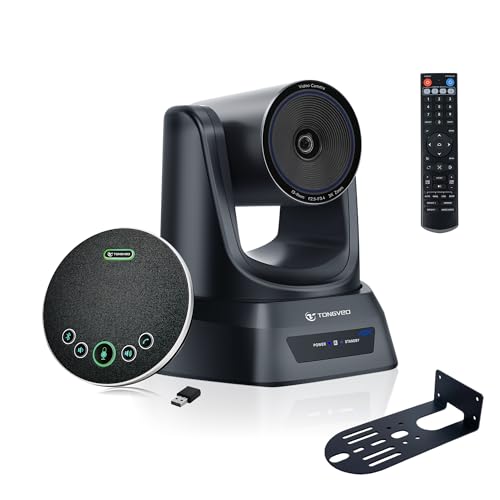
- 3x optical zoom with presenter tracking
- Wireless speakerphone with 360° pickup
- 4K via HDMI; 1080p/30fps via USB
Best For: Presentation-led rooms needing a separate wireless speakerphone
Best for Wireless Screen Sharing
Enther&MAXHUB All-in-One 4K Camera

- 120° view with auto-framing
- Integrated six-mic array and speaker
- Wireless sharing for up to four devices
Best For: Small rooms needing an all-in-one camera and presentation sharing
Best for Moving Presenters – TONGVEO 4K PTZ Camera and Speakerphone
Among wireless video conferencing kits, this TONGVEO pairing is worth considering when a presenter needs to move around the room. Its AI-tracking PTZ camera offers 3x optical zoom, while the separate Bluetooth speakerphone handles room audio. The camera itself connects by USB or HDMI, so the video connection is not wireless.
Best For: Small to medium meeting rooms, training spaces, or presentations with a moving speaker.
Pros:
- AI tracking and motorized pan, tilt, and zoom help keep a moving subject in frame.
- Camera supports 4K at 30 fps over HDMI, with a 93° field of view.
- Speakerphone offers four omnidirectional microphones, up to 5 m pickup, and USB, Bluetooth, or wireless-dongle connectivity.
Cons:
- USB camera output is listed as 1080p rather than 4K.
- The speakerphone’s stated battery runtime is 6–8 hours.
Choose this kit for its tracking flexibility and separate room audio, but check which camera output your conferencing setup will use before counting on 4K video.
Best for Participant Framing – BizEye P30 Dual-Lens Kit
If your shortlist of wireless video conferencing kits prioritizes how remote attendees see each participant, the BizEye P30 Kit offers a dual-lens camera with automatic framing and a Bluetooth-capable speakerphone. Its gallery mode can frame up to four individuals, then switch to group framing for larger meetings.
Best For: Four- to eight-person meetings that benefit from flexible individual and group views.
Pros:
- Combines a 4K PTZ camera with a 1080p panoramic lens for framing options.
- Offers auto framing, presenter tracking, and individual gallery views.
- Speakerphone has four omnidirectional microphones, noise reduction, and up to 10 hours of wireless use.
Cons:
- Individual gallery framing is limited to four participants.
- The camera uses a USB connection; Bluetooth applies to the speakerphone, not wireless camera video.
This is a strong fit when camera composition matters more than a single fixed wide shot. Its remote, presets, and web controls also give meeting organizers ways to adjust the view.
Best for Personal Workstations – Poly Studio P5 and Sync 20+ Kit
For buyers comparing wireless video conferencing kits for a desk rather than a meeting room, the Poly Studio P5 and Sync 20+ bundle pairs a USB webcam with a portable Bluetooth speakerphone. The camera delivers 1080p video and includes automatic low-light compensation and a privacy shutter.
Best For: Individual PC or Mac users who want a desk webcam and a speakerphone they can move between workspaces.
Pros:
- 1080p webcam includes low-light compensation, a privacy shutter, and up to 4x digital zoom.
- Bluetooth speakerphone offers echo and noise reduction and a stated 20-hour battery life.
- Works with Zoom and Microsoft Teams; Poly Lens Desktop provides settings and updates.
Cons:
- Camera resolution is 1080p, not 4K.
- The webcam requires a USB connection, and the bundle is oriented toward personal use rather than whole-room coverage.
This bundle makes the most sense when convenient personal video and portable audio matter more than PTZ movement or wide meeting-room framing.
Best for Presenter Tracking – TONGVEO 4K PTZ Camera and Bluetooth Speakerphone
Among wireless video conferencing kits, this TONGVEO package suits rooms that need a camera that follows a presenter and a speakerphone that can sit on the meeting table without an audio cable running across it. The camera still needs power and a wired USB or HDMI connection.
Best For: Presentation-led meetings that need optical zoom, automated camera movement, and a separate wireless speakerphone.
Pros:
- 3x optical zoom, 350° pan, and 180° tilt offer flexible room coverage.
- Presenter tracking and auto-framing support different meeting formats.
- Bluetooth speakerphone provides 360° pickup and noise cancellation; a wireless dongle is included.
Cons:
- USB video output is specified at 1080p/30fps; 4K output uses HDMI.
- The camera is not wireless and requires power plus a video cable.
Choose this kit if a moving speaker is your main concern. Its optical zoom and tracking are more relevant to that use than the 4K headline alone, while the HDMI-versus-USB resolution difference is worth checking against your setup.
Best for Wireless Screen Sharing – Enther&MAXHUB All-in-One 4K Camera
For buyers comparing wireless video conferencing kits, the Enther&MAXHUB system brings camera, microphones, speaker, and conferencing terminal into one unit. Its standout wireless feature is screen sharing; the supplied specifications also list HDMI and USB connectivity.
Best For: Small meeting rooms that want an integrated video bar with wide room coverage and wireless presentation sharing.
Pros:
- 120° field of view and auto-framing help keep a group in view.
- Six-microphone array has a stated pickup range of up to 8 meters.
- Supports one-key wireless screen sharing and up to four sharing devices using dongles and applications.
Cons:
- Its 5x zoom is digital, not optical.
- Wireless sharing should not be mistaken for a fully cable-free camera installation.
This is the simpler choice when the room needs one integrated device rather than a camera and tabletop speakerphone. Check how its screen-sharing dongles and applications fit your meeting workflow before buying.
How We Picked These Wireless Video Conferencing Kits
We focused on the listed camera and audio features, framing options, connection types, and likely fit for a desk or meeting room. The selection includes bundled webcams and speakerphones, PTZ cameras with zoom, and all-in-one room systems. Product names and feature claims are not a substitute for checking the full specifications: confirm what is included, which connections are wireless, and whether the setup works with your meeting platform before buying.
Quick Comparison
For a single desk, the Poly Studio P5 and Sync 20+ kit is the most straightforward webcam-and-speakerphone option on this list. The 4K dual-lens webcam and Bluetooth speakerphone bundle is another compact camera-and-audio choice. For a room where participants sit at different distances, compare the TONGVEO PTZ system and the 4K AI auto-tracking PTZ system for their stated 3× optical zoom and framing features. The Enther&MAXHUB all-in-one system is worth considering if you prefer an integrated room camera with auto-framing. Verify each product’s room coverage and included audio hardware rather than choosing on resolution alone.
Key Buying Factors for Wireless Video Conferencing Kits
Know Which Link Is Wireless
Bluetooth commonly connects a speakerphone or other audio device; it does not necessarily transmit camera video. A camera described alongside a wireless speakerphone may still need USB, HDMI, or a power cable. Map out the complete path from camera and microphone to computer, display, and meeting software before ordering.
Match Framing to the Room
A wide-angle camera can help fit people around a small table. PTZ movement and optical zoom offer more control when participants sit farther away, while auto-framing may reduce manual adjustment as people join or leave. Check the stated field of view, mounting position, and whether tracking follows a speaker or simply keeps the group in frame.
Prioritize Audio and Compatibility
Clear two-way audio matters as much as 4K video. Check microphone pickup range, speakerphone placement, echo cancellation claims, and whether an external microphone is needed for the far end of a larger room. Also verify operating-system support, meeting-app compatibility, available USB ports, and whether any advertised resolution requires a particular connection or software setting.
Who Should Buy Which Wireless Video Conferencing Kits?
Choose a personal webcam-and-speakerphone bundle for a desk or a small shared workspace. Consider a dual-lens or all-in-one system when simple group framing matters more than camera control. Look at the PTZ options if you need to reframe a larger table or zoom toward distant participants. If your priority is a cable-free conference table, inspect the wiring diagram first: none of these product names alone establishes that the entire video setup is wireless.