As remote work becomes more integral to our daily routines, finding the right video conferencing system is essential for effective communication. You need a solution that not only meets your team’s needs but also enhances the virtual meeting experience. With numerous options available, it’s vital to know which systems stand out in 2025. Let’s explore the best all-in-one video conferencing solutions that could transform your virtual interactions.
Logitech MeetUp Video Conferencing System

The Logitech MeetUp Video Conferencing System is the ideal choice for small teams looking to enhance their virtual meetings. With ultra HD 4K resolution and a 120° field of view, you’ll capture every detail. Its three beamforming mics guarantee clear audio up to 4 meters away, while the integrated speakers optimize sound for huddle rooms. Setup is a breeze with plug-and-play USB connectivity, and it’s compatible with various platforms like Microsoft Teams and Zoom. Compact and cable-free, this system fits perfectly in small spaces, making it the go-to solution for teams of 5-7 people seeking effective communication.
Best For: Small teams of 5-7 people looking for an effective video conferencing solution with high-quality audio and video.
Pros:
- Compact all-in-one design minimizes cable clutter and fits well in small spaces.
- Ultra HD 4K resolution and 120° field of view ensure clear video quality for all participants.
- Easy plug-and-play USB connectivity allows for quick setup and compatibility with major conferencing platforms.
Cons:
- Not suitable for large rooms, limiting its use to smaller spaces.
- Some users have reported issues with focus during video calls.
- Customer service experiences have been noted as inconsistent by some users.
All-in-One Conference Room Video Camera System Bundle

Looking for a reliable solution for small-to-medium conference rooms? The TONGVEO All-in-One Conference Room Video Camera System Bundle is your answer. It features a HD 1080P PTZ camera and a Bluetooth conference speakerphone, ensuring crystal-clear video and audio for video calls and remote training. With 3X optical zoom and a wide field of view, every participant gets included. Setup is a breeze with plug-and-play USB or HDMI connections. Plus, it connects via Bluetooth 5.0, accommodating up to 12 people. Rated 4.6 out of 5 stars, users love its quality, although customer support can improve.
Best For: Small-to-medium conference rooms that require high-quality video and audio for video calls, online courses, and remote training.
Pros:
- Full HD video quality with 1920x1080p at 60fps and a wide field of view for clear visuals.
- Easy setup with plug-and-play functionality via USB or HDMI, compatible with major video conferencing apps.
- Bluetooth connectivity allows for wireless use with a long battery life, accommodating up to 12 participants.
Cons:
- Customer service issues reported by some users, indicating potential delays in support and resolution.
- Limited compatibility with operating systems older than Windows 7 and Mac OS 10.10.
- Some complaints about product reliability, suggesting a need for improved quality control.
Yealink UVC34 4K Conference Room Camera System

For teams seeking a seamless video conferencing experience, the Yealink UVC34 4K Conference Room Camera System stands out with its impressive 4K AI-powered camera and integrated audio capabilities. With an 8 MP resolution and a 120° super-wide-angle lens, you’ll enjoy stunning video quality and automatic framing of participants. The Yealink UVC34 also features an 8-microphone array and 5W speaker, ensuring crystal-clear audio during meetings. Its all-in-one design makes setup a breeze, connecting effortlessly via USB Type A. Plus, with remote management and an electric lens cap for privacy, this system is perfect for any modern workspace.
Best For: Teams and organizations looking for a high-quality, easy-to-use video conferencing solution that integrates seamlessly with popular meeting platforms.
Pros:
- Stunning video quality with 4K resolution and a super-wide-angle lens for immersive meetings.
- Superior audio performance thanks to the 8-microphone array and high-fidelity speaker.
- Plug-and-play functionality for quick setup and portability, making it convenient to use anywhere.
Cons:
- Limited compatibility with platforms outside of Microsoft Teams and Zoom Rooms may restrict some users.
- 5x digital zoom may not be sufficient for larger conference rooms or more detailed views.
- Electric lens cap might require adjustments to ensure it’s functioning properly for privacy needs.
Yealink A10-020 All-in-One Video Conferencing System

Ideal for home offices and small meeting rooms, the Yealink A10-020 All-in-One Video Conferencing System combines a 4K camera with advanced AI features like Auto Framing and Speaker Tracking. You’ll appreciate the 8 MEMS microphones and built-in speaker, delivering exceptional audio quality with noise cancellation. The intuitive CTP18 touch panel simplifies meeting control, seamlessly integrating Microsoft Teams and Zoom. With its plug-and-play setup, you can connect via HDMI, Ethernet, or Wi-Fi, making installation a breeze. Plus, the electric privacy shutter guarantees your calls remain secure and professional. This system is a fantastic choice for effortless virtual meetings.
Best For: The Yealink A10-020 All-in-One Video Conferencing System is best for home office users and small meeting rooms seeking high-quality video and audio solutions.
Pros:
- Easy plug-and-play setup with multiple connectivity options (HDMI, Ethernet, Wi-Fi).
- AI-powered features like Auto Framing and Speaker Tracking enhance the meeting experience.
- Intuitive CTP18 touch panel supports seamless integration with Microsoft Teams and Zoom.
Cons:
- May be overkill for very small home offices or casual users.
- Limited scalability for larger conference rooms without additional equipment.
- Dependence on Wi-Fi connectivity could affect performance in poor network environments.
TONGVEO 20x Zoom Conference Room Camera System

The TONGVEO 20x Zoom Conference Room Camera System stands out as a top choice for businesses that need a robust solution for large meeting rooms. With a 20x optical zoom and Full HD 1080P resolution at 60fps, it guarantees crystal-clear video quality. The system features a 360° omnidirectional microphone that captures voices from up to 20 feet away, making collaboration seamless. Its Bluetooth speakerphone, powered by an 8000mAh battery, offers 17 hours of operation. Easy to set up, it connects via USB or HDMI, and works with major video conferencing apps, guaranteeing you’re always ready for your next meeting.
Best For: Businesses and organizations that require a high-quality video conferencing solution for large meeting rooms.
Pros:
- Full HD 1080P resolution at 60fps ensures clear video quality.
- 360° omnidirectional microphone captures voices effectively from a distance.
- Easy connectivity via USB or HDMI with compatibility for major video conferencing apps.
Cons:
- The PTZ camera is wired, which may limit placement options.
- The speakerphone, while wireless, requires charging and has a limited battery life.
- May require additional setup time for optimal configuration in larger spaces.
Logitech MeetUp HD Video and Audio Conferencing System

Designed specifically for small meeting and huddle rooms, the Logitech MeetUp HD Video and Audio Conferencing System stands out with its super-wide 120-degree field of view. With motorized pan/tilt capability, you can extend the view to 170 degrees, ensuring everyone’s included. Enjoy stunning video quality with support for Ultra 4K, 1080p, and 720p resolutions. The integrated audio system features beamforming microphones and a custom speaker for crystal-clear conversations, while the expansion mic boosts audio range. Setup is a breeze; it’s USB plug-and-play compatible with platforms like Zoom and Teams, making your virtual meetings seamless and efficient.
Best For: The Logitech MeetUp HD Video and Audio Conferencing System is best for small meeting rooms and huddle spaces accommodating up to 6-7 people.
Pros:
- Compact all-in-one design reduces cable clutter and is easy to set up.
- Super-wide 120-degree field of view with motorized pan/tilt for inclusive visibility.
- Integrated audio system with beamforming microphones ensures clear sound quality.
Cons:
- Limited effectiveness in larger rooms, making it unsuitable for bigger gatherings.
- Mixed customer service experiences regarding warranty and product issues.
- Some users reported concerns about scalability for future office expansions.
TOUCAN 360-Degree Video Conference Camera
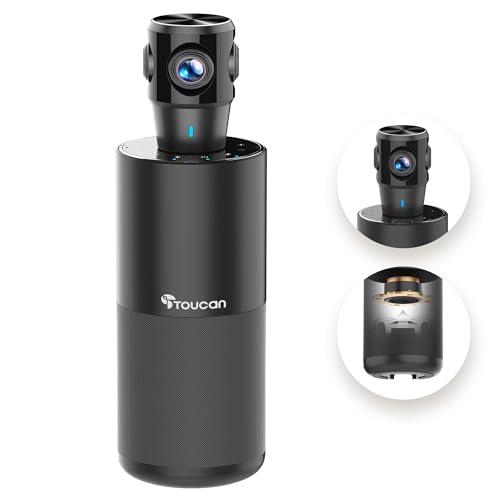
If you’re looking for a video conferencing solution that offers seamless 360° omni-directional shooting, the TOUCAN 360-Degree Video Conference Camera could be the perfect fit for your needs. With 1080p HD visuals and a high-quality microphone featuring noise reduction, your meetings will have crystal-clear audio and video. Its plug-and-play functionality makes setup a breeze, and it’s compatible with popular platforms like Zoom and Microsoft Teams. The flexible base allows for tripod use, while a privacy shutter guarantees security when not in use. With a solid 4.1-star rating, it’s well-regarded for its performance and ease of use.
Best For: Professionals and teams seeking a high-quality, user-friendly video conferencing solution for various platforms.
Pros:
- Crystal-clear 1080p HD video and high-quality audio with noise reduction for effective communication.
- Instant plug-and-play setup compatible with multiple operating systems and popular conferencing platforms.
- Versatile design with tripod compatibility and a privacy shutter for added security.
Cons:
- Some users have reported issues with microphone recognition and audio feedback.
- Heavier than some competitors, potentially affecting portability.
- May not perform optimally in very large conference rooms compared to specialized equipment.
Bose Professional VB-S All-in-one Video Conference HD Camera

For anyone seeking a high-quality video conferencing solution, the Bose Professional VB-S stands out with its impressive 4K Ultra-HD camera and advanced digital PTZ functionality. Weighing just 2.1 pounds, its elegant design fits into any setting—be it home, office, or classroom. The four beamforming microphones greatly enhance voice clarity while reducing background noise. It’s compatible with popular platforms like Google Meet and Zoom, making it versatile for any virtual meeting. Plus, Bluetooth connectivity allows for seamless audio streaming. Users appreciate its easy setup and intelligent speaker tracking, ensuring every meeting feels professional and engaging.
Best For: Professionals and educators looking for a high-quality, all-in-one video conferencing solution that enhances communication in various settings.
Pros:
- 4K Ultra-HD camera provides clear video quality for professional meetings.
- Four beamforming microphones effectively reduce background noise and enhance voice clarity.
- Easy compatibility with popular conferencing platforms like Google Meet, Microsoft Teams, and Zoom.
Cons:
- Some users report issues with microphone performance in larger spaces.
- Occasional resolution challenges noted in specific environments.
- The plastic material may not feel as premium compared to metal alternatives.
4K Conference Room Camera System with AI Auto-Tracking and Speakerphone

The TONGVEO 4K Conference Room Camera System stands out with its impressive AI auto-tracking feature, making it an ideal choice for teams that value seamless interaction during video meetings. With a 120° wide-angle view and 5X digital zoom, you’ll capture every participant perfectly. Its easy gesture controls let you switch between tracking modes effortlessly, while the built-in speakerphone offers ultra-clear sound with noise reduction. Installation is a breeze, compatible with major platforms like Zoom and Skype. Plus, its durable design and solid customer ratings guarantee you’re making a smart investment for your conference room needs.
Best For: Teams and organizations looking for a high-quality, user-friendly conference camera system that enhances video meetings with advanced tracking and audio features.
Pros:
- Excellent video quality with 4K resolution and effective auto-tracking capabilities.
- Clear audio output from the built-in speakerphone and noise reduction technology.
- Easy installation and compatibility with popular video conferencing platforms.
Cons:
- Some users report issues with the auto-tracking feature not stopping as desired.
- Limitations with remote control when managing multiple cameras.
- Lack of wireless connectivity options may be a drawback for some users.
Logitech Group Video Conferencing Bundle for Big Meeting Rooms

Designed specifically for large meeting rooms, the Logitech Group Video Conferencing Bundle is ideal for teams of up to 20 participants who need seamless communication. With HD 1080p video, autofocus, and a 90-degree field of view, you’ll capture every detail. The included speakerphone and expansion mics extend audio pickup to 28 feet, ensuring everyone’s voice is heard clearly. It’s compatible with various platforms, making setup a breeze through a simple USB connection. Customers praise its sound quality and user-friendly design, although some report minor issues with Bluetooth and camera sensitivity. Overall, it’s a solid choice for effective conferencing.
Best For: Teams in large meeting rooms looking for high-quality video and audio conferencing solutions for up to 20 participants.
Pros:
- Easy plug-and-play setup with USB connection for quick installation.
- High-definition 1080p video and excellent audio quality ensure clear communication during meetings.
- Compatible with multiple video conferencing platforms, enhancing versatility for users.
Cons:
- Some users report issues with Bluetooth connectivity and camera sensitivity to movement.
- Microphone performance may require troubleshooting for optimal use.
- Limitations noted regarding cable connections and automatic tracking features.
Factors to Consider When Choosing All in One Video Conferencing Systems
When you’re choosing an all-in-one video conferencing system, you need to take into account several key factors. Think about video quality and audio clarity, as they can make or break your virtual meetings. Also, verify the system is compatible with your preferred platforms and easy to set up, while keeping design and portability in mind.
Video Quality and Resolution
Choosing the right video conferencing system often hinges on video quality and resolution, which greatly impacts your meeting experience. To guarantee clear visuals, look for systems that support at least HD 1080p resolution, with some high-end models offering Ultra HD 4K for sharper imagery. A wider field of view, around 120° or more, enhances visibility, allowing all participants to be seen without adjusting the camera frequently. Advanced lens technology, such as low-distortion lenses, improves image quality by reducing artifacts. Additionally, features like digital pan, tilt, and zoom capabilities let you focus on individual speakers, essential for maintaining engagement. Automatic framing and brightness optimization guarantee everyone is well-lit and centered, adapting to various lighting conditions for the best video experience.
Audio Clarity and Range
While video quality sets the stage for your meetings, audio clarity guarantees that communication flows smoothly. Look for systems equipped with beamforming microphones that focus on speakers while minimizing background noise. Full-duplex audio capabilities are essential too, as they allow everyone to speak and listen simultaneously without interruptions. Consider the audio pickup range; some systems can capture sound from up to 16.4 feet away, making them ideal for larger spaces. Noise-canceling technology is another must-have, filtering out unwanted sounds for a better experience. Finally, echo cancellation features help reduce feedback, ensuring that voices come through clearly and without distortion. Prioritize these elements to enhance your virtual meeting experience markedly.
Compatibility With Platforms
To guarantee a smooth video conferencing experience, it’s essential that your system is compatible with popular platforms like Zoom, Microsoft Teams, Google Meet, and Skype for Business. This compatibility facilitates seamless integration in various meeting environments. Make sure to check for USB or HDMI connectivity options for easy plug-and-play setup with existing devices and operating systems, such as Windows and macOS. Some systems might need specific software or drivers, so confirm compatibility with your desired OS versions. Additionally, look for systems that support remote management and configuration through software to simplify updates across multiple devices. Finally, verify the system’s ability to connect wirelessly via Bluetooth or Wi-Fi, enhancing flexibility and reducing cable clutter for your virtual meetings.
Setup and Installation Ease
When setting up an all-in-one video conferencing system, ease of installation can greatly impact your overall experience. Look for systems with plug-and-play functionality, allowing you to connect via USB or HDMI with minimal hassle. Ensuring compatibility with various operating systems and video conferencing software is essential for seamless integration into your existing setup. Opt for all-in-one designs that reduce cable clutter, simplifying the installation process by combining multiple components into one unit. Flexibility in mounting options, such as wall or tabletop placement, can adapt to different room configurations. Finally, reviewing user feedback on installation experiences can provide insights into how straightforward the setup process is across various environments, helping you make an informed choice.
Design and Portability Features
Design and portability are essential factors to take into account when choosing an all-in-one video conferencing system. A compact, integrated design minimizes cable clutter, making these systems perfect for small to medium meeting spaces. You’ll appreciate the plug-and-play functionality that allows for quick setup without complicated installations. Lightweight designs enhance portability, letting you easily move systems between locations or meeting rooms. Additionally, many models offer versatile mounting options, such as wall or tabletop setups, catering to different room layouts. Aesthetically, these systems are crafted to blend seamlessly into office environments with low-profile designs that maintain a professional appearance. Considering these features will help you select a system that meets your needs effectively.
Microphone Array Configuration
Choosing the right microphone array configuration can greatly impact the quality of your video conferencing experience. Opt for a system with multiple beamforming microphones to enhance audio pickup by focusing on your voice while minimizing background noise. This guarantees clearer communication during meetings. The best pickup range of 8 to 20 feet allows everyone to be heard, which is vital for larger spaces. Full-duplex audio capability enables simultaneous speaking and listening, improving conversation flow. Additionally, noise cancellation technology helps eliminate distracting sounds, keeping the focus on important discussions. A 360-degree omnidirectional microphone configuration is ideal for round-table settings, ensuring all participants are heard equally. By considering these factors, you’ll enhance your virtual meeting experience.
Price and Budget Considerations
Budget plays an essential role in selecting the right all-in-one video conferencing system. You’ll find options ranging from budget-friendly models to premium solutions that can exceed $1,000, depending on features. While the initial purchase price is significant, don’t forget to factor in potential additional costs for accessories, subscriptions, and future upgrades. Evaluating the cost-per-participant can help you gauge value, especially in larger organizations where scalability impacts overall expenses. Researching customer reviews and ratings reveals long-term reliability, as cheaper options might lead to higher maintenance costs. Ultimately, consider how warranty and customer support services fit into your budget; a pricier system could offer better support and longer warranty periods, saving you money on repairs and replacements.
Warranty and Support Options
When investing in an all-in-one video conferencing system, warranty and support options can greatly impact your overall experience and satisfaction. Be sure to check the warranty terms; some systems offer limited coverage while others provide extensive support. Customer feedback often highlights how responsive and effective support teams are in resolving issues, which is fundamental for your satisfaction. Look for products with clear return policies or satisfaction guarantees, ensuring you have options if the system doesn’t meet your needs. Additionally, consider the availability of firmware updates and remote management support, as these features can enhance your system’s longevity and performance. Research user reviews about warranty claims and support experiences to assess the reliability of the manufacturer’s customer service.