When calls fill your workday, a headset needs to do more than sound good. Your voice should stay clear, the fit should remain comfortable, and the connection should work reliably with your calling setup.
These 10 options span straightforward USB headsets and wireless models with Bluetooth, dongles, or added mute controls. Use the buying guide below to narrow the field by workspace and workflow.
Best 10 Call Center Headsets with Mic Picks for 2026
Quick-Connect Wireless Pick

- Physical power switch reconnects after pairing
- USB dongle supports computers without Bluetooth
- Boom mute button gives voice confirmations
Best For: Computer-based calls with simple wireless controls
Dual-Device ANC Pick

- Hybrid ANC and microphone ENC
- USB-A dongle plus Bluetooth connectivity
- Flip-to-mute boom; up to 35 hours talk time
Best For: Switching between computer and mobile calls
Flexible Wired Pick
JIAMQISHI USB and 3.5mm Headset
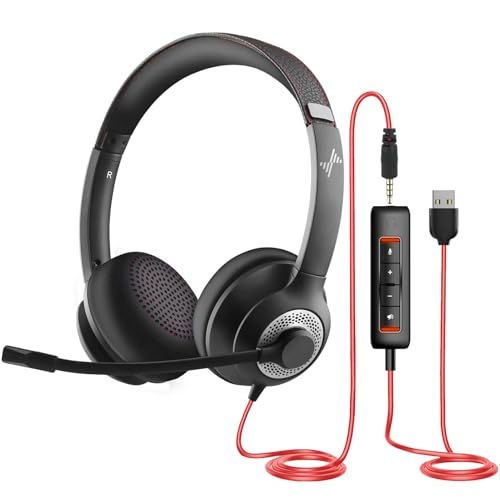
- USB and 3.5mm wired connections
- 270-degree boom supports either side
- USB in-line mute and volume controls
Best For: Wired use across different devices
Simple USB-A Pick

- Wired USB-A connection for PC or Mac
- Binaural design with leatherette cushions
- Adjustable headband and carrying case
Best For: Desk-based calls on a USB-A computer
Best for Flexible USB Setups
Jabra Evolve 20 (2025 Edition)

- USB-A/USB-C wired connection
- Noise-canceling microphone
- Lightweight on-ear design with in-line controls
Best For: Office and home desks needing flexible USB connectivity
Best for Wireless Multitasking

- Bluetooth 5.3 and 2.4 GHz dongle
- Simultaneous computer and phone connection
- Up to 30 hours of advertised talk time
Best For: Workers switching between computer meetings and phone calls
Best for Simple USB-A Calling

- Plug-and-play USB-A connection
- Rotating noise-canceling boom mic
- In-line mute and volume controls
Best For: PC and Chromebook users at fixed USB-A desks
Best for Teams
Yealink BH70 Dual with Charging Stand
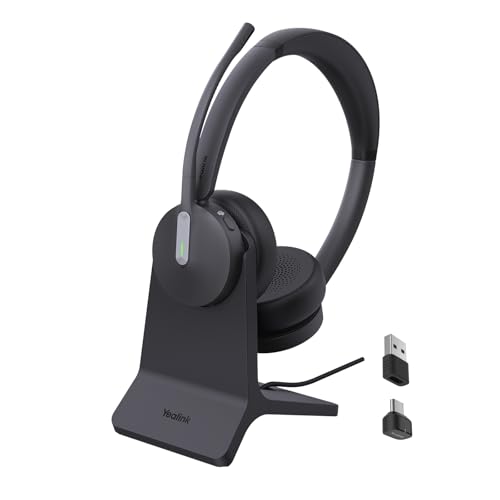
- Teams-certified with one-touch access via the BT51 dongle
- Three-microphone noise reduction for work calls
- Up to 35 hours of talk time; charging stand included
Best For: Teams-based wireless calling
Best Wired Flexibility
NUBWO HW02 USB and 3.5 mm Headset
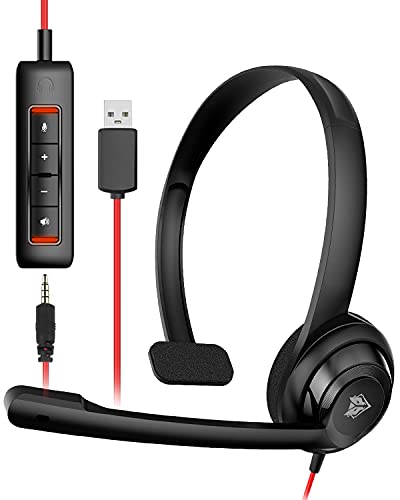
- USB and 3.5 mm connection options
- Detachable inline volume and mute controls
- Lightweight design with adjustable boom mic
Best For: Wired computer calls with occasional 3.5 mm use
Best for Wireless PC Calls

- Bluetooth plus a Windows-only USB dongle
- Up to 35 hours of stated operation
- One-click mute during active calls
Best For: Wireless calls on a Windows PC
Quick-Connect Wireless Pick – OTYHVV Wireless Work Headset
Among call center headsets with mic, this OTYHVV wireless model is a practical choice for computer-based calls when you want a USB dongle and simple power controls. Its physical switch reconnects the headset after initial pairing, while the charging base provides a slot for the dongle.
Best For: Remote workers who want quick setup, one-tap mute, and wireless calling from a computer.
Pros:
- AI-powered microphone noise cancellation is designed to reduce background sounds on calls.
- USB dongle connects to computers without requiring built-in Bluetooth or drivers.
- Boom-mounted mute button provides voice prompts confirming mute status.
Cons:
- PC mute control requires the USB dongle; it is not available through computer Bluetooth.
- Supplied notes do not specify talk time or wireless range.
The straightforward power switch and dedicated mute control suit back-to-back meetings. Choose the dongle connection if PC-side mute is important to your workflow.
Dual-Device ANC Pick – M112 Wireless Headset
For shoppers comparing call center headsets with mic, the M112 combines active noise cancellation for listening with environmental noise cancellation for the microphone. It connects through a USB-A dongle and Bluetooth, with support for staying connected to two devices at once.
Best For: PC or Mac users who also take mobile calls and want a physical flip-to-mute boom.
Pros:
- Hybrid ANC offers three listening modes, while microphone ENC targets background noise on calls.
- USB-A dongle and Bluetooth allow dual-device connectivity.
- Flip-to-mute boom makes mute status easy to control physically.
- Rated for up to 35 hours of talk time after a two-hour charge.
Cons:
- USB dongle is not compatible with landlines, desk phones, or VoIP phones.
- Multi-function button answers and ends cell calls only.
The M112 offers a useful mix of listening isolation and call controls for computer-and-phone workflows. Check your calling hardware before buying if you rely on a desk phone.
Flexible Wired Pick – JIAMQISHI USB and 3.5mm Headset
If you prefer wired call center headsets with mic, this JIAMQISHI on-ear model offers both USB and 3.5mm connections. Its unidirectional boom can rotate 270 degrees for left- or right-side wear, and the USB in-line controls include microphone and speaker mute.
Best For: Shared work or study spaces where a wired headset needs to connect to different devices.
Pros:
- USB and 3.5mm connections cover a range of compatible computers and mobile devices.
- Rotatable boom supports wearing the microphone on either side.
- In-line controls include microphone mute, speaker mute, and volume adjustment.
- Adjustable headband and breathable memory-foam earpads are designed for extended wear.
Cons:
- Wired design limits movement to the cable’s reach.
- In-line USB controls may not apply when using the 3.5mm connection alone.
This is a versatile wired option if connection flexibility matters more than roaming around the office. Check which controls are available with the port you plan to use.
Simple USB-A Pick – Plantronics Blackwire 3220
The Plantronics Blackwire 3220 is a straightforward wired entry among call center headsets with mic. This binaural, over-the-head model uses USB-A for compatible PCs and Macs and includes cushioned leatherette earpieces.
Best For: Desk-based computer calling where a wired USB-A connection is preferred.
Pros:
- Binaural design provides an earpiece for each ear.
- USB-A wired connection suits compatible PCs and Macs.
- Adjustable headband and included carrying case add practical flexibility.
Cons:
- USB-A-only version will need an adapter for devices without that port.
- Five-foot cable offers less freedom of movement than a wireless headset.
The Blackwire 3220 keeps the setup focused on computer calls rather than wireless features. Confirm that your workstation has USB-A before choosing this version.
Best for Flexible USB Setups – Jabra Evolve 20 (2025 Edition)
Among call center headsets with mic, the Jabra Evolve 20 (2025 Edition) is a practical wired choice for desks that use USB-A or USB-C. Its dual-ear, on-ear design and in-line controls keep everyday calls straightforward.
Best For: Office or work-from-home users who want a wired headset with flexible USB connectivity.
Pros:
- Noise-canceling microphone is designed for clearer calls.
- Lightweight, 132 g design with ear cushions for extended wear.
- USB-A/USB-C connection, in-line call controls, and compatibility with leading meeting platforms.
Cons:
- Wired connection limits movement away from the computer.
- On-ear fit may not suit buyers who prefer over-ear cups.
The flexible USB connection is the main reason to choose this model; if wireless mobility matters more, consider a different setup.
Best for Wireless Multitasking – awatrue EH11 Wireless Headset
If you need call center headsets with mic that let you move without a cable, the awatrue EH11 offers Bluetooth 5.3 and a 2.4 GHz dongle. Its dual-device connection is useful when your workday alternates between computer meetings and phone calls.
Best For: Agents and remote workers who switch between a computer and smartphone and want a wireless headset.
Pros:
- Noise-canceling microphone and a built-in mute button support call handling.
- Connects to a computer and cellphone simultaneously.
- Advertised up to 30 hours of talk time, with a charging base included.
- Adjustable padded headband and breathable ear cushions.
Cons:
- Requires charging, unlike a wired USB headset.
- On-ear design may not be the right fit for everyone.
The dual-device setup and charging base make this a convenient pick for mobile workdays, provided you are comfortable managing battery life.
Best for Simple USB-A Calling – Logitech H390 Wired Headset
For shoppers comparing call center headsets with mic, the Logitech H390 keeps the basics simple: plug its USB-A cable into a computer, then use the in-line controls for volume and mute. The rotating boom mic can be moved out of the way between calls.
Best For: PC or Chromebook users who want straightforward, wired calling without software setup.
Pros:
- Plug-and-play USB-A connection with no software installation required.
- Rotating noise-canceling microphone and accessible in-line controls.
- Adjustable headband, swivel-mounted leatherette cushions, and a 6.23 ft cable.
Cons:
- USB-A connection may require an adapter for computers with only USB-C ports.
- Wired cable limits movement away from the computer.
The H390 is a sensible choice for a fixed USB-A workstation, especially if easy mute access matters more than wireless freedom.
Best for Teams – Yealink BH70 Dual with Charging Stand
For buyers comparing call center headsets with mic, the Yealink BH70 Dual offers a wireless, Teams-certified option with three microphones and noise-reduction processing designed to keep your voice clear in busy offices or home workspaces.
Best For: Teams-based calling where wireless mobility and a charging stand matter.
Pros:
- Three-microphone noise reduction targets background conversations, keyboard sounds, and household noise.
- Up to 35 hours of talk time with the busylight off.
- Includes a USB-C/A dongle and charging stand; the 147 g on-ear design is built for extended wear.
Cons:
- One-touch Teams activation requires the BT51 dongle to be connected.
- The charging stand has no call controls and includes no power adapter.
The BH70 is a strong fit if your calling setup centers on Teams. The bundled stand makes charging convenient, but it does not replace headset controls.
Best Wired Flexibility – NUBWO HW02 USB and 3.5 mm Headset
The NUBWO HW02 is a straightforward wired choice among call center headsets with mic. Its adjustable boom microphone and detachable USB control unit suit computer calls, while the 3.5 mm connection offers another way to plug into compatible devices.
Best For: Buyers who want a lightweight wired headset with both USB and 3.5 mm connection options.
Pros:
- Detachable USB controls provide volume and mute adjustments for PC or Mac calls.
- Adjustable boom mic supports conversations on platforms including Teams, Skype, and Zoom.
- On-ear design weighs about 60 g for extended calls.
Cons:
- Wired connection limits movement away from the device.
- USB inline controls are intended for computer use; a 3.5 mm connection is used for phones or tablets.
Choose the HW02 if simple controls and connection flexibility matter more than wireless freedom. Its low weight is appealing for long sessions, though fit remains a personal preference.
Best for Wireless PC Calls – PrancyBt KH120M Headset
Among wireless call center headsets with mic, the PrancyBt KH120M pairs Bluetooth connectivity with an included USB dongle for computers without built-in Bluetooth. It offers an adjustable headband, soft ear pads, and a microphone designed to reduce surrounding noise.
Best For: Windows PC users who want wireless calls without a desk-phone connection.
Pros:
- Bluetooth connection and included USB dongle provide two computer connection options.
- Up to 35 hours of stated operation and a wireless range of up to 33 feet.
- One-click mute is available during active calls or meetings.
Cons:
- The included USB dongle works only with Windows.
- Not compatible with desk phones or landline telephones.
- Mute does not work outside active calls or meetings.
The KH120M makes sense for a Windows-based wireless setup, especially if your PC lacks Bluetooth. Check your connection needs first: its dongle and mute function have specific limitations.
How We Picked These Call Center Headsets with Mic
We focused on practical differences that matter during frequent calls: wired versus wireless connections, microphone and mute controls, wearing style, and stated compatibility. The selection includes simple USB models for fixed desks and wireless choices for people who move between calls and tasks. Product descriptions can establish features, but they cannot prove how a mic sounds in your office or how a headset feels after a full shift. Check current specifications and return terms before buying.
Quick Comparison: Which Type Fits Your Workday?
- Wired USB: Start with the Jabra Evolve 20, Plantronics Blackwire 3220, Logitech H390, JIAMQISHI, or NUBWO HW02 if you want a desk-focused connection without charging.
- Wireless flexibility: Consider the Yealink BH70, awatrue, PrancyBt, or either listed generic wireless model if you need to move away from your desk. Compare their included adapters and supported connections before choosing.
- Platform-specific setup: The Yealink BH70 listing states Teams certification. If that matters to your organization, confirm the exact package and device compatibility.
Key Buying Factors for Call Center Headsets with Mic
Connection and Compatibility
Match the headset to the device you actually take calls on. A USB-A wired headset needs an available USB-A port or a suitable adapter; Bluetooth models may connect directly, while some wireless options include a USB dongle. Check your computer, softphone, and workplace device policy. If you alternate between a laptop and phone, verify switching support rather than assuming every wireless headset offers it.
Microphone, Mute, and Background Noise
Look for a boom mic you can position near your mouth and a mute control you can find without interrupting a call. Noise-cancelling microphone claims concern what callers hear; ANC concerns noise you hear through the earcups. Neither feature guarantees silence in a busy room. For shared offices, prioritize a consistent mic position and a clearly indicated mute state.
Comfort and Daily Upkeep
On-ear pressure, headband adjustment, and weight matter more as call hours increase. If you wear glasses, consider how the ear pads sit against the frames. Wired models avoid battery management but limit movement; wireless models add charging and, potentially, dongle management. Check the stated battery life against your shift length, allowing for charging time between shifts.
Who Should Buy Which Call Center Headsets with Mic?
For a fixed workstation: Choose a wired USB option if simplicity and no charging are priorities. For moving around an office: Compare wireless models by range, adapter requirements, and mute access. For a Teams-centered workplace: Look closely at the BH70’s stated certification, while confirming your organization’s requirements. For long shifts: Put fit and an easy return policy ahead of extra features; comfort is personal, and the best specification sheet cannot settle it for you.