The best headset for Zoom is one you can wear comfortably and connect reliably—without making coworkers strain to hear you. A wired USB model keeps setup simple, while wireless and open-ear options offer more freedom to move.
These 10 picks cover different budgets, port types, and wearing styles. Use the guide below to narrow them down by your workspace and meeting habits.
Best 10 Zoom Headsets with Microphone Picks for 2026
Best USB-C Open-Ear Pick
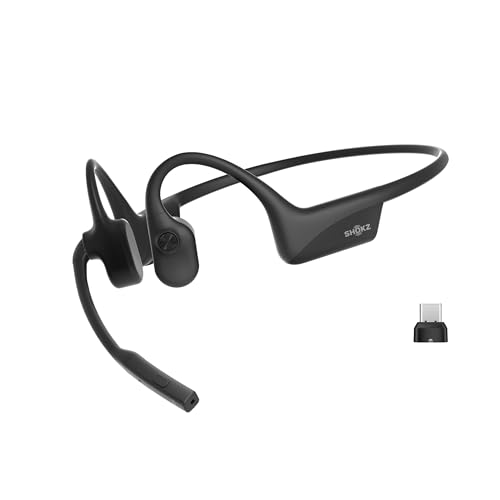
- 35 g open-ear design
- Zoom-Certified with USB-C adapter
- Up to 16 hours of talk time
Best For: USB-C computer users who want to hear their surroundings
Best USB-A Open-Ear Pick

- Includes USB-A wireless adapter
- Zoom-Certified open-ear headset
- Up to 16 hours of talk time
Best For: USB-A computer users who prefer an open-ear fit
Best Flip-to-Mute Wireless Pick

- Flip-to-mute microphone boom
- ANC, ENC, and USB-A dongle
- Up to 35 hours of talk time
Best For: Long computer calls in busy spaces
Best Dual-Connection Wired Pick

- USB and 3.5 mm connections
- Rotatable unidirectional boom mic
- In-line mute and volume controls
Best For: Desk-based calls and online classes
USB-A Everyday Pick

- Plug-and-play USB-A connection
- Rotating noise-canceling microphone
- Inline mute and volume controls
Best For: Everyday meetings on a USB-A computer
USB-C Everyday Pick

- Plug-and-play USB-C connection
- Rotating noise-canceling microphone
- Inline mute and volume controls
Best For: Wired meetings on a USB-C laptop
One-Ear Collaboration Pick

- Single-ear design keeps one ear open
- USB-C connection with USB-A adapter
- Inline call, mute, and volume controls
Best For: Work calls with one-ear awareness
Wireless Flexibility
PrancyBt KH120M Bluetooth Headset

- Bluetooth or included Windows USB dongle
- Up to 35 hours of stated battery life
- Mute works during active calls or meetings
Best For: Windows users who want wireless meeting audio
Lightweight Wired Pick
Lenovo USB-A Wired Stereo Headset Gen 2

- 140 g lightweight design
- In-line call, volume, and mute controls
- AI noise cancellation uses Lenovo software
Best For: PC and laptop users with a USB-A port
Multi-Device Wired Pick

- Certified for Zoom and Microsoft Teams
- USB-C, USB-A adapter, and 3.5 mm
- Noise-cancelling boom microphone
Best For: Users switching between computers and compatible mobile devices
Best USB-C Open-Ear Pick – SHOKZ OpenComm2 UC
Among zoom headsets with microphone, the SHOKZ OpenComm2 UC stands out for its open-ear bone-conduction design and included USB-C wireless adapter. It weighs 35 g and is Zoom-Certified for computer meetings.
Best For: People who want to hear their surroundings during calls and have a USB-C port on their PC or Mac.
Pros:
- Open-ear fit leaves your ears uncovered.
- Noise-canceling microphone with DSP and physical mute controls.
- Up to 16 hours of talk time; a five-minute charge provides up to two hours of talk time.
Cons:
- Open-ear design does not block surrounding noise for the wearer.
- Included computer adapter requires a USB-C port.
Choose this version if awareness and a USB-C computer connection matter more than isolating yourself from office noise.
Best USB-A Open-Ear Pick – SHOKZ OpenComm2 UC
If your computer has USB-A rather than USB-C, this version of the SHOKZ OpenComm2 UC is a practical entry among zoom headsets with microphone. It includes a Loop 120 USB-A wireless adapter and is Zoom-Certified.
Best For: PC or Mac users with a USB-A port who prefer an open-ear headset for meetings.
Pros:
- 35 g open-ear design keeps ears uncovered.
- Noise-canceling microphone with DSP and onboard call controls.
- Up to 16 hours of talk time, with a five-minute quick charge providing up to two hours of talk time.
Cons:
- Open-ear fit offers no noise isolation for the listener.
- The included computer adapter uses USB-A, not USB-C.
The key buying decision versus the USB-C model is your available computer port; the open-ear fit makes the same trade-off between awareness and isolation.
Best Flip-to-Mute Wireless Pick – M112 ANC & ENC Headset
For shoppers comparing zoom headsets with microphone for a busy workspace, the M112 pairs active noise cancellation for listening with environmental noise cancellation for the mic. Its flip-to-mute boom gives you a physical way to mute during calls.
Best For: People taking long computer calls who want noise reduction, a USB-A dongle, and a flip-to-mute mic.
Pros:
- ANC for listening and ENC for microphone pickup.
- Includes a USB-A dongle and supports simultaneous dongle and Bluetooth connections.
- Up to 35 hours of talk time on a charge.
Cons:
- Not compatible with landlines, desk phones, or VoIP phones.
- Wireless operating range is listed at 33 feet.
This is a feature-rich wireless option for computer meetings, especially if a physical mic-mute action matters to you. Note the phone-system limitation before buying.
Best Dual-Connection Wired Pick – JIAMQISHI EH01 USB Headset
The JIAMQISHI EH01 is a straightforward wired choice among zoom headsets with microphone. Its USB and 3.5 mm connection options make it useful across compatible computers and devices without relying on a wireless battery.
Best For: Desk-based meetings or online classes where a wired connection and accessible mute controls are priorities.
Pros:
- USB and 3.5 mm connection options.
- Unidirectional, rotatable boom mic can be worn on either side.
- In-line microphone mute, speaker mute, and volume controls.
Cons:
- Wired design limits movement to the cable’s reach.
- On-ear pads may not suit buyers who want an open-ear fit.
Pick this model if connection flexibility and simple in-line controls are more important than roaming away from your desk.
USB-A Everyday Pick – Logitech H390 Wired Headset
Among zoom headsets with microphone, the Logitech H390 is a straightforward choice for computers with USB-A ports. It combines plug-and-play setup, stereo audio, and a rotating noise-canceling microphone for everyday calls.
Best For: People who want a simple wired headset for meetings on a USB-A computer or Chromebook.
Pros:
- USB-A plug-and-play connection requires no software installation.
- Rotating microphone helps reduce unwanted background noise and tucks away when not needed.
- Inline volume and mute controls, padded ear cushions, and a 6.23-foot cable add convenience.
Cons:
- USB-A connection is less convenient for computers with only USB-C ports.
- Wired design limits movement to the cable’s reach.
The H390 is a practical option if your computer has USB-A and you value easy controls over wireless mobility.
USB-C Everyday Pick – Logitech H391 Wired Headset
If you’re comparing zoom headsets with microphone for a USB-C computer, the Logitech H391 offers a straightforward wired setup. It pairs stereo audio with a rotating noise-canceling microphone and needs no software installation.
Best For: People who want plug-and-play calls on a USB-C laptop or Chromebook.
Pros:
- USB-C connection works without installing software.
- Rotating microphone minimizes unwanted background noise and moves out of the way.
- Inline mute and volume controls, padded ear cushions, and a 6.23-foot cable suit longer conversations.
Cons:
- The wired connection limits movement to the cable’s reach.
- Its USB-C plug is not a direct fit for a USB-A-only port.
Choose the H391 when USB-C is your preferred computer connection and you want familiar, uncomplicated meeting controls.
One-Ear Collaboration Pick – Poly Blackwire 3210
The Poly Blackwire 3210 stands out among zoom headsets with microphone if you prefer to keep one ear open during calls. Its wired USB-C connection includes a USB-A adapter, and Poly lists it as compatible with Zoom and Microsoft Teams.
Best For: People who want one-ear awareness and flexible USB connections for work calls.
Pros:
- Connects to PC or Mac through USB-C or the included USB-A adapter.
- Noise-canceling microphone and Dynamic EQ support voice calls.
- Inline answer/end, mute, and volume controls simplify call management.
Cons:
- Single-ear design is not ideal if you want audio in both ears.
- Wired connection limits how far you can move from the computer.
The Blackwire 3210 is the most flexible connection option here, especially if you switch between USB-C and USB-A computers while keeping an ear free.
Wireless Flexibility – PrancyBt KH120M Bluetooth Headset
Among zoom headsets with microphone options, the PrancyBt KH120M suits buyers who want wireless movement during calls. It connects by Bluetooth or an included USB dongle, with a stated range of up to 33 feet.
Best For: Windows users who want a wireless headset for meetings and calls.
Pros:
- Noise-cancelling microphone and one-click mute for active calls or meetings.
- Up to 35 hours of stated battery life.
- Adjustable headband, soft ear pads, and rotatable earcups.
Cons:
- The included USB dongle works only with Windows.
- Not compatible with desk phones or landline telephones.
This is a practical pick if you value freedom from a cable; check your computer’s Bluetooth or Windows USB compatibility before buying.
For shoppers comparing zoom headsets with microphone options, the Lenovo USB-A Wired Stereo Headset Gen 2 offers a straightforward wired connection and in-line call controls. Lenovo lists it as compatible with Zoom, Teams, and several other meeting platforms.
Best For: Laptop or PC users who want a lightweight USB-A headset for calls.
Pros:
- USB-A plug-and-play connection for supported meeting platforms.
- Control box provides call, volume, and mute functions.
- 140 g design with replaceable earcups.
Cons:
- AI-enhanced noise cancellation relies on Lenovo’s LADM software.
- USB-A connection may require an adapter on devices without a USB-A port.
Choose this model if a light, corded setup matters more than wireless mobility, and check whether your device has the required port.
Of these zoom headsets with microphone options, the Poly Blackwire 5220 offers the most connection choices: USB-C, a tethered USB-A adapter, and a 3.5 mm jack for compatible devices. It is certified for Zoom and Microsoft Teams.
Best For: People who switch between a computer and compatible mobile devices.
Pros:
- Zoom and Microsoft Teams certification.
- Noise-cancelling boom mic and ear cushions that provide passive isolation.
- USB-C, USB-A adapter, and 3.5 mm connection options.
Cons:
- Wired connections limit movement away from your device.
- Passive ear-cushion isolation is not active noise cancellation.
Its versatile ports make it worth considering for a mixed-device workspace, especially if you prefer a corded headset over managing a battery.
How We Picked the Best Zoom Headsets with Microphone
We focused on features that matter during video meetings: a dedicated microphone, practical connection options, accessible mute controls, and a wearing style suited to extended calls. This selection includes USB-A and USB-C wired headsets, wireless models with dongles, and open-ear designs. Product descriptions do not establish how well a microphone performs in your particular room, so check current compatibility details and return terms before buying.
Quick Comparison: Which Style Fits Your Calls?
- Simple wired setup: The Logitech H390 (USB-A) and H391 (USB-C) suit buyers who want a familiar stereo headset without charging.
- More connection flexibility: The Poly Blackwire 5220 lists USB-C, USB-A, and 3.5 mm connections; verify which connections the specific package supports and whether microphone and controls work on each device.
- One ear free: The single-ear Poly Blackwire 3210 lets you hear people nearby while taking calls.
- Open-ear wireless: Choose the SHOKZ OpenComm2 UC variant with a dongle that matches your computer’s USB-C or USB-A port.
- Wireless alternatives: The PrancyBt and the Upgrade ANC & ENC headset offer dongle-based options; compare battery life, mute operation, and connection requirements.
Key Buying Factors for Zoom Headsets with Microphone
Microphone and Room Noise
Look for a boom mic positioned near your mouth and a convenient way to mute. A noise-canceling microphone is intended to reduce background sound sent to other participants; ANC, by contrast, is intended to reduce noise you hear. Neither label guarantees clear speech in a noisy room. If your workspace is busy, review microphone samples when available.
Connection and Compatibility
Match the headset’s plug or dongle to your computer before comparing extras. USB-A and USB-C are different connectors, and a headset’s mute or volume controls may behave differently across Zoom, operating systems, and devices. Wired USB avoids battery management; a USB dongle can simplify wireless connection, but it occupies a port. If you switch between computers, confirm what comes in the box.
Comfort and Awareness
Stereo on-ear or over-ear designs can help you focus, but fit matters on long meeting days. Single-ear and open-ear styles keep you more aware of your surroundings, which can be useful in a shared home or office. Consider weight, earcup pressure, replaceable pads, and whether the boom sits comfortably on your preferred side.
Who Should Buy Which Zoom Headsets with Microphone?
For a straightforward desk setup, start with a wired Logitech model matched to your port; the JIAMQISHI USB headset and Lenovo USB-A stereo headset are other wired options to compare for controls and fit. Choose the Blackwire 3210 if you need one ear uncovered, or consider the Blackwire 5220 if its listed connection choices suit several devices. Pick a USB-A or USB-C OpenComm2 UC if open-ear awareness is your priority. If you need to walk during meetings, compare the two other wireless options for the mute method and battery routine you’ll actually use. Among Zoom Headsets with Microphone, the right choice is the one that fits your ports, room, and workday—not the longest feature list.