As you explore the landscape of cloud-ready printers for 2025, you’ll find that advancements in technology have made wireless printing more accessible and efficient than ever. Whether you’re in a home office or a bustling workplace, these top ten models promise to elevate your printing experience. With features like mobile app integration and dual-band connectivity, you might wonder which printer truly stands out among the rest. Let’s take a closer look.
Brother Professional Laser Printer with Scanner (MFC-L2900DW)

If you’re a small business owner in need of a versatile printing solution, the Brother Professional Laser Printer MFC-L2900DW is an excellent choice. This compact all-in-one device prints at an impressive 36 pages per minute, making high-volume tasks a breeze. You’ll appreciate the automatic duplex printing and 50-page document feeder, which boost efficiency. Plus, its dual-band wireless connectivity lets you print and scan directly from your smartphone or tablet using the Brother Mobile Connect app. With a user-friendly touchscreen and seamless cloud integration, you’ll streamline your workflow while ensuring your sensitive information is secure. It’s a smart investment for any business.
Best For: Small business owners looking for a compact and efficient all-in-one printing solution that can handle high-volume tasks.
Pros:
- High-speed printing at 36 pages per minute, ideal for busy work environments.
- Versatile connectivity options including dual-band wireless, Ethernet, and USB, allowing for flexible printing and scanning.
- User-friendly 3.5-inch touchscreen and seamless cloud integration for enhanced workflow efficiency.
Cons:
- Monochrome printing limits use for color documents and graphics.
- Weighing 26 pounds, it may be less portable compared to lighter alternatives.
- Requires Brother Genuine Supplies, which might increase the cost of replacement cartridges.
Epson EcoTank ET-2800 Wireless All-in-One Printer

The Epson EcoTank ET-2800 Wireless All-in-One Printer stands out as an ideal choice for budget-conscious users seeking high-quality printing without the hassle of traditional ink cartridges. With its cartridge-free design, you’ll enjoy significant savings—up to 90% on ink costs. This printer offers an impressive print resolution of 5760 x 1440 dpi, ensuring vibrant color prints and sharp black text. Setup is a breeze, taking just about ten minutes, and it supports a variety of media types. While some users report connectivity issues with the Epson Smart Panel app, the overall print quality and ink longevity make it a worthwhile investment.
Best For: Budget-conscious users seeking high-quality printing without the hassle of traditional ink cartridges.
Pros:
- Cartridge-free design allows for significant ink savings of up to 90%.
- High print resolution of 5760 x 1440 dpi ensures vibrant color and sharp text.
- Easy setup process takes approximately ten minutes, making it user-friendly.
Cons:
- Some users report connectivity issues with the Epson Smart Panel app.
- Slow print speed of up to 10 pages per minute may be a drawback for high-volume printing.
- Users have experienced print quality deterioration over time with certain paper types.
Brother MFC-J4335DW Wireless All-in-One Color Inkjet Printer

For home office professionals or small business owners seeking efficiency, the Brother MFC-J4335DW Wireless All-in-One Color Inkjet Printer stands out with its revolutionary INKvestment Tank technology. It offers up to a year of ink in the box, so you won’t have to worry about constant refills. With fast printing speeds and all-in-one functionality—print, copy, scan, and fax—this compact printer fits perfectly in any workspace. Plus, being cloud-ready and compatible with the Brother Mobile Connect App makes wireless printing a breeze. Enjoy seamless connectivity and smart features like Alexa integration for ink alerts as you work.
Best For: Home office professionals and small business owners looking for an efficient, all-in-one printing solution with minimal maintenance.
Pros:
- Fast printing speeds and all-in-one functionality (print, copy, scan, fax) enhance productivity.
- Revolutionary INKvestment Tank technology provides up to a year of ink, reducing the need for frequent refills.
- Wireless and cloud-ready with compatibility for the Brother Mobile Connect App and Alexa integration for smart features.
Cons:
- Small LED display may make navigation less user-friendly.
- Clunky setup process can be frustrating for some users.
- Design aesthetics may not appeal to everyone, lacking a modern look.
HP DeskJet 2855e Wireless All-in-One Inkjet Printer

Looking for a budget-friendly solution for your light printing needs? The HP DeskJet 2855e Wireless All-in-One Inkjet Printer might be just what you need. This compact printer offers color printing, scanning, and copying with a reliable wireless connection. With print speeds up to 7.5 ppm for black and 5.5 ppm for color, it handles everyday tasks efficiently. You’ll appreciate the easy setup via the HP Smart app, compatible with AirPrint for Apple users. Plus, the three-month Instant Ink trial helps manage costs, although be mindful of potential issues like paper feeding. Overall, it’s perfect for casual home use!
Best For: Budget-conscious users looking for a compact printer for light home printing, scanning, and copying tasks.
Pros:
- Easy wireless setup with the HP Smart app and AirPrint compatibility.
- Affordable ink subscription with the Instant Ink trial to manage ink costs.
- Reliable performance for casual printing needs with decent print quality.
Cons:
- Potential issues with paper feeding may arise.
- Customer support can be difficult to navigate.
- Not suitable for high-volume printing or professional-quality documents.
Brother Business Color Laser Printer (HL-L8360CDW)

Designed with busy professionals in mind, the Brother HL-L8360CDW Business Color Laser Printer excels in delivering fast, high-quality prints at up to 33 pages per minute. With a maximum print resolution of 2400 x 600 dpi, your documents will look crisp and vibrant. The automatic duplex printing feature saves paper, while the 300-sheet input capacity reduces the need for constant refills. Enjoy multiple connectivity options, including wireless and USB, and easily print from your mobile devices. Plus, with super high yield toner cartridges, you’ll get impressive cost efficiency. Overall, it’s a reliable choice for your office printing needs.
Best For: The Brother HL-L8360CDW Business Color Laser Printer is best for busy professionals and small to medium-sized businesses that require fast, high-quality printing with cost efficiency.
Pros:
- Fast printing at up to 33 pages per minute for both color and black documents.
- High print resolution of 2400 x 600 dpi ensures crisp and vibrant document quality.
- Cost-efficient with super high yield toner cartridges that can print up to 6,500 pages.
Cons:
- Weight of 48.1 pounds may make it less portable compared to lighter printers.
- Some users report issues with toner cartridges, affecting overall satisfaction.
- Limited input capacity of 300 sheets may require more frequent reloading in high-volume environments.
Dell E525W Color Laser All-in-One Wireless and Cloud Ready Printer

The Dell E525W Color Laser All-in-One Printer stands out as an excellent choice for small businesses and home offices that demand versatility and cloud connectivity. Weighing 36.1 pounds, it fits well in tight spaces and supports media sizes up to 11×17 inches. With a maximum copy speed of 18 pages per minute, you’ll appreciate its efficiency. Enjoy vibrant prints with a resolution of 600 x 600 dpi. While it’s user-friendly with WiFi connectivity and offers useful mobile scanning through the Dell Document Hub, be mindful of potential paper jams and high toner costs that some users have reported.
Best For: Small businesses and home offices seeking a versatile and cloud-connected printing solution.
Pros:
- Fast printing with a maximum copy speed of 18 pages per minute.
- Vivid color quality with a print resolution of 600 x 600 dpi.
- Easy WiFi connectivity and mobile scanning capabilities via the Dell Document Hub.
Cons:
- Frequent paper jams reported by users.
- High costs associated with toner replacements.
- User-unfriendly interface and slow warm-up time noted in feedback.
HP OfficeJet Pro 8139e Wireless All-in-One Printer

For home office professionals seeking efficiency and versatility, the HP OfficeJet Pro 8139e Wireless All-in-One Printer stands out with its impressive array of features. It prints, scans, copies, and faxes, all while delivering speeds up to 20 pages per minute. With wireless connectivity options like Apple AirPrint and HP Smart app, you can print seamlessly from any device. The 225-sheet input tray and automatic duplex printing enhance productivity, while the 1-year Instant Ink trial helps manage costs. Although some users report setup challenges, the print quality and reliability make it a solid choice for your home office needs.
Best For: Home office professionals seeking an efficient and versatile all-in-one printing solution.
Pros:
- Impressive print speeds of up to 20 pages per minute and automatic duplex printing for enhanced productivity.
- Wireless connectivity options including Apple AirPrint and HP Smart app for seamless printing from multiple devices.
- Comes with a 1-year Instant Ink trial to help manage ink costs effectively.
Cons:
- Some users report setup challenges, particularly with wireless connectivity.
- Occasional issues with slow printing and paper jams have been noted.
- Mixed experiences with the Instant Ink service, leading to varying satisfaction among users.
Brother HL-L2480DW Wireless Compact Monochrome Laser Printer

Small businesses and remote workers will find the Brother HL-L2480DW Wireless Compact Monochrome Laser Printer an invaluable tool. This multi-function device combines printing, scanning, and copying, making it perfect for any workspace. With dual-band wireless connectivity and print speeds up to 36 pages per minute, it’s efficient and user-friendly. The 2.7” touchscreen simplifies navigation, while cloud-based app support lets you print and scan directly from services like Google Drive. Plus, the Brother Mobile Connect App enables remote management and easy supply ordering. With a 250-sheet capacity and cost-saving toner options, it’s a smart choice for productivity.
Best For: Small businesses and remote workers looking for an efficient multi-function printer that combines printing, scanning, and copying in one device.
Pros:
- Versatile multi-functionality: Combines printing, scanning, and copying, saving space and resources.
- Fast printing speeds: Prints up to 36 pages per minute, enhancing productivity.
- Mobile management: The Brother Mobile Connect App allows for remote printing and easy supply ordering.
Cons:
- Monochrome only: Limited to black and white printing, which may not suit all users’ needs.
- No automatic document feeder for scanning: Requires manual handling for multi-page scanning tasks.
- Initial setup may be complex: Some users may find the wireless setup challenging without technical assistance.
Brother MFC-L3720CDW Wireless All-in-One Color Printer

Ideal for busy offices or home workspaces, the Brother MFC-L3720CDW Wireless All-in-One Color Printer delivers laser-quality output across printing, copying, scanning, and faxing tasks. With print speeds up to 19 ppm and scan speeds reaching 29 ipm for black and 22 ipm for color, you’ll tackle multi-page jobs effortlessly. Its 50-page Auto Document Feeder and 250-sheet paper tray minimize interruptions. You can easily connect to cloud services like Google Drive and Dropbox via its 3.5-inch touchscreen, while the Brother Mobile Connect app allows for remote management and monitoring of toner levels, ensuring smooth operation wherever you are.
Best For: Those seeking a versatile and efficient all-in-one printer for home offices or busy workspaces.
Pros:
- Fast Performance: Print speeds up to 19 ppm and scan speeds of 29 ipm (black) and 22 ipm (color) enhance productivity.
- Convenient Connectivity: Dual-band wireless support and compatibility with cloud services allow for easy access and management.
- User-Friendly Interface: The 3.5-inch color touchscreen simplifies navigation and enables custom shortcuts for frequent tasks.
Cons:
- Initial Cost: Higher upfront investment compared to basic printers.
- Size: May require more space due to its all-in-one design and larger paper tray.
- Toner Costs: Replacement toner can be expensive, especially if not using the subscription service.
Lexmark MS431dw Black and White Laser Printer
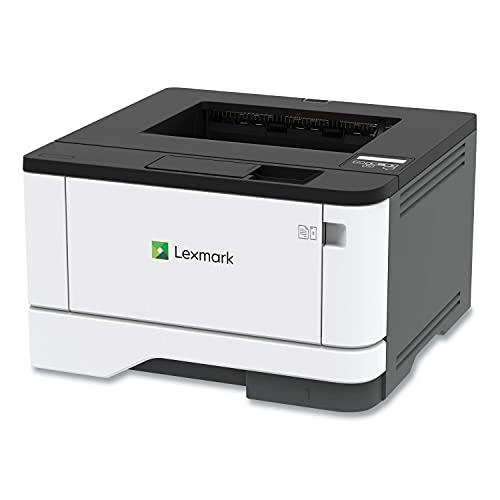
The Lexmark MS431dw Black and White Laser Printer stands out as an excellent choice for businesses that demand efficiency and reliability in their printing tasks. With its compact size and impressive capacity, you can handle between 800 to 8000 pages monthly. Enjoy seamless connectivity through Wi-Fi, Ethernet, and USB, making mobile printing a breeze. The automatic two-sided printing not only saves paper but also enhances productivity. Built with durability in mind, it features a steel frame and energy-saving modes. Plus, you’ll appreciate its full-spectrum security architecture, ensuring your data remains protected throughout your printing experience.
Best For: The Lexmark MS431dw Black and White Laser Printer is best for small to medium-sized businesses that require efficient, high-volume printing with reliable connectivity options.
Pros:
- Compact design fits easily into any workspace without sacrificing performance.
- Automatic two-sided printing helps save paper and reduces printing costs.
- Robust security features protect sensitive data during the printing process.
Cons:
- Limited color printing capabilities as it is a black and white printer only.
- Monthly page volume may be excessive for very small businesses or home offices.
- Initial setup may require some technical knowledge for optimal configuration and connectivity.
Factors to Consider When Choosing Cloud Ready Printers
When you’re choosing a cloud-ready printer, think about the connectivity options that fit your needs. You’ll also want to evaluate printing speed, paper handling capacity, and the type of ink or toner it uses. Don’t forget to check the mobile app usability, as it can make a big difference in your printing experience.
Connectivity Options Available
Choosing a cloud-ready printer means considering various connectivity options that fit your needs. Most cloud-ready printers support dual-band wireless (2.4GHz/5GHz), Ethernet, and USB connections, giving you flexibility for different environments. If you often print from your smartphone or tablet, look for models that offer mobile printing capabilities through compatible apps. Many printers also support popular cloud services like Google Drive, Dropbox, and OneNote, making it easy to integrate into your workflow. For added convenience, some feature Wi-Fi Direct technology, allowing direct peer-to-peer connections without needing a network. Additionally, advanced options like NFC (Near Field Communication) enable quick pairing with mobile devices, enhancing your overall printing experience. Evaluate these options to find the perfect fit!
Printing Speed Requirements
Finding the right printing speed is essential for maintaining efficiency in any workspace. If you’re in a busy office, you’ll want a laser printer that offers speeds between 19 to 36 pages per minute (ppm) to handle high-volume tasks effectively. Inkjet printers, on the other hand, typically print at slower speeds of 5 to 20 ppm, which might not cut it for your needs. Look for printers with automatic duplex printing; this feature allows you to print double-sided without manual effort, saving time and reducing paper waste. Don’t forget about scan speeds, especially if you’re considering a multifunction device—aim for 22 to 29 images per minute (ipm) to guarantee quick document processing and keep your workflow smooth.
Paper Handling Capacity
Paper handling capacity is essential in determining how smoothly your printing tasks can run, especially in high-demand environments. The maximum number of sheets a printer can hold in its input tray directly impacts how often you need to refill the paper supply. If you frequently print large volumes, consider printers with capacities of 250 sheets or more to minimize interruptions. Look for features like bypass trays for specialty media and automatic document feeders (ADFs) to improve versatility and efficiency. Additionally, duplex printing capabilities can greatly cut down on paper usage. Finally, always assess the printer’s compatibility with various media types, sizes, and weights to confirm it meets your specific printing needs.
Ink or Toner Type
When selecting a cloud-ready printer, one crucial factor to take into account is whether you prefer ink or toner. Inkjet printers use liquid ink cartridges, delivering vibrant color prints and are excellent for photos. However, laser printers use toner cartridges filled with powdered ink, providing faster print speeds and sharper text, making them ideal for high-volume tasks. If you print a lot, toner cartridges often yield up to 6,500 pages, making them more cost-effective long-term. Ink systems can vary, with options like refillable tanks that save you up to 90% on ink costs. Additionally, while inkjets may clog if not used regularly, laser printers usually require less maintenance despite their higher initial cost. Choose wisely based on your printing habits!
Mobile App Usability
As you explore options for cloud-ready printers, the usability of mobile apps becomes a key factor. A well-designed mobile app lets you manage printing tasks, monitor ink levels, and troubleshoot issues directly from your smartphone or tablet. Look for printers with dedicated apps that enhance convenience, especially if you’re often on the go. An intuitive interface is crucial for easy navigation and should include features like print previews, document editing, and seamless access to cloud storage. Confirm compatibility with both iOS and Android devices to avoid connectivity problems. Additionally, apps that integrate with cloud services like Google Drive and Dropbox allow you to print documents directly from your storage, eliminating the need for extra steps.