Renters should not have to choose between convenient smart access and a security upgrade that damages the property. The best renter-friendly smart garage locks and retrofit deadbolts add keyless entry, remote control, or temporary access without requiring permanent modifications.
This roundup compares 10 options with an emphasis on installation flexibility, app features, access methods, connectivity, and compatibility. Before buying, verify whether you need a garage-door controller, a deadbolt retrofit, or both.
Best 10 Renter-Friendly Smart Garage Locks Picks for 2026
Best No-Drill Upgrade
SafeRentGear Retrofit Smart Door Lock

- Tool-free, no-drill installation
- Works with several existing lock types
- Keypad, app, Alexa, and Google control
Best For: Renters and nonpermanent installations
Best 2K Video Access
myQ Smart Garage Door Video Keypad

- 2K wide-angle garage video
- Customizable and scheduled PIN codes
- Motion alerts and two-way audio
Best For: Compatible opener owners wanting video monitoring
Best Hub-Free Retrofit
Retrofit Smart Lock for Existing Deadbolt
- No-drill installation from inside the door
- Built-in Wi-Fi without a hub or subscription
- Retains original keys and supports remote alerts
Best For: Renters wanting a removable deadbolt retrofit
Best Value Video Keypad
myQ Smart Garage Door Video Keypad

- 1080p wide-angle video monitoring
- Scheduled PIN access through the app
- Wireless DIY installation with battery pack
Best For: Compatible opener owners wanting basic video access
Fast Biometric Entry

- Unlocks in about 0.5 seconds with fingerprint access
- Wi-Fi app control plus keypad and physical-key backups
- Up to eight months of battery life with USB-C emergency power
Best For: Fast, flexible entry with biometric access
Rental-Friendly Retrofit

- Installs over an existing deadbolt without drilling
- Built-in Wi-Fi provides remote app control without a hub
- Keypad supports permanent, temporary, and one-time codes
Best For: Renters needing a removable deadbolt upgrade
Feature-Rich Keypad Security

- Creates up to 200 customizable access codes
- Tracks activity and supports remote Wi-Fi control
- Adds auto-lock, PIN protection, and IP54 weather resistance
Best For: Households managing numerous users and access events
Best Connected Upgrade
ULTRALOQ Bolt SE WiFi Smart Deadbolt

- Multiple keyless entry methods
- Built-in Wi-Fi remote control
- Matter over Thread support
Best For: Renters and hosts wanting versatile access management
Best No-Drill Option

- 3M adhesive installation
- Keeps the existing key
- Adjustable auto-lock timing
Best For: Renters and hosts wanting reversible Bluetooth access
Best Smart-Home Ready Retrofit
- No-drill adhesive retrofit
- Matter and Hub3 support
- Phone, NFC, touch, and voice control
Best For: Renters wanting expandable smart-home access
Best No-Drill Upgrade – SafeRentGear Retrofit Smart Door Lock
For renters seeking renter-friendly smart garage locks or entry upgrades, this SafeRentGear retrofit lock emphasizes a tool-free installation that avoids drilling and permanent changes. It fits over or alongside compatible existing deadbolts, mortise, and rim/latch locks, and includes a Wi-Fi hub for app and voice control.
Best For: Renters, apartments, Airbnb hosts, and other nonpermanent installation situations.
Pros:
- Installs without drilling or tools and includes adhesive pads.
- Works with many existing deadbolt, mortise, and rim/latch setups.
- Supports keypad entry, temporary codes, SmartLife app control, Alexa, and Google Home.
Cons:
- Requires six AAA batteries, which are not included.
- Compatibility still depends on the existing lock and door hardware.
- Voice assistant control requires setup with the included Wi-Fi hub.
This is a flexible choice when preserving the original lock matters most. Verify your current hardware and plan for the required batteries before installation.
Best 2K Video Access – myQ Smart Garage Door Video Keypad
This myQ video keypad is a strong option for renters comparing renter-friendly smart garage locks, especially when garage monitoring matters as much as access. It adds customizable PINs, smartphone control, a wide-angle 2K camera, motion detection, notifications, and two-way audio without replacing the garage opener.
Best For: Users with compatible Chamberlain, LiftMaster, or Craftsman openers who want video-enabled garage access.
Pros:
- Provides 2K live video with a wide-angle view of the garage area.
- Creates individual and time-specific PIN codes through the myQ app.
- Includes motion alerts, remote viewing, and two-way audio.
Cons:
- Compatibility is limited to a single compatible opener manufactured after 1993.
- Recorded history and advanced AI detection require a myQ subscription after the trial.
- Battery operation may require periodic charging or replacement; a power adapter kit is available separately.
Choose this model when surveillance and controlled guest access are priorities. Confirm opener compatibility and account for optional subscription and power-accessory costs.
Best Hub-Free Retrofit – Retrofit Smart Lock for Existing Deadbolt
For renters looking at renter-friendly smart garage locks and similar removable entry upgrades, this retrofit lock keeps the existing single-cylinder deadbolt and original keys. It installs from inside the door without drilling or wiring, connects directly to 2.4GHz Wi-Fi, and avoids a separate hub or subscription.
Best For: Renters and homeowners wanting a removable, app-connected deadbolt retrofit with physical-key backup.
Pros:
- Installs in about eight minutes with a screwdriver and leaves the original keys usable.
- Built-in Wi-Fi enables remote control, status checks, activity history, and alerts without a hub or monthly fee.
- Offers up to 10 months of battery life under the stated usage conditions.
- Gyroscope-based auto-locking and door-ajar alerts add practical monitoring.
Cons:
- Designed for compatible single-cylinder deadbolts and specified door dimensions.
- The optional keypad is sold separately.
- Remote features require 2.4GHz Wi-Fi.
This is one of the more straightforward removable retrofits for users who want smart features while retaining a key. Check door thickness, backset, and deadbolt compatibility before ordering.
Best Value Video Keypad – myQ Smart Garage Door Video Keypad
This earlier myQ video keypad is worth considering for shoppers comparing renter-friendly smart garage locks and wireless garage access devices. It provides 1080p video, customizable PINs, motion notifications, two-way audio, and app control while working with compatible Chamberlain, LiftMaster, and Craftsman openers.
Best For: Compatible garage owners who want wireless PIN access and basic video monitoring.
Pros:
- Supports personalized and time-specific access codes through the myQ app.
- Offers 1080p live viewing, wide-angle coverage, motion alerts, and two-way audio.
- Uses wireless DIY installation and includes a mounting kit and battery pack.
Cons:
- Works with one compatible Chamberlain, LiftMaster, or Craftsman opener manufactured after 1993.
- Recorded video and advanced AI alerts require a myQ subscription after the trial.
- The optional power adapter kit is needed for wired, low-maintenance operation.
This model fits users who want app-managed garage entry and video without a complicated installation. Check opener compatibility and decide whether battery or optional wired power better suits your setup.
Fast Biometric Entry – WYZE Auto-Lock Bolt v2
For renters looking for renter-friendly smart garage locks or entry-door security, the WYZE Auto-Lock Bolt v2 combines fingerprint access, app control, a keypad, and physical keys. Its built-in Wi-Fi supports remote management without requiring a separate hub.
Best For: Users who want fast fingerprint entry with multiple backup unlocking methods.
Pros:
- Fingerprint scanner can unlock the door in about 0.5 seconds.
- Built-in Wi-Fi enables remote lock management through the Wyze app.
- Includes keypad, physical keys, auto-lock, and USB-C emergency power.
- Supplied batteries are rated for up to eight months of use.
Cons:
- Its fingerprint-focused design may be more than needed for shoppers who prefer simple keypad access.
- Wi-Fi and biometric features depend on battery power and proper setup.
The Lock Bolt v2 is a flexible choice when quick entry matters. Its backup keys and USB-C emergency power option add useful reassurance, while the Wyze ecosystem can simplify remote access management.
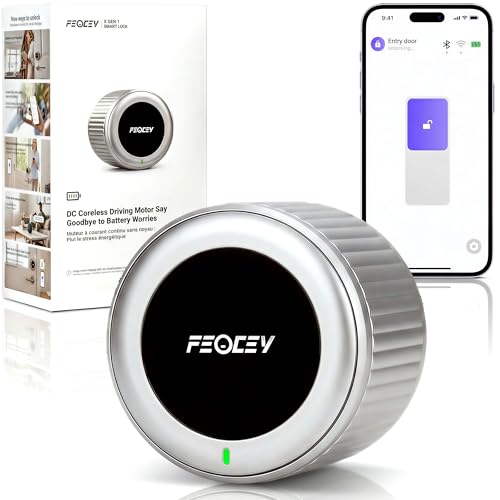
Rental-Friendly Retrofit – FEOCEY Wi-Fi Smart Lock
This retrofit model is a strong fit for shoppers comparing renter-friendly smart garage locks because it upgrades an existing single-cylinder deadbolt without drilling, wiring, or permanent changes. It keeps the original keys and adds keypad, app, and remote access.
Best For: Renters, apartment residents, and hosts who want a removable smart-lock upgrade.
Pros:
- Installs over compatible existing deadbolts without drilling or permanent modifications.
- Built-in 2.4GHz Wi-Fi works without a separate hub.
- Supports permanent, temporary, and one-time keypad codes.
- Includes auto-lock, door-status alerts, geofencing, and original-key backup.
Cons:
- Compatibility is limited to most US single-cylinder deadbolts with specified backsets.
- Requires three CR123A batteries and a compatible existing deadbolt.
Among these options, the FEOCEY stands out for minimizing installation changes. Confirm your deadbolt type and dimensions before buying, then use its keypad and app features to manage household or guest access.
Feature-Rich Keypad Security – Tapo DL100 Smart Deadbolt
The Tapo DL100 gives shoppers considering renter-friendly smart garage locks a conventional deadbolt replacement with keypad, Bluetooth, Wi-Fi, and voice access. It installs into standard lock-hole sizes without drilling extra holes and includes two backup keys.
Best For: Households that need many access codes, activity tracking, and broad smart-home compatibility.
Pros:
- Supports up to 200 customizable codes with family and guest profiles.
- Offers app, Bluetooth, keypad, voice, and physical-key unlocking.
- Provides remote status checks, alerts, and timestamped activity records.
- Includes auto-lock, PIN attempt limiting, IP54 weather resistance, and BHMA Grade 3 certification.
Cons:
- Battery life is rated up to 200 days in Wi-Fi mode or 300 days in Bluetooth mode.
- Unlike a retrofit design, installation replaces the existing deadbolt hardware.
The DL100 is a practical pick for access-heavy homes that want detailed monitoring and smart-home integration. Its no-extra-hole installation helps simplify setup, but renters should confirm that replacing the deadbolt is permitted.
Best Connected Upgrade – ULTRALOQ Bolt SE WiFi Smart Deadbolt
For renters seeking renter-friendly smart garage locks or entry locks, the ULTRALOQ Bolt SE offers broad access options and built-in Wi-Fi without requiring a hub for app control. Its DIY installation is designed to take about 10 minutes, though renters should confirm that replacing the existing deadbolt is permitted.
Best For: Renters and hosts who want remote access, multiple entry methods, and voice-assistant compatibility.
Pros:
- Supports fingerprint access, passcodes, app control, web access, shared eKeys, voice control, and mechanical keys.
- Built-in 2.4 GHz Wi-Fi enables remote locking, unlocking, notifications, and activity history without a hub.
- Offers auto-lock, low-battery alerts, weather-resistant construction, and up to 18 months of battery life with Thread.
Cons:
- Matter over Thread features require a compatible Thread Border Router.
- Only supports 2.4 GHz Wi-Fi, and the door sensor is not included.
- As a replacement deadbolt, installation may be less suitable where renters cannot modify hardware.
The Bolt SE is the most feature-rich option here, especially for users who want remote management and several ways to grant access. Its compatibility requirements and replacement-style installation are the main factors to check before buying.
Best No-Drill Option – CANDY HOUSE Sesame 5 US
The CANDY HOUSE Sesame 5 US is a strong fit for renter-friendly smart garage locks and entry doors because it attaches over an existing deadbolt with 3M adhesive tape. It requires no drilling or tools, making it easier to install and remove than a replacement deadbolt.
Best For: Renters, Airbnb hosts, and shared-space users who want simple Bluetooth control while keeping their existing key.
Pros:
- Installs with included 3M adhesive tape without drilling or permanent hardware changes.
- Works with existing keys, including unusual keys through a possible custom 3D-printed adapter.
- Includes adjustable auto-lock timing from 3 seconds to 1 hour and a built-in control button.
Cons:
- Bluetooth connectivity is more limited than a Wi-Fi-enabled lock for remote access.
- The adhesive installation depends on a suitable existing deadbolt and surface.
- Remote and voice-control features are not listed for this model.
For renters prioritizing reversibility, the Sesame 5 US keeps the original lock and adds motorized control with minimal installation effort. Its Bluetooth-only connection makes it better for nearby phone access than for managing the lock from afar.
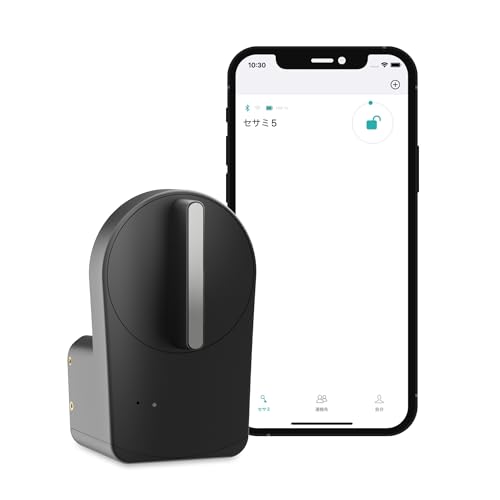
Best Smart-Home Ready Retrofit – CANDY HOUSE Sesame 5
The CANDY HOUSE Sesame 5 is a renter-friendly smart garage lock or entry-lock retrofit that mounts over an existing deadbolt with included 3M adhesive tape. It combines no-drill installation with broader control options, including phone, wearable, NFC, voice, and optional remote access through Hub3.
Best For: Renters and vacation-rental operators who want a removable retrofit with smart-home and remote-control expansion.
Pros:
- Uses no-drill 3M adhesive installation and works with most existing keys.
- Supports iPhone, Apple Watch, NFC tags, widgets, touch accessories, and voice assistants.
- Matter support and optional Hub3 connectivity add smart-home integration and remote control.
Cons:
- Remote control requires the optional Hub3 rather than Bluetooth alone.
- More advanced features may involve additional accessories or setup.
- Adhesive mounting requires a compatible existing deadbolt and suitable surface.
The Sesame 5 is the more expandable choice between the two Sesame models, offering a reversible installation with a wider ecosystem of controls. Choose it if you expect to add Hub3 or connected accessories; otherwise, its extra capabilities may be unnecessary.
How We Picked These Renter-Friendly Smart Garage Locks
We focused on products that can improve access with minimal property changes, including retrofit deadbolt designs, tool-free or no-drill installation, wireless connectivity, keypad entry, fingerprint access, and compatibility with existing hardware. Because “smart garage lock” can describe different devices, this list includes both garage-door access products and smart deadbolts that may suit a home’s interior entry door or garage-to-house door.
We also considered practical renter concerns: whether the original lock or access method can be restored, how much hardware must be replaced, whether a hub is required, and how easily access can be shared or revoked.
Quick Comparison
| Feature | What to look for | Why it matters |
|---|---|---|
| Installation | Retrofit, no-drill, or tool-free design | Reduces damage and makes move-out easier |
| Access | Keypad, app, fingerprint, or Bluetooth | Lets household members and guests enter conveniently |
| Connectivity | Wi-Fi built in or hub required | Determines remote access and setup complexity |
| Compatibility | Existing deadbolt or garage-door system | Prevents buying an incompatible lock |
Key Buying Factors for Renter-Friendly Smart Garage Locks
Confirm the Hardware Type
A video keypad or garage-door controller is not the same as a deadbolt retrofit. Check whether your property uses a standard deadbolt, a sectional garage door opener, or a separate door between the garage and living space. Measure the existing hardware and review the manufacturer’s compatibility list before ordering.
Prioritize Reversible Installation
Look for products that attach to the inside of an existing deadbolt or use the current garage-door opener system. Avoid drilling into doors, frames, or walls unless your landlord has approved it. Keep the original hardware and installation parts so the property can be returned to its previous condition.
Evaluate Access and Connectivity
Keypads are useful for guests, cleaners, and children, while fingerprint readers can speed up daily entry. Built-in Wi-Fi usually simplifies remote control, but battery life and network reliability still matter. Bluetooth-only models may require you to be nearby or purchase an additional hub for remote access.
Check Security and Everyday Usability
Choose unique PINs, temporary codes, activity alerts, and automatic locking when available. Consider manual key backup, low-battery warnings, weather exposure, and whether the app supports multiple users. For a garage-door product, confirm that the opener and door sensors are supported.
Who Should Buy Which Renter-Friendly Smart Garage Locks?
Choose a true garage-door keypad or video keypad if your main goal is secure access through the overhead garage door. Choose a retrofit deadbolt when you want to preserve the existing exterior lock and add smart control to a garage-to-home or entry door. A fingerprint model suits households that want fast personal access, while a keypad is better for frequent guests and shared codes. If you want remote operation without adding a separate hub, prioritize built-in Wi-Fi; if simple local unlocking is enough, Bluetooth can be less complicated.