Choosing the right audio press box or live-streaming mixer can make the difference between a polished broadcast and a distracting, inconsistent production. The products in this roundup range from dedicated press-distribution hardware to portable consoles, creator bundles, and all-in-one live-production systems.
Use the guide below to compare connectivity, routing, portability, recording, and ease of use before choosing the setup that best fits your events, interviews, podcasts, or multi-camera streams.
Best 10 Audio Press Boxes for Live Streaming Picks for 2026
Multi-Feed Distribution
Whirlwind 24-Output Passive Press Box
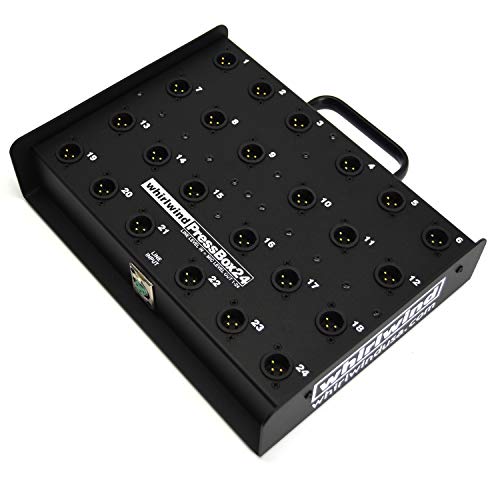
- Routes one line-level input to 24 mic outputs
- Transformer-isolated, ground-lifted outputs
- Designed for broadcast media feeds
Best For: Large broadcast and live-event audio distributions
Portable Streaming Control

- Connects to smartphones and Mac or PC
- Adds ContourFX and StreamFX processing
- Compact two-channel streaming-focused design
Best For: Solo creators and mobile live-streaming setups
Complete Studio Bundle
RODECaster Pro II Streaming Kit

- Includes four microphones, headphones, and accessories
- Four combo inputs support multi-person recording
- APHEX processing and flexible connectivity included
Best For: Multi-person podcasts, interviews, and studio livestreams
All-in-One Video Production
YoloBox Ultra Streaming System

- Built-in 4K switcher, encoder, recorder, and monitor
- Handles four HDMI sources plus USB inputs
- Supports NDI, SRT, ISO recording, and network bonding
Best For: Multi-camera livestreams and remote video production
Creator Audio Starter

- Two-channel mixer with condenser microphone
- Noise reduction and real-time tone controls
- Voice effects and follow-singing mode
Best For: Beginner streamers, podcasters, and live singers
Mobile Production Hub

- Standalone switcher, encoder, recorder, and streamer
- Handles HDMI, USB, and IP sources
- Touchscreen control with wired and wireless connectivity
Best For: Mobile and multi-source live production
Interactive Podcast Audio

- Includes condenser mic, boom arm, and sound board
- Noise reduction with adjustable audio controls
- Voice effects, reverb presets, and follow-singing mode
Best For: Interactive podcasts, gaming streams, and live singing
Best All-in-One Switcher

- Four HDMI inputs plus dual HDMI outputs
- Audio controls, recording, playback, and monitoring
- Streams to three platforms with overlay support
Best For: Multi-camera live productions with integrated audio and video control
Best for Large Multi-Camera Productions

- Eight HDMI inputs with 4K60 scaling
- ISO recording, NDI HX, and instant replay
- 11.2-inch OLED touchscreen and 10-hour battery
Best For: Large events and sports streams with complex multi-camera workflows
Best Compact Audio Mixer

- Connects up to three mobile phones
- Noise reduction and 16 built-in effects
- Bluetooth accompaniment with tone controls
Best For: Mobile creators, podcasts, karaoke, and voice-focused streams
Multi-Feed Distribution – Whirlwind 24-Output Passive Press Box
For broadcasters needing audio press boxes for live streaming, the Whirlwind PB24 distributes one line-level source to 24 mic-level media feeds. Transformer-isolated outputs and ground lifting help reduce interference between connected devices.
Best For: Broadcast teams and live event crews feeding audio to many cameras, reporters, or streaming systems.
Pros:
- Provides 24 mic-level outputs from one line-level input.
- Transformer isolation and ground lifts help limit interference.
- Specified 65dB channel-to-channel isolation and -103dB output noise.
- Uses TRSP-2 transformers throughout.
Cons:
- Passive design is intended for line-level distribution rather than mixing or signal processing.
- At 9.77 pounds, it is less portable than compact streaming interfaces.
- The supplied specifications list a -45dB output level from a 0dB input.
The PB24 is a specialized, high-capacity press box for routing one clean source to a large media pool. It is a strong fit when output count and isolation matter more than portability or onboard streaming controls.
Portable Streaming Control – Mackie M-Caster Live Mixer
The Mackie M-Caster Live is a compact option for audio press boxes for live streaming when smartphone or computer connectivity is more important than a large number of physical inputs. It accepts a mic, headset, or compatible smartphone connection and adds selectable vocal processing and voice effects.
Best For: Mobile streamers, solo creators, and content producers who want a small corded mixer with smartphone and USB connectivity.
Pros:
- Connects through a smartphone headphone jack or USB on Mac and PC.
- Supports microphones, headsets, and 1/8-inch TRS/TRRS audio connections.
- Includes selectable ContourFX vocal sounds and StreamFX voice-changing effects.
- RGB lighting offers 15 user-selectable colors.
Cons:
- Its listed two-channel specification is less suited to large multi-microphone productions.
- It uses a corded power source rather than battery power.
- Connectivity centers on 1/8-inch audio and USB rather than XLR inputs.
The M-Caster Live prioritizes portability and creator-friendly effects. Choose it for straightforward solo or small-stream setups, not for distributing one source to numerous press feeds.
Complete Studio Bundle – RODECaster Pro II Streaming Kit
This RODECaster Pro II bundle is a full production package for audio press boxes for live streaming, podcasts, interviews, and roundtable broadcasts. It combines the console with four broadcast microphones, headphones, boom arms, stands, XLR cables, and a 64GB SD card.
Best For: Multi-person podcasts, interviews, livestreams, and home studios that need microphones and accessories included.
Pros:
- Includes four broadcast microphones and four headphones for group recording.
- Four Neutrik combo inputs and Revolution Preamps support multi-mic productions.
- Integrated APHEX processing includes Aural Exciter, Big Bottom, and Compellor.
- Offers dual USB-C, Bluetooth, and Wi-Fi connectivity.
Cons:
- The complete 18-item bundle weighs 36.1 pounds, making it a substantial setup.
- Its tabletop format is less suited to highly mobile field streaming.
- The package may include more equipment than a solo creator needs.
This is the most complete production-oriented choice in the group. Its included four-microphone setup and onboard processing make it practical for organized, multi-person productions, though the bundle is larger and heavier than a basic streaming mixer.
All-in-One Video Production – YoloBox Ultra Streaming System
The YoloBox Ultra is a video-focused option to pair with audio press boxes for live streaming. Its built-in 4K encoder, switcher, recorder, and 8-inch touchscreen can handle multiple HDMI sources, while NDI, SRT, and cellular bonding support more flexible live-production workflows.
Best For: Churches, schools, sports teams, and creators producing multi-camera horizontal or vertical livestreams.
Pros:
- Combines a 4K encoder, switcher, recorder, and touchscreen monitor.
- Supports four HDMI cameras plus USB-C and USB-A sources.
- Offers PiP, overlays, scoreboards, instant replay, and auto-switching.
- Supports NDI, SRT, ISO recording, and up to five combined network connections.
Cons:
- It is primarily a video production device, so a separate audio distribution solution may still be needed.
- Cellular bonding can involve additional charges.
- The supplied notes describe a battery-powered system rather than a dedicated audio mixer.
The YoloBox Ultra is best viewed as the video hub of a live-production system. It is compelling when multi-camera switching, recording, vertical output, and resilient networking are priorities, but it does not replace a dedicated press box for audio-only distribution.
Creator Audio Starter – G10 Mixer Bundle
For shoppers comparing audio press boxes for live streaming, the TENLAMP G10 bundle is a compact starting point that combines a two-channel mixer, condenser microphone, and accessories. It is geared toward creators who want real-time control over vocals, music, and effects without assembling a separate audio chain.
Best For: Beginner streamers, podcasters, gamers, and singers using a PC, phone, or tablet.
Pros:
- Includes a mixer, condenser microphone, and essential accessories.
- Offers noise reduction, bass, treble, reverb, and pitch controls.
- Supports Bluetooth, USB, TRS/XLR input, and OTG/Type-C connections.
- Includes follow-singing mode, voice changing, and built-in sound effects.
Cons:
- The two-channel design may be limiting for larger or more complex setups.
- Its effects-focused controls may be more than needed for simple voice streaming.
The G10 makes sense when convenience and interactive features matter more than a fully modular studio system. Its broad device compatibility and included microphone help simplify setup, while the two-channel format keeps the system focused on personal streaming and recording.
Mobile Production Hub – Magewell Director Mini
Among audio press boxes for live streaming, the Magewell Director Mini is a broader live-production solution rather than a microphone mixer. It combines source switching, audio and video processing, encoding, recording, monitoring, and streaming in a standalone unit for creators who need to manage a more involved broadcast.
Best For: Mobile producers and advanced streamers handling multiple HDMI, USB, IP, or media sources.
Pros:
- Combines switching, encoding, recording, monitoring, and streaming in one device.
- Accepts up to two HDMI, two USB-A, and three simultaneous IP sources.
- Built-in 5.44-inch AMOLED touchscreen supports scene control and previewing.
- Supports H.264/H.265 encoding, SD or internal recording, and simultaneous streaming.
Cons:
- It is a production switcher, not an included microphone-and-mixer bundle.
- Its advanced source-management features may be unnecessary for simple single-camera streams.
- USB cellular modems are supported but not included.
The Director Mini is the strongest fit when live production flexibility is the priority. Dual battery slots, Ethernet, Wi-Fi, and support for services such as YouTube, Twitch, Facebook, RTMP, and SRT make it suitable for both field and fixed setups.
Interactive Podcast Audio – G10 Mixer and Mic Kit
For audio press boxes for live streaming that emphasize creator interaction, the G10 podcast bundle pairs a sound board with a 3.5mm condenser microphone and boom arm. Its voice effects, reverb presets, follow-singing function, and noise reduction are designed for podcasts, gaming streams, music performances, and conversational content.
Best For: Podcasters, gamers, singers, and streamers who want an all-in-one microphone and effects setup.
Pros:
- Includes a 3.5mm condenser microphone, boom arm, and sound board.
- Provides noise reduction plus bass, treble, reverb, pitch, and harmony controls.
- Offers 12 built-in sound effects and voice-changing options.
- Supports 3.5mm, 6.35mm, XLR, 48V microphone, Bluetooth, and Type-C connections.
Cons:
- The supplied microphone is 3.5mm, so buyers seeking a dedicated XLR mic may need another microphone.
- The numerous effects and reverb presets may require setup time for users wanting a basic workflow.
This kit is a practical choice for creators who want more than straightforward voice capture. The included boom arm helps position the microphone, while follow-singing and customizable effects support interactive streams and live vocal performance.
Best All-in-One Switcher – Osee GoStream Deck HDMI Pro
For buyers comparing audio press boxes for live streaming, the Osee GoStream Deck is a versatile production hub with four HDMI inputs, dedicated audio controls, recording, playback, and direct streaming. Its hard control panel also supports MultiView monitoring, overlays, and landscape or portrait output.
Best For: Multi-camera conferences, podcasts, worship services, weddings, and other live productions needing integrated video and audio control.
Pros:
- Four HDMI inputs, two HDMI outputs, Ethernet, USB-C, audio inputs, and headphone monitoring.
- Includes EQ, limiter, fader, recording, playback, and audio monitoring controls.
- Can stream to three platforms and supports OBS or vMix through USB.
- Supports lower thirds, logos, green screen, PIP, and other graphic overlays.
Cons:
- Its broad feature set may require time to learn.
- Designed for production setups rather than simple, single-camera streaming.
The GoStream Deck is a strong choice when an audio press box setup also needs substantial video-switching and broadcast features. It is especially practical for users who want to manage a live production without relying entirely on a computer.
Best for Large Multi-Camera Productions – YoloBox Extreme
Among audio press boxes for live streaming, the YoloBox Extreme stands out as a high-capacity all-in-one system for complex productions. It combines eight HDMI inputs, assignable outputs, NDI support, ISO recording, replay tools, and a large OLED touchscreen in a portable unit.
Best For: Sports, events, and professional multi-camera streams requiring extensive input capacity, replay, and isolated recordings.
Pros:
- Accepts up to eight HDMI sources with built-in 4K60 scaling.
- Offers two assignable HDMI outputs for program, multiview, or preview.
- Supports ISO recording for multiple inputs and instant replay from six cameras.
- Includes up to six NDI HX inputs and an extended 10-hour battery life.
Cons:
- Its advanced capabilities may be more than smaller streaming setups need.
- The supplied notes emphasize video and production features rather than dedicated audio mixing controls.
Choose the YoloBox Extreme when scalability and recording flexibility matter more than a compact audio-only workflow. Its touchscreen control and high input count make it well suited to demanding live events.
Best Compact Audio Mixer – Mini Live Sound Card
For a simpler audio press box for live streaming, this mini sound mixer focuses on voice processing and flexible mobile connectivity. It provides noise reduction, independent tone controls, 16 effects, Bluetooth accompaniment, and connections for up to three mobile phones.
Best For: Podcasts, mobile live broadcasts, karaoke, voice chat, and creators who need portable audio effects and multi-device support.
Pros:
- Supports up to three connected mobile phones without switching cables.
- Provides intelligent noise reduction for cleaner voice input.
- Includes 16 effects, voice-changing modes, Bluetooth accompaniment, and adjustable bass, middle, and treble.
- Works with phones and computers for plug-and-play streaming applications.
Cons:
- It is an audio mixer rather than a video switcher.
- The supplied notes do not specify supported software update details.
- Its auxiliary output and mobile-focused design may not suit larger broadcast systems.
This sound card is a practical budget-oriented option when your streaming setup primarily needs voice cleanup, effects, and flexible phone connections. It is less appropriate for multi-camera production or advanced broadcast routing.
How We Picked the Best Audio Press Boxes for Live Streaming
We evaluated these products by looking at how well they support real-world streaming workflows, including press conferences, interviews, podcasts, houses of worship, field reporting, and multi-camera events. Key considerations included input and output flexibility, signal routing, monitoring, recording, streaming integration, portability, and setup complexity.
Because “press box” can describe both a dedicated audio distribution unit and a broader live-production system, this selection includes purpose-built press hardware alongside mixers and production consoles that can handle similar broadcast needs. Check the specifications carefully to confirm that a product provides the outputs, connectors, and signal flow your production requires.
Quick Comparison
| Best For | Look For | Product Type |
|---|---|---|
| Press conferences and media feeds | Multiple isolated microphone outputs | Dedicated press box |
| Portable interviews and podcasts | Mic inputs, headphone monitoring, and recording | Compact mixer |
| Multi-camera broadcasts | Video switching, encoding, and audio integration | All-in-one production system |
| Beginner creator setups | Simple controls, included accessories, and USB connectivity | Streaming bundle |
Key Buying Factors for Audio Press Boxes for Live Streaming
Inputs, Outputs, and Routing
Start by counting every source you need to connect: microphones, cameras, phones, computers, playback devices, and monitoring headphones. A dedicated press box should provide enough microphone-level outputs for journalists, while a mixer may prioritize combination inputs, USB audio, Bluetooth, or line-level connections. Confirm whether outputs are independently buffered or simply duplicated, since that affects reliability when feeding multiple destinations.
Audio Quality and Control
Look for clean preamps, adjustable gain, phantom power when required, headphone monitoring, and useful metering. Compressors, limiters, equalization, noise reduction, and feedback control can help maintain intelligible speech during unpredictable live events. Built-in effects may be convenient, but they should not replace fundamental routing and monitoring capabilities.
Streaming and Recording Workflow
Determine whether the system connects directly to streaming platforms or requires a computer and separate software. Hardware encoding, scene switching, local recording, NDI, HDMI, and USB interfaces can simplify a production, but they also add features and learning requirements. Verify supported resolutions, frame rates, platform compatibility, and storage options before buying.
Portability and Reliability
For mobile productions, prioritize a compact design, durable controls, quick setup, and dependable power options. For fixed installations, physical I/O, ventilation, expansion, and straightforward cabling may matter more than weight. Always test the complete signal chain before an important broadcast.
Who Should Buy Which Audio Press Boxes for Live Streaming?
Choose a dedicated press box if your main goal is distributing one clean source to many reporters or camera crews. Choose a compact mixer or creator bundle for podcasts, interviews, and single-operator streams where microphone control and monitoring are priorities. An all-in-one production system is better suited to operators handling multiple cameras, switching, encoding, and recording from one device.
Beginners should favor clear controls and a manageable connection layout over an excess of advanced features. Experienced producers may benefit from flexible routing, isolated outputs, NDI or HDMI support, multitrack recording, and room to expand. Before ordering, map your complete setup on paper and leave spare inputs and outputs for future equipment.