The best Thunderbolt docking stations for reliable operation simplify demanding desk setups by connecting displays, storage, networking, accessories, and power through one dependable hub.
This roundup compares 10 Thunderbolt 4 and Thunderbolt 5 docks across monitor support, charging, port selection, compatibility, and business-ready features so you can choose with confidence.
Best 10 Thunderbolt Docking Stations for Reliable Operation Picks for 2026
Best for Maximum Expansion
Belkin Thunderbolt 5 140W Dock
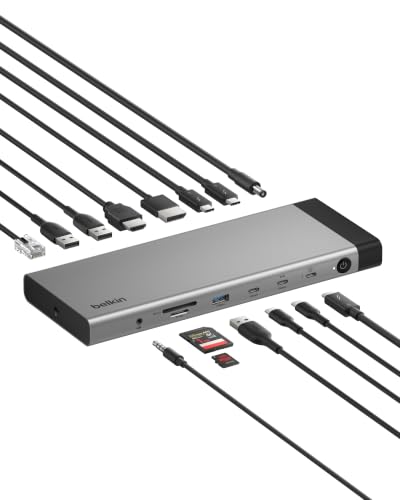
- 14 ports with up to 80Gbps data transfer
- Triple 4K@144Hz or single 8K@60Hz support
- 2.5Gb Ethernet and 140W power delivery
Best For: Power users needing extensive connectivity and multiple high-resolution displays
Best for Built-In High-Speed Storage
UGREEN Maxidok Thunderbolt 5 Dock

- 17 ports with an M.2 NVMe slot up to 8TB
- Up to 120Gbps Thunderbolt 5 bandwidth
- 2.5GbE, multi-display support, and active cooling
Best For: Power users needing fast internal dock storage and extensive workstation expansion
Best for MacBook Plug-and-Play Use
Plugable Thunderbolt 4 Mac Dock
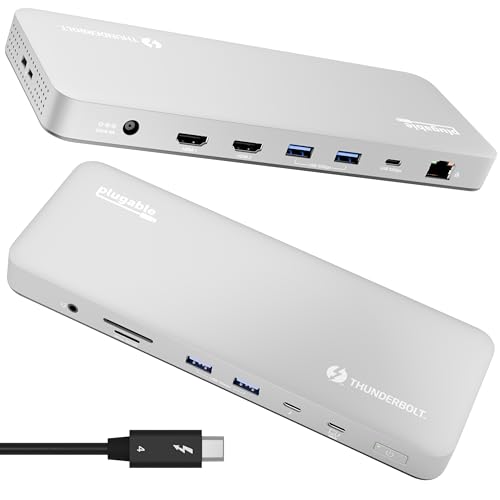
- Dual 4K 60Hz HDMI on compatible Macs
- 100W charging with 13 total ports
- Driverless setup and lifetime support
Best For: MacBook users wanting a straightforward dual-monitor workstation
Best High-Speed Expansion
UGREEN 8-in-1 Thunderbolt 4 Dock

- Three Thunderbolt 4 ports with up to 40Gbps throughput
- Dual 4K or single 8K display support in compatible systems
- Up to 85W charging plus Gigabit Ethernet
Best For: High-performance Windows laptops and Pro/Max-chip MacBooks
Best for Business Workstations
Dell Pro Thunderbolt 4 Smart Dock SD25TB4

- Supports up to four 4K monitors
- Up to 130W Dell or 96W third-party charging
- Remote management and business security features
Best For: Managed Windows offices and multi-display workstations
Best for Surface Desks
Microsoft Surface Thunderbolt 4 Dock

- Supports up to two 4K monitors
- Six USB ports plus 2.5G Ethernet and audio
- Tactile port indicators and security lock slot
Best For: Microsoft Surface users building a dual-monitor desk
Best for Mixed-Device Fleets
StarTech Thunderbolt 4 Quad-Display Dock

- Driverless Windows and macOS compatibility
- Up to four 4K 60Hz displays on qualifying Windows PCs
- 98W power delivery with 16-port connectivity
Best For: Mixed-device fleets and multi-monitor workstations
Best for Managed Business Workspaces

- Supports dual 4K or triple FHD displays
- Includes 180W AC power adapter and key cables
- Firmware updates without rebooting
Best For: Commercial notebooks and centrally managed offices
Best for Remote IT Management
Lenovo ThinkPad Thunderbolt 4 Smart Dock

- 40Gbps Thunderbolt 4 bandwidth
- Supports one 8K or two 4K 144Hz displays
- Remote fleet updates and diagnostics via LAFM
Best For: IT-managed fleets and high-refresh workstations
Best for Maximum Expansion – Belkin Thunderbolt 5 140W Dock
For users who need Thunderbolt docking stations for reliable operation across demanding displays, storage, and networking, the Belkin 140W Thunderbolt 5 Dock offers a highly expandable workstation hub. Its 14 ports, up to 80Gbps data speeds, triple 4K display support, and 2.5Gb Ethernet make it well suited to busy desks and creative workflows.
Best For: Power users building a triple-monitor workstation with fast wired networking and extensive peripheral connectivity.
Pros:
- Supports up to three 4K displays at 144Hz or one 8K display at 60Hz.
- Delivers up to 140W through one USB-C connection.
- Includes 2.5Gb Ethernet, 14 ports, and Thunderbolt device daisy chaining.
- Built-in safety protections and a Kensington lock support dependable desk use.
Cons:
- Its full display and Thunderbolt 5 capabilities require compatible host devices and displays.
- The broad feature set may be more than a basic home-office setup needs.
Choose this Belkin dock when maximum expansion and high-resolution multi-monitor support matter more than keeping the setup simple. It supports Windows, Mac, and Chrome OS with compatible USB-C, Thunderbolt 4, or Thunderbolt 5 systems.
Best for Mixed-Device Workstations – Plugable Thunderbolt 4 Dual-Monitor Dock
The Plugable Thunderbolt 4 Dock is a practical choice among Thunderbolt docking stations for reliable operation in home offices and managed workspaces. It combines 40Gbps Thunderbolt 4 performance, 100W charging, dual 4K HDMI output, and 13 ports in a driverless design.
Best For: Windows and Mac environments that need a standardized dual-monitor workstation with broad device compatibility.
Pros:
- Supports dual 4K 60Hz HDMI displays or one 8K display on compatible systems.
- Provides 100W power delivery, with 96W certified charging, for the host laptop.
- Includes HDMI, USB, SD and microSD, Gigabit Ethernet, audio, and a downstream Thunderbolt 4 port.
- Driverless Thunderbolt 4 operation simplifies deployment across compatible devices.
Cons:
- Display support varies by computer; some Thunderbolt 3, USB-C, and base Mac models support only one external display.
- Networking is Gigabit Ethernet rather than 2.5Gb Ethernet.
This Plugable model is a sensible fit when dependable dual-display support and easy deployment are priorities. Check the specific Mac or Windows host requirements before buying, since display behavior differs across processor generations and connection types.
Best for Built-In High-Speed Storage – UGREEN Maxidok Thunderbolt 5 Dock
For demanding users comparing Thunderbolt docking stations for reliable operation, the UGREEN Maxidok stands out by combining Thunderbolt 5 connectivity with an internal M.2 NVMe slot. Its 17 ports, 2.5Gb Ethernet, high total system power, and active cooling are designed for expansive, sustained workstation use.
Best For: Professionals who want fast removable storage, multiple displays, and extensive connectivity from one desktop dock.
Pros:
- Supports an M.2 PCIe Gen4x4 NVMe SSD up to 8TB, subject to size and heatsink limits.
- Offers 17 ports, including two downstream Thunderbolt 5 ports, USB ports, card readers, audio, and DisplayPort.
- Supports triple independent displays on Windows and dual displays on Mac.
- Includes 2.5GbE networking and AI-assisted cooling for heavy workloads.
Cons:
- The M.2 slot does not accept every SSD heatsink design, including several listed oversized models.
- The cooling fan can make audible noise while operating.
- HDMI monitors require an active DisplayPort-to-HDMI adapter or cable because the DP port does not support DP++.
This UGREEN dock is especially compelling when integrated NVMe storage and high port density are worth the added complexity. Confirm your SSD dimensions, operating system, and display-adapter needs before purchasing.
Best for MacBook Plug-and-Play Use – Plugable Thunderbolt 4 Mac Dock
The Plugable TBT-UDM is a focused option for MacBook owners seeking Thunderbolt docking stations for reliable operation without driver downloads. Its 13-port layout combines dual 4K HDMI output, 100W charging, storage-card readers, Ethernet, and a downstream Thunderbolt 4 port in a space gray aluminum-clad design.
Best For: M4 and M5 MacBook Air or Pro users who want a simple dual-monitor desk setup with one-cable connectivity.
Pros:
- Supports two 4K 60Hz HDMI displays on compatible M4/M5 and Pro or Max M-series Macs.
- Provides 100W host charging and 13 ports, including USB, SD, microSD, Ethernet, and audio.
- Driverless setup works over compatible Thunderbolt 4 or USB4 connections.
- Includes lifetime support from Plugable’s North American connectivity team.
Cons:
- Base M1 and M2 MacBooks support only one external display.
- Base M3 Macs require clamshell mode for dual-display operation.
- Its 100W charging is less powerful than some newer high-wattage Thunderbolt docks.
This dock is a strong match for Mac-centered desks where straightforward setup and dual 4K output are more important than Thunderbolt 5 speeds. Verify your Mac’s processor tier and display requirements to ensure the expected monitor configuration is supported.
Best High-Speed Expansion – UGREEN 8-in-1 Thunderbolt 4 Dock
For users seeking Thunderbolt docking stations for reliable operation, the UGREEN 8-in-1 Thunderbolt 4 Dock combines fast connectivity, display flexibility, wired networking, and laptop charging in one setup. Its three Thunderbolt 4 ports support up to 40Gbps, while the included 140W GaN charger provides up to 85W laptop charging.
Best For: Windows laptops and higher-end MacBooks that need dual 4K displays, fast peripherals, and Ethernet.
Pros:
- Supports dual 4K at 60Hz or a single 8K at 30Hz in compatible Windows setups.
- Includes three Thunderbolt 4 ports, three USB-A 10Gbps ports, and Gigabit Ethernet.
- Delivers up to 85W charging with the included 140W GaN charger.
Cons:
- Basic-M-chip MacBooks are limited to one 4K display.
- Full-featured USB-C computers support only a single display.
- It is not compatible with the 2018 Intel Mac mini.
The UGREEN dock is a strong fit when expansion speed and display output matter most. Confirm your computer’s chip and port capabilities before buying, especially if you plan to run multiple monitors.
Best for Business Workstations – Dell Pro Thunderbolt 4 Smart Dock SD25TB4
The Dell Pro Thunderbolt 4 Smart Dock is designed for demanding office and workstation setups. Among Thunderbolt docking stations for reliable operation, it stands out with support for up to four 4K displays, 2.5GbE networking, remote Wi-Fi management, and business-focused security features.
Best For: Dell-centered business environments, multi-monitor workstations, and managed Windows deployments.
Pros:
- Supports up to four 4K monitors through HDMI 2.1, DisplayPort 1.4, USB-C, and Thunderbolt 4.
- Provides up to 130W charging for Dell systems and up to 96W for other devices.
- Includes 2.5GbE, Wi-Fi management, WPA3, PXE boot, MAC filtering, and DMA protection.
- Uses 65% recycled plastic and 100% recycled packaging.
Cons:
- Its listed minimum operating system is Windows 10, so Mac compatibility is not established in the supplied details.
- The feature set may be more than needed for a simple home desk.
This is the most enterprise-oriented option in the roundup. Its remote management and security tools can simplify fleet administration, while the four-display support suits data-heavy and creative workflows.
Best for Surface Desks – Microsoft Surface Thunderbolt 4 Dock
The Microsoft Surface Thunderbolt 4 Dock offers a straightforward way to connect a Surface setup and common desk accessories. It is a practical choice among Thunderbolt docking stations for reliable operation, with multiple USB-C and USB-A ports, 2.5G Ethernet, dual-4K monitor support, and tactile port indicators.
Best For: Microsoft Surface users who want a tidy workstation with two 4K displays and varied peripheral connectivity.
Pros:
- Supports up to two 4K monitors.
- Provides three USB-C ports, three USB-A ports, 2.5G Ethernet, and a 3.5mm audio jack.
- Raised tactile indicators make ports easier to identify.
- Includes a security lock slot and uses 20% recycled ocean-bound plastic.
Cons:
- The supplied compatibility details specifically identify Microsoft Surface devices.
- Charging is described as rapid charging but does not specify a wattage.
- It offers fewer display outputs and less expansion detail than the Dell dock.
Surface owners who need dependable everyday connectivity should find this dock easy to organize and use. Its dual-4K support and 2.5G Ethernet cover a productive desk, while the tactile labeling is a useful accessibility detail.
Best for Mixed-Device Fleets – StarTech Thunderbolt 4 Quad-Display Dock
For organizations needing Thunderbolt docking stations for reliable operation across Windows and macOS, the StarTech Thunderbolt 4 Dock combines driverless USB4 and Thunderbolt compatibility with extensive port connectivity. It can support up to four 4K 60Hz displays on qualifying Windows systems and dual extended 4K displays on supported Macs.
Best For: Mixed-device fleets, laptop refreshes, and users who need broad display support with up to 98W laptop charging.
Pros:
- Driverless compatibility with Windows and macOS, including Intel, Apple Silicon, AMD, and Snapdragon X Copilot+ PCs.
- Supports up to four 4K 60Hz monitors on qualifying Windows laptops.
- Provides dual 4K 60Hz extended displays on supported M3 and M4 MacBooks.
- Includes a fully specified power adapter and up to 98W power delivery.
Cons:
- Quad-display support depends on specific Windows processor and DisplayPort 1.4 DSC requirements.
- Dual extended displays on some MacBook models require specific chips or clamshell operation.
Its tested, cross-platform design and three-year warranty make this a strong choice for deployments where compatibility and display flexibility matter more than a minimal port count.
Best for Managed Business Workspaces – Dell WD19TBS Thunderbolt Dock
The Dell WD19TBS is a practical pick among Thunderbolt docking stations for reliable operation in commercial laptop environments. It combines Thunderbolt connectivity, dual 4K or triple-FHD display support, and a 180W AC adapter for a streamlined desk setup.
Best For: Commercial notebooks, managed office workstations, and users who value centralized firmware updates.
Pros:
- Supports dual 4K displays at 60Hz or triple Full HD displays.
- Provides power, data, audio, and video through Thunderbolt technology.
- Firmware can be updated without rebooting through Client Command Suite and Microsoft System Center Configuration Manager.
- Includes HDMI, DisplayPort, Ethernet, USB, and Thunderbolt connections.
Cons:
- Its one-year warranty is shorter than those of the StarTech and Lenovo options in this roundup.
- Compatibility is described broadly for Thunderbolt-standard notebooks rather than with a detailed model list.
With included display and Thunderbolt cables, a high-output power adapter, and business-oriented management support, the WD19TBS fits offices that prioritize straightforward deployment and maintenance.
Best for Remote IT Management – Lenovo ThinkPad Thunderbolt 4 Smart Dock
For IT teams seeking Thunderbolt docking stations for reliable operation across a mixed device fleet, the Lenovo ThinkPad Thunderbolt 4 Smart Dock Gen 2 adds remote management to high-speed connectivity. It offers up to 40Gbps data transfer, 100W charging, and support for one 8K 60Hz display or two 4K 144Hz monitors.
Best For: Managed workplace fleets that need remote configuration, diagnostics, and high-refresh-rate display support.
Pros:
- Supports up to 40Gbps Thunderbolt 4 bandwidth.
- Can drive one 8K 60Hz display or two 4K 144Hz monitors.
- Lenovo Accessories Fleet Manager enables browser-based remote updates, configuration, and diagnostics.
- Includes HDMI 2.1, DisplayPort 1.4, USB-A, USB-C, Ethernet, and a built-in one-meter Thunderbolt 4 cable.
Cons:
- Remote management features may be more than individual users need.
- The listed minimum operating system is macOS 15 Sequoia, so buyers should verify system requirements for their platform.
This dock is especially compelling for IT-managed environments: its 3-year warranty, integrated cable, high-speed display support, and fleet-management tools help reduce hands-on maintenance.
How We Picked the Best Thunderbolt Docking Stations for Reliable Operation
We selected docks that offer a strong balance of bandwidth, power delivery, display support, port variety, and compatibility. The lineup includes Thunderbolt 4 and Thunderbolt 5 models, single- and multi-monitor solutions, and options designed for Windows PCs, Macs, business laptops, and mixed-device offices.
We also considered practical reliability factors: reputable manufacturers, included power adapters or cables, support for modern display standards, networking options, and features such as firmware management or remote administration. A high port count alone is not enough; a dock must remain stable when several peripherals are active at once.
Quick Comparison
| What to Compare | Why It Matters |
|---|---|
| Thunderbolt generation | Thunderbolt 4 provides 40Gbps connectivity; Thunderbolt 5 can offer greater bandwidth for demanding displays and storage. |
| Power delivery | Higher wattage helps charge performance laptops while they are under load. |
| Display support | Check resolution, refresh rate, operating-system limits, and the number of monitors supported. |
| Ports and networking | USB speed, Ethernet, audio, memory-card readers, and downstream Thunderbolt ports determine everyday flexibility. |
| Management features | Business docks may add firmware tools, remote management, or enterprise deployment support. |
Key Buying Factors for Thunderbolt Docking Stations for Reliable Operation
Match the Dock to Your Laptop
Confirm that your computer has a full-featured Thunderbolt 4 or Thunderbolt 5 port rather than a USB-C port with limited capabilities. Mac and Windows display behavior can differ, particularly when connecting multiple monitors. Check the manufacturer’s compatibility list before buying.
Verify Charging Requirements
Compare the dock’s advertised power delivery with your laptop’s charger. A 100W dock may suit an ultraportable, while workstation-class systems may benefit from 130W or more. Some docks require a proprietary host configuration to reach their maximum charging rate.
Plan Your Monitor Setup
Look beyond the headline resolution. Confirm whether your preferred arrangement supports dual, triple, or quad displays; 4K refresh rates; DisplayPort or HDMI standards; and your operating system. Thunderbolt 5 models can be especially attractive for high-refresh or high-resolution workflows, but compatible computers and displays are still required.
Prioritize Stability and Thermals
A dependable dock should have adequate cooling, a quality power adapter, a secure host connection, and current firmware. Keep the dock ventilated, use certified Thunderbolt cables, and update firmware when the manufacturer recommends it.
Who Should Buy Which Thunderbolt Docking Stations for Reliable Operation?
- Home-office and general productivity users: Choose a Thunderbolt 4 dock with 90W to 100W charging, dual-display support, and essential USB and Ethernet ports.
- Creative professionals: Look for high-speed downstream Thunderbolt ports, fast storage support, strong display bandwidth, and sufficient charging for demanding laptops.
- High-refresh or next-generation setups: Consider a Thunderbolt 5 model when your computer and monitors can use its additional bandwidth.
- Business and IT-managed environments: Dell, Lenovo, Microsoft, and other enterprise-focused docks may be preferable for firmware controls, fleet deployment, and remote management.
- Multi-monitor Windows users: Favor models that explicitly support your desired number of 4K displays and include the exact DisplayPort or HDMI outputs you need.
Before ordering, verify the host laptop, monitor layout, charging wattage, cable requirements, and operating-system support. Those checks matter more than the raw number of ports when choosing a dock for reliable daily use.