The best Thunderbolt docking stations turn a laptop into a capable desktop workspace, adding displays, high-speed storage, wired networking, USB accessories, and power through one connection.
These 10 picks cover versatile Thunderbolt 4 docks for home offices, creative workstations, business fleets, and Mac or Windows setups. Use the guide below to match ports, display support, charging, and compatibility to your needs.
Best 10 Thunderbolt Docking Stations Picks for 2026
Best for Flexible Expansion
UGREEN 8-in-1 Thunderbolt 4 Dock

- Three 40Gbps Thunderbolt 4 ports
- Dual 4K or single 8K display support
- 85W charging with included 140W adapter
Best For: High-speed workstations needing multiple Thunderbolt connections
Best for Multi-Monitor Offices
Lenovo ThinkPad Universal Thunderbolt 4 Dock

- Supports up to four 4K displays
- 100W dynamic notebook charging
- Remote management through Dock Manager
Best For: Windows offices and IT-managed multi-monitor workstations
Best for Surface Workspaces
Microsoft Surface Thunderbolt 4 Dock

- Supports up to two 4K monitors
- Includes 2.5G Ethernet and six USB ports
- Tactile indicators simplify port identification
Best For: Surface users building a dual-monitor desk setup
Best for Dell Workstations

- 130W power delivery with a 180W adapter
- Dual DisplayPort, HDMI, Ethernet, and Thunderbolt 3
- Three-year manufacturer warranty
Best For: Compatible Dell Latitude, Precision, XPS, and Rugged laptops
Best for Modern Mac Setups
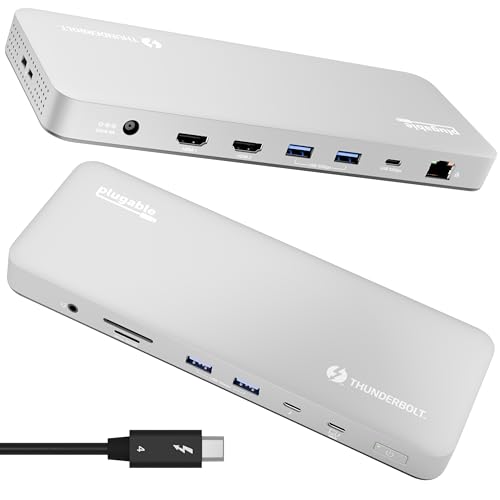
- 13 ports with dual 4K HDMI output
- 100W charging and driverless operation
- Supports M4/M5 Macs and compatible Windows systems
Best For: MacBook users who need dual 4K displays and extensive connectivity
Best for Multi-Display Offices
WD19TBS Thunderbolt Dock Bundle

- Supports up to three displays, including dual 4K
- 180W adapter with HDMI, DisplayPort, and Ethernet
- Mounting flexibility for monitor or under-desk placement
Best For: Windows office setups with compatible Dell, HP, or Lenovo notebooks
Maximum-Power Workstation
HP Thunderbolt 4 Ultra 180W G6 Dock

- Thunderbolt 4 with support for four displays
- Eight USB ports, including five USB-A
- 230W listed wattage and three-year warranty
Best For: High-connectivity desktop and notebook workstations
Smart Business Hub
Dell Pro Thunderbolt 4 Smart Dock SD25TB4

- Supports up to four 4K displays
- Up to 130W Dell or 96W other-device charging
- Remote Wi-Fi management and business security
Best For: Managed office and multi-monitor professional setups
Best for Flexible Expansion – UGREEN 8-in-1 Thunderbolt 4 Dock
The UGREEN Revodok Max 208 is a strong option among Thunderbolt docking stations for users who want fast connectivity, multiple Thunderbolt ports, and straightforward dual-display support. It combines 40Gbps Thunderbolt 4 performance with USB-A ports, Gigabit Ethernet, and laptop charging from its included 140W GaN adapter.
Best For: Users building a high-speed workstation around a Thunderbolt 4 laptop, especially those who need multiple downstream Thunderbolt devices.
Pros:
- Three Thunderbolt 4 ports support up to 40Gbps and 15W charging.
- Supports dual 4K displays at 60Hz or a single 8K display in supported configurations.
- Includes three 10Gbps USB-A ports, Gigabit Ethernet, and up to 85W laptop charging.
Cons:
- Display support varies by computer, including limitations on base-chip MacBooks.
- Full functionality requires connection to the included power adapter.
- Full-featured USB-C systems support only a single display.
Choose this dock if expansion flexibility and multiple Thunderbolt connections matter more than having the largest number of legacy ports. Check your laptop’s processor and display capabilities before buying.
Best for Multi-Monitor Offices – Lenovo ThinkPad Universal Thunderbolt 4 Dock
The Lenovo ThinkPad Universal Thunderbolt 4 Dock is designed for demanding desk setups and is one of the more capable Thunderbolt docking stations for multi-display productivity. It offers up to four 4K displays, 100W dynamic charging, broad Windows compatibility, and remote management features for supported deployments.
Best For: Office professionals and IT teams that need a multi-monitor Windows workstation with centralized dock management.
Pros:
- Supports up to four 4K displays at 60Hz or one 8K display.
- Provides up to 100W dynamic power delivery to the notebook.
- Includes DisplayPort, HDMI 2.1, USB, Gigabit Ethernet, audio, and a downstream Thunderbolt 4 port.
Cons:
- Its broadest compatibility and four-display support are oriented toward Windows-based systems.
- The dock uses a separate 135W Slim Tip power adapter.
- Display configuration depends on the host computer and connected outputs.
This is a practical choice for a permanent office setup where display capacity and business-oriented management are priorities. It is especially appealing for organizations standardizing docks across compatible Windows systems.
Best for Surface Workspaces – Microsoft Surface Thunderbolt 4 Dock
The Microsoft Surface Thunderbolt 4 Dock is a compact choice for Surface users who want Thunderbolt connectivity without giving up everyday peripheral access. Among Thunderbolt docking stations, it stands out for its 2.5Gbps Ethernet, tactile port indicators, dual 4K monitor support, and a mix of USB-C and USB-A connections.
Best For: Microsoft Surface owners creating a clean home-office or professional desk setup with two 4K monitors.
Pros:
- Supports up to two 4K monitors.
- Combines three USB-C and three USB-A ports with 2.5G Ethernet.
- Raised tactile indicators make ports easier to identify by touch.
Cons:
- Compatibility is listed specifically for Microsoft Surface devices.
- The supplied notes do not specify the dock’s maximum laptop power-delivery wattage.
- It has fewer total ports than some 13-port Thunderbolt docks.
This dock makes the most sense when your setup centers on a compatible Surface device and you value simple port identification and faster-than-Gigabit networking. Confirm compatibility with your specific Surface model before purchasing.
Best for Mixed-Device Deployments – Plugable Thunderbolt 4 Dock with Dual 4K HDMI
The Plugable TBT4-UD5 is a versatile pick among Thunderbolt docking stations, combining 13 ports, 100W power delivery, and dual 4K HDMI output. Its driverless design and support for Thunderbolt 4, Thunderbolt 5, and USB4 systems make it well suited to home offices, professional workspaces, and mixed-device fleets.
Best For: Users and IT teams standardizing workstations across compatible Windows and Mac laptops.
Pros:
- Offers 13 ports, including dual HDMI, USB, SD and microSD, Gigabit Ethernet, and a downstream Thunderbolt 4 port.
- Supports dual 4K displays at 60Hz or a single 8K display on supported systems.
- Provides 100W power delivery, with 96W certified charging, and driverless operation.
Cons:
- Display support is limited on some Thunderbolt 3, USB-C, and base-chip Mac systems.
- Base M3 Macs require clamshell mode for dual displays.
- Its broad compatibility still depends on the host laptop’s Thunderbolt or USB4 capabilities.
This is a well-rounded dock for users who need a generous port selection and clear display compatibility guidance. It is particularly useful when one dock must serve a variety of supported Windows and Mac configurations.
Best for Dell Workstations – Dell WD19TB Thunderbolt Dock
Dell WD19TB Thunderbolt Docking Station with 180W AC Power Adapter (130W Power Delivery), Black
Check Price On AmazonThe Dell WD19TB is a practical choice among Thunderbolt docking stations for compatible Dell laptops. It combines a 180W adapter with 130W power delivery, dual DisplayPort outputs, HDMI, Gigabit Ethernet, USB connectivity, and a Thunderbolt 3 port for a flexible desk setup.
Best For: Dell Latitude, Precision, XPS, and select Rugged systems that need robust display and peripheral connectivity.
Pros:
- Supports up to three displays through two DisplayPort outputs, HDMI, and a USB-C multifunction DisplayPort connection.
- Includes 130W power delivery and a 180W AC adapter.
- Offers Ethernet, Thunderbolt 3, USB-A, USB-C, and audio connections.
- Compact 8.1-by-3.5-by-1.1-inch design with a three-year manufacturer warranty.
Cons:
- Compatibility is focused on specific Dell laptop families and should be checked before purchase.
- Uses Thunderbolt 3 rather than the newer Thunderbolt 4 standard.
For users with a supported Dell laptop, the WD19TB is a strong workstation dock with generous power and a useful mix of display outputs. Its main limitation is the need to verify exact model compatibility.
Best for Modern Mac Setups – Plugable Thunderbolt 4 Dock
The Plugable TBT-UDM is a versatile Thunderbolt docking station designed around newer MacBook systems. Its 13 ports include dual HDMI, a downstream Thunderbolt 4 port, USB connections, UHS-II card readers, Ethernet, audio, and 100W host charging.
Best For: M4 and M5 MacBook Air and Pro users, plus compatible Pro and Max M-series Macs, who want dual 4K displays without installing drivers.
Pros:
- Supports dual 4K 60Hz HDMI displays on M4/M5 systems and specified compatible Macs.
- Provides 13 ports, including Thunderbolt 4, four USB-A ports, USB-C, SD/microSD, Ethernet, and audio.
- Delivers up to 100W host charging and supports a single 6K display in supported configurations.
- Works with compatible Windows Thunderbolt 4 and USB4 systems and includes lifetime support.
Cons:
- Base M1 and M2 MacBooks support only one external display.
- Base M3 Macs require clamshell mode for dual displays.
- At 1.3 kg, it is relatively substantial for a desktop dock.
The TBT-UDM is a well-equipped option for Mac-focused desks where dual 4K output and broad connectivity matter. Display support varies by Mac processor, so confirm the specific computer configuration first.
Best for Multi-Display Offices – WD19TBS Thunderbolt Dock Bundle
This WD19TBS bundle is a practical pick among Thunderbolt docking stations for commercial laptop environments. It includes a 180W adapter and supports power, data, audio, and video over Thunderbolt, with capacity for up to three displays, including a single 5K or dual 4K arrangement.
Best For: Windows-based office setups using compatible Dell, HP, or Lenovo notebooks and multiple external displays.
Pros:
- Supports up to three displays, including one 5K display or two 4K monitors.
- Includes DisplayPort, HDMI, Thunderbolt, USB, and Ethernet connectivity.
- Comes with a 180W adapter and a Thunderbolt cable in the bundle.
- Can be mounted behind a monitor or under a desk with an optional secure VESA mount.
Cons:
- Listed compatibility and operating-system support are centered on Windows 10 and compatible commercial laptops.
- Includes only a one-year warranty.
- The bundle is identified under the ANYHDD brand rather than Dell.
For a multi-monitor office, this bundle offers useful display capacity and desk-mounting flexibility at a glance. Verify Thunderbolt compatibility and the included bundle contents before ordering.
Maximum-Power Workstation – HP Thunderbolt 4 Ultra 180W G6 Dock
For demanding desktop or notebook setups, this HP model is one of the more expansive Thunderbolt docking stations in the lineup. It combines Thunderbolt 4, up to 230W of rated wattage, eight USB ports, and support for up to four displays.
Best For: Desktop and notebook users building a high-connectivity, multi-display workstation.
Pros:
- Supports up to four displays through Thunderbolt 4 connectivity.
- Offers eight USB ports, including five USB Type-A and three USB-C ports.
- Provides charging capability with a listed 230W wattage rating.
- Includes a three-year manufacturer warranty.
Cons:
- The supplied specifications do not detail the exact video outputs beyond one HDMI port.
- Its broad feature set may be more than needed for a simple laptop desk setup.
The HP G6 is a strong choice when port count, display capacity, and charging headroom matter most. Confirm your computer’s display compatibility and power requirements before buying.
Smart Business Hub – Dell Pro Thunderbolt 4 Smart Dock SD25TB4
The Dell Pro SD25TB4 is designed for business users who need Thunderbolt docking stations with multi-display support, fast charging, and centralized management. It supports up to four 4K monitors and includes wired networking, Wi-Fi management, and security-focused features.
Best For: Business and professional users managing several displays and docked Dell systems.
Pros:
- Supports up to four 4K monitors through HDMI 2.1, DisplayPort 1.4, USB-C, and Thunderbolt 4.
- Delivers up to 130W to Dell systems and 96W to other devices.
- Includes two Thunderbolt 4 ports and 2.5GbE networking.
- Supports remote Wi-Fi management and business security features.
Cons:
- The supplied operating-system detail lists Windows 10 as the minimum version.
- Its management and security features may be unnecessary for basic home use.
This Dell dock stands out for managed office environments and demanding multi-screen workflows. Check your laptop’s USB-C or Thunderbolt compatibility and charging support before purchase.
Flexible Display Setup – Dell WD22TB4 Thunderbolt 4 Dock
The Dell WD22TB4 is a practical option among Thunderbolt docking stations for users who need multiple video outputs, Ethernet, and broad host compatibility. It supports Thunderbolt 4, Thunderbolt 3, USB4, and compatible USB-C systems, while the bundle includes a 180W adapter and several cables.
Best For: Windows, Ubuntu, Chrome OS, and compatible macOS users who want flexible dual- or triple-monitor connectivity.
Pros:
- Provides two DisplayPort 1.4 outputs, HDMI 2.0, USB-C DisplayPort Alt Mode, and two Thunderbolt 4 ports.
- Offers up to 130W power delivery to Dell laptops and 90W to non-Dell systems.
- Includes a 180W adapter plus USB-C, HDMI, DisplayPort, and Ethernet cables.
- Comes with a three-year warranty and supports Windows, Ubuntu, Chrome OS, and compatible Macs.
Cons:
- Monitor support depends on the host computer; USB-C Alt Mode systems may support fewer screens.
- HDMI and USB-C Alt Mode video outputs are shared and cannot be used simultaneously.
- Base M1 and M2 Macs are limited to one external display through the dock.
The WD22TB4 offers a useful mix of ports and included accessories, but compatibility is especially important. Verify your laptop’s charging needs, video limits, and host port type before ordering.
How We Picked the Best Thunderbolt Docking Stations
We compared these Thunderbolt Docking Stations by evaluating their connection standard, port selection, display capabilities, host charging, operating-system compatibility, and suitability for common work setups. We also considered whether a dock is aimed at MacBook users, Windows business laptops, mixed-device environments, or demanding multi-monitor workstations.
Thunderbolt 4 is the baseline for this list, but the practical differences are in implementation. A dock may offer several downstream Thunderbolt ports, multiple DisplayPort or HDMI connections, faster Ethernet, higher charging capacity, or better enterprise management. Adapter requirements and display limitations can still vary by computer, so confirm your laptop’s specifications before buying.
Quick Comparison
| Best for | What to prioritize |
|---|---|
| Everyday home office | 100W charging, two displays, and a useful mix of USB ports |
| Creative professionals | 40Gbps bandwidth, multiple Thunderbolt ports, fast storage, and high-resolution displays |
| Business fleets | Reliable firmware, broad laptop support, security features, and warranty coverage |
| Four-monitor setups | Native display outputs, host GPU support, and compatibility with the desired resolutions |
| MacBook users | macOS display behavior, charging needs, and compatibility with Apple Silicon models |
Key Buying Factors for Thunderbolt Docking Stations
Display Support
Check the number of displays, maximum resolution, and refresh rate rather than relying only on a “multi-monitor” label. Two 4K displays at 60Hz are enough for many offices, while four-display docks are better suited to specialized workstations. Some Mac models limit the number of independent external screens, even when the dock supports more.
Charging and Power Delivery
For a single-cable setup, choose a dock that can meet your laptop’s charging requirement. Around 90W to 100W suits many ultraportables, while larger workstations may benefit from 130W or more. Dell, Lenovo, HP, and other manufacturers can apply different charging behavior depending on the laptop and adapter.
Ports and Networking
Count the ports you will use every day: USB-A for older peripherals, USB-C for newer accessories, audio, SD or microSD, Ethernet, and video outputs. A 2.5GbE port can help with supported network hardware, but standard gigabit Ethernet is sufficient for many offices.
Compatibility and Desk Setup
Confirm Thunderbolt support on the host computer, operating-system requirements, included cables, and the dock’s physical size. A bundled power adapter is important because high-wattage docks generally cannot be powered adequately over USB-C alone. Firmware updates may also improve stability and device compatibility.
Who Should Buy Which Thunderbolt Docking Stations?
Choose a compact, broadly equipped model such as the UGREEN or Plugable options if you want a flexible home-office dock with fast charging and dual-monitor support. MacBook Air and Pro owners should focus on the Plugable model specifically positioned for newer Apple laptops, while Microsoft Surface users may prefer the Surface-branded dock for a more integrated setup.
For corporate Windows environments, Lenovo, HP, and Dell models are the strongest candidates because they are designed around business laptops, higher charging demands, fleet deployment, or extended support. The Dell Pro SD25TB4 is particularly suitable when four displays, 2.5GbE, and newer video connectivity matter. Consider the Dell WD19TB, WD19TBS bundle, or WD22TB4 when you need a proven business dock with a substantial power adapter and familiar enterprise compatibility.
Before ordering, verify your laptop model, maximum supported displays, charging requirements, and preferred video connectors. The right dock is the one that provides the ports you actually need without forcing workarounds for your computer’s display or power limitations.