The best travel-friendly ergonomic computer mice make mobile work more comfortable without taking up much space in your bag. This roundup compares compact designs, foldable models, vertical options, and multi-device mice for laptops, tablets, and hybrid workstations.
We focused on portability, connection flexibility, comfort, battery convenience, and reliable tracking so you can choose a mouse that fits your travel routine and work style.
Best 10 Travel-Friendly Ergonomic Computer Mice Picks for 2026
Best Pocket-Friendly Pick

- Folds flat for pocket or bag storage
- Connects with up to three devices
- Quiet clicks and rechargeable battery
Best For: Frequent travelers prioritizing maximum portability
Best Premium Compact Option

- Tracks on surfaces including glass
- Pairs with up to three devices
- Offers 8,000 DPI and 70-day battery life
Best For: Mobile professionals needing precision and flexibility
Best Ergonomic Full-Size Pick

- Full-size shape with thumb rest
- Six buttons and programmable controls
- Battery lasts about two to three months
Best For: Right-handed travelers who value comfort over compactness
Best Battery-Life Value
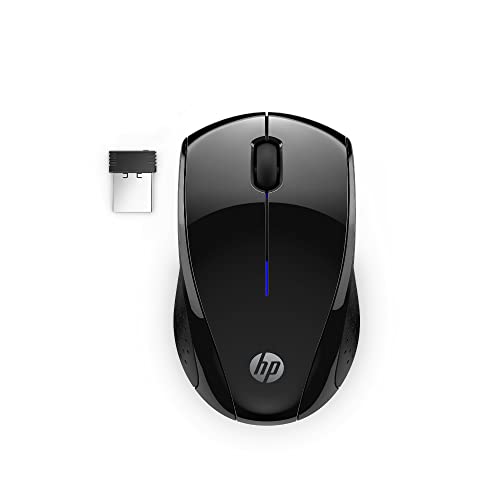
- Ambidextrous contoured shape
- Receiver stores inside the mouse
- Up to 15 months from one AA battery
Best For: Budget-minded travelers wanting simple, reliable wireless use
Best Ergonomic Pick
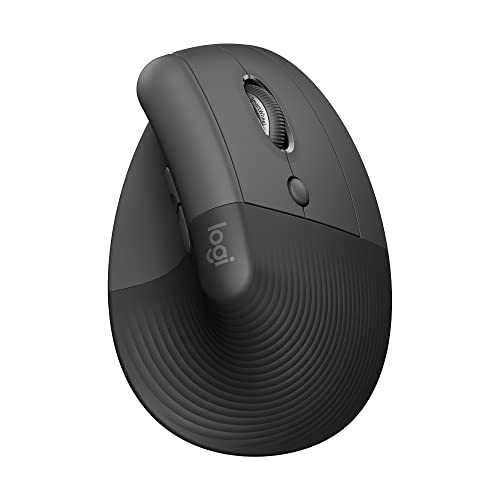
- 57-degree vertical design supports a more natural forearm posture
- Bluetooth and Logi Bolt connectivity
- Up to two years of battery life
Best For: Small- to medium-sized right hands needing extended-use comfort
Best Lightweight Travel Design
Dell MS700 Bluetooth Travel Mouse
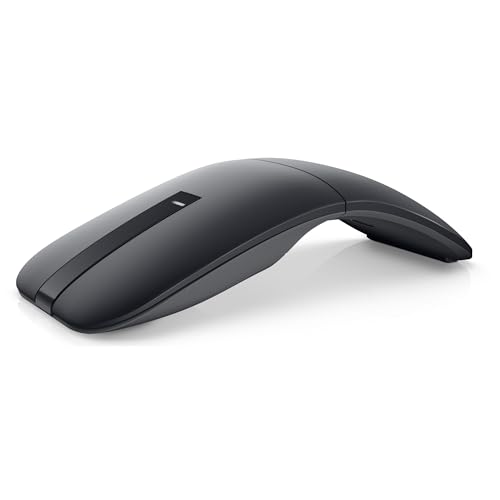
- Weighs just 56.9 grams
- Twists to power off and stow
- Connects with up to three Bluetooth devices
Best For: Frequent travelers using Windows PCs
Best Foldable Option
Logitech Mobi Fold Wireless Mouse

- Ultra-thin foldable design powers on when unfolded
- Quiet clicks with 4000 DPI tracking
- Bluetooth connects to three devices
Best For: Travelers wanting a rechargeable mouse for laptops and tablets
Quiet Bluetooth Pick

- Quiet clicks and ergonomic shape
- Bluetooth 5.0 with no USB receiver
- Compact 2.4-ounce travel design
Best For: Quiet laptop work and commuting
Most Portable Design
TECKNET Folding Wireless Mouse
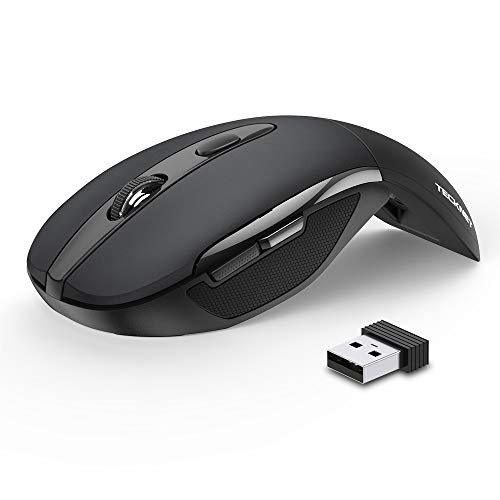
- Folds flat for travel
- Three DPI settings up to 2000 DPI
- Up to 24 months of claimed battery life
Best For: Frequent travel and compact packing
Vertical Comfort Choice
UGREEN Ergonomic Wireless Mouse

- Vertical handshake-style design
- Bluetooth and 2.4G dual connectivity
- Four DPI levels up to 4000 DPI
Best For: Medium to large hands needing wrist support
Best Pocket-Friendly Pick – Arc Travel Mouse
For shoppers seeking travel-friendly ergonomic computer mice, this foldable Arc-style model prioritizes portability, quiet operation, and flexible connectivity. Its rotating design snaps flat for packing, while Bluetooth and 2.4GHz options support multiple devices.
Best For: Travelers who want a slim, pocketable mouse for laptops, tablets, and other devices.
Pros:
- Rotates and snaps flat to save space in a bag or pocket.
- Supports up to three connected devices through Bluetooth and 2.4GHz wireless.
- Quiet, soft-click buttons suit shared workspaces and business travel.
- Built-in rechargeable battery can last about 30 days per charge.
Cons:
- Its three-button layout is simpler than models with programmable controls.
- The listed design is right-handed.
- 2.4GHz use requires the included USB nano receiver.
This is a practical choice when packability matters most. Its folding profile and rechargeable design make it especially convenient for commuters and frequent travelers, though users wanting a larger, feature-rich desktop mouse may prefer another option.
Best Premium Compact Option – Logitech MX Anywhere 3S
The Logitech MX Anywhere 3S is a strong fit for travel-friendly ergonomic computer mice when precise tracking and multi-device productivity are priorities. It uses Bluetooth, tracks on surfaces including glass, and combines quiet clicks with fast MagSpeed scrolling.
Best For: Mobile professionals who need a compact, high-precision mouse for several computers or operating systems.
Pros:
- 8,000 DPI tracking works on virtually any surface, including glass.
- Connects with up to three devices over Bluetooth.
- Quiet Clicks reduce noise without removing the tactile feel.
- Runs up to 70 days on a full charge and supports quick USB-C charging.
Cons:
- No USB receiver is included; a compatible Logi Bolt receiver is sold separately.
- Its compact right-handed design may not suit every grip preference.
- Advanced customization requires Logitech Options+ software.
With reliable Bluetooth, strong battery life, and surface versatility, this is one of the more capable choices for working away from a desk. The missing receiver is the main consideration if you prefer plug-and-play USB connectivity.
Best Ergonomic Full-Size Pick – Lenovo Yoga Pro Mouse
For travelers who prefer a more substantial grip, the Lenovo Yoga Pro brings a full-sized ergonomic shape to the travel-friendly ergonomic computer mice category. It includes a thumb rest, soft side material, programmable buttons, and dual-device Bluetooth pairing.
Best For: Right-handed users who want extended comfort and configurable controls while working between two devices.
Pros:
- Full-sized ergonomic design includes a thumb rest and soft-touch side areas.
- Six buttons and programmable controls support customized workflows.
- Tracks across multiple surfaces with adjustable DPI up to 4,000.
- Rechargeable battery lasts about two to three months per charge.
Cons:
- The larger 5-inch body is less compact than fold-flat travel designs.
- Dual-device pairing is more limited than mice supporting three devices.
- The listed operating-system support centers on Windows 10 and later.
This mouse favors hand comfort and control over the smallest possible packing footprint. It makes sense for travelers who work for long periods and are willing to carry a fuller-sized mouse.
Best Battery-Life Value – HP X3000 G3 Wireless Mouse
The HP X3000 G3 is a straightforward option among travel-friendly ergonomic computer mice, offering an ambidextrous contoured shape, USB-A wireless connectivity, and long battery life. Its receiver stores inside the mouse, helping keep travel accessories together.
Best For: Travelers who want an affordable, dependable mouse with replaceable-battery convenience.
Pros:
- Ambidextrous design accommodates either hand.
- USB nano receiver stores inside the mouse for easier packing.
- 1600 DPI optical tracking supports precise everyday control.
- Uses one AA battery for up to 15 months of claimed use.
Cons:
- It uses a USB-A receiver rather than Bluetooth.
- Three buttons provide fewer customization options than six-button models.
- Requires replacement AA batteries instead of USB-C recharging.
This HP is a sensible pick for basic laptop travel, especially when you want long battery life and a receiver that will not get lost easily. It is less suitable for newer devices without USB-A ports or users seeking advanced ergonomic controls.
Best Ergonomic Pick – Logitech Lift Vertical Mouse
For shoppers seeking travel-friendly ergonomic computer mice that prioritize wrist comfort, the Logitech Lift uses a 57-degree vertical design, a softly textured grip, and a thumb rest. Its Bluetooth and Logi Bolt connectivity also make it practical for switching between compatible laptops, tablets, and computers.
Best For: Small- to medium-sized right hands that need an ergonomic mouse for extended work sessions and occasional travel.
Pros:
- Vertical shape encourages a more natural forearm posture.
- Comfortable grip, thumb rest, quiet clicks, and customizable buttons.
- Works via Bluetooth or Logi Bolt and offers up to two years of battery life.
Cons:
- Designed specifically for right-handed use.
- Its upright shape is less compact than a conventional travel mouse.
The Lift is the strongest comfort-focused option here, especially for users who spend long hours at a desk but still want wireless flexibility. Its larger ergonomic shape may be less convenient for minimalist packing than the foldable alternatives.
Best Lightweight Travel Design – Dell MS700 Bluetooth Travel Mouse
The Dell MS700 is a practical choice among travel-friendly ergonomic computer mice for users who value minimal weight and packability. It weighs 56.9 grams, twists flat for storage, and connects to up to three devices over Bluetooth 5.0.
Best For: Frequent travelers who want an ambidextrous, lightweight mouse for Windows-based computers.
Pros:
- Lightweight 56.9-gram design is easy to carry.
- Twistable body powers off and helps it stow compactly.
- Bluetooth 5.0 supports up to three devices, with adjustable sensitivity up to 4000 DPI.
Cons:
- Only two buttons are provided.
- Compatibility details are centered on Windows and PC use.
- Uses touch scrolling rather than a traditional scroll wheel.
The MS700 emphasizes portability over extensive controls or pronounced ergonomic shaping. Its ambidextrous profile and twist-to-stow design make it a particularly convenient companion for business trips and mobile workstations.
Best Foldable Option – Logitech Mobi Fold Wireless Mouse
The Logitech Mobi Fold stands out among travel-friendly ergonomic computer mice with an ultra-thin body that folds for packing and unfolds to power on. It combines quiet clicks, 4000 DPI tracking, Bluetooth support for three devices, and USB-C recharging in a compact 79-gram design.
Best For: Travelers who want a pocketable rechargeable mouse for laptops, tablets, and shared workspaces.
Pros:
- Foldable, lightweight design fits easily in a bag or pocket.
- Quiet clicks and adaptive touch scrolling suit public or shared spaces.
- Connects to three devices and provides up to one month of battery life.
Cons:
- USB-C charging cable is not included.
- Compact right-handed design may be less suitable for users wanting a full-size ergonomic shape.
- Battery life is shorter than the Lift’s stated two-year battery life.
The Mobi Fold is the most packing-friendly choice in this group. Its fold-to-power-on design, rechargeable battery, quiet operation, and broad operating-system support make it well suited to mobile productivity, though it prioritizes portability over a pronounced vertical ergonomic form.
Quiet Bluetooth Pick – Lenovo WL310 Silent Mouse
For shoppers seeking travel-friendly ergonomic computer mice, the Lenovo WL310 combines a compact build with a hand-friendly shape and quiet Bluetooth operation. Adjustable DPI settings and receiver-free connectivity make it practical for laptops, shared workspaces, and mobile setups.
Best For: Professionals and students who want a quiet, lightweight Bluetooth mouse for Windows, Mac, or Chromebook use.
Pros:
- Ergonomic shape is designed to reduce wrist strain during extended use.
- Silent clicks suit quiet offices, libraries, and late-night work.
- Bluetooth 5.0 connects without a USB receiver and supports up to a 10-meter range.
- Compact 2.4-ounce design is easy to carry in a laptop bag.
Cons:
- Right-hand orientation may not suit left-handed users.
- Maximum sensitivity is 1600 DPI, lower than some alternatives.
- Requires Windows 10 or compatible computer support as specified.
The WL310 is a sensible travel choice when quiet operation and simple Bluetooth pairing matter more than advanced customization. Its compact size and included battery add convenience for commuting and everyday laptop work.
Most Portable Design – TECKNET Folding Wireless Mouse
The TECKNET Folding Wireless Mouse stands out among travel-friendly ergonomic computer mice because it folds flat for packing. Its rubberized grip, adjustable DPI, plug-and-play receiver, and long claimed battery life support convenient use on the road.
Best For: Travelers who prioritize a compact folding mouse with broad operating-system compatibility and a USB receiver.
Pros:
- Folds flat to take up less space in a laptop bag.
- Soft rubber grips and an ergonomic shape are designed for either hand.
- Three DPI settings, up to 2000 DPI, allow cursor-speed adjustment.
- Auto-sleep mode and two AAA batteries provide up to 24 months of claimed use.
Cons:
- Two AAA batteries are required but not included.
- Side buttons are not supported on macOS.
- Folding requires care to avoid pinching fingers.
Choose this model if packability is the main concern. The stored nano receiver and 10-meter 2.4GHz range make setup straightforward, while the broad compatibility is useful for mixed-device travel.
Vertical Comfort Choice – UGREEN Ergonomic Wireless Mouse
For users who prefer a more supportive grip, the UGREEN vertical mouse is one of the travel-friendly ergonomic computer mice with a natural handshake-style position. It offers quiet clicks, dual wireless connectivity, four DPI levels, and switching between up to three devices.
Best For: Medium- to large-handed users who want vertical wrist positioning and flexible Bluetooth or 2.4G connectivity.
Pros:
- Vertical design is intended to reduce wrist rotation and muscle strain.
- Bluetooth and 2.4G wireless modes support up to three devices.
- Four DPI settings reach 4000 DPI for varied work and navigation needs.
- Quiet buttons and PTFE glide feet support peaceful, smooth operation.
Cons:
- Designed for medium to large hands and may not fit smaller hands well.
- At 170 grams, it is heavier than the other listed options.
- Uses one AA battery rather than a built-in rechargeable battery.
The UGREEN is a strong fit when ergonomic wrist positioning matters more than minimum weight. Check the hand-size guide before buying, since its vertical form and larger fit may be less convenient for small-handed travelers.
How We Picked These Travel-Friendly Ergonomic Computer Mice
We selected these 10 models based on the features that matter most when you work away from a permanent desk: compact dimensions, comfortable shaping, dependable wireless performance, easy storage, and practical power options. The lineup includes Bluetooth-only and dual- or tri-mode mice, rechargeable and replaceable-battery designs, foldable travel models, and more supportive ergonomic shapes.
We also considered useful differences in button layouts, tracking resolution, scrolling, operating-system compatibility, and noise levels. Since “ergonomic” can mean anything from a gently contoured shell to a pronounced vertical design, the best choice depends on how much hand support you need and how portable the mouse must be.
Quick Comparison
- Best for premium mobile productivity: Logitech MX Anywhere 3S
- Best for pronounced wrist support: Logitech Lift Vertical
- Best for maximum compactness: Foldable Arc, Logitech Mobi Fold, or TECKNET Folding Mouse
- Best for multi-device flexibility: Lenovo Yoga Pro, UGREEN, or the tri-mode Arc Mouse
- Best for simple everyday travel: HP X3000 G3 or Dell MS700
- Best for quiet workspaces: Lenovo WL310, UGREEN, or Logitech Mobi Fold
Key Buying Factors for Travel-Friendly Ergonomic Computer Mice
Size and Folding Design
A slim or folding mouse is easier to fit beside a laptop charger, but the smallest designs may provide less palm support. Check the folded thickness, active shape, and whether the mouse can be used comfortably for several hours.
Connection Options
Bluetooth saves a USB port and works well with modern laptops and tablets. A 2.4GHz receiver can offer simple plug-and-play reliability, while dual- or tri-mode models are useful if you switch between multiple devices. Confirm compatibility with Windows, macOS, ChromeOS, and tablets before buying.
Comfort and Hand Position
Look for side grips, a broad thumb rest, or a vertical profile if wrist comfort is a priority. Compact travel mice generally suit fingertip or claw grips better than large palm grips. Right-handed vertical models may be comfortable but less versatile for shared or left-handed use.
Power, Tracking, and Controls
USB-C charging is convenient for travel because it reduces the number of cables you carry. Long battery life is useful when outlets are unavailable. Adjustable DPI helps match slow, precise control with quick cursor movement, while extra programmable buttons can improve productivity but may add bulk.
Who Should Buy Which Travel-Friendly Ergonomic Computer Mice?
Choose a foldable model if bag space is your top concern or you only use a mouse occasionally. Pick the MX Anywhere 3S or Lenovo Yoga Pro if you want stronger productivity features and frequent multi-device switching. The Logitech Lift is better suited to users who value a more upright wrist position over minimal size.
For quiet offices, libraries, and shared accommodations, prioritize silent-click models such as the Lenovo WL310, Logitech Mobi Fold, or UGREEN. If you want an uncomplicated backup for commuting, the HP, Dell, or TECKNET options provide straightforward portability without requiring an elaborate setup.