The best ergonomic computer mice for gaming combine a more comfortable hand position with the speed, precision, and programmable controls gamers need. This roundup covers vertical, wireless, wired, and feature-rich options for different grip styles and budgets.
Use the buying guide below to compare sensor performance, button layouts, connectivity, comfort, and battery considerations before choosing your next gaming mouse.
Best 10 Ergonomic Computer Mice for Gaming Picks for 2026
Best Customizable Pick

- Right-handed ergonomic shape with thumb rest
- 11 programmable buttons and Hyperscroll wheel
- 26,000 DPI sensor with customizable RGB
Best For: PC gamers seeking extensive controls and personalization
Best Wireless Versatility

- Bluetooth, 2.4GHz, and wired connection modes
- Rechargeable 500mAh battery with indicator
- Right-handed shape with quiet clicks
Best For: Multi-device users who want quiet wireless flexibility
Best Vertical Design
Nulea Ergonomic Vertical Mouse

- 57-degree grip supports a natural forearm position
- Four DPI settings up to 3,200
- Wired plug-and-play design with RGB lighting
Best For: Users who prefer a simple vertical grip for gaming and work
Best Simple Gaming Pick

- Right-handed ergonomic wired design
- Five programmable buttons with macro support
- 6,400 DPI sensor and tactile scroll wheel
Best For: Gamers wanting essential controls in a familiar shape
Best Vertical Gaming Pick
TKMARS Joystick Ergonomic Mouse
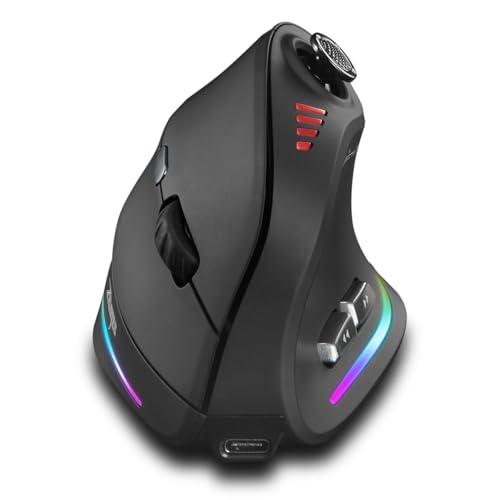
- Vertical grip with built-in five-way joystick
- 12 programmable buttons and up to 24,000 DPI
- Bluetooth, 2.4G wireless, or USB-C connectivity
Best For: Right-handed gamers wanting maximum control and a natural grip
Best Wired Customization
Redragon M612 RGB Gaming Mouse

- 11 programmable buttons with macro and rapid-fire controls
- Wired USB connection with up to 8,000 DPI
- Streamlined claw grip and textured side surface
Best For: Right-handed gamers who prefer wired reliability and remappable controls
Best Everyday Vertical Option

- Vertical design for wrist- and forearm-focused comfort
- Bluetooth and 2.4G wireless connectivity
- Rechargeable battery with up to two months without lighting
Best For: Medium-to-large-handed users balancing daily work and light gaming
Rocker-Control Precision
TRELC Wired Vertical Gaming Mouse

- 5D rocker adds five thumb-controlled inputs
- 11 programmable buttons with onboard memory
- Vertical grip and up to 10,000 DPI
Best For: Right-handed players wanting extensive wired controls
Premium Wireless Comfort
Razer Pro Click V2 Vertical Mouse

- Six-button vertical design with wrist-supporting base
- 2.4GHz, Bluetooth, and wired connectivity
- 30K sensor and up to six months of battery life
Best For: Users seeking premium multi-device wireless performance
Tri-Mode Gaming Flexibility
Wireless 5D Rocker Gaming Mouse

- 12 programmable buttons plus a 5D thumb rocker
- Bluetooth, 2.4GHz wireless, and USB-C wired modes
- Up to 24,000 DPI with five RGB effects
Best For: Right-handed gamers needing maximum customization and flexibility
Best Customizable Pick – Razer Basilisk V3
The Razer Basilisk V3 is a strong choice among ergonomic computer mice for gaming if you want a right-handed shape, thumb rest, extensive button customization, and precise wired tracking. Its 11 programmable buttons and 26,000 DPI optical sensor suit players who need quick access to macros, actions, or sensitivity adjustments.
Best For: Right-handed PC gamers who want extensive customization, RGB lighting, and a comfortable thumb-rest design.
Pros:
- Ergonomic right-handed design includes a thumb rest.
- 11 programmable buttons support macros and secondary functions.
- 26,000 DPI optical sensor offers precise tracking.
- Hyperscroll tilt wheel and 11-zone Razer Chroma RGB add useful control and customization.
Cons:
- Wired connectivity may be less convenient than wireless models.
- Its many controls and customization options may be more than casual users need.
The Basilisk V3 stands out for gamers who prioritize control and personalization over a minimal setup. Its ergonomic shape, crisp optical switches, and broad Synapse customization make it a particularly capable option for PC gaming.
Best Wireless Versatility – INPHIC PM6 PRO
The INPHIC PM6 PRO brings flexible connectivity and quiet operation to the ergonomic computer mice for gaming category. Its right-handed shape, thumb rest, rechargeable 500mAh battery, and three connection modes make it practical for gaming, office work, and switching between several devices.
Best For: Right-handed users with medium or large hands who need wireless flexibility, quiet clicks, and multi-device support.
Pros:
- Supports Bluetooth, 2.4GHz wireless, and USB-C wired connections.
- Right-handed ergonomic shape includes a sculpted thumb rest and matte anti-slip surface.
- Rechargeable 500mAh battery includes a three-level power indicator.
- Six DPI presets range from 800 to 12,800, with Windows driver customization.
Cons:
- A separate USB-C data cable is required for wired mode and is not included.
- Driver customization is limited to Windows.
- Quiet-click design may not appeal to users who prefer more audible feedback.
This is a versatile option when one mouse needs to serve multiple devices and environments. Its rechargeable design and silent clicks are especially useful for shared workspaces, while the adjustable DPI and wireless modes remain suitable for gaming.
Best Vertical Design – Nulea Ergonomic Vertical Mouse
The Nulea vertical mouse offers a different approach to ergonomic computer mice for gaming with its 57-degree grip. This wired model is designed to keep the forearm in a more natural position, while four DPI settings, forward and back buttons, and RGB backlighting provide basic control for gaming and everyday computer use.
Best For: Right-handed users who prefer a vertical grip and want a simple, plug-and-play wired mouse.
Pros:
- 57-degree vertical design is intended to support a natural forearm position.
- Plug-and-play USB connection requires no driver installation.
- Four DPI settings cover 800, 1200, 2400, and 3200 DPI.
- RGB outline lighting and forward/back buttons add functionality and visual appeal.
Cons:
- The vertical shape may take a few days to get used to.
- Buttons are not programmable.
- Forward and back buttons are not compatible with Mac OS.
The Nulea is best viewed as a comfort-focused vertical mouse with gaming-friendly extras rather than a high-end competitive gaming peripheral. Its modest DPI range and fixed controls keep it straightforward, while the vertical posture may appeal to users who dislike traditional mouse shapes.
Best Simple Gaming Pick – Razer DeathAdder Essential
The Razer DeathAdder Essential is a straightforward entry in the ergonomic computer mice for gaming category. Its right-handed ergonomic shape, five programmable buttons, 6,400 DPI optical sensor, and wired connection provide the essential controls for PC gaming without the larger button count of more feature-heavy models.
Best For: Right-handed gamers who want a familiar ergonomic design and essential programmable controls.
Pros:
- Right-handed ergonomic shape is designed for comfortable use.
- Five programmable buttons support remapping and macro functions through Razer Synapse.
- 6,400 DPI optical sensor offers adjustable sensitivity.
- Ridged rubberized scroll wheel improves grip and controlled scrolling.
Cons:
- It has fewer buttons and a lower maximum DPI than the Basilisk V3.
- Wired connectivity does not offer wireless freedom.
- Mechanical switches are rated for up to 10 million clicks, below the rating listed for the Basilisk V3.
The DeathAdder Essential is a sensible pick for gamers who want a familiar Razer shape and core gaming features. It keeps the setup uncomplicated while still providing programmable buttons, adjustable sensitivity, and a tactile scroll wheel.
Best Vertical Gaming Pick – TKMARS Joystick Ergonomic Mouse
For gamers seeking ergonomic computer mice for gaming, the TKMARS combines a vertical grip with extensive customization. Its built-in joystick, 12 programmable buttons, adjustable sensitivity up to 24,000 DPI, and dual wireless connectivity make it suited to both gaming and productivity.
Best For: Right-handed gamers who want a vertical design, joystick control, and extensive button customization.
Pros:
- Vertical shape supports a more natural hand and wrist position.
- Built-in five-way joystick adds navigation and control options.
- Offers Bluetooth, 2.4G wireless, and USB-C connectivity.
- Rechargeable 800mAh battery, RGB lighting, and up to 24,000 DPI.
Cons:
- The vertical design is intended for right-handed use.
- Its extensive controls may be more than casual users need.
- At about 0.3 kg, it may feel substantial compared with lighter mice.
The TKMARS is the most feature-rich option here for users who prioritize gaming controls and wrist-oriented ergonomics. Its tall shape and joystick will require an adjustment period, but the combination of wireless flexibility and programmable inputs is compelling for extended sessions.
Best Wired Customization – Redragon M612 RGB Gaming Mouse
The Redragon M612 is a practical wired choice among ergonomic computer mice for gaming, pairing a streamlined claw-grip shape with 11 programmable buttons. Its adjustable DPI, textured side grip, and rapid-fire and macro controls are useful for players who prefer a direct USB connection.
Best For: Right-handed PC and console gamers who want programmable controls without managing batteries or wireless connections.
Pros:
- Eleven buttons can be reassigned for game or work shortcuts.
- Wired USB connection avoids battery charging.
- Supports DPI settings from 500 to 8,000 through software.
- Frosted coating, rubberized side texture, and claw-grip shape support control.
Cons:
- The wired design does not provide wireless freedom.
- Its right-handed shape may not suit left-handed users.
- The included DPI defaults are lower than the maximum software range.
Choose the M612 if dependable wired performance and remappable inputs matter more than portability. It lacks the wrist-neutral vertical form of the other ergonomic computer mice for gaming in this roundup, but its familiar claw-grip design and tactile surface offer a straightforward setup for long gaming or work sessions.
Best Everyday Vertical Option – MEETION BTM010 Wireless Mouse
The MEETION BTM010 is an everyday vertical option for shoppers comparing ergonomic computer mice for gaming with general-purpose comfort. It offers dual Bluetooth and 2.4G connectivity, a rechargeable battery, RGB lighting, and four DPI settings up to 3,200.
Best For: Right-handed users with medium to large hands who want a comfortable wireless mouse for light gaming, work, and browsing.
Pros:
- Vertical shape is designed to reduce wrist and forearm strain.
- Supports Bluetooth 5.0/3.0 and 2.4G wireless connections.
- Rechargeable battery can last up to two months with lighting off.
- Forward and backward buttons simplify browsing and document navigation.
Cons:
- Its 3,200 DPI maximum is lower than the gaming-focused alternatives.
- The design may be too large for users with smaller hands.
- The smooth surface may feel less grippy for users who frequently lift the mouse.
The BTM010 is better suited to comfort-focused daily computing and light gaming than competitive play. Its vertical posture, long stated battery life, and broad device compatibility make it a sensible choice for users who want ergonomic support without a large set of gaming controls.
Rocker-Control Precision – TRELC Wired Vertical Gaming Mouse
For shoppers comparing ergonomic computer mice for gaming, the TRELC wired model combines a handshake-style vertical grip with extensive button customization. Its integrated 5D rocker and programmable controls are especially useful for games that demand frequent inputs, while the corded USB connection avoids battery management.
Best For: Right-handed FPS, MOBA, or MMO players who want many customizable controls and a wired setup.
Pros:
- 5-direction thumb rocker provides five additional directional inputs.
- All 11 buttons can be customized through the included software, with settings saved onboard.
- Offers five DPI levels from 1,500 to 10,000 and customizable side lighting.
- Vertical handshake design is intended to reduce wrist strain during extended use.
Cons:
- Wired USB connectivity limits freedom of movement.
- Right-handed design is not suitable for left-handed users.
- Button-rich layout may require time to configure and learn.
The TRELC is a specialized choice for players who prioritize control density and ergonomic positioning over a lightweight, minimalist design. Its onboard memory is convenient when moving between compatible computers.
Premium Wireless Comfort – Razer Pro Click V2 Vertical Mouse
The Razer Pro Click V2 Vertical is a premium option among ergonomic computer mice for gaming, pairing a natural handshake grip with wireless flexibility and a high-resolution sensor. It supports 2.4GHz, Bluetooth, and wired operation, making it suited to users who switch between gaming and productivity setups.
Best For: Right-handed gamers and creators who want premium wireless connectivity, long battery life, and a supported vertical design.
Pros:
- Vertical six-button design and base support promote a more natural hand and wrist position.
- Connects to up to five devices through HyperSpeed wireless, Bluetooth, or wired mode.
- Focus Pro 30K optical sensor is specified for tracking on glass, with 60-million-click mechanical switches.
- Battery lasts up to six months under standard test conditions, according to the supplied notes.
Cons:
- Windows 11 is listed as the minimum required operating system.
- Six buttons provide fewer programmable controls than the other rocker-equipped options here.
- Its feature set may be more than needed for shoppers seeking a basic ergonomic mouse.
The Pro Click V2 Vertical stands out for multi-device convenience and polished wireless performance. Choose it when long battery life, lighting customization, and premium sensor hardware matter as much as ergonomic shaping.
Tri-Mode Gaming Flexibility – Wireless 5D Rocker Gaming Mouse
This wireless vertical model gives ergonomic computer mice for gaming shoppers a broad control layout and flexible connection options. Its 5D thumb rocker works alongside 12 programmable buttons, while Bluetooth, 2.4GHz wireless, and USB-C wired modes support gaming across PCs, laptops, and tablets.
Best For: Right-handed gamers who want a highly configurable vertical mouse with wireless, Bluetooth, and wired connectivity.
Pros:
- Tri-mode connectivity supports Bluetooth 5.0, 2.4GHz wireless, and USB-C wired use.
- 12 programmable buttons and a 5-direction rocker offer extensive game control.
- Rechargeable design provides cable-free use, with a stated wireless range of up to 33 feet.
- Five DPI presets reach 24,000 DPI, and the side strips provide five RGB effects.
Cons:
- Right-handed vertical shape will not suit every grip or user.
- Button programming requires the supplied configuration software.
- The large number of controls may feel complex for casual users.
This model is the most versatile pick for shoppers who want abundant inputs without giving up connection flexibility. Its rechargeable tri-mode design also makes it practical for switching between gaming, work, and multiple devices.
How We Picked the Best Ergonomic Computer Mice for Gaming
We selected these mice based on the features that matter most during extended gaming and everyday computer use: hand-friendly shaping, sensor responsiveness, button customization, connection reliability, and practical comfort. The lineup includes conventional ergonomic shells, vertical mice, joystick-style designs, and models with extensive programmable controls.
Because comfort is highly personal, we also considered variety in grip support, hand positioning, size, connectivity, lighting, and price. A mouse that feels excellent for a palm grip may not suit a fingertip player, so matching the design to your hand and play style is essential.
Quick Comparison
| Mouse type | Best for | Main strengths | Potential trade-off |
|---|---|---|---|
| Traditional ergonomic wired | Competitive and budget gaming | Low latency, dependable connection | Requires desk cable management |
| Traditional ergonomic wireless | Flexible desk setups | Less cable clutter, easy movement | Requires charging or batteries |
| Vertical ergonomic | Wrist-position comfort | More upright hand posture | Adjustment period for fast games |
| High-button gaming designs | MMO, strategy, and shortcut-heavy play | Many remappable controls | Heavier or more complex layout |
Key Buying Factors for Ergonomic Computer Mice for Gaming
Shape, Grip, and Hand Size
Choose a shell that supports your palm without forcing your fingers to stretch. Palm grips generally benefit from larger, fuller bodies, while claw and fingertip grips often suit shorter or narrower designs. Vertical mice can reduce forearm rotation, but their taller shape may require practice.
Sensor and DPI Control
DPI ratings up to 24,000 can be useful for high-resolution displays, but maximum DPI is not a quality guarantee. Look for consistent tracking, adjustable sensitivity, and a sensor that remains accurate at the settings you actually use. Onboard profiles are helpful if you switch between games or computers.
Buttons and Software
Extra buttons are valuable for abilities, macros, media controls, and productivity shortcuts. Confirm that the layout is reachable without changing your grip. Also check whether the software supports remapping, sensitivity stages, lighting control, and saved profiles.
Wired Versus Wireless
Wired models are simple, continuously powered, and often cost less. Wireless mice offer a cleaner setup and unrestricted movement, while Bluetooth is convenient for multiple devices and 2.4GHz connections are generally preferable for gaming responsiveness. For wireless models, check charging time and battery life.
Weight, Tracking, and Build Quality
A lighter mouse can feel quicker in shooters, while a heavier design may feel steadier for office work or strategy games. Look for smooth feet, a durable scroll wheel, firm clicks, and a cable or wireless connection that does not interfere with movement.
Who Should Buy Which Ergonomic Computer Mice for Gaming?
Choose a traditional wired ergonomic mouse if you want dependable low-latency performance, simple setup, and strong value. These are practical choices for competitive players and budget-conscious buyers.
Choose a vertical mouse if wrist and forearm positioning are your main priorities or you spend long hours switching between gaming and work. Expect a short learning curve, especially in fast-paced titles.
Choose a wireless model if you value a clean desk and unrestricted movement. Prioritize 2.4GHz gaming support, reliable battery life, and a comfortable charging routine.
Choose a high-button design for MMOs, strategy games, simulations, or productivity-heavy setups where quick access to commands matters more than the simplest shape. Before buying, verify that the buttons fit your grip and are supported by usable configuration software.