The best professional computer trackballs can reduce desk-space demands while delivering accurate pointer control for design, office work, and productivity. The right model depends on your preferred finger placement, connection options, comfort needs, and budget.
We compared 10 leading trackballs across ergonomics, sensor performance, scrolling, wireless flexibility, and business-friendly features to help you choose confidently.
Best 10 Professional Computer Trackballs Picks for 2026
Best Multi-Device Pro

- Up to six-device pairing with three connection modes
- 10 programmable buttons and swappable bearings
- 12,000 DPI tracking with a 36mm thumb ball
Best For: Multi-device professionals needing extensive customization
Best Adjustable Comfort

- Adjustable 0°, 20°, or 30° hand positioning
- Precision mode for speed or accuracy
- Easy-Switch and FLOW across two computers
Best For: Right-handed office users seeking ergonomic adjustability
Best Wired Ambidextrous
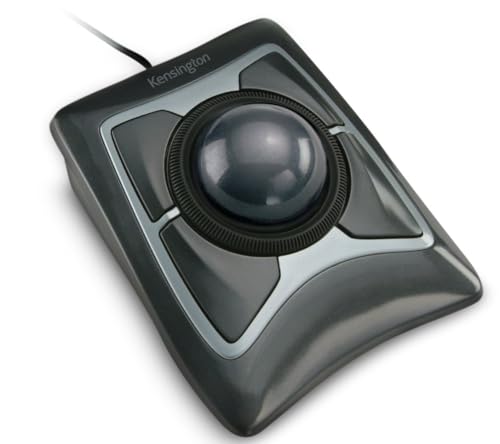
- Large 55mm ball with Diamond Eye optical tracking
- Ambidextrous design and detachable wrist rest
- Wired USB-A connection with a dedicated scroll ring
Best For: Shared desks and users preferring reliable wired control
Best Quiet Rechargeable

- 20° ergonomic tilt with a contoured grip
- 80% quieter clicks for shared workspaces
- Up to 120 days of battery life with USB-C charging
Best For: Quiet, comfortable productivity on Windows or macOS
Best Overall
Kensington SlimBlade Pro Wireless Trackball

- Bluetooth, 2.4GHz wireless, and wired modes
- Large 55mm ball with dual-sensor tracking
- Ambidextrous design and four-month rechargeable battery
Best For: Professionals seeking flexible connectivity and long-term comfort
Best Ergonomic Upgrade

- Wireless Bluetooth connectivity
- Eight physical buttons
- Ergonomic design with included lithium-polymer battery
Best For: Bluetooth-focused office users who want more button controls
Best for Customization
ELECOM Huge Wireless Trackball

- 52mm ball with soft palm rest
- Eight buttons and horizontal scrolling
- Three switchable DPI settings
Best For: Right-handed users needing control and adjustable cursor speed
Wired Precision Pick

- Precise optical tracking with reduced hand movement
- Dedicated scroll ring for documents and web pages
- Ambidextrous design with detachable wrist rest
Best For: Wired office setups and shared workstations
Ergonomic Business Choice

- Wireless design for tight desks and busy workspaces
- Sculpted right-handed shape for extended comfort
- Up to 18 months from one AA battery
Best For: Right-handed office users and business deployments
Compact Wireless Upgrade

- Thumb control saves space on small desks
- Bluetooth and Logi Bolt connectivity
- Three customizable buttons with Smart Actions
Best For: Compact workstations and mixed-device users
Best Multi-Device Pro – ELECOM IST PRO
For professionals comparing computer trackballs, the ELECOM IST PRO stands out for flexible connectivity and extensive customization. Its 36mm thumb ball, 12,000 DPI PixArt sensor, silent switches, and 10 programmable buttons suit demanding office, editing, spreadsheet, and multitasking workflows.
Best For: Professionals who switch among multiple computers, tablets, and smartphones and want deep button customization.
Pros:
- Connects with up to six devices using Bluetooth 5.3, 2.4GHz wireless, or USB-C wired mode.
- Offers 10 programmable buttons, a tilt wheel, and swappable steel or ruby bearings.
- Provides a large 36mm thumb ball, tracking up to 12,000 DPI, and a 1000Hz report rate.
- Silent clicks and up to 18 months of AA-battery life support quiet, long work sessions.
Cons:
- Its right-handed design may not suit left-handed users.
- The extensive controls and configuration options may be more than basic users need.
The IST PRO is a feature-rich choice for a professional setup that spans several devices. It is especially compelling when connectivity flexibility, precision, and programmable controls matter more than a minimalist design.
Best Adjustable Comfort – Logitech MX Ergo Plus
Logitech MX Ergo Plus Wireless Trackball | Extra 10-degree wedge, PC and Mac compatibility
Check Price On AmazonThe Logitech MX Ergo Plus is a practical option for professionals seeking a comfortable computer trackball with an adjustable hand position. Its SmartShift-style hinge and included wedge offer multiple angles, while precision mode, multi-computer switching, and a rechargeable battery support productive desk work.
Best For: Right-handed office users who prioritize adjustable ergonomics and switching between two computers.
Pros:
- Adjustable positioning supports 0°, 20°, or 30° hand angles.
- Precision mode provides a quick switch between faster and more precise tracking.
- Easy-Switch and FLOW support workflows across two computers, including copy and paste.
- A full charge lasts up to four months, while a one-minute charge provides up to a day of use.
Cons:
- It supports pairing with up to two computers, fewer than some multi-device models.
- The supplied operating-system details specifically list Windows 7 and Windows 8.
The MX Ergo Plus focuses on positioning and workflow convenience rather than a large number of controls. Its adjustable angle and cross-computer features make it a strong fit for long office sessions and multi-PC desks.
Best Wired Ambidextrous – Kensington Expert Trackball
Kensington Expert Trackball Mouse (K64325), Black Silver, 5"W x 5-3/4"D x 2-1/2"H
Check Price On AmazonThe Kensington Expert is a straightforward wired choice among professional computer trackballs. Its large 55mm ball, Diamond Eye optical tracking, scroll ring, detachable wrist rest, and ambidextrous shape emphasize stable cursor control and comfortable desk use without wireless battery management.
Best For: Shared workspaces and users who want a large, ambidextrous trackball with reliable USB-A connectivity.
Pros:
- The 55mm ball and Diamond Eye optical tracking support precise cursor control.
- A patented scroll ring makes navigating long pages convenient.
- Its ambidextrous design and detachable wrist rest accommodate varied users and preferences.
- Four buttons, cursor-speed controls, and scroll-speed customization offer useful configuration options.
Cons:
- The wired USB-A connection provides less placement flexibility than wireless models.
- Only four buttons are available for customization.
- ChromeOS users get basic HID functions but cannot customize through KensingtonKonnect.
The Expert is best when dependable wired operation and broad hand compatibility are priorities. Its large ball and scroll ring are well suited to document-heavy work, though users wanting wireless convenience or many programmable controls should look elsewhere.
Best Quiet Rechargeable – Logitech MX Ergo S
The Logitech MX Ergo S combines a tilted ergonomic shape with quieter operation for professional computer trackball use. Its 20-degree angle, precision-mode button, six customizable buttons, dual wireless connectivity, and USB-C charging are designed for comfortable, efficient daily work.
Best For: Medium- to large-handed professionals wanting a quiet rechargeable trackball for Windows or macOS.
Pros:
- A 20-degree tilt and contoured grip are designed to improve forearm posture and comfort.
- Clicks are 80% quieter, making it suitable for shared or distraction-sensitive work areas.
- Six customizable buttons and Smart Actions expand shortcut options through Logi Options+.
- Battery life reaches up to 120 days, with one minute of charging providing up to 24 hours of use.
Cons:
- Its 2,048 DPI maximum sensitivity is lower than some performance-oriented trackballs.
- It is right-handed and intended for medium- to large-sized hands.
- The charging cable is not included.
The MX Ergo S is a polished productivity model for users who value quiet clicks, a rechargeable battery, and ergonomic positioning. It offers useful customization without the more extensive button count of the ELECOM IST PRO.
Best Overall – Kensington SlimBlade Pro Wireless Trackball
For professional computer trackballs, the Kensington SlimBlade Pro stands out for flexible connectivity and an ambidextrous, low-profile design. It supports Bluetooth, 2.4GHz wireless, and wired USB-C use, making it practical for varied desk setups.
Best For: Professionals who want rechargeable, versatile connectivity and comfortable all-day cursor control.
Pros:
- Offers Bluetooth, 2.4GHz wireless, and wired connection options.
- Large 55mm ball and dual sensors provide responsive tracking.
- Ambidextrous, low-profile design requires less arm and wrist movement.
- Rechargeable battery can last up to four months per charge.
Cons:
- KensingtonKonnect software is required for customizing the programmable buttons.
- Windows ARM-based computers are currently unsupported.
The SlimBlade Pro is a strong all-purpose choice when flexibility, reduced desk movement, and long battery life matter more than a compact footprint.
Best Ergonomic Upgrade – Logitech MX Ergo S Trackball
The Logitech MX Ergo S is a streamlined option among professional computer trackballs, combining wireless Bluetooth connectivity with an ergonomic design. Its eight buttons provide useful control potential for office workflows and productivity tasks.
Best For: Users who prioritize an ergonomic wireless trackball with multiple physical buttons.
Pros:
- Uses wireless Bluetooth connectivity.
- Includes eight buttons for flexible control.
- Features an ergonomic design for work-focused use.
- Includes a lithium-polymer battery.
Cons:
- The supplied notes specify Bluetooth connectivity but do not list wired or 2.4GHz options.
- Compatibility details are limited to Windows 10 and ChromeOS 134 in the supplied specifications.
The MX Ergo S is worth considering for professionals who want a straightforward Bluetooth model with a generous button layout, though its connection and compatibility details are less extensive here.
Best for Customization – ELECOM Huge Wireless Trackball
The ELECOM Huge is a practical pick among professional computer trackballs for users who want a large finger-operated ball and extensive controls. Its eight buttons, adjustable DPI settings, and horizontal scrolling support make it suited to productivity-heavy desktops.
Best For: Right-handed professionals who want precise control, adjustable sensitivity, and many physical inputs.
Pros:
- Large 52mm trackball and soft palm rest support extended use.
- Eight physical buttons include scroll-wheel tilting for horizontal scrolling.
- Switchable 500, 1000, and 1500 DPI settings adjust cursor speed.
- 2.4GHz wireless connection offers up to 10 meters on non-magnetic surfaces.
Cons:
- The design is right-handed rather than ambidextrous.
- Uses a replaceable battery instead of a rechargeable battery.
- Its large body may take more desk space than low-profile alternatives.
With a substantial palm rest, cleanable ruby bearings, and configurable sensitivity, the ELECOM Huge is a compelling choice for detailed desktop work where control and button access take priority.
Wired Precision Pick – Kensington Orbit Trackball
For shoppers comparing professional computer trackballs, the Kensington Orbit is a practical wired option focused on precise cursor control and easy scrolling. Its optical tracking, dedicated scroll ring, ambidextrous design, and included wrist rest suit extended desktop use.
Best For: Office users who want an ambidextrous, corded trackball with straightforward scrolling and ergonomic support.
Pros:
- Optical tracking provides precise cursor movement with less hand travel.
- Dedicated scroll ring makes navigating documents and web pages easy.
- Ambidextrous design accommodates right- and left-handed users.
- Detachable wrist rest supports a more comfortable working position.
Cons:
- USB wired connectivity limits cable-free desk flexibility.
- Only two buttons are available for programmable functions.
- Requires compatible Kensington software for customization.
The Orbit is a strong fit when reliable wired performance, scrolling convenience, and broad hand orientation compatibility matter more than wireless freedom or numerous buttons.
Ergonomic Business Choice – Logitech Ergo M575
The Logitech Ergo M575 for Business is designed for professional computer trackball users who need wireless freedom and all-day comfort. Its sculpted right-handed shape, thumb-controlled tracking, shortcut customization, and long battery life make it well suited to busy desks and managed deployments.
Best For: Right-handed professionals and organizations outfitting employees with wireless trackballs for long workdays.
Pros:
- Ergonomic sculpted shape promotes a more relaxed hand and forearm posture.
- Wireless Bluetooth and radio-frequency connectivity support flexible setups.
- Works well in tight spaces because the mouse itself stays stationary.
- Single AA battery provides up to 18 months of use.
Cons:
- Right-hand orientation is not suited to left-handed users.
- Battery-powered operation requires eventual battery replacement.
- Some customization features depend on Logitech software.
With business-focused management support, five buttons, and adjustable cursor speed, the M575 is a sensible professional choice for compact workspaces and extended wireless use.
Compact Wireless Upgrade – Logitech Ergo M575S
Logitech Ergo M575S Wireless Ergonomic Trackball Mouse, Black/Blue (910-007026)
Check Price On AmazonThe Logitech Ergo M575S is a space-conscious choice for professional computer trackballs, combining thumb control with wireless connectivity and customizable shortcuts. It supports Bluetooth or the included Logi Bolt receiver and uses a recycled-plastic construction for a more flexible modern workstation setup.
Best For: Professionals who need a compact wireless trackball for laptops, tablets, or space-saving desks.
Pros:
- Thumb control moves the cursor without requiring the mouse to move.
- Bluetooth and included Logi Bolt receiver offer connection flexibility.
- Three customizable buttons support shortcuts and Smart Actions.
- Ergonomic shape is designed to suit most hand sizes.
Cons:
- Its listed Bluetooth connectivity may require a separate receiver-based setup for some devices.
- Right-handed ergonomic shaping may not suit every user.
- Cursor sensitivity is listed at up to 2,000 DPI.
The M575S stands out for compact desks and mixed-device work, especially if you value wireless flexibility, shortcut controls, and an ergonomic shape in a smaller setup.
How We Picked the Best Professional Computer Trackballs
We evaluated these models against the features that matter most during sustained professional use: control layout, pointer precision, connection reliability, comfort, scrolling, power design, and compatibility. We also considered whether each trackball suits a specific work style, such as spreadsheet navigation, creative applications, shared workstations, or travel.
Models with multiple connection methods earned consideration for flexible office setups, while rechargeable designs were assessed for charging convenience and cable use. We also separated thumb-controlled and finger-controlled designs because neither layout is universally better.
Quick Comparison
| Best For | What to Prioritize |
|---|---|
| All-day office work | Ergonomic shape, smooth tracking, and reliable wireless connectivity |
| Creative and precision tasks | Adjustable sensitivity, a large ball, and programmable controls |
| Multi-device setups | Bluetooth, 2.4GHz wireless, wired operation, and device switching |
| Small desks or travel | Compact construction and low cable dependence |
| Shared workstations | Simple setup, broad compatibility, and easy cleaning |
Key Buying Factors for Professional Computer Trackballs
Control Style and Hand Position
Thumb-controlled trackballs generally feel familiar to mouse users and keep the fingers available for buttons. Finger-controlled designs can offer more direct ball control and may be preferable for detailed pointer work. Check the shape and button placement before buying, especially if you switch between hands or have a larger hand.
Connectivity and Device Switching
Bluetooth is convenient for laptops and tablets, while a 2.4GHz receiver can provide a dependable desktop connection. Wired use can be valuable when charging, troubleshooting, or working in environments where wireless devices are restricted. Multi-device switching is especially useful for professionals who move between a work computer and personal device.
Precision, Scrolling, and Customization
Look for adjustable sensitivity and a smooth ball when your work involves design, editing, or fine cursor placement. A dedicated scroll wheel or ring improves document navigation. Programmable buttons can reduce repetitive keyboard commands, but confirm that the manufacturer’s software supports your operating system.
Power, Size, and Maintenance
Rechargeable models reduce battery replacement, while replaceable-battery designs can run longer between maintenance. A larger trackball may feel steadier but take more desk space. All trackballs benefit from occasional cleaning around the ball socket to preserve smooth movement.
Who Should Buy Which Professional Computer Trackballs?
Choose a thumb-operated ergonomic model if you want the easiest transition from a conventional mouse and prioritize relaxed wrist movement. Choose a finger-operated model if precise ball control and flexible cursor movement matter more than familiarity. A multi-connection trackball is the best fit for professionals managing several computers, while a compact wireless option suits small desks and mobile setups.
For demanding daily use, prioritize comfort and control over headline DPI figures. The best Professional Computer Trackballs are the ones that match your hand position, software workflow, and connection requirements without creating new strain.