The best computer trackballs for home offices can reduce desk clutter while giving your hand a more stationary, comfortable way to control the pointer. They are especially useful when desk space is limited or repetitive mouse movement becomes tiring.
We compared 10 models across comfort, connectivity, tracking controls, adjustability, and everyday practicality to help you choose the right fit for your workspace.
Best 10 Computer Trackballs for Home Offices Picks for 2026
Best Overall Ergonomic Upgrade

- 20-degree ergonomic tilt
- Bluetooth and Logi Bolt connectivity
- Rechargeable USB-C battery
Best For: Feature-focused home-office users seeking long-session comfort
Best Wired Ambidextrous Pick
Kensington Orbit with Scroll Ring

- Ambidextrous ergonomic design
- Dedicated scroll ring
- Detachable wrist rest
Best For: Users who prefer a simple wired setup and easy scrolling
Best Multi-Device Value

- Connects to up to three devices
- Four adjustable DPI levels
- Rechargeable and space-friendly
Best For: Right-handed users with multi-device or compact desk setups
Best Long-Battery-Life Choice

- Ergonomic thumb-controlled tracking
- Up to 18 months of AA battery life
- Bluetooth and Logi Bolt connectivity
Best For: Users seeking low-maintenance wireless comfort for daily work
Quiet Tilt Control
Nulea Wireless Trackball Mouse
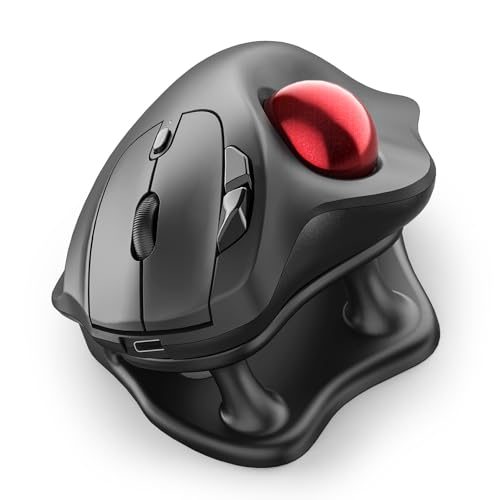
- 21.7° ergonomic tilt stand
- Silent operation for shared spaces
- Bluetooth and USB support for up to three devices
Best For: Right-handed home-office users prioritizing quiet, multi-device control
Flexible Angle Choice
ProtoArc EM02 Wireless Trackball

- Adjusts between 0° and 15°
- Bluetooth and 2.4GHz wireless connectivity
- USB-C rechargeable with long standby
Best For: Users wanting adjustable positioning and multi-device flexibility
Vertical Wrist Support

- 54° vertical ergonomic design
- Thumb-controlled trackball for reduced movement
- Removable ball and up to 21 days of battery life
Best For: Right-handed users who prefer a strongly vertical grip
Best Adjustable Angle
Ergonomic Wireless Trackball Mouse

- 0° or 18° adjustable tilt
- Three-device Bluetooth and 2.4GHz connectivity
- Rechargeable, quiet, and backlit
Best For: Right-handed users seeking flexible wrist positioning
Best for Customization

- Large 52mm trackball
- Ten programmable buttons
- Bluetooth, 2.4GHz, and wired USB-C modes
Best For: Power users needing shortcuts and flexible connectivity
Best Overall Ergonomic Upgrade – Logitech MX Ergo S
The Logitech MX Ergo S is a strong choice among computer trackballs for home offices when comfort, customization, and wireless flexibility matter. Its 20-degree tilt, thumb-controlled ball, quiet clicks, and rechargeable battery are designed for extended desk work.
Best For: Home-office users who want an ergonomic, feature-rich trackball for daily productivity.
Pros:
- 20-degree tilt and sculpted grip support a more comfortable forearm position.
- Bluetooth and included Logi Bolt receiver support dual wireless connectivity.
- Customizable buttons and Smart Actions add workflow flexibility.
- Quick USB-C charging provides up to 24 hours from a one-minute charge.
Cons:
- Its right-handed design is intended for medium- to large-sized hands.
- Charging cable is not included.
- Advanced features require the Logi Options+ app.
The MX Ergo S is the most complete option here for a dedicated home-office setup, particularly if you value an adjustable ergonomic angle and extensive customization.
Best Wired Ambidextrous Pick – Kensington Orbit with Scroll Ring
The Kensington Orbit is a practical wired option among computer trackballs for home offices, especially for users who prefer a simple USB connection. Its optical tracking, scroll ring, ambidextrous shape, and detachable wrist rest focus on accurate, comfortable everyday navigation.
Best For: Left- or right-handed users who want a straightforward wired trackball with easy scrolling.
Pros:
- Ambidextrous design works for both right- and left-handed users.
- Dedicated scroll ring makes moving through documents and web pages convenient.
- Detachable wrist rest cushions the hand and wrist.
- Software allows button assignments and cursor or scrolling-speed adjustments.
Cons:
- USB wiring limits desk placement and mobility.
- Only two buttons are provided.
- It lacks wireless and rechargeable operation.
Choose the Orbit if reliability, ambidextrous use, and a dedicated scroll ring are more important to you than wireless convenience or extensive button controls.
Best Multi-Device Value – Nulea M501 Wireless Trackball
The Nulea M501 offers flexible wireless control for computer trackballs for home offices, with Bluetooth or USB-dongle connectivity and support for up to three devices. Its thumb-operated ball, four DPI levels, rechargeable battery, and compact-workspace suitability make it a versatile everyday option.
Best For: Right-handed users who switch between multiple computers or work in tight spaces.
Pros:
- Connects with up to three devices through Bluetooth or the USB receiver.
- Four DPI levels support adjustable cursor control.
- Rechargeable battery eliminates routine disposable-cell replacement.
- Trackball operation works well on narrow or cluttered work surfaces.
Cons:
- Buttons are not programmable.
- Right-handed design limits shared use.
- Charging should use the included cable, a computer USB port, or a 5V charger rather than a fast charger.
The M501 is a sensible fit for flexible home offices, particularly when multi-device switching and limited desk space are priorities.
Best Long-Battery-Life Choice – Logitech ERGO M575S
The Logitech ERGO M575S is a streamlined choice among computer trackballs for home offices, using thumb control to reduce hand movement while preserving desk space. Its ergonomic shape, quiet clicks, dual wireless connectivity, and included AA battery suit routine productivity work.
Best For: Home-office users who want comfortable wireless tracking with minimal maintenance.
Pros:
- Sculpted ergonomic shape supports a relaxed hand and improved forearm posture.
- Bluetooth and included Logi Bolt receiver provide connection flexibility.
- Included AA battery can last up to 18 months.
- Thumb control works well on small or space-saving setups.
Cons:
- It is designed for right-handed use.
- It has fewer buttons than the MX Ergo S.
- Battery operation is not rechargeable.
The ERGO M575S is an appealing everyday choice when you want Logitech’s ergonomic approach and long battery life without stepping up to the MX Ergo S’s larger feature set.
Quiet Tilt Control – Nulea Wireless Trackball Mouse
For computer trackballs for home offices, the Nulea M511 combines thumb control, a 21.7° tilt stand, and quiet operation. Its wireless design supports Bluetooth or USB receiver connections, making it practical for desk work across multiple devices.
Best For: Right-handed users who want quiet, rechargeable trackball control with a built-in ergonomic tilt.
Pros:
- 21.7° tilt stand encourages a more natural wrist position.
- Silent trackball, buttons, and scroll wheel suit shared spaces and late-night work.
- Bluetooth and USB receiver support up to three paired devices.
- Four DPI settings from 400 to 1600 support precision or faster cursor movement.
Cons:
- Designed for right-handed use.
- Buttons are not programmable.
- Requires Windows 11 or macOS 14 Sonoma according to the listed minimum requirements.
The M511 is a focused choice when quiet clicking and a moderate ergonomic tilt matter more than extensive customization. Its six-button layout and multi-device switching also fit busy home-office workflows.
Flexible Angle Choice – ProtoArc EM02 Wireless Trackball
The ProtoArc EM02 stands out among computer trackballs for home offices with a hinge that switches between a flat 0° position and a 15° tilt. It also offers Bluetooth and 2.4GHz wireless connectivity, quiet clicks, and USB-C recharging for flexible daily use.
Best For: Users who want to adjust the mouse angle and switch between computers or tablets from a compact workspace.
Pros:
- Adjustable 0° or 15° angle supports personalized hand positioning.
- Connects through Bluetooth or a 2.4GHz USB receiver and switches between devices.
- Five DPI settings range from 200 to 1600 for adjustable cursor control.
- USB-C charging and up to 90 days of standby reduce charging frequency.
Cons:
- Forward and backward buttons are not compatible with Mac OS.
- As with other trackballs, the ball and rollers may need cleaning if movement becomes sticky or imprecise.
- Right-handed design limits suitability for left-handed users.
The EM02 is a versatile pick for users who are still refining their preferred trackball posture. Its adjustable angle, quiet buttons, and broad connection options make it well suited to varied home-office setups.
Vertical Wrist Support – Nulea M506 Wireless Trackball
For shoppers comparing computer trackballs for home offices, the Nulea M506 uses a pronounced 54° vertical shape and thumb-operated ball to reduce wrist and arm movement. It adds three-device connectivity, four DPI levels, and a removable trackball for easier maintenance.
Best For: Right-handed office or creative-work users seeking a strongly vertical grip and thumb-controlled navigation.
Pros:
- 54° vertical design keeps the wrist and forearm in a more relaxed position.
- Thumb-controlled trackball supports precise movement with less hand and arm travel.
- Two Bluetooth channels and one USB receiver connect up to three devices.
- Detachable trackball simplifies cleaning, while the rechargeable battery runs up to 21 days per charge.
Cons:
- Its crisp, audible clicks may be less suitable for quiet shared spaces.
- Designed for right-handed users.
- Listed operating-system compatibility specifies Windows.
The M506 is the most aggressively vertical option in this group, making it a reasonable fit for users who prefer a handshake-style grip. The removable ball is a practical advantage for maintaining smooth tracking over time.
Best Adjustable Angle – Ergonomic Wireless Trackball Mouse
For home offices that need flexible positioning, this wireless model combines a thumb-operated trackball with selectable 0° or 18° tilt. Its three-device connectivity, rechargeable battery, and quiet clicks make it a practical choice among computer trackballs for home offices.
Best For: Right-handed users who want adjustable wrist positioning and multi-device control.
Pros:
- Choose between 0° and 18° angles for a more natural hand position.
- Connect up to three devices through Bluetooth and 2.4GHz wireless.
- Rechargeable USB-C battery, five DPI settings, and quiet-touch buttons.
- Backlight can be turned on or off, and the receiver stores in the base.
Cons:
- Right-hand design limits use for left-handed users.
- The manufacturer recommends a one- to two-week adjustment period for new trackball users.
- The downloadable driver is not compatible with macOS.
This is a versatile home-office option if angle adjustment and broad wireless compatibility matter most. Its 800–4800 DPI range also gives you room to tune cursor speed for different screens and tasks.
Best for Shared Spaces – ProtoArc EM01 NL Wireless Trackball
The ProtoArc EM01 NL is designed for quiet home-office work, with a tilting body, thumb-operated ball, and wireless switching for up to three devices. It is a straightforward pick among computer trackballs for home offices, especially when desk space is limited.
Best For: Users who want quiet primary clicks, an adjustable angle, and simple multi-device switching.
Pros:
- Adjustable 0–20° hinge supports different hand positions.
- Bluetooth and 2.4G modes connect up to three devices.
- Rechargeable design with five selectable DPI levels from 200 to 1600.
- Quiet left and right clicks suit shared work areas.
Cons:
- The scroll wheel and side buttons are not silent.
- Trackball and roller cleaning is needed to maintain smooth accuracy.
- Right-hand design does not suit left-handed users.
Choose this model if a quieter clicking experience and adjustable posture are higher priorities than very high cursor sensitivity. Regular cleaning of the ball and three rollers is part of normal maintenance.
Best for Customization – ELECOM Huge Plus Trackball
The ELECOM Huge Plus stands out for its large 52mm ball, 10 programmable buttons, and three connection modes. For home-office users who want extensive shortcut control and a wired fallback, it is one of the most feature-rich computer trackballs for home offices in this group.
Best For: Power users who want a large ball, programmable controls, and Bluetooth, wireless, or wired operation.
Pros:
- Large 52mm ball provides fluid control and fits naturally in the hand.
- Bluetooth, 2.4GHz wireless, and wired USB-C support up to three devices.
- Ten programmable buttons can speed up navigation and productivity tasks.
- Rechargeable battery offers up to five months of use per charge.
Cons:
- Its 7.2-by-4.5-inch body and 291g weight make it larger and heavier than compact options.
- It is designed for right-handed use.
- Advanced bearing customization may appeal mainly to enthusiasts.
This is the strongest fit for users who will actually use programmable shortcuts or prefer a larger control surface. The wired USB-C mode also lets you continue working while charging.
How We Picked the Best Computer Trackballs for Home Offices
We evaluated these Computer Trackballs for Home Offices based on the features that matter most during long work sessions: hand positioning, ball size and control, connection options, power design, programmable controls, and compatibility with common computers. We also considered whether each model suits a particular grip, desk layout, or workflow rather than treating one design as universally best.
Thumb-operated models can feel familiar to traditional mouse users, while finger-operated trackballs may offer more precise control and reduce thumb strain. Adjustable tilt, rechargeable batteries, wired connectivity, and multi-device support can also make a meaningful difference in daily use.
Quick Comparison
- Best for premium comfort: Logitech MX Ergo S Advanced Wireless Trackball Mouse
- Best for a simple finger-operated design: Kensington Orbit Trackball Mouse with Scroll Ring
- Best for budget-friendly ergonomic control: Nulea M501 Wireless Trackball Mouse
- Best for Bluetooth flexibility: Logitech Ergo M575S Wireless Trackball Mouse
- Best for adjustable angles: ProtoArc EM02 Wireless Trackball Mouse
- Best for a vertical hand position: Nulea M506 Wireless Trackball Mouse
- Best for extensive customization: ELECOM Huge Plus Wireless Trackball Mouse
Key Buying Factors for Computer Trackballs for Home Offices
Ball Position and Hand Comfort
Choose a thumb-controlled model if you want a mouse-like transition and compact footprint. Finger-operated designs place the ball beneath the fingers and can be preferable for users who want broader, more deliberate pointer control. Check the shape and button placement before prioritizing specifications.
Angle and Posture
A tilt stand or vertical shell can keep your wrist and forearm in a more neutral position. Adjustable models are useful if you alternate between relaxed and upright grips, but they may take more desk space.
Connectivity and Power
Bluetooth is convenient for laptops and multi-device setups, while a 2.4GHz receiver can provide simple plug-and-play performance. Wired operation avoids battery concerns and may appeal to fixed desktop users. For wireless models, compare rechargeable charging with replaceable-battery convenience.
Precision and Customization
Multiple DPI settings help balance precise document work with faster navigation. Programmable buttons are valuable for shortcuts, editing, browsing, and productivity software, but they are less important if you prefer a straightforward layout.
Who Should Buy Which Computer Trackballs for Home Offices?
Choose a premium Logitech model if long-session comfort, dependable software support, and polished ergonomics are your priorities. Select Kensington’s scroll-ring design if you prefer finger control and easy document navigation. Nulea and ProtoArc options are worth considering when you want ergonomic shaping or angle adjustment at a potentially lower cost.
For users who switch between computers, prioritize Bluetooth or multi-connection support. If you work in a small office, focus on a compact shape and wireless receiver storage. Users with demanding customization needs should look closely at programmable controls, connection modes, and software compatibility before buying.