Video editing rewards precise pointer control, but long timelines and detailed trimming can make a conventional mouse uncomfortable. A trackball keeps your hand relatively still while giving you smooth cursor movement across bins, viewers, and editing timelines.
We selected 10 standout models for different editing setups, from compact wireless thumb-controlled designs to full-size finger-operated trackballs with scroll rings. The right choice depends on your preferred control style, desk space, connectivity needs, and tolerance for a learning curve.
Best 10 Computer Trackballs for Video Editing Picks for 2026
Best Wireless Ergonomic Pick

- Bluetooth wireless connectivity
- Eight-button control layout
- Ergonomic design with included rechargeable battery
Best For: Wireless editing setups and shortcut-focused users
Best Slim Design
Kensington Slimblade Trackball

- SlimBlade series design
- Battery-powered operation
- Red finish with Kensington branding
Best For: General desktop use with a streamlined trackball profile
Best Customizable Wireless Option
ProtoArc EM06 Wireless Trackball
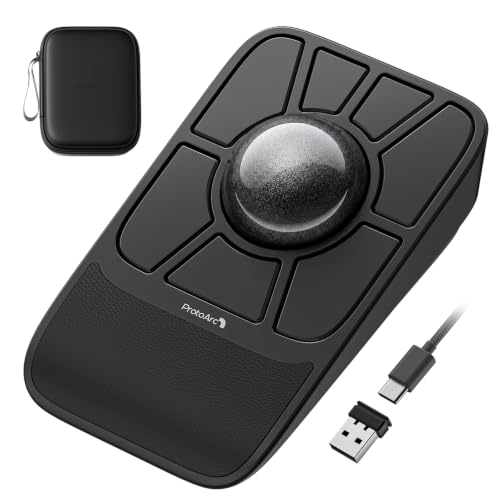
- 55mm ball with dual-sensor tracking
- Seven buttons and four saved profiles
- Bluetooth, 2.4G, and wired modes
Best For: Multi-device editing workflows needing customizable controls
Best Wired Precision Pick
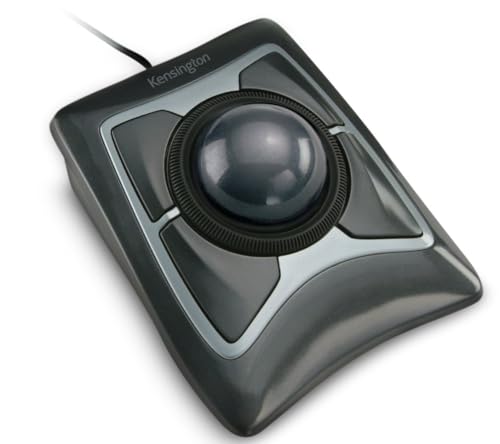
- Large 55mm ball with optical tracking
- Scroll ring for quick navigation
- Wired USB-A connection and ambidextrous design
Best For: Precise desktop editing with stable wired connectivity
Best Wireless Thumb-Control Pick

- Wireless Bluetooth and USB connectivity for up to three devices
- Four DPI levels for adjustable cursor precision
- Rechargeable, ergonomic right-handed thumb control
Best For: Right-handed editors needing a flexible wireless trackball
Best Ambidextrous Wired Pick
Kensington Orbit with Scroll Ring

- Ambidextrous design for left- or right-handed users
- Optical tracking with a dedicated scroll ring
- Software supports button and speed customization
Best For: Shared editing desks and users who prefer wired control
Best Silent Ergonomic Pick
Nulea M511 Tilt-Stand Trackball
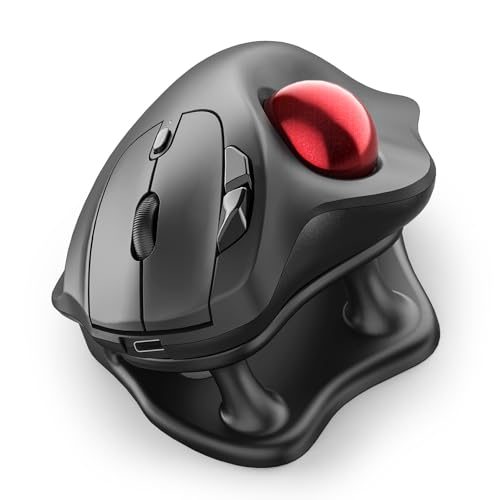
- 21.7-degree tilt stand supports a natural wrist position
- Silent operation for shared spaces and late-night editing
- Bluetooth and USB connections with four DPI levels
Best For: Right-handed editors wanting quiet, comfortable multi-device control
Best Wireless Pick
Kensington Orbit Wireless Trackball

- Four adjustable DPI settings
- Scroll ring for fast navigation
- Bluetooth LE and 2.4 GHz wireless
Best For: Editors wanting wireless flexibility and adjustable pointer control
Best Simple Wired Option
Kensington Orbit Trackball Mouse

- Reliable wired USB connection
- Accurate optical tracking
- Compact ambidextrous design
Best For: Editors seeking a battery-free, plug-and-play trackball
Best Ergonomic Wired Pick
Kensington Orbit with Scroll Ring

- Precise optical tracking
- Dedicated scroll ring
- Detachable wrist rest
Best For: Editors wanting wired control with added navigation and wrist support
Best Wireless Ergonomic Pick – Logitech MX Ergo S
The Logitech MX Ergo S is a practical wireless option for shoppers comparing computer trackballs for video editing. Its ergonomic design, Bluetooth connectivity, and eight-button layout give editors a flexible setup for cursor control and shortcuts.
Best For: Editors who want a wireless, ergonomic trackball with multiple buttons.
Pros:
- Bluetooth connectivity supports a cable-free workspace.
- Eight buttons provide room for additional controls.
- Ergonomic design may suit extended computer sessions.
- Rechargeable lithium-polymer battery is included.
Cons:
- The supplied notes identify Bluetooth but do not list wired connectivity.
- At 200 g, it may feel substantial compared with lighter mice.
The MX Ergo S is a strong fit when wireless convenience and button capacity matter more than extensive editing-specific software features.
Best Slim Design – Kensington Slimblade Trackball
The Kensington Slimblade is a straightforward choice among computer trackballs for video editing, especially for users who prefer a slim trackball format. Its supplied specifications identify a red SlimBlade model with a battery-powered design.
Best For: Users seeking a compact-looking Kensington trackball for general desktop control.
Pros:
- SlimBlade design offers a distinctive streamlined profile.
- Kensington branding may appeal to users familiar with the series.
- Battery-powered operation avoids a fixed USB cable.
Cons:
- The supplied notes do not specify button count, connectivity type, or tracking technology.
- They also do not list editing-focused customization features.
The Slimblade may suit buyers prioritizing its slim series design, but shoppers who need clearly documented buttons or connection options should compare the listed alternatives.
Best Customizable Wireless Option – ProtoArc EM06 Wireless Trackball
The ProtoArc EM06 stands out among computer trackballs for video editing with dual sensors, a gaming-grade chip, customizable buttons, and five DPI levels. Its tri-mode connection options and profile storage also make it adaptable across editing computers and other devices.
Best For: Editors who want high-precision tracking, programmable controls, and multi-device flexibility.
Pros:
- Large 55mm trackball and dual sensors are designed for precise tracking.
- Seven buttons, five DPI levels, and up to four saved profiles support customization.
- Tri-mode connectivity supports Bluetooth, 2.4 GHz, and wired use.
- Rechargeable 930mAh battery and included wrist rest add convenience.
Cons:
- The notes state that profile customization supports only 2.4G and wired connections.
- Regular trackball cleaning is recommended to maintain smooth, accurate operation.
- The supplied notes report possible detection issues with multi-port hubs and incompatibility with Safari.
The EM06 is one of the most feature-rich options here for editing workflows, provided its connection and software limitations fit your setup.
Best Wired Precision Pick – Kensington Expert Trackball
Kensington Expert Trackball Mouse (K64325), Black Silver, 5"W x 5-3/4"D x 2-1/2"H
Check Price On AmazonThe Kensington Expert Trackball is a dependable wired choice among computer trackballs for video editing. Its large 55mm ball, Diamond Eye optical tracking, scroll ring, and ambidextrous design emphasize precise, controlled navigation during timeline and desktop work.
Best For: Editors who prefer reliable USB connectivity and a large trackball with a scroll ring.
Pros:
- Large 55mm ball and Diamond Eye optical tracking target precise cursor control.
- Patented scroll ring supports quick vertical page scanning.
- Ambidextrous design and detachable wrist rest support varied working preferences.
- Four buttons, cursor speed, and scroll speed can be customized through KensingtonKonnect.
Cons:
- Wired USB-A connectivity limits cable-free flexibility.
- KensingtonKonnect does not currently support Windows ARM-based computers according to the notes.
- ChromeOS users receive HID functions but cannot customize through KensingtonKonnect.
The Expert Trackball is a solid editing-oriented pick when precision, a scroll ring, and stable wired operation are more important than wireless convenience.
Best Wireless Thumb-Control Pick – Nulea M501
For anyone comparing computer trackballs for video editing, the Nulea M501 offers wireless flexibility, four DPI levels, and a thumb-controlled design that can help reduce broad wrist and arm movement. Its rechargeable battery and support for up to three devices also suit multitasking setups.
Best For: Right-handed editors who want a rechargeable wireless trackball for compact or multi-device workspaces.
Pros:
- Connects to up to three devices through Bluetooth or the included USB receiver.
- Four adjustable DPI levels support precise cursor control.
- Ergonomic thumb control and a curved shape promote a more natural hand position.
- Six buttons include convenient back and forward controls.
Cons:
- All buttons are non-programmable.
- Designed for right-handed use only.
- Charging should use the included cable, a computer USB port, or a 5V charger rather than a fast charger.
The M501 is a practical choice when wireless connectivity and workspace flexibility matter more than extensive customization. Its adjustable sensitivity makes it adaptable for timeline navigation and general editing tasks, while the thumb-ball layout keeps the device compact.
Best Ambidextrous Wired Pick – Kensington Orbit with Scroll Ring
The Kensington Orbit is a straightforward option for shoppers seeking computer trackballs for video editing, pairing optical tracking with a distinctive scroll ring and a wired USB connection. Its ambidextrous shape and detachable wrist rest make it suitable for shared workstations.
Best For: Left- or right-handed users who prefer a dependable wired trackball with scrolling controls and optional button customization.
Pros:
- Ambidextrous design works for both left- and right-handed users.
- Optical tracking provides precise cursor movement with less hand travel.
- Scroll ring makes moving through pages and documents convenient.
- Downloadable Kensington software supports button assignments and cursor or scrolling-speed adjustments.
Cons:
- Only two buttons are provided.
- USB wired connectivity offers less desk flexibility than a wireless model.
- Compatibility details list Mac OS 13 Ventura and Windows 11 as minimum requirements.
The Orbit is especially appealing for editors who value consistent wired operation and ambidextrous ergonomics. Its scroll ring can be useful when moving through long timelines or documents, while the software adds a degree of personalization absent from many basic trackballs.
Best Silent Ergonomic Pick – Nulea M511 Tilt-Stand Trackball
The Nulea M511 stands out among computer trackballs for video editing with its 21.7-degree tilt stand, silent operation, and four selectable DPI levels. It also supports Bluetooth and USB connections, making it useful for editors who switch between computers or other compatible devices.
Best For: Right-handed editors who prioritize quiet operation, an elevated wrist angle, and multi-device connectivity.
Pros:
- 21.7-degree tilt stand supports a more natural wrist position.
- Silent trackball, buttons, and scroll wheel suit shared spaces or late-night work.
- Connects with Bluetooth or USB and switches among up to three devices.
- Four DPI settings range from 400 to 1600 for editing and everyday navigation.
Cons:
- Buttons are not programmable.
- Right-handed design limits hand orientation.
- Listed compatibility requires macOS 14 Sonoma or Windows 11.
The M511 is a strong fit for quiet editing environments where comfort and device switching are important. Its tilt stand and adjustable sensitivity support extended cursor work, although users seeking customizable shortcuts will need to look elsewhere.
Best Wireless Pick – Kensington Orbit Wireless Trackball
For computer trackballs for video editing, the Kensington Orbit Wireless Trackball combines adjustable cursor speed with wireless flexibility. Its four DPI settings include a 400 DPI option for more controlled pointer movement, while the scroll ring helps navigate timelines, documents, and long webpages.
Best For: Editors who want an ambidextrous wireless trackball with adjustable sensitivity and both Bluetooth LE and 2.4 GHz connectivity.
Pros:
- Four DPI settings, including a lower 400 DPI option for precision work
- Scroll ring supports quick vertical navigation
- Dual wireless connectivity with a stated range of up to 30 feet
- Ambidextrous design and programmable functions through KensingtonKonnect software
Cons:
- Requires two AA batteries
- Has only two buttons
- KensingtonKonnect does not currently support Windows ARM-based computers
This is the most flexible option of the three for a clean editing desk, especially if you switch between Bluetooth and a USB receiver. Its limited button count may make it less suitable if you need many dedicated editing shortcuts.
Best Simple Wired Option – Kensington Orbit Trackball Mouse
The wired Kensington Orbit Trackball is a straightforward choice among computer trackballs for video editing. Its optical tracking, medium 40mm ball, and USB connection provide a simple setup without relying on batteries or wireless pairing.
Best For: Editors who prefer a compact, plug-and-play wired trackball for a stable workstation setup.
Pros:
- USB connection avoids wireless pairing and battery changes
- Optical tracking is designed for accurate cursor movement
- Ambidextrous, compact design uses less desk space than a traditional mouse
- KensingtonKonnect software supports button assignments and cursor-speed adjustments
Cons:
- No scroll ring
- Only two buttons for shortcuts
- Wired cable limits placement flexibility
This model makes sense when reliability and simplicity matter more than extra controls. It can handle precise pointer work, but the lack of a scroll ring and limited buttons may require more keyboard shortcuts during editing.
Best Ergonomic Wired Pick – Kensington Orbit with Scroll Ring
The Kensington Orbit with Scroll Ring is a practical wired choice for computer trackballs for video editing, pairing optical tracking with a dedicated scroll ring and detachable wrist rest. The 40mm spherical ball is designed for controlled cursor movement, while the ring helps with vertical navigation.
Best For: Editors who want a wired trackball with a scroll ring, wrist support, and ambidextrous operation.
Pros:
- Optical tracking and a hard 40mm ball support precise cursor control
- Scroll ring makes vertical navigation easier
- Detachable wrist rest supports a more cushioned hand position
- Ambidextrous design and customizable functions through KensingtonKonnect software
Cons:
- Wired USB design offers less placement flexibility
- Only two buttons are available for assignments
- ChromeOS users cannot customize the device through KensingtonWorks
Choose this model if a scroll ring and wrist rest are more important than wireless operation. It offers useful navigation and comfort features for longer sessions, though editors needing numerous physical shortcut buttons may want a more programmable design.
How We Picked the Best Computer Trackballs for Video Editing
We focused on features that matter during real editing sessions: precise cursor control, ergonomic support, reliable connectivity, button accessibility, scrolling, and compatibility with common Windows and macOS workflows. We also included both thumb-operated and finger-operated designs because control preference can significantly affect accuracy and comfort.
Models with multiple connection options, adjustable sensitivity, programmable buttons, or dedicated scroll controls received particular attention. Size and desk footprint also matter, especially for editors working at compact workstations or switching between a desktop and laptop.
Quick Comparison
| Trackball style | Best suited to | Main advantage |
|---|---|---|
| Thumb-controlled | Mouse users and general editing | Familiar hand position and compact operation |
| Finger-controlled | Detailed pointer work | Fine ball movement with less thumb fatigue |
| Scroll-ring models | Timeline navigation | Fast, tactile vertical scrolling |
| Wireless or tri-mode | Flexible workstations | Cleaner desks and device switching |
Key Buying Factors for Computer Trackballs for Video Editing
Control Style and Precision
Thumb trackballs feel closest to traditional mice and are often easier to learn. Finger-operated models can offer more direct control for scrubbing, positioning the playhead, and moving between small interface targets. Higher or adjustable DPI settings are useful when you need to move quickly across a wide display, while lower sensitivity can help with precise selections.
Scrolling and Programmable Controls
A scroll ring or responsive wheel is valuable for navigating long timelines and effects panels. Extra buttons can be assigned to common commands such as undo, zoom, playback, or modifier keys, although software support varies by operating system and application.
Comfort, Size, and Maintenance
Look for a stable base, a natural wrist angle, and enough room to rest your hand without reaching. A tilt stand may help some users, while a compact design is better for smaller desks. Trackballs collect dust over time, so a removable ball and accessible sensor area make cleaning easier.
Connectivity and Compatibility
Bluetooth and 2.4GHz wireless connections reduce cable clutter, while wired operation avoids battery concerns and can simplify troubleshooting. Tri-mode models are especially useful if you edit across multiple computers. Confirm operating-system support and whether configuration software is available for your setup.
Who Should Buy Which Computer Trackballs for Video Editing?
Choose a thumb-controlled model if you want the quickest transition from a standard mouse or prefer a compact footprint. Choose a finger-controlled Kensington-style design if maximum ball control is more important than familiarity. Editors who spend much of the day moving through long sequences should prioritize a model with a dedicated scroll ring. If you frequently change devices or want a flexible desk setup, select a wireless or tri-mode option. Finally, buyers with wrist or hand discomfort should compare the shape and angle carefully; no single design suits every grip.