Multi-camera production demands more than good cameras. The right control panel can make color correction, switching, PTZ control, and live monitoring faster and more repeatable when every shot must match.
This roundup compares 10 options ranging from DaVinci Resolve grading panels to ATEM switcher controllers and compact live-production consoles, helping you choose the best fit for your crew, software, and workflow.
Best 10 Color Grading Control Panels for Multi-Camera Production Picks for 2026
Studio Precision
DaVinci Resolve Micro Color Panel
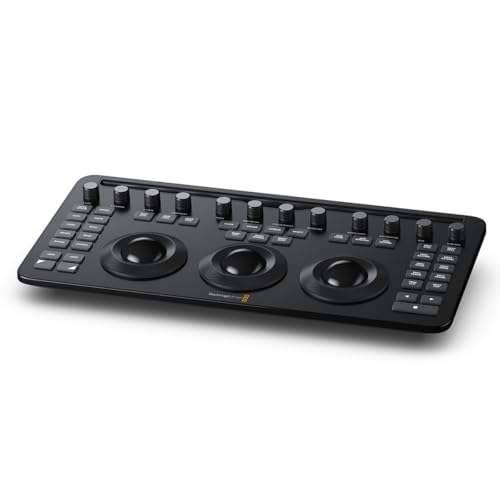
- Three trackballs and 12 color controls
- Bluetooth 5.1 LE or USB-C connectivity
- 40 navigation and transport buttons
Best For: DaVinci Resolve Studio colorists
Live Production Hub
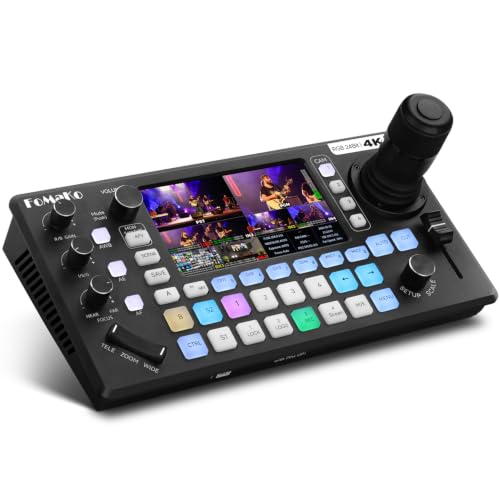
- Controls up to four PTZ cameras
- Four 4K HDMI inputs and on-device color control
- Integrated audio, recording, and streaming
Best For: Solo live-production operators
Wireless Grading Control
DaVinci Resolve Micro Colour Panel

- Three trackballs and 12 regulators
- Bluetooth or USB-C connectivity
- Compact PL keyboard-style design
Best For: Compact wireless DaVinci Resolve setups
Broadcast Switching
Osee GoStream Deck Multi-Cam Mixer

- Four HDMI inputs with dual HDMI outputs
- PVW/PGM buses, T-Bar, macros, and auto-switching
- Streaming, recording, graphics, and audio tools
Best For: Small live-event production teams
Multi-Camera Switching Control

- Two M/E rows with 20 inputs each
- Custom LCD labeling and independent select buses
- Built for larger ATEM switcher workflows
Best For: ATEM-based multi-camera control rooms
Camera Matching Reference

- Optimized for vectorscope and waveform checks
- Supports exposure, contrast, and white balance
- Helps match multiple cameras consistently
Best For: Multi-camera shoots needing a repeatable color reference
Large-Scale Production Control

- Four M/E rows with 40 inputs per row
- Four system-control LCDs for row-level operation
- Twenty-four LCDs provide custom button labeling
Best For: ATEM Constellation-based professional facilities
Compact Precision

- Compact design with durable finish
- Optical-pickup trackerballs and knobs
- Press-to-reset knobs with function displays
Best For: Desktop colorists needing compact tactile controls
Switching Command

- Dedicated video switching controller
- LCD display and three-axis DVE joystick
- Tri-color buttons for visual feedback
Best For: ATEM operators managing live multi-camera switching
Expanded ATEM Control

- 30 input buttons for broad source access
- Eight dedicated keyers and three system LCDs
- Joystick, T-bar, fade-to-black, and preview controls
Best For: Larger ATEM multi-camera production setups
Studio Precision – DaVinci Resolve Micro Color Panel
For editors seeking color grading control panels for multi-camera production, the Blackmagic Design DaVinci Resolve Micro Color Panel provides a compact, dedicated interface for DaVinci Resolve Studio. Its three trackballs, 12 color-correction controls, and navigation buttons put essential grading adjustments within easy reach.
Best For: DaVinci Resolve Studio users who want a compact color-focused panel for camera and post-production work.
Pros:
- Three trackballs and 12 dedicated color-correction controls.
- Includes 40 navigation and transport buttons for timeline control.
- Supports Bluetooth 5.1 LE and USB-C connectivity.
- Compact 14.33-by-7.18-inch design with a two-year warranty.
Cons:
- Designed specifically around DaVinci Resolve Studio rather than general-purpose switching.
- Its single USB-C port may limit wired connection options.
This is the most directly color-grading-oriented option in the roundup. It is a strong fit when precise hands-on control in DaVinci Resolve matters more than live switching, streaming, or camera routing.
Live Production Hub – KC800 4K Multi-Cam Switcher
The KC800 is a broader live-production solution than a traditional grading panel, combining camera control, switching, audio mixing, recording, and streaming. For color grading control panels for multi-camera production, it is relevant when the workflow centers on managing multiple PTZ cameras and live program output, with on-device color controls included.
Best For: Solo operators handling up to four PTZ cameras for churches, events, corporate broadcasts, and live streams.
Pros:
- Controls up to four PTZ cameras through VISCA or VISCA-over-IP.
- Four 4K HDMI inputs, three HDMI outputs, and a UVC connection.
- Includes on-device focus, exposure, and color control.
- Combines six-channel audio, USB/SD recording, and streaming to three platforms.
Cons:
- Its feature set is focused on live switching and production rather than dedicated post-production grading.
- The extensive controls and routing options may require a learning period.
- PTZ control depends on compatible VISCA or VISCA-over-IP cameras.
The KC800 makes sense when camera operation and live delivery are the priority. Its integrated PTZ joystick, AI tracking, and color controls can reduce the amount of equipment needed at a live-production position.
Wireless Grading Control – DaVinci Resolve Micro Colour Panel
The DaVinci Resolve Micro Colour Panel is a compact control surface for users building color grading control panels for multi-camera production around DaVinci Resolve. Three trackballs and 12 regulators provide hands-on adjustment, while Bluetooth or USB-C connection supports flexible workstation placement.
Best For: DaVinci Resolve users who want a compact panel with wireless connectivity and a PL keyboard layout.
Pros:
- Provides three trackballs and 12 dedicated regulators.
- Supports Bluetooth wireless connectivity or USB-C.
- Compact keyboard-style design suited to smaller workspaces.
Cons:
- The supplied notes list fewer navigation details than the other Micro Color Panel listing.
- It carries a one-year warranty.
- It is intended for color-control workflows rather than live camera switching.
This panel is worth considering when a tidy, flexible control surface is more important than a full broadcast switcher. Bluetooth can help keep a grading station less cluttered, while USB-C provides a wired alternative.
Broadcast Switching – Osee GoStream Deck Multi-Cam Mixer
The Osee GoStream Deck is a live video mixer for production teams that need camera switching, audio control, graphics, recording, and streaming in one unit. While it is not a dedicated grading surface, it can complement color grading control panels for multi-camera production by handling the live program workflow around multiple HDMI sources.
Best For: Conferences, worship services, education, podcasts, weddings, and other multi-camera live events.
Pros:
- Four HDMI inputs and two HDMI outputs support multi-source production and monitoring.
- Includes PVW/PGM buses, T-Bar, macros, and auto-switching.
- Supports audio effects, SD or USB SSD recording, and MP4 playback.
- Can stream to three platforms and supports landscape or portrait output.
Cons:
- It is a video switcher rather than a dedicated color-grading panel.
- Advanced workflows may require the included PC control software or companion module.
- Its one-year manufacturer warranty is shorter than some competing options.
The GoStream Deck is a practical choice when live switching and delivery matter more than detailed post-production color manipulation. Its keyers, macros, audio tools, and recording functions make it a versatile control point for small production teams.
Multi-Camera Switching Control – ATEM 2 M/E Advanced Panel
For teams seeking color grading control panels for multi-camera production, this hardware panel provides hands-on switching control around a two-row layout. Its LCD-labeled buttons, independent select buses, and dual system-control displays are suited to larger live-production workflows.
Best For: Multi-camera productions using compatible ATEM systems that need two M/E rows and physical operator controls.
Pros:
- Two M/E rows with 20 input buttons per row.
- LCDs support custom labeling for rows and input buttons.
- Each row includes an independent select bus and system-control LCDs.
- Can control up to four M/Es per row in larger switcher setups.
Cons:
- At 65 pounds, it is a substantial installation piece.
- Its large panel dimensions may not suit compact control rooms.
- Designed for ATEM-compatible workflows rather than general-purpose color grading.
This is a practical choice when tactile multi-camera switching matters more than portability. Confirm your ATEM system requirements and available mounting space before buying.
Camera Matching Reference – ColorChecker Video Target
For color grading control panels for multi-camera production, consistent camera references are just as important as the control surface. This two-sided ColorChecker Video target helps crews evaluate color, exposure, contrast, and white balance before footage reaches editing and grading.
Best For: Video crews matching multiple cameras across angles, scenes, or changing lighting conditions.
Pros:
- Designed specifically for multi-camera color matching.
- Vectorscope-optimized chromatic chips include saturated and desaturated colors.
- Gray steps support waveform, zebra, and false-color exposure checks.
- Reverse side provides a spectrally neutral white-balance reference.
Cons:
- This is a physical reference target, not a hardware control panel.
- It requires compatible camera-monitoring or editing tools for evaluation.
- Its usefulness depends on placing and lighting the target consistently.
This target complements a grading-control workflow by giving operators a repeatable reference for camera matching. It is especially useful when continuity between multiple cameras is a priority.
Large-Scale Production Control – ATEM 4 M/E Advanced Panel
For facilities evaluating color grading control panels for multi-camera production, the ATEM 4 M/E Advanced Panel is built for expansive ATEM Constellation workflows. Its four M/E rows, high input capacity, and extensive LCD labeling support complex live-production control.
Best For: Professional video facilities using an ATEM Constellation switcher and needing a large dedicated control surface.
Pros:
- Four M/E rows provide extensive multi-layer switching control.
- Each row includes 40 input buttons.
- Four independent system-control LCDs support row-level operation.
- Twenty-four LCDs allow custom labeling across the panel.
Cons:
- Its feature scale may be excessive for smaller productions.
- Compatibility is centered on ATEM Constellation and related ATEM systems.
- The supplied notes do not specify physical dimensions or weight.
This panel makes the most sense where multiple operators or complex switching demands justify a full-size surface. Verify compatibility with your exact ATEM setup before committing to the larger format.
Compact Precision – Tangent Wave2
The Tangent Wave2 is a compact option for color grading control panels for multi-camera production. Its trackerballs, optical-pickup knobs, mode displays, and USB connectivity provide hands-on control for compatible Mac, PC, and other listed platforms.
Best For: Editors and colorists who want a compact desktop control surface with dedicated physical controls.
Pros:
- Compact form with a durable finish
- High-resolution trackerballs and knobs with optical pickups
- Knobs include a press-to-reset switch and many controls have function displays
Cons:
- Provides a mixed control layout rather than a larger multi-panel surface
- USB connectivity may be less convenient than Ethernet for some studio setups
The Wave2 emphasizes compact, tactile operation and clear control feedback. It is a practical fit when desktop space and straightforward physical grading controls matter.
Switching Command – ATEM 1 M/E Advanced Panel
The Blackmagic Design ATEM 1 M/E Advanced Panel is a video switching controller suited to production teams coordinating live multi-camera workflows. It combines DVE control, an LCD dynamic display, a three-axis joystick, and tri-color buttons with Mac/PC software control.
Best For: Multi-camera operators who need a dedicated ATEM switching controller with physical DVE and transition controls.
Pros:
- Includes DVE functionality and a three-axis joystick
- LCD dynamic display provides control feedback
- Tri-color buttons support quick visual identification
Cons:
- Designed as a video switching controller rather than a dedicated color-grading surface
- Its listed weight is 12.7 pounds, so it is better suited to a permanent or semi-permanent setup
This panel is more focused on switching and DVE operation than hands-on color adjustment. Choose it when ATEM production control is the priority in a multi-camera environment.
Expanded ATEM Control – ATEM 1 M/E Advanced Panel 30
The Blackmagic Design ATEM 1 M/E Advanced Panel 30 provides expanded physical control for ATEM switchers in multi-camera production. Its 30 input buttons, dedicated keyers, LCD system displays, joystick, T-bar, and Ethernet connection are designed for hands-on live switching.
Best For: ATEM-based production teams that need extensive input access and dedicated transition and keying controls.
Pros:
- 30 input buttons provide broad source access
- Includes four upstream and four downstream keyers
- Offers joystick DVE control, an ergonomic T-bar, fade-to-black, and preview controls
- Color-backlit buttons and three system LCDs support live operation
Cons:
- Its 10.9 kg weight makes it less portable
- Designed for ATEM switchers, limiting its general-purpose use
- Ethernet connectivity requires an appropriate network-based setup
The Panel 30 is built for operators who need many sources and dedicated live-production controls close at hand. It is a stronger fit for larger ATEM setups than for compact color-grading workstations.
How We Picked the Best Color Grading Control Panels for Multi-Camera Production
We evaluated these panels by looking at the type of control they provide, system compatibility, physical workflow, connectivity, and suitability for live or post-production environments. Dedicated grading surfaces were considered for tactile color correction, while switcher panels and integrated mixers were assessed for camera selection, transitions, audio, PTZ, and streaming control.
Because “control panel” can mean different things in production, this list includes purpose-built DaVinci Resolve panels, ATEM hardware controllers, live video switchers, and color-reference tools. Confirm compatibility with your cameras, switcher, software, video standards, and available inputs before buying.
Quick Comparison
| Best For | Look For | Typical Advantage |
|---|---|---|
| DaVinci Resolve grading | Trackballs, knobs, and Resolve integration | Precise tactile color control |
| Live switching | Dedicated source buttons and transition controls | Faster, more confident camera changes |
| PTZ production | Joystick, camera control, and tracking features | Combined framing and switching workflow |
| ATEM systems | Panel-to-switcher compatibility and M/E layout | Scalable broadcast-style operation |
| Color matching | White-balance and chart references | More consistent camera output |
Key Buying Factors for Color Grading Control Panels for Multi-Camera Production
Match the Panel to Your Primary Task
A grading panel is designed for tonal and color adjustments, not necessarily live camera switching. If your priority is matching multiple cameras in post, prioritize trackballs, grading controls, and direct software support. For live shows, a switcher panel with source selection, transitions, macros, and preview/program controls may be more useful.
Check Compatibility and Signal Standards
Verify that the panel works with your version of DaVinci Resolve, ATEM model, switcher software, camera protocol, and operating system. For video mixers, check HDMI or SDI requirements, resolution and frame-rate support, keying, multiview, audio inputs, and streaming output. PTZ users should also confirm camera-control protocols and network compatibility.
Consider Operator Ergonomics
Physical controls are valuable when an operator must work quickly without searching through menus. Look for clearly labeled buttons, responsive knobs, suitable fader or joystick placement, readable displays, and a footprint that fits your desk or production surface. Larger panels can improve speed but may be excessive for a small crew.
Plan for Consistent Camera Matching
Control hardware cannot correct inconsistent exposure, white balance, or lighting by itself. A video color target can provide a repeatable reference, while a grading panel makes the correction process more efficient. Use both when matching several cameras across changing locations or lighting conditions.
Who Should Buy Which Color Grading Control Panels for Multi-Camera Production?
Choose a DaVinci Resolve panel if color correction and finishing are the center of your workflow. These are suited to editors, colorists, and production teams that need hands-on control over multiple camera angles.
Choose an ATEM Advanced Panel if you already operate a compatible Blackmagic switcher and want dedicated, broadcast-style control over live sources, transitions, and M/E buses. Select the panel size that matches your show complexity and available workspace.
Choose an integrated HDMI mixer or PTZ controller if you need a compact setup for events, classrooms, houses of worship, interviews, or small studios. These can reduce the number of separate devices, but confirm that their inputs and control features meet your expansion plans.
Add a color reference target when camera consistency matters more than tactile operation alone. It is especially useful for establishing white balance and repeatable color references before grading.