The right control panel can make live color adjustments faster, more consistent, and easier to manage while you monitor cameras, scenes, and audience feedback. This roundup covers programmable decks, editing consoles, and integrated video switchers for different streaming workflows.
Some options focus on tactile knobs and shortcut control, while others combine touchscreen monitoring, camera switching, recording, and production tools. Use the guide below to narrow the choices by setup, software, and level of control.
Best 10 Color Grading Control Panels for Live Streaming Picks for 2026
Best All-in-One Control

- 10 LCD keys, touchscreen, and four metal knobs
- OBS scene and source control with Studio Mode support
- Automatic app layouts, macros, USB hub, and adjustable stand
Best For: Streamers wanting flexible controls for OBS and editing workflows
Best Dedicated Wirecast Surface
X-keys Wirecast Control Surface
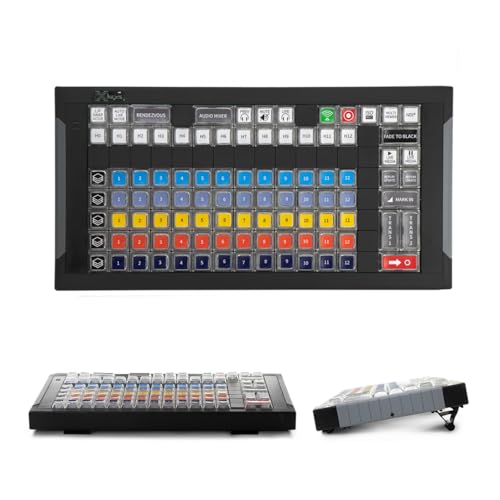
- Controls Wirecast layers, sources, and transitions
- Telestream-designed layout for Wirecast Studio or Pro
- Supports Windows and Mac, with a Big Sur limitation
Best For: Wirecast producers needing dedicated switching controls
Best Creative Editing Console
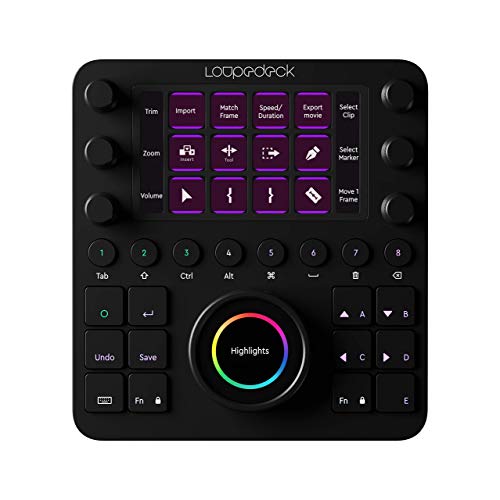
- Customizable buttons, touchscreen, wheels, and dials
- Native OBS Studio and vMix integrations listed
- Predefined workspaces plus profiles, shortcuts, and macros
Best For: Editors and streamers needing a premium multi-application console
Best Touch-and-Dial Alternative

- 10 LCD macro keys with static or animated icons
- Swipeable touch strip and four multifunction dials
- Plugin marketplace and one-touch app and media commands
Best For: Streamers wanting compact tactile controls and flexible macros
Best Hybrid Editing Deck
Loupedeck+ for Live Color Work

- Dedicated dials and color wheels for tactile editing
- Supports OBS, Streamlabs, Twitch, and vMix
- Up to four programmable layers with custom actions
Best For: Streamers who also edit and color-grade photo or video content
Best Streaming Command Center

- Six tactile analog dials for channel adjustments
- 12 haptic keys and eight programmable buttons
- Supports PC, Mac, OBS, Streamlabs, Twitch, and Adobe apps
Best For: Streamers managing multiple apps, macros, audio, and media controls
Best Multi-Camera Switcher

- Four HDMI and one SDI input for multi-camera streams
- 10.1-inch touchscreen multi-view display
- T-bar switching, chroma key, and USB 3.0 streaming output
Best For: Medium-to-large multi-camera events and live productions
Macro-Key Workflow Controller

- 15 customizable LCD macro keys
- Works with OBS and major streaming platforms
- Compact stand-mounted USB control deck
Best For: Streamers needing programmable shortcuts alongside their main video setup
Touchscreen Switching Console

- 10.1-inch touchscreen multiview
- Five video inputs with HDMI and SDI
- Chroma key, logo overlay, and USB 3.0 streaming
Best For: Multi-camera live streams needing keying and touchscreen source control
Portable Multi-Camera Production Kit

- Four HDMI inputs and two HDMI outputs
- Includes 14-inch monitor and mounting plates
- AC, DC, or USB power-bank operation
Best For: Mobile multi-camera streaming and event production
Best All-in-One Control – CT-SD10 Stream Controller
The CT-SD10 is a versatile option for creators seeking color grading control panels for live streaming, combining LCD keys, a touchscreen, and four metal knobs. Its rotary controls can be assigned to video effects, while app-based layouts and OBS integration help keep streaming commands organized.
Best For: Streamers and hybrid creators who want customizable controls for OBS, editing software, and other desktop applications.
Pros:
- Combines 10 LCD keys, a touchscreen, and four precision metal knobs.
- Supports OBS scene and source control, including Studio Mode preview.
- App-based layout switching can automatically adapt controls to active software.
- Includes multi-action macros, a three-port USB hub, and an adjustable stand.
Cons:
- The supplied notes do not identify dedicated color-grading software integrations.
- Its broad feature set may require setup time to customize effectively.
The CT-SD10 stands out when you want one compact surface for streaming, editing, and general workflow automation. The four knobs offer useful tactile control, but buyers specifically focused on grading should confirm that their preferred software supports the desired assignments.
Best Dedicated Wirecast Surface – X-keys Wirecast Control Surface
The X-keys Wirecast Control Surface is a focused choice for live producers comparing color grading control panels for live streaming. Rather than emphasizing editing dials, it is designed around fast access to Wirecast layers, sources, and transitions.
Best For: Wirecast Studio or Pro users who want a dedicated physical surface for switching and layer management.
Pros:
- Provides control of Wirecast layers, sources, and transitions.
- Uses a layout designed by Telestream.
- Works with Wirecast Studio or Pro version 9 or newer.
- Compatible with both Windows and Mac versions of Wirecast.
Cons:
- It is specialized for Wirecast rather than presented as a general-purpose grading controller.
- The supplied notes state that it is not yet compatible with Big Sur.
- Its functionality depends on using a supported Wirecast version.
This surface makes the most sense for a Wirecast-centered production setup where dependable layer and transition access matters more than broad software customization. Check operating-system compatibility carefully, especially if the system uses Big Sur.
Best Creative Editing Console – Loupedeck CT
Loupedeck Creative Tool - Professional Custom Editing Console for Photo, Video, Music and Design
Check Price On AmazonThe Loupedeck CT is a strong candidate for creators evaluating color grading control panels for live streaming alongside photo, video, and design work. Its customizable dials, touchscreen, buttons, and software profiles can support precision-oriented workflows, while native OBS and vMix integrations extend its usefulness in production environments.
Best For: Editors and streamers who need one premium console for creative applications, macros, and supported streaming software.
Pros:
- Offers customizable controls across buttons, touchscreen, wheels, and dials.
- Lists native integrations for OBS Studio, vMix, Premiere Pro, Final Cut Pro, and other creative tools.
- Includes predefined workspaces and customizable profiles with shortcuts and macros.
- Uses an aluminum cover, LED backlighting, and machine-quality ball bearings.
Cons:
- The supplied notes do not specify dedicated color-grading controls or a particular grading software configuration.
- Streamlabs integration is listed for Windows only.
- Its many customization options may take time to configure for a specific workflow.
The Loupedeck CT is especially appealing if live streaming is only one part of your work. Its native integrations and flexible profiles provide room to build a tailored setup, though buyers should verify compatibility with their exact operating system and preferred applications.
Best Touch-and-Dial Alternative – SOOMFON Studio Deck
The SOOMFON Studio Deck gives creators a combination of LCD macro keys, a touch strip, and four multifunction dials when comparing color grading control panels for live streaming. The dials are intended for adjustments such as volume, brightness, and image zoom, while customizable pages and plugins help adapt the controller to different tasks.
Best For: Streamers and multitaskers who want tactile dials, swipeable control pages, and one-touch macros in a compact deck.
Pros:
- Provides 10 customizable LCD macro keys with static or animated icons.
- Includes a touchscreen sliding interface for navigating control pages.
- Four multifunction knobs can adjust volume, brightness, image zoom, and more.
- Offers a plugin marketplace and one-touch commands for apps, websites, text, and audio.
Cons:
- The supplied notes do not identify dedicated color-grading software support.
- It requires macOS Catalina 10.15 or later or Windows 10 64-bit or later.
- Spotify integration requires an active Spotify Premium account.
The SOOMFON is a practical fit for users who value quick macro access and physical dials without committing to a specialist broadcast surface. For grading-related use, confirm how its multifunction knobs can be assigned in the software you plan to use.
Best Hybrid Editing Deck – Loupedeck+ for Live Color Work
For creators comparing color grading control panels for live streaming, the Loupedeck+ is a strong hybrid option: it combines dedicated dials and color wheels with support for OBS, Streamlabs, Twitch, and vMix. Its focus is hands-on editing, while programmable controls can help streamline recurring production tasks.
Best For: Streamers and video editors who want tactile color and editing controls alongside streaming-software support.
Pros:
- Includes dedicated buttons, dials, and color wheels for hands-on editing.
- Supports OBS, Streamlabs, Twitch, and vMix, plus major photo and video applications.
- Offers up to four programmable layers and custom actions for application-specific workflows.
- USB-powered setup includes factory profiles for supported creative software.
Cons:
- Its feature set is oriented toward photo and video editing rather than dedicated live-switching hardware.
- The supplied details specify Windows 10 as the minimum required operating system version.
- It uses a membrane switch type rather than a mechanical keyboard design.
The Loupedeck+ makes the most sense when color grading is central to your workflow and you also want configurable streaming controls. Choose it over a conventional stream keypad if physical editing controls matter more than a compact command-center layout.
Best Streaming Command Center – Razer Stream Controller
The Razer Stream Controller is a practical choice for shoppers seeking color grading control panels for live streaming with broader production controls. Its six analog dials can adjust audio, media, and other channels, while haptic keys and programmable buttons organize shortcuts across streaming and creative applications.
Best For: PC and Mac streamers who prioritize app switching, macro control, and adjustable channel management.
Pros:
- Provides 12 haptic switchblade keys, six tactile analog dials, and eight programmable buttons.
- Supports OBS Studio, Streamlabs, Twitch, Adobe Premiere Pro, After Effects, Lightroom Classic, and more.
- Custom layouts, icons, and Dynamic Mode help organize commands by application.
- Works with both PC and Mac and includes a detachable stand.
Cons:
- The supplied features describe the dials primarily for audio, media, and channel adjustments rather than dedicated color wheels.
- It requires a USB connection and corded power.
- Its compact keypad format may offer less specialized color-grading control than an editing-focused console.
Pick the Razer Stream Controller when live production efficiency matters most and color-related adjustments are part of a larger control workflow. It is especially useful for creators who frequently move between streaming, audio, media, and Adobe applications.
Best Multi-Camera Switcher – FEELWORLD L4 Live Mixer
For live productions where camera switching matters more than desktop color controls, the FEELWORLD L4 is a useful alternative to typical color grading control panels for live streaming. It combines four HDMI inputs, one SDI input, a 10.1-inch touchscreen, chroma key, and USB 3.0 streaming output in a hardware mixer designed for multi-camera events.
Best For: Churches, weddings, sports, concerts, classes, and other medium-to-large multi-camera streams.
Pros:
- Accepts four HDMI sources and one SDI source for multi-camera production.
- Provides a 10.1-inch touchscreen multi-view for previewing inputs and monitoring setup.
- Uses a T-bar and buttons for quick picture switching.
- Includes chroma key and USB 3.0 output for computer-based live streaming.
Cons:
- It is a video mixer and switcher, not a dedicated color-grading control panel.
- The supplied details emphasize camera switching, preview, and streaming rather than tactile grading controls.
- At 4.4 pounds, it is less compact than a small desktop controller.
The FEELWORLD L4 is the better fit when your live stream depends on several cameras and on-device monitoring. If precise hands-on color grading is your priority, consider a dedicated editing console instead; if reliable source switching is the need, this mixer offers a more production-oriented setup.
Macro-Key Workflow Controller – SOOMFON Stream Controller
For color grading control panels for live streaming, the SOOMFON Stream Controller is a compact shortcut deck rather than a dedicated video mixer. Its 15 customizable LCD keys can trigger software actions, making it useful for assigning frequently used streaming, audio, lighting, or editing commands.
Best For: Streamers and creators who want customizable one-touch shortcuts for OBS and related applications.
Pros:
- 15 customizable LCD keys can display personalized icons.
- Supports OBS Studio, Twitch, YouTube, Spotify, and other integrations.
- One-touch controls can handle audio, microphone muting, social posts, and lights.
- Removable stand and rubber feet support flexible desktop placement.
Cons:
- It does not provide dedicated physical color-grading controls or video inputs.
- Setup requires compatible Windows or macOS software and a direct USB connection.
- Spotify integration requires an active Premium account.
The SOOMFON is best viewed as a customizable companion to a streaming setup. It can speed up repetitive commands, but users seeking hands-on color wheels, faders, or camera switching will need a more specialized panel.
Touchscreen Switching Console – FEELWORLD L4 Video Switcher
For color grading control panels for live streaming, the FEELWORLD L4 focuses on live production and source control rather than full color correction. Its touchscreen previews inputs and provides access to chroma key, logo overlay, transitions, and switching controls during a multi-camera broadcast.
Best For: Live producers who need touchscreen monitoring, multi-camera switching, and basic keyed graphics.
Pros:
- 10.1-inch HD touchscreen previews signals, preset, and program output.
- Four HDMI inputs and one SDI input support mixed camera connections.
- Built-in chroma key includes color selection and edge or flare controls.
- USB 3.0 output supports streaming software and 1080p at 60 recording.
Cons:
- It is a switcher with chroma-key tools, not a dedicated color-grading control surface.
- Logo uploads are limited to one image at a time and a 256×128-pixel size.
- Its one-year warranty may be less extensive than some studio equipment coverage.
The L4 is a practical choice when live color work mainly means chroma-key selection and polished source switching. Its built-in display and USB streaming output make it more production-ready than a shortcut controller, though it is not designed for detailed cinematic grading.
Portable Multi-Camera Production Kit – Osee GoStream Deck Kit
For color grading control panels for live streaming, the Osee GoStream Deck is an all-in-one live production kit built around camera switching and monitoring. It combines a switcher, 14-inch display, multiple HDMI connections, USB I/O, and flexible power options for mobile productions.
Best For: Mobile crews and event streamers who need an integrated multi-camera switching and monitoring package.
Pros:
- Includes a switcher, 14-inch 1080×1920 screen, silent fan, and mounting plates.
- Four HDMI inputs and two HDMI outputs allow source switching while retaining multiview.
- Two USB ports support a USB camera and streaming software such as OBS, vMix, or Zoom.
- Can run from AC, DC, or a USB power bank and provide USB power to other devices.
Cons:
- Its stated functions center on switching and streaming, not dedicated color grading.
- At 11.9 pounds, it is portable but not an especially lightweight handheld unit.
- The kit has a one-year manufacturer warranty.
The GoStream Deck makes sense when portability and an integrated monitoring workflow matter more than specialized grading controls. It can form the production hub for a mobile stream, but users seeking tactile color wheels or precision grading faders should look elsewhere.
How We Picked These Color Grading Control Panels for Live Streaming
We selected products based on the type and quality of hands-on control they offer, including physical dials, knobs, macro keys, touchscreens, touch strips, and programmable buttons. We also considered compatibility with popular streaming and production software such as OBS, Wirecast, Adobe creative applications, and general live video workflows.
The list includes both dedicated control surfaces and all-in-one video production systems. That distinction matters: a compact deck can speed up software commands and color adjustments, while a video mixer may also handle camera inputs, previews, switching, chroma keying, recording, and output.
Quick Comparison
- Best for compact software control: CT-SD10 and the SOOMFON Studio Deck models offer macro keys plus tactile controls in relatively small footprints.
- Best for professional editing workflows: Loupedeck Creative Tool and Loupedeck More are designed around customizable controls for photo and video applications.
- Best for streaming-focused control: The Razer Stream Controller and Wirecast Control Surface emphasize programmable commands and live-production access.
- Best for multi-camera production: FEELWORLD L4 and Osee GoStream systems combine switching, monitoring, and video I/O with physical or touchscreen operation.
Key Buying Factors for Color Grading Control Panels for Live Streaming
Control Layout and Tactile Feedback
Look for dedicated dials or metal knobs if you need to make repeatable adjustments without taking your eyes off the program feed. Macro keys are useful for scene changes, transitions, filters, audio actions, and other commands. Touchscreens provide flexibility, but physical controls are usually easier to operate quickly and consistently.
Software and Hardware Compatibility
Check whether the panel supports your streaming software, operating system, plug-ins, and camera hardware. A control surface that works well with Adobe applications may require different configuration for OBS or Wirecast. For integrated switchers, verify HDMI and SDI input types, output options, USB connectivity, and supported resolutions.
Workflow Capacity
Count how many simultaneous actions you need. A compact controller may be ideal for one streamer managing scenes and color presets, whereas a multi-camera producer may need several inputs, preview monitoring, chroma key, recording, and a larger touchscreen.
Setup, Customization, and Portability
Programmable profiles and per-application layouts can reduce setup time once configured. Also consider desk space, cable management, power requirements, and whether the device is practical to transport for remote productions.
Who Should Buy Which Color Grading Control Panels for Live Streaming?
Choose a compact macro controller if you mainly stream from a computer and want faster access to scenes, color presets, camera settings, or software commands. The CT-SD10 and SOOMFON decks are sensible starting points when tactile controls and customizable keys matter.
Choose a Loupedeck or Wirecast-oriented surface if your work centers on editing, color workflows, or a specific production application. These products are better suited to users willing to customize profiles and build a repeatable software workflow.
Choose a Razer Stream Controller if you want a polished desktop control center for streaming shortcuts, tactile dials, and programmable actions without moving to a full video switcher.
Choose a FEELWORLD L4 or Osee GoStream system if you need hardware-based multi-camera switching and monitoring in addition to control-panel functions. These are more appropriate for studios, events, interviews, and productions where camera inputs and live video routing are central requirements.