Professional makers need more than sharp resolution. The right resin 3D printer should deliver dependable detail, predictable throughput, manageable post-processing, and a build area suited to the work you actually produce.
We selected 10 standout models spanning compact tabletop machines, high-resolution printers, fast production units, and large-format options. Use the guide below to narrow the list by workflow, budget, and operating priorities.
Best 10 Resin 3D Printers for Professional Makers Picks for 2026
Fast Precision Pick

- 14K detail with 16.8 × 24.8 μm XY resolution
- Up to 170mm/h with high-speed resin
- Temperature-controlled vat and auto-fill
Best For: Professional makers balancing fine detail with fast, assisted production
Smart High-Resolution Choice

- 16K LCD with 14 × 19 μm XY resolution
- 150mm/h printing with tilted release technology
- AI camera, heated tank, and automatic leveling
Best For: High-resolution workflows requiring monitoring and automation
Large-Format Workhorse

- 298 × 164 × 300mm build volume
- 13.6-inch 7K screen with 46 × 46μm pixels
- 1300ml vat with automatic resin management
Best For: Large models, batch printing, and high-volume studio work
Production-Scale Precision
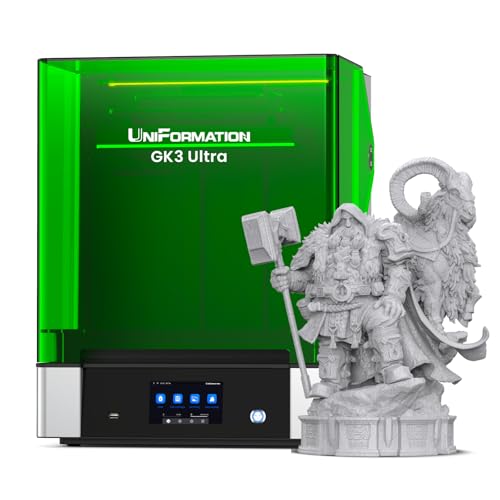
- 300 × 160 × 300mm build volume
- 16K detail with ±0.003mm repeat positioning
- Heating and automatic resin feeding
Best For: Studios and small businesses producing large, repeatable parts
Precision Workhorse

- 14K detail with a 16.8 x 24.8µm XY pixel size
- Automatic leveling and AI-assisted print inspections
- Handles ultra-high-viscosity resins up to 8,000 cps
Best For: Detailed professional models and advanced resin experimentation
Compact Detail Specialist

- 8K monochrome LCD with 22-micron XY resolution
- Compact tabletop design for models and miniatures
- Supports open-source software and major slicers
Best For: Detailed miniatures and smaller models in limited workspace
Fast Workflow Pick

- 10K detail with 17 x 17µm XY pixels
- Maximum listed speed of 120 mm/h
- Five intelligent inspections for workflow monitoring
Best For: Fast, detailed production with reduced operational oversight
Fast Detail Specialist
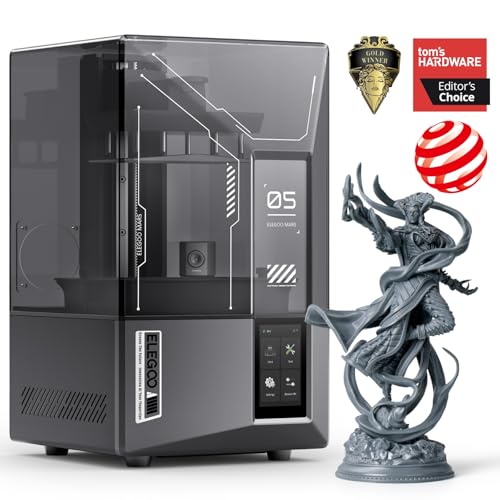
- 9K mono LCD with 18 μm XY resolution
- Up to 150 mm/h with tilt-release technology
- AI monitoring and Wi-Fi cluster printing
Best For: Detailed, high-throughput resin printing
Multi-Material Workhorse

- Dual-color and dual-material printing
- Handles resins up to 8,000 cps
- Automatic leveling and AI inspection
Best For: Material experimentation and professional production
Precision Production Platform

- 566:1 high-contrast amber screen
- Automated slicing, leveling, and diagnostics
- ≤2 μm repeat positioning accuracy claim
Best For: Precision-focused professional production
Fast Precision Pick – ANYCUBIC Photon Mono M7 PRO
For professional makers seeking resin 3D printers for professional makers, the ANYCUBIC Photon Mono M7 PRO emphasizes speed without overlooking fine detail. Its 14K monochrome LCD, 170mm/h high-speed-resin rating, and assisted resin-handling features make it suited to demanding, repeatable workflows.
Best For: Detail-focused makers who prioritize fast production and automated resin handling.
Pros:
- 14K resolution with 16.8 × 24.8 μm XY resolution and the ability to print holes as small as 0.3 mm.
- Prints up to 170mm/h with high-speed resin and up to 130mm/h with standard resin.
- Temperature-controlled vat, automatic resin filling, and one-key resin recycling support a smoother workflow.
- Six intelligent detection functions help identify setup, resin, residue, and print-related issues.
Cons:
- The 170mm/h figure depends on high-speed resin and a 0.1mm layer test.
- Its 33.3-pound, 25 × 15 × 35-inch footprint requires a dedicated workspace.
The M7 PRO is a strong all-around option when production speed and fine resolution matter equally. Its automation is especially useful for makers running frequent prints, though its larger desktop footprint should be planned for.
Smart High-Resolution Choice – ELEGOO Saturn 4 Ultra 16K
The ELEGOO Saturn 4 Ultra 16K is one of the more feature-rich resin 3D printers for professional makers, combining very high resolution with automated setup and monitoring. Its heated resin tank, AI camera, automatic leveling, and Wi-Fi transfer are designed to reduce hands-on intervention.
Best For: Makers who want high-resolution production with monitoring, automation, and network-friendly features.
Pros:
- 16K LCD with 14 × 19 μm XY resolution for intricate models.
- 150mm/h printing speed using tilted release technology and increased light energy intensity.
- Automatic heated resin tank activates below 25°C to help maintain printing conditions.
- AI camera, Wi-Fi transfer, automatic leveling, power-on resume, and cluster printing add workflow convenience.
Cons:
- The 8.33 × 4.66 × 8.66-inch build area is smaller than the large-format models in this roundup.
- At 35.4 pounds, it is not especially portable.
Choose the Saturn 4 Ultra 16K when resolution and smart workflow tools are more important than maximum build volume. Its monitoring and automatic checks make it particularly appealing for unattended or repeat printing.
Large-Format Workhorse – ANYCUBIC Photon Mono M7 MAX
For makers who need to produce large parts or multiple models at once, the ANYCUBIC Photon Mono M7 MAX brings a substantial build area to the resin 3D printers for professional makers category. Its 1300ml vat, temperature control, automatic material management, and flip-top design are geared toward bigger, more efficient print jobs.
Best For: Studios and professional makers printing large models or batches without splitting parts.
Pros:
- 298 × 164 × 300mm build volume supports large models and batch printing.
- 13.6-inch 7K screen delivers 46 × 46μm XY pixel size with anti-aliasing.
- Temperature-controlled vat and automatic resin management help maintain supply during large prints.
- Suspension Drip setting returns resin to the vat, while the 1300ml capacity supports large jobs.
Cons:
- Its 60.9-pound weight and 30.91 × 19.29 × 20.47-inch dimensions demand substantial space.
- The listed maximum speed is 60mm/h, below the faster smaller-format printers here.
The M7 MAX is the practical choice when build volume is the priority. It trades compactness and top-end speed for the ability to print large or multiple parts in one session, with useful resin-management features for extended jobs.
Production-Scale Precision – UniFormation GK3 Ultra
The UniFormation GK3 Ultra targets professional makers who need both a large build area and consistent mechanical performance. Its 16K screen, rigid Z-axis architecture, built-in heating, automatic resin feeding, and maintenance-focused design make it well suited to prototyping, studios, and repeated production.
Best For: Professional studios, small businesses, and makers producing large or multiple precise parts.
Pros:
- 300 × 160 × 300mm build volume supports large models and multiple parts per print.
- 16K LCD with 20 × 26μm pixel size provides sharp detail across the large format.
- KK60 Z-axis module offers repeat positioning accuracy up to ±0.003mm.
- Heating to 25°C/30°C, automatic resin feeding, quick-release vat, drip hanger, and carbon filter support a cleaner workflow.
Cons:
- At 85.8 pounds and 19 × 21 × 26 inches, it requires a sturdy, permanent setup.
- The supplied notes do not specify a maximum printing speed.
The GK3 Ultra stands out for production-minded users who value capacity and repeatability over portability. Its heating and automatic feeding systems are especially useful for large prints and colder working environments.
Precision Workhorse – Photon P1 14K
For professional makers who need highly detailed resin 3D printers for professional makers, the ANYCUBIC Photon P1 combines a 14K monochrome screen with automated setup and inspection features. Its rigid ball-screw and guide-rail structure is designed to reduce vibration, while Wave Release Technology helps models detach more easily.
Best For: Professional makers printing detailed models and experimenting with high-viscosity industrial resins.
Pros:
- 14K resolution with 16.8 x 24.8 micrometer XY pixel size for crisp detail.
- Factory-calibrated automatic leveling with pre-print self-checks and pressure feedback.
- Supports resins up to 8,000 cps, including ultra-high-viscosity formulations.
- AI monitoring checks plate installation, layer separation, resin level, and vat residue.
Cons:
- Its 29.7-pound weight and sizable footprint may require a dedicated workspace.
- The advanced feature set may be more than casual users need.
The Photon P1 is the strongest fit here for makers prioritizing maximum detail, resin versatility, and reduced hands-on calibration. It is especially appealing for demanding workflows where print monitoring and reliable release matter.
Compact Detail Specialist – Sonic Mini 8K S
The Phrozen Sonic Mini 8K S is a compact option among resin 3D printers for professional makers, offering 22-micron XY resolution in a tabletop design. Its open-source software compatibility and support for popular slicers give experienced users flexibility, while precise Z-axis calibration supports consistent layer placement.
Best For: Makers who want high-detail miniatures, models, and action figures in a compact tabletop printer.
Pros:
- 8K monochrome LCD and 22-micron XY resolution capture fine features.
- Compact tabletop footprint with a 16.5 x 7.2 x 17 cm print volume.
- Works with open-source software and slicers such as Lychee, Chitubox, and Tango.
- Precise Z-axis calibration supports even and accurate printing.
Cons:
- Its stated print volume is smaller than that of larger-format resin printers.
- The notes do not specify automatic leveling or built-in print monitoring.
The Sonic Mini 8K S makes the most sense when detail and software freedom matter more than large build capacity. Its compact format is well suited to professional makers producing miniatures and smaller display models.
Fast Workflow Pick – Photon Mono 4 Ultra
For makers seeking efficient resin 3D printers for professional makers, the ANYCUBIC Photon Mono 4 Ultra pairs 10K detail with a listed maximum print speed of 120 mm/h. Its ACF film, intelligent release algorithm, and automated detection tools are aimed at smoother operation and fewer avoidable interruptions.
Best For: Professional makers who value fast, detailed production and built-in operational checks.
Pros:
- 10K 7-inch monochrome screen with 17 x 17 micrometer XY pixels.
- Maximum listed print speed of 120 mm/h with ACF film and intelligent release control.
- COB light source and Fresnel lenses provide a light angle within 3° and at least 90% uniformity.
- Five intelligent inspections cover residue, leftover resin, failed prints, and printer lifespan.
Cons:
- The supplied notes do not provide the printer’s build volume.
- Its 10K resolution is below the Photon P1’s stated 14K resolution.
The Photon Mono 4 Ultra is a practical choice for makers balancing fine detail with throughput. Its release system and inspection features can streamline recurring print work, while the multilingual interface keeps operation approachable.
Fast Detail Specialist – ELEGOO Mars 5 Ultra
The ELEGOO Mars 5 Ultra is a practical choice among resin 3D printers for professional makers who need detailed models, fast production, and workflow monitoring. Its 9K mono LCD, 18 μm XY resolution, tilt-release system, and claimed speeds up to 150 mm/h support both precision work and efficient batch printing.
Best For: Professional makers prioritizing fine detail, fast prints, and multi-printer workflow control.
Pros:
- 9K resolution and 18 μm XY resolution reproduce intricate details.
- Tilt-release technology and selectable print modes support faster or more controlled production.
- AI camera, residue detection, resin shortage alarms, and leveling alerts help catch problems.
- Wi-Fi cluster printing can control multiple Mars 5 Ultra printers from one device.
Cons:
- AI detection results may vary with the environment, model, and resin type.
- The feature set may be more than needed for occasional hobby printing.
The Mars 5 Ultra stands out when productivity and detail matter equally. Its monitoring and cluster-printing features are especially useful for makers managing repeated jobs, while the 9K screen supports presentation-ready results.
Multi-Material Workhorse – ANYCUBIC Photon P1
The ANYCUBIC Photon P1 is one of the more versatile resin 3D printers for professional makers, combining dual-color or dual-material printing with automated setup and industrial-resin support. Its stable motion system, factory-calibrated leveling, and monitoring tools are aimed at dependable production rather than constant manual adjustment.
Best For: Makers who want dual-material creativity and compatibility with high-viscosity professional resins.
Pros:
- Dual-color or dual-material printing expands design options and can reduce resin use on small models.
- Ball screw and precision guide rails help minimize vibration during lifting.
- Smart Leveling 3.0 performs automatic checks and provides corner pressure feedback.
- Supports resins up to 8,000 cps, with pre-configured settings for Anycubic resins.
Cons:
- The 39-pound, 28 x 14 x 13-inch design requires a substantial workspace.
- Dual-material capability may be unnecessary for single-resin projects.
For professional makers experimenting with materials or producing more complex color combinations, the Photon P1 offers a broad feature set. Its automated leveling and AI inspection are useful additions for longer or higher-value print jobs.
Precision Production Platform – Reflex RS Turbo
The Reflex RS Turbo targets professional makers who need repeatable accuracy, rapid processing, and extensive print-failure detection. Its high-contrast amber screen, C5 ball-screw Z-axis, one-click slicing, and adaptive process controls make it a production-focused option among resin 3D printers for professional makers.
Best For: Production-oriented makers seeking precise positioning, automated diagnostics, and resin-process flexibility.
Pros:
- High-contrast 566:1 amber screen is designed for crisp details and faster curing.
- One-click slicing can repair several model defects and generate supports automatically.
- Force sensors detect fine resin residue, pause prints, and generate diagnostic reports.
- C5 ball-screw Z-axis offers ≤2 μm repeat positioning accuracy, with stated tolerances of ≤0.05 mm.
Cons:
- At 50.6 pounds, it is a substantial machine to position and relocate.
- The advanced process-control system may have a steeper learning curve than simpler printers.
- Some performance claims depend on the selected resin and print conditions.
The RS Turbo is best suited to makers who value process control and repeatability over a minimal setup. Its automated preparation, sensing, and adaptive motion features can help support demanding workflows where failed prints are costly.
How We Picked These Resin 3D Printers for Professional Makers
We focused on features that matter in a working studio rather than treating resolution as the only measure of quality. The selection considers XY resolution, build volume, print speed, screen durability, leveling systems, connectivity, material compatibility, and the practical demands of washing, curing, and routine maintenance.
The list includes both established models and newer designs so you can compare compact detail-oriented printers with larger machines built for batch production. Manufacturer specifications can vary by resin, layer height, and print profile, so published speed figures should be viewed as maximums rather than typical everyday results.
Quick Comparison
| Priority | What to look for | Best fit |
|---|---|---|
| Fine miniature detail | High XY resolution and stable exposure control | 8K, 10K, 14K, or 16K compact printers |
| Higher throughput | Fast lift speeds, efficient vat handling, and reliable profiles | Fast 14K and 16K models |
| Large parts or batches | Wide build plate and adequate Z height | Large-format 7K and 16K printers |
| Easy setup | Auto-leveling, guided calibration, and clear controls | Modern beginner-friendly models |
| Color or material flexibility | Compatible resin ecosystem and specialized hardware | Dual-color or dual-material-capable models |
Key Buying Factors for Resin 3D Printers for Professional Makers
Resolution Versus Useful Detail
Higher pixel counts can produce smoother small features, but the complete optical system, exposure settings, resin, and model orientation matter just as much. Choose high resolution for miniatures, jewelry patterns, and finely textured prototypes; do not pay for pixels you cannot use in your normal parts.
Build Volume and Production Speed
Measure your largest regular object, then leave room for supports and multiple parts. A larger printer may reduce batch time, while a fast compact unit can be more efficient for single prototypes. Remember that printing is only part of the cycle: washing, curing, support removal, and inspection also affect throughput.
Setup, Reliability, and Maintenance
Auto-leveling can simplify setup, but it does not eliminate the need for a clean build plate, correct exposure, and regular vat inspection. Look for rigid construction, dependable release behavior, replacement screens or vats that are easy to source, and software with usable profile support.
Resin, Ventilation, and Operating Costs
Confirm that the printer supports the resins you plan to use, including standard, tough, water-washable, castable, or engineering formulas. Budget for resin, film, screens, gloves, cleaning fluid, filters, and a wash-and-cure setup. Resin printing also requires appropriate ventilation and safe handling; it is not a casual desktop process.
Who Should Buy Which Resin 3D Printers for Professional Makers?
Choose a compact high-resolution model if you mainly print miniatures, product mockups, jewelry masters, or small detailed parts and want to conserve workspace and resin.
Choose a fast 14K or 16K printer if you run frequent prototypes or batches and can take advantage of larger plates, reliable profiles, and shorter layer cycles.
Choose a large-format model if your work involves oversized props, larger mechanical shells, or many parts at once. Confirm that your wash-and-cure equipment can handle the resulting pieces.
Choose an easier-to-operate model if multiple people share the printer or you want to reduce calibration friction. Guided setup and auto-leveling are valuable, but material safety and post-processing still require a disciplined workflow.
For most professional makers, the best choice is the printer that balances detail, volume, uptime, and total operating cost—not necessarily the one with the highest headline resolution.