If your video calls freeze, file uploads crawl, or your workspace sits in a weak-signal corner, a mesh system can make a big difference. The best setups spread strong Wi-Fi across your home without the dead zones.
Below, we focus on mesh Wi-Fi systems for remote work that balance coverage, stability, and value so you can pick the right fit for your home office and household.
Best 10 Mesh Wi-Fi Systems for Remote Work Picks for 2026
Editor’s Choice
TP-Link Deco X55 AX3000 3-Pack

- Wi‑Fi 6 mesh with up to 6,500 sq. ft. coverage
- Supports up to 150 devices
- 3 Gigabit ports per unit with Ethernet backhaul support
Best For: Remote workers needing wide coverage and wired flexibility
Future-Proof Pick
NETGEAR Orbi 370 WiFi 7 3-Pack

- Wi‑Fi 7 mesh rated up to 5 Gbps
- Covers up to 6,000 sq. ft. and supports 70 devices
- Enhanced backhaul and easy Orbi app management
Best For: Users who want a Wi‑Fi 7 mesh ready for heavier workloads
Budget-Friendly Pick

- Up to 5,500 sq. ft. coverage with a single mesh network
- Supports up to 100 devices
- 2 Gigabit ports per unit and wired backhaul support
Best For: Cost-aware remote workers who need dependable coverage
Compact Home Pick
Linksys Velop Triband AC4600 3-Pack

- Tri-band mesh with up to 5,000 sq. ft. coverage
- App-controlled setup and management
- 2 ports per node for basic wired connectivity
Best For: Smaller homes needing stable tri-band mesh coverage
Best for Easy Setup
TP-Link Deco X60 Wi‑Fi 6 Mesh System

- Wi‑Fi 6 AX3000 mesh system
- Covers up to 5,000 sq. ft.
- Supports up to 110 devices
Best For: Remote workers in larger homes who need dependable whole-home coverage
Value Gigabit Choice
Amazon eero 6+ Mesh Wi‑Fi System

- Supports plans up to a gigabit
- TrueMesh helps reduce dead spots
- Covers up to 4,500 sq. ft.
Best For: Budget-conscious remote workers who want gigabit-ready mesh coverage
Coverage Upgrade
TP-Link Deco X15 Mesh Wi‑Fi System
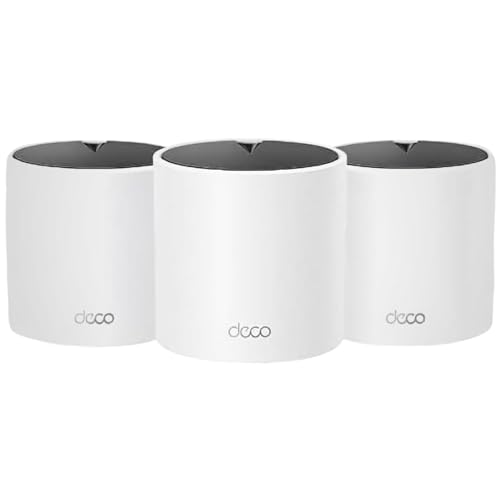
- Wi‑Fi 6 AX1500 mesh system
- Covers up to 5,600 sq. ft.
- Supports up to 120 devices
Best For: Remote workers needing wide-area coverage for busy households
Reliable Whole-Home Coverage
TP-Link Deco M5 3-Pack for Seamless Mesh Wi‑Fi

- Up to 5,500 sq. ft. coverage with three units
- Single network name for smooth roaming
- HomeCare security, parental controls, and QoS
Best For: Remote workers in larger homes who need simple, stable coverage
High-Performance Office Mesh
TP-Link Deco XE70 Pro 3-Pack Wi‑Fi 6E

- Wi‑Fi 6E with a congestion-free 6 GHz band
- Up to 4.9 Gbps and support for up to 200 devices
- 2.5 Gbps port plus wireless and wired backhaul
Best For: Remote teams and power users who need high capacity and wired flexibility
Compact Wi‑Fi 6E Value Pick
TP-Link Deco XE70 Pro 2-Pack for Remote Work

- Wi‑Fi 6E tri-band mesh with a 6 GHz band
- Up to 4.9 Gbps and support for up to 200 devices
- 2.5 Gbps port with wired backhaul support
Best For: Remote workers in smaller spaces who want modern mesh performance
Editor’s Choice – TP-Link Deco X55 AX3000 3-Pack
If you’re shopping for mesh Wi-Fi systems for remote work, the Deco X55 is built for homes that need steady coverage, lots of device support, and flexible Ethernet options. It uses Wi‑Fi 6, covers up to 6,500 square feet, and supports up to 150 devices, which makes it a practical pick for busy work-from-home setups.
Best For: Remote workers who want broad coverage, strong device capacity, and wired backhaul support.
Pros:
- Wi‑Fi 6 AX3000 system with coverage up to 6,500 sq. ft.
- Supports up to 150 devices for laptops, phones, and smart gear.
- Each unit includes 3 Gigabit Ethernet ports and supports Ethernet backhaul.
- Deco app setup and AI-driven mesh make management straightforward.
Cons:
- Dual-band design may not suit users wanting tri-band capacity.
- A modem is required for most internet providers.
- Some advanced security features are tied to TP-Link HomeShield.
The Deco X55 stands out as a balanced remote-work mesh system: wide coverage, strong client support, and useful wired ports without overcomplicating setup. It’s a solid fit if you want dependable whole-home Wi‑Fi for calls, uploads, and multiple connected work devices.
Future-Proof Pick – NETGEAR Orbi 370 WiFi 7 3-Pack
The NETGEAR Orbi 370 is aimed at users who want a fast mesh Wi‑Fi system for remote work today and enough headroom for heavier internet use later. It covers up to 6,000 square feet, supports up to 70 devices, and uses Wi‑Fi 7 with enhanced backhaul to keep video calls and other traffic moving smoothly across the home.
Best For: Remote workers who want Wi‑Fi 7 speed, strong coverage, and easy app-based control.
Pros:
- Wi‑Fi 7 system rated up to 5 Gbps.
- Whole-home coverage up to 6,000 sq. ft. with no dead zones.
- Enhanced backhaul helps keep performance steady across devices.
- Orbi app setup and management are simple, and guest WiFi is supported.
Cons:
- Supports up to 70 devices, which is lower than some rivals.
- Armor security requires a separate subscription after the trial.
- Made for use in the US only.
For remote work setups that need a next-gen network, the Orbi 370 is one of the most forward-looking options here. Its Wi‑Fi 7 platform and multi-gig support make it a strong match for homes with fast internet and demanding calls, streaming, or collaboration tools.
Budget-Friendly Pick – TP-Link Deco S4 AC1900 3-Pack
If you need mesh Wi‑Fi systems for remote work without paying for the latest Wi‑Fi generation, the Deco S4 is a practical value option. This 3-pack covers up to 5,500 square feet, supports up to 100 devices, and uses a simple single-network mesh design to reduce dead spots and roaming hassles.
Best For: Budget-conscious remote workers who want reliable whole-home coverage and easy setup.
Pros:
- Covers homes up to 5,500 sq. ft. with a unified mesh network.
- Supports up to 100 devices for everyday home office use.
- Each unit has 2 Gigabit Ethernet ports and supports wired backhaul.
- Deco app setup is simple, and guest WiFi can be controlled with Alexa.
Cons:
- Wi‑Fi 5 is older than the Wi‑Fi 6 and Wi‑Fi 7 models in this roundup.
- AC1900 speeds are lower than newer mesh systems.
- Security relies on WPS rather than newer protocols listed on newer systems.
The Deco S4 makes sense when coverage and stability matter more than cutting-edge speed. For basic remote work, it offers a straightforward mesh experience, wired ports, and wide coverage at a more accessible tier.
Compact Home Pick – Linksys Velop Triband AC4600 3-Pack
The Linksys Velop tri-band mesh system is a clean fit for smaller to mid-sized remote-work homes that still need stable whole-home Wi‑Fi. It covers up to 5,000 square feet, uses tri-band design, and is built as an intelligent mesh replacement system for smoother roaming around the house.
Best For: Remote workers in smaller homes who want tri-band mesh coverage and app control.
Pros:
- Tri-band mesh design for a more capable home network layout.
- Covers up to 5,000 sq. ft. with intelligent mesh coverage.
- App control makes setup and ongoing management easier.
- Includes 2 ports and supports Wi‑Fi mesh replacement use.
Cons:
- Coverage is lower than some larger 3-pack mesh systems.
- Only 2 ports per node limits wired expansion.
- Supplied details do not list advanced security extras beyond WPA2 personal.
Velop is a straightforward option when you want a mesh network that focuses on home-wide consistency rather than top-tier speed claims. It should work well for remote workers who value easy app management and a tri-band setup in a moderately sized space.
Best for Easy Setup – TP-Link Deco X60 Wi‑Fi 6 Mesh System
If you need one of the more capable mesh Wi-Fi systems for remote work, the TP-Link Deco X60 is built for strong whole-home coverage and dependable multitasking. It uses Wi‑Fi 6 AX3000 to help reduce dead zones, supports up to 110 devices, and includes wired Ethernet backhaul for better performance when you want a more stable work-from-home setup.
Best For: Remote workers who want fast, broad Wi‑Fi coverage and lots of device capacity in a larger home.
Pros:
- Covers up to 5,000 sq. ft. with a 2-pack.
- Supports up to 110 devices for busy home networks.
- Includes 2 Gigabit Ethernet ports per unit and wired Ethernet backhaul support.
- Deco app setup and management is designed to be quick and simple.
Cons:
- Requires a modem for most internet service providers.
- Only a 2-pack is included, so very large homes may need expansion.
The X60 stands out if your remote work depends on stable video calls, multiple connected devices, and consistent coverage across the home. It also adds WPA3 security and TP-Link HomeCare features for extra peace of mind.
Value Gigabit Choice – Amazon eero 6+ Mesh Wi‑Fi System
The Amazon eero 6+ is a practical mesh Wi-Fi system for remote work if you want gigabit-capable performance without paying for a premium model. It supports internet plans up to a gigabit, uses Wi‑Fi 6 with a 160 MHz channel boost, and relies on eero’s TrueMesh technology to help reduce drop-offs and dead spots during calls and streaming.
Best For: Home workers who want affordable gigabit-ready mesh Wi‑Fi with easy setup.
Pros:
- Supports wifi speeds up to a gigabit.
- TrueMesh helps reduce dead spots and drop-offs.
- Designed to handle work, streaming, and video chat at the same time.
- Setup and management are handled through the eero app.
Cons:
- Online security and advanced network features require a separate subscription.
- Covers up to 4,500 sq. ft., which is less than some larger mesh kits.
For remote work, the eero 6+ is appealing because it balances price, gigabit support, and ease of use. It also adds automatic updates and a built-in smart home hub, which is helpful if you want one system to handle more than just internet access.
Coverage Upgrade – TP-Link Deco X15 Mesh Wi‑Fi System
The TP-Link Deco X15 is a solid mesh Wi-Fi option for remote work when you want broad coverage and easy expansion. This Wi‑Fi 6 AX1500 system covers up to 5,600 sq. ft., supports up to 120 devices, and includes wired Ethernet backhaul support to help keep performance steady across a busy home network.
Best For: Remote workers in larger households who need wide coverage and strong device handling.
Pros:
- Covers up to 5,600 sq. ft. with the 3-pack.
- Supports up to 120 devices.
- Each unit includes 2 Gigabit Ethernet ports and wired backhaul support.
- Deco app setup makes installation and remote management straightforward.
Cons:
- Dual-band AX1500 is less powerful than higher-tier Wi‑Fi 6 systems.
- Requires a modem for most internet service providers.
If your home office shares bandwidth with lots of devices, the X15 gives you a lot of practical coverage for the money. It also adds AI-roaming, built-in security features, and compatibility with Alexa and Google Assistant for easier everyday control.
Reliable Whole-Home Coverage – TP-Link Deco M5 3-Pack for Seamless Mesh Wi‑Fi
If you need mesh Wi-Fi systems for remote work that can replace a basic router and still keep video calls, uploads, and everyday browsing steady across a larger home, the Deco M5 is a practical option. This 3-pack is built for whole-home coverage, simple roaming, and straightforward setup through the Deco app.
Best For: Remote workers who want dependable coverage, easy setup, and built-in security in a larger home.
Pros:
- Covers up to 5,500 sq. ft. with three units to help reduce dead zones
- Single network name supports seamless roaming as you move around the home
- Adaptive Routing helps choose the best path for connected devices
- Includes HomeCare antivirus, parental controls, and QoS tools
Cons:
- Dual-band design is less advanced than newer Wi‑Fi 6E systems
- Coverage and device capacity are lower than the higher-end Deco options here
- Modem is required for most ISP connections
For remote work setups that value coverage and simplicity over top-tier speed specs, the Deco M5 delivers a well-rounded mesh experience. Its wired backhaul support and Gigabit ports add flexibility if you want a more stable office connection in part of the home.
High-Performance Office Mesh – TP-Link Deco XE70 Pro 3-Pack Wi‑Fi 6E
For mesh Wi-Fi systems for remote work, the Deco XE70 Pro is aimed at homes that need more capacity, faster wired options, and less interference. Its Wi‑Fi 6E design adds a congestion-free 6 GHz band, while the 2.5 Gbps port and tri-band layout make it a strong fit for busy households with multiple laptops and devices.
Best For: Remote teams and power users who want faster Wi‑Fi, more device capacity, and 2.5G wired flexibility.
Pros:
- Wi‑Fi 6E adds a 6 GHz band for less interference and smoother connections
- Tri-band design supports up to 4.9 Gbps and up to 200 devices
- Each unit includes a 2.5 Gbps port plus two Gigabit ports
- Supports wireless and wired backhaul for performance tuning
Cons:
- Coverage in the notes is listed as 7,200 sq. ft. for the 3-pack, but individual details also mention 2,900 sq. ft. coverage, so buyers should double-check the package configuration
- More advanced than basic mesh systems, so it may be more than some simple home setups need
- Requires compatible devices to fully benefit from Wi‑Fi 6E features
If your work-from-home routine depends on strong performance across many devices, this Deco XE70 Pro is the most capable option in the group. It combines modern wireless capacity with robust wired connectivity and app-based management for easier day-to-day control.
Compact Wi‑Fi 6E Value Pick – TP-Link Deco XE70 Pro 2-Pack for Remote Work
This 2-pack version is a smart fit if you want mesh Wi-Fi systems for remote work without stepping up to a larger three-node setup. It keeps the same Wi‑Fi 6E platform, tri-band design, and 2.5 Gbps port support, making it a strong choice for smaller homes or apartments that still need reliable coverage and fast office-grade connectivity.
Best For: Remote workers in smaller homes who want Wi‑Fi 6E performance with fewer nodes.
Pros:
- Wi‑Fi 6E adds a 6 GHz band to help reduce interference
- Tri-band speeds up to 4.9 Gbps and support for up to 200 devices
- Each unit includes a 2.5 Gbps port and two Gigabit ports
- Supports wireless and wired backhaul for more flexible placement
Cons:
- 2-pack coverage is smaller than the 3-pack and is better suited to more compact spaces
- Advanced features may be unnecessary for very light internet use
- To get the full benefits of Wi‑Fi 6E, your devices need to support it
As a scaled-down version of the XE70 Pro, this model keeps the same performance-focused foundation while trimming the system size. It is a sensible pick when you want modern mesh networking for a remote-work setup but do not need maximum home-wide coverage.
How We Picked the Best Mesh Wi-Fi Systems for Remote Work
We prioritized systems that offer dependable whole-home coverage, stable backhaul performance, and enough speed for video conferencing, cloud storage, and multiple connected devices. We also looked at ease of setup, app controls, wired port options, and how well each system fits different home sizes and internet plans.
Quick Comparison: What Matters Most
For remote work, the right choice is usually less about peak speed claims and more about consistent performance where you actually work. Wi-Fi 6 and Wi-Fi 6E models are a strong sweet spot for most homes, while Wi-Fi 7 systems can make sense if you want extra headroom and already have a fast internet plan. Coverage ratings help narrow the field, but layout, wall materials, and node placement still matter.
Key Buying Factors for Mesh Wi-Fi Systems for Remote Work
Coverage and Node Placement
Choose a system that comfortably covers your home with some margin to spare. If your office is far from the main router location, look for strong node-to-node performance and at least one extra unit in larger or multi-story homes.
Speed and Band Support
For most remote workers, dual-band Wi-Fi 6 is enough for meetings, browsing, and uploads. Tri-band and 6E systems can help reduce congestion if several people are working, streaming, or gaming at the same time.
Wired Ports and Backhaul
Ethernet ports are useful for desktops, docks, printers, and work devices that benefit from a stable wired connection. If you can use wired backhaul between nodes, that often improves consistency more than chasing higher theoretical speeds.
Device Capacity
Busy homes with laptops, phones, tablets, smart TVs, and work hardware should choose a mesh system rated for higher device counts. That helps reduce slowdowns during meetings or large downloads.
Setup, App Controls, and Security
Simple setup and reliable app management save time when you need to pause a device, check signal quality, or create a separate network for work gear. Security features are a plus, especially if you want protection tools or guest-network controls built in.
Who Should Buy Which Mesh Wi-Fi Systems for Remote Work?
If you work from a small apartment or modest home, a value-focused Wi-Fi 6 mesh system is usually the best fit. For larger homes, mixed-use households, or heavy multitasking, step up to tri-band or Wi-Fi 6E. If your internet plan is very fast and you want more future-proofing, a Wi-Fi 7 mesh system may be worth the premium. For most buyers, the best option is the one that matches your home size, internet speed, and how demanding your workday really is.