Choosing one of the best 4K computer monitors for students can make everything from research and coding to spreadsheets and design work feel clearer and more efficient. Higher resolution means sharper text and more usable screen space.
This roundup focuses on practical student needs: comfortable viewing, reliable connectivity, and strong value across different desk sizes and budgets.
Best 10 4K Computer Monitors for Students Picks for 2026
Editor Pick
Dell 27 S2725QS 4K IPS Monitor

- 27-inch 4K IPS panel
- 120Hz with FreeSync Premium
- ComfortView Plus and adjustable stand
Best For: Students needing a balanced daily-use monitor
Big Screen Value
LG 32UR500K-B 32-Inch 4K Monitor

- 32-inch 4K UHD screen
- HDR10 with up to 90% DCI-P3
- Built-in speakers and OnScreen Control
Best For: Students who want a larger screen for multitasking
Best USB-C Pick
Dell 27 S2725QC 4K USB-C Monitor

- USB-C with up to 65W power delivery
- 27-inch 4K IPS with 99% sRGB
- 120Hz and ComfortView Plus
Best For: Students using a USB-C laptop setup
Eye-Care Choice
LG 27UP650K-W 27-Inch 4K IPS Monitor

- 27-inch 4K IPS with HDR400
- Reader Mode and Flicker Safe
- Height, tilt, and pivot adjustments
Best For: Students prioritizing comfort and compact size
Flexible 4K Gaming Pick
Acer Nitro 27-inch 4K IPS Monitor

- 27-inch UHD IPS panel for crisp study work
- DFR switches between 4K and higher refresh modes
- FreeSync, HDR 10, and 95% DCI-P3 support
Best For: Students who want a sharp 4K display with gaming flexibility
Big-Screen Multitasking Choice
Samsung 32-inch UJ59 4K Monitor

- Large 32-inch 4K display for more workspace
- PBP and PIP help with two-device multitasking
- Eye Saver and Flicker Free support long study use
Best For: Students who want a roomy screen for schoolwork and multitasking
USB-C Student Setup
LG 27UP850K-W 27-inch 4K Monitor

- 27-inch IPS 4K panel with 95% DCI-P3 color
- USB-C delivers data and up to 90W charging
- HDR400, built-in speakers, and adjustable stand
Best For: Students using a laptop who want a clean USB-C workspace
UltraFine 27-inch 4K IPS Pick
LG 27US500-W 27-Inch 4K UHD Monitor

- 27-inch 4K IPS panel with wide viewing angles
- HDR10 and up to 90% DCI-P3 color support
- Reader Mode, Flicker Safe, and Onscreen Control
Best For: Students who want a crisp 27-inch 4K display for homework and multitasking
Large-Screen Productivity Value
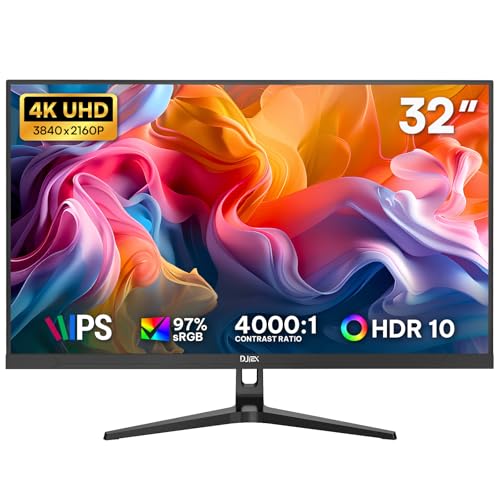
- 32-inch 4K UHD panel with lots of workspace
- IPS display with 97% sRGB and HDR10
- Low Blue Light plus HDMI and DisplayPort inputs
Best For: Students who want a larger 4K screen for multitasking and reports
Eye-Care 27-inch 4K Option
ASUS VY27UQ 27 Inch 4K UHD Monitor

- 27-inch 4K IPS panel with HDR-10 support
- Blue light filter, flicker-free tech, and rest reminders
- Built-in speakers plus HDMI and DisplayPort
Best For: Students who want a 27-inch 4K monitor with eye-comfort features
Editor Pick – Dell 27 S2725QS 4K IPS Monitor
For students shopping 4K computer monitors for students, the Dell S2725QS is a strong all-around choice because it balances sharp 4K detail, smooth motion, and comfort features for long study sessions. The 27-inch IPS panel, 99% sRGB coverage, and 120Hz refresh rate make it useful for classwork, streaming, and light creative work.
Best For: Students who want a polished 27-inch 4K monitor for everyday schoolwork, streaming, and occasional photo or video editing.
Pros:
- 4K IPS panel with 99% sRGB for crisp text and vivid color.
- 120Hz refresh rate and FreeSync Premium for smoother motion.
- ComfortView Plus reduces harmful blue light by up to 35%.
- Height, pivot, swivel, and tilt adjustments help with desk ergonomics.
Cons:
- USB-C is not listed, so single-cable laptop setups are limited.
- 27 inches may feel smaller than larger 32-inch options for multitasking.
Overall, this Dell is a well-rounded pick if you want a student-friendly monitor that feels premium without going too far into specialty territory. It offers the best mix of clarity, comfort, and responsiveness for mixed academic use.
Big Screen Value – LG 32UR500K-B 32-Inch 4K Monitor
If you want 4K computer monitors for students with more screen space, the LG 32UR500K-B stands out for its 32-inch 4K UHD panel and practical multitasking tools. It is a straightforward option for coursework, streaming, and general desktop use, with HDR10 support and built-in stereo speakers.
Best For: Students who want a larger 32-inch display for reading, split-screen work, and media.
Pros:
- Large 32-inch 4K UHD display gives you extra room for multitasking.
- HDR10 and up to 90% DCI-P3 support add richer color.
- Built-in stereo speakers with Waves MaxxAudio reduce desk clutter.
- OnScreen Control makes it easy to split the display and adjust settings.
Cons:
- 60Hz refresh rate is less suited to fast-paced gaming than higher-refresh models.
- VA panel and 250 brightness are more basic than premium IPS alternatives.
This LG makes sense if size and simplicity matter more than extra speed. It is a practical pick for students who mainly need a spacious, affordable-feeling 4K workspace.
Best USB-C Pick – Dell 27 S2725QC 4K USB-C Monitor
Among 4K computer monitors for students, the Dell S2725QC is the cleanest choice if you want a simple desk setup with modern connectivity. It pairs a 27-inch 4K IPS panel with 120Hz refresh, 99% sRGB color, and USB-C with up to 65W power delivery, which is especially convenient for laptop-based studying.
Best For: Students who want a single-cable USB-C monitor for school laptops and everyday productivity.
Pros:
- USB-C connection with up to 65W power delivery simplifies laptop charging.
- 27-inch 4K IPS display with 99% sRGB delivers sharp, accurate visuals.
- 120Hz refresh rate and FreeSync Premium help motion feel smooth.
- ComfortView Plus reduces harmful blue light by up to 35%.
Cons:
- 27-inch size may be less expansive for heavy split-screen multitasking than 32-inch models.
- Response time is listed at 4ms in the details, not the ultra-low spec of some rivals.
For students who use a USB-C laptop, this is the most convenient monitor in the group. It combines strong image quality with a tidy, classroom-to-dorm-friendly connection setup.
Eye-Care Choice – LG 27UP650K-W 27-Inch 4K IPS Monitor
The LG 27UP650K-W is a straightforward pick for students who want a sharp 27-inch 4K display with comfort-focused features and dependable everyday performance. Its IPS panel, DisplayHDR 400 support, and adjustable stand make it a sensible fit for study desks, especially if you value clear text and flexible positioning.
Best For: Students who want a compact 27-inch 4K monitor for homework, reading, and casual entertainment.
Pros:
- 27-inch 4K IPS panel offers sharp detail and wide viewing angles.
- VESA DisplayHDR 400 and up to 95% DCI-P3 support improve color and brightness handling.
- Reader Mode and Flicker Safe are useful for longer study sessions.
- Height, tilt, and pivot adjustments help dial in a comfortable setup.
Cons:
- 60Hz refresh rate is basic compared with higher-refresh alternatives.
- At 5ms response time, it is not the fastest option for fast-action gaming.
This LG is a practical student monitor if your priority is comfort and reliable 4K clarity rather than gaming speed. It fits especially well in smaller spaces where a 27-inch panel is enough.
Flexible 4K Gaming Pick – Acer Nitro 27-inch 4K IPS Monitor
If you’re comparing 4K computer monitors for students, the Acer Nitro VG270K stands out for its sharp 27-inch UHD IPS panel and practical mix of resolution and speed. It works well for coursework, video streaming, and light gaming, especially if you want the option to trade resolution for a higher refresh rate through DFR.
Best For: Students who want a sharp 4K display that can also handle gaming and fast-moving content.
Pros:
- 27-inch 3840 x 2160 IPS panel delivers detailed, high-quality visuals.
- DFR lets you choose 4K at up to 72Hz or 1080p at up to 144Hz.
- AMD FreeSync and up to 0.5ms response time help reduce tearing and ghosting.
- HDR 10 support and 95% DCI-P3 color gamut improve contrast and color.
Cons:
- 4K refresh tops out at 72Hz, so it is not a high-refresh 4K gaming monitor.
- Best gaming performance depends on using the lower-resolution DFR mode.
Overall, this is a versatile pick for students who want crisp text and roomy 4K desktop space with a little extra gaming flexibility. The zero-frame design and adjustable stand add to its appeal for everyday study setups.
Big-Screen Multitasking Choice – Samsung 32-inch UJ59 4K Monitor
For students who need extra space for research, documents, and multiple apps, this Samsung UJ59 is a practical option among 4K computer monitors for students. Its 32-inch UHD screen gives you more room to work with fewer scrolls, while Picture-by-Picture and Picture-in-Picture make it easier to keep two sources on screen at once.
Best For: Students who prioritize a large 4K workspace for multitasking and everyday schoolwork.
Pros:
- 32-inch 4K UHD screen provides a lot of room for documents and windows.
- PBP and PIP support make multitasking with two devices more practical.
- Eye Saver and Flicker Free mode are useful for longer study sessions.
- FreeSync, Game Mode, and low input lag add some gaming flexibility.
Cons:
- 60Hz refresh rate is basic compared with faster monitors.
- VA panel response time is slower than the IPS options in this list.
In short, this Samsung is a strong value for students who want a big screen first and gaming extras second. The 32-inch size and split-screen features make it especially useful for writing, browsing, and research-heavy workloads.
USB-C Student Setup – LG 27UP850K-W 27-inch 4K Monitor
The LG 27UP850K-W is a well-rounded pick for students who want a clean, modern desk setup from one of the more versatile 4K computer monitors for students. Its 27-inch IPS display delivers sharp UHD detail, while USB-C with up to 90W power delivery helps simplify laptop connections and reduce cable clutter.
Best For: Students using a laptop who want USB-C convenience, good color, and a flexible work monitor.
Pros:
- 27-inch 4K IPS panel offers sharp detail and wide 95% DCI-P3 color.
- USB-C with up to 90W power delivery is great for laptop users.
- DisplayHDR 400 and HDR10 add extra support for brighter content.
- Height, tilt, and pivot adjustments make it easier to fit a study desk.
Cons:
- 60Hz refresh rate is standard, not ideal for high-refresh gaming.
- Response time is modest compared with faster gaming-focused monitors.
Overall, this LG is the most desk-friendly choice here for students who want a tidy one-cable setup and strong everyday image quality. The built-in speakers and multi-connection support make it easy to use for classes, assignments, and streaming.
UltraFine 27-inch 4K IPS Pick – LG 27US500-W 27-Inch 4K UHD Monitor
If you want a sharp, flexible option among 4K computer monitors for students, the LG 27US500-W balances 27-inch 4K clarity with a clean borderless design. It’s a practical choice for reading, writing, research, and light creative work, with HDR10 support and an IPS panel that keeps text and visuals easy to view from wider angles.
Best For: Students who want a crisp 27-inch 4K display for homework, research, and everyday multitasking.
Pros:
- 4K UHD resolution with IPS viewing angles for sharp text and consistent visibility
- HDR10 and up to 90% DCI-P3 coverage for richer color in supported content
- Onscreen Control makes it easier to split the screen and adjust settings
- Flicker Safe and Reader Mode help support longer study sessions
Cons:
- 60Hz refresh rate is aimed at productivity rather than fast-motion gaming
- No USB-C connection listed in the supplied details
- 27 inches may feel smaller than a 32-inch option for heavy multitasking
Overall, this LG monitor is a well-rounded student pick if you value a sharp 4K workspace, easy viewing, and simple display controls over extra ports or high refresh performance.
Large-Screen Productivity Value – 32 Inch 4K UHD IPS Monitor
For students who need more room to spread out coursework, this 32-inch entry in 4K computer monitors for students gives you a large UHD workspace for spreadsheets, browser tabs, documents, and presentations. The IPS panel, HDR10 support, and 97% sRGB coverage make it a practical everyday monitor for study sessions, office tasks, and casual streaming.
Best For: Students who want a larger 4K screen for multitasking, reports, and shared study setups.
Pros:
- 32-inch 4K UHD screen provides lots of space for multitasking
- IPS panel with 97% sRGB and 1.07 billion colors for clear visuals
- Low Blue Light support is designed for more comfortable long sessions
- Dual HDMI and dual DisplayPort inputs make device switching easier
Cons:
- 60Hz refresh rate is basic for fast-paced gaming
- USB-C is not built in; adapters may be needed for some laptops
- The larger footprint may take up more desk space than a 27-inch monitor
This is a sensible pick if your priority is screen real estate and everyday productivity, especially when you want a 4K monitor that can handle study work without feeling cramped.
Eye-Care 27-inch 4K Option – ASUS VY27UQ 27 Inch 4K UHD Monitor
The ASUS VY27UQ is a solid all-around choice in 4K computer monitors for students who want sharp visuals plus extra comfort features. Its 27-inch 4K IPS panel, HDR-10 support, and Adaptive Sync make it suitable for schoolwork, streaming, and everyday multitasking, while the eye-care tools are helpful for long study days.
Best For: Students who want a 27-inch 4K monitor with eye-comfort features and useful extras.
Pros:
- 27-inch 4K IPS display with wide viewing angles
- Eye Care Plus features include blue light filtering, flicker-free viewing, and rest reminders
- Adaptive Sync helps keep visuals smooth and artifact-free
- Built-in speakers and HDMI/DisplayPort add convenience
Cons:
- 60Hz class performance is better for school and media than competitive gaming
- Built-in speakers are convenient, but not a replacement for dedicated audio
- The hygiene-focused bezel treatment may matter less than display specs for some buyers
In practice, this ASUS monitor stands out for students who spend long hours at a desk and want comfort features alongside the usual 4K productivity benefits.
How We Picked the Best 4K Computer Monitors for Students
We focused on the features that matter most in 4K Computer Monitors for Students: crisp text rendering, enough screen size for multitasking, eye-comfort features, and broad laptop compatibility. We also considered refresh rate, panel type, USB-C or other useful inputs, built-in speakers when available, and overall value for everyday school use.
Quick Comparison
In general, 27-inch 4K models are the sweet spot for most students because they balance sharpness, desk space, and affordability. A 32-inch screen gives you more room for split-screen work, while higher refresh rates are nice for smoother scrolling and light gaming. IPS panels are usually the safest choice for color and viewing angles, while VA panels can offer stronger contrast.
Key Buying Factors for 4K Computer Monitors for Students
Screen Size and Desk Space
Most students will be well served by 27-inch displays. If you sit farther back or want more room for multiple windows, a 32-inch model can feel more comfortable. Smaller desks may benefit from a 27-inch monitor with a clean stand and thin bezels.
Resolution, Sharpness, and Scaling
At 4K resolution, text and UI elements are very sharp, which is great for essays, coding, and research. Make sure your laptop or desktop handles scaling well so fonts stay readable without wasting the extra screen space.
Panel Type and Eye Comfort
IPS is usually the best all-around choice for students because it offers consistent color and wide viewing angles. Look for reader modes, flicker-free backlights, and low-blue-light features if you spend long hours studying.
Ports and Connectivity
Check for HDMI and DisplayPort at minimum, and USB-C if you want a simpler single-cable setup with compatible laptops. If you move between classes or dorm spaces, easy input switching and built-in speakers can be convenient extras.
Refresh Rate and Extra Features
A 60Hz panel is fine for schoolwork, but 120Hz or similar can make scrolling feel smoother and add flexibility for casual gaming. Adaptive sync support is a bonus if you also use the monitor for entertainment.
Who Should Buy Which 4K Computer Monitors for Students?
If you mainly write papers, browse, and attend classes online, a 27-inch IPS model with eye-comfort features is the best fit. Students doing creative work or heavy multitasking may prefer a 32-inch screen for extra workspace. If you also game, prioritize a higher refresh rate. If your budget is tight, choose the monitor with the best combination of 4K clarity, basic ergonomics, and the inputs you actually need.