Mini desktop computers can be a smart choice when you want a small footprint without giving up practical storage capacity. The best models make it easy to keep large files local, organize backups, and still run everyday apps smoothly.
In this roundup, we focused on compact systems that offer the right mix of storage, RAM, connectivity, and upgrade potential for buyers who need more than a basic tiny PC.
Best 10 Mini Desktop Computers for Large File Storage Picks for 2026
Desktop NAS for Massive Storage

- Six M.2 NVMe slots
- Up to 24TB total storage
- Supports FNOS, UNRAID, TrueNAS
Best For: compact home NAS and large media libraries
Budget Expandable Mini PC

- 512GB NVMe SSD included
- Up to 2TB SSD plus 2.5-inch HDD
- 16GB RAM expandable to 32GB
Best For: home office users who want flexible storage expansion
Fast Everyday Storage PC
GMKtec Nucbox M2 Pro i7 Mini PC

- 1TB NVMe SSD included
- Extra M.2 2242 SATA expansion
- 2.5Gbps LAN for faster transfers
Best For: users who want fast storage and strong everyday performance
Expandable Creator-Ready Mini PC
- 1TB NVMe SSD included
- Up to 10TB total storage
- Dual-slot RAM up to 64GB
Best For: creative and business users who need expandable storage
Business-Ready Storage
- 1TB NVMe SSD for quick large-file access
- 32GB RAM supports smooth multitasking
- Renewed business mini PC with Wi-Fi 6E support
Best For: Office users who need fast storage and strong multitasking in a compact PC
Expandable Storage Pick

- 1TB SSD included with dual M.2 expansion
- Supports up to 16TB total SSD storage
- 2.5GbE Ethernet helps with fast transfers
Best For: Users who want plenty of storage now and much more room to expand later
Compact Business Storage

- 1TB SSD for fast storage and boot times
- 32GB RAM supports multitasking
- Wi-Fi 6 and Windows 11 Pro included
Best For: Business buyers who want a reliable compact desktop with strong memory and 1TB storage
Business Storage Bundle
Lenovo ThinkCentre 1L Mini Desktop

- 512GB SSD plus 512GB external HDD
- 16GB RAM with Intel Core i3-1215U
- Includes keyboard and mouse for setup
Best For: office users who want extra file storage in a compact all-in-one bundle
Fast File-Handling Pick
- 512GB SSD plus secondary M.2 expansion slot
- 2.5GbE Ethernet for faster wired networking
- Dual HDMI supports 4K dual-screen use
Best For: buyers who need compact office hardware with storage expansion and fast networking
Desktop NAS for Massive Storage – Beelink ME Mini PC
If you want mini desktop computers for large file storage, the Beelink ME Mini PC is built around capacity first. With six M.2 NVMe SSD slots and support for up to 24TB total storage, it is a strong fit for people building a compact home NAS, media library, or shared file server.
Best For: Home users and enthusiasts who want a compact NAS-style mini PC with very large expandable storage.
Pros:
- Six M.2 NVMe SSD slots support up to 24TB total capacity.
- Intel N95, 12GB LPDDR5, and 64GB eMMC support NAS use or light mini PC tasks.
- Supports FNOS, UNRAID, and TrueNAS for flexible storage setups.
- Dual 2.5G LAN, WiFi 6, and Bluetooth 5.2 help with fast sharing and networking.
Cons:
- Storage drives are not included and must be added separately.
- The focus is storage and NAS use rather than heavy desktop performance.
Overall, this Beelink model stands out when the priority is packing as much storage as possible into a small footprint. It is especially appealing if you want a quiet, low-power machine for media streaming, file sharing, and home server duties.
Budget Expandable Mini PC – Getorli Ryzen 5 3501U Mini PC
For mini desktop computers for large file storage, the Getorli Mini PC offers a practical starting point with upgrade paths. It includes a 512GB NVMe SSD out of the box, supports expansion to 2TB SSD, and can also add a 2.5-inch HDD, making it useful for everyday computing with more room for files.
Best For: Home office buyers who want a compact PC with flexible storage expansion.
Pros:
- 512GB PCIe 3.0 NVMe SSD with expansion options up to 2TB.
- Can add a 2.5-inch HDD for extra file storage.
- 16GB RAM is upgradable to 32GB for smoother multitasking.
- Triple display support and WiFi 6 add versatility for desk setups.
Cons:
- Base storage is far smaller than dedicated NAS-style mini PCs.
- Storage expansion is good, but not as extensive as multi-slot systems.
This Getorli model makes sense if you need a small desktop that can grow with your storage needs without jumping straight to a full NAS build. It is a balanced option for office use, streaming, and light server-style tasks.
Fast Everyday Storage PC – GMKtec Nucbox M2 Pro i7 Mini PC
If you are comparing mini desktop computers for large file storage, the GMKtec Nucbox M2 Pro is a speed-focused option with useful expansion. It ships with a 1TB NVMe SSD, supports another M.2 2242 SATA drive up to 2TB, and pairs that with 16GB RAM and a strong Intel Core i7-1185G7 processor.
Best For: Users who want a compact PC with fast storage, dual-drive flexibility, and better everyday performance.
Pros:
- Includes a 1TB M.2 2280 NVMe SSD for generous starting storage.
- Supports expansion to 2TB on the NVMe slot and up to 2TB on M.2 2242 SATA.
- Intel Core i7-1185G7 and 16GB DDR4 support productivity and multitasking.
- 2.5Gbps LAN helps with faster file transfer over the network.
Cons:
- Storage expansion is limited compared with mini PCs designed as NAS units.
- It is more of a general-purpose mini PC than a dedicated large-capacity file server.
In practical use, this GMKtec model is a good middle ground if you want storage headroom without giving up desktop responsiveness. It works well for media, office work, and quick local access to large files.
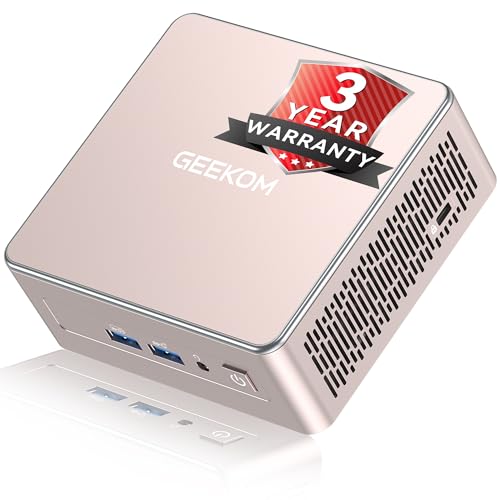
Expandable Creator-Ready Mini PC – GEEKOM A5 Ryzen 5 Mini PC
For mini desktop computers for large file storage, the GEEKOM A5 is appealing because it combines a roomy starting setup with real expansion options. It includes a 1TB NVMe SSD, dual-slot RAM, an extra M.2 2242 slot, and a 2.5-inch HDD bay that can bring total storage up to 10TB.
Best For: Buyers who want a compact mini PC with flexible storage upgrades for creative or business work.
Pros:
- 1TB PCIe NVMe SSD with up to 4TB SSD expansion support.
- Extra M.2 2242 slot plus 2.5-inch HDD bay for up to 10TB total storage.
- Dual-slot DDR4 RAM is upgradable to 64GB.
- Three-year warranty adds long-term peace of mind.
Cons:
- Expansion depends on using multiple storage types rather than a NAS-style multi-slot design.
- Higher-capacity builds will require additional drives after purchase.
As a storage-friendly mini PC, the GEEKOM A5 gives you more flexibility than many compact systems in its class. It is a sensible pick if you want a machine that can start fast and scale with larger files over time.
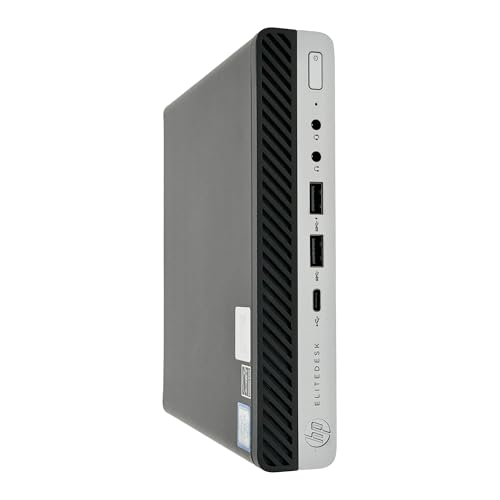
Business-Ready Storage – HP ProDesk 600 G5 Mini PC
If you’re shopping for mini desktop computers for large file storage, the HP ProDesk 600 G5 focuses on speed and capacity in a compact business build. Its 1TB NVMe SSD helps with fast access to large files, while 32GB of RAM supports smooth multitasking for productivity, data work, and everyday office use.
Best For: Professionals who want a renewed mini PC with fast 1TB storage and strong multitasking headroom.
Pros:
- 1TB NVMe SSD for fast file access and storage
- 32GB DDR4 RAM for heavy multitasking
- Intel Core i5-9500T for productive day-to-day performance
- Built-in AX210 Wi-Fi 6E and Bluetooth 5.3 on supported configurations
Cons:
- Renewed unit, not a brand-new system
- Storage is fast, but it is still a single 1TB drive out of the box
Overall, this is a practical pick if you need a compact desktop that can handle large files without slowing down routine work. The combination of 32GB RAM and a 1TB NVMe drive makes it especially appealing for office users who value responsiveness.
Expandable Storage Pick – GMKtec G10 Mini PC
The GMKtec G10 is a compelling option among mini desktop computers for large file storage because it starts with a 1TB SSD and adds serious expansion flexibility. Dual M.2 2280 slots can support up to 16TB total storage, making it a better long-term fit if you expect your file library to grow.
Best For: Buyers who want a mini PC with room to expand storage far beyond the included 1TB SSD.
Pros:
- 1TB SSD included for immediate storage needs
- Dual M.2 slots with support for up to 16TB total SSD expansion
- 16GB RAM expandable to 64GB
- 2.5GbE Ethernet for fast network transfers
Cons:
- Ryzen 5 3500U is more mid-range than high-end
- Wi-Fi 5 is included, not Wi-Fi 6
For buyers who care more about storage growth than raw processor horsepower, this mini PC stands out. The combination of a 1TB SSD, dual-slot expansion, and fast wired networking makes it practical for larger local libraries and file-heavy workflows.
Compact Business Storage – Dell OptiPlex 7080 Micro
Among mini desktop computers for large file storage, the Dell OptiPlex 7080 Micro is a straightforward business choice with the essentials already built in. It pairs 32GB of RAM with a 1TB SSD, so you get plenty of space for files and the memory needed to keep multiple apps and browser tabs responsive.
Best For: Business users who want a dependable compact PC with 1TB storage and strong memory capacity.
Pros:
- 1TB SSD for fast boot and file storage
- 32GB high-bandwidth RAM for multitasking
- Intel Core i5-10500T with 6 cores and 12 threads
- Wi-Fi 6, Bluetooth, and Windows 11 Pro included
Cons:
- Renewed model rather than new
- Storage expansion details are not highlighted in the supplied notes
This is a good fit if you want a compact business desktop that handles large files without adding complexity. It offers the storage and memory most office buyers need, plus a practical port selection for everyday use.
Expandable Workstation Pick – Ryzen 5 3500U Mini PC for Triple Displays
If you want mini desktop computers for large file storage that stay compact while leaving room to grow, the C4 SE is a practical budget-friendly option. It ships with 256GB SSD storage today, plus an extra M.2 SSD expansion slot for more files and apps later, making it a flexible fit for home offices and study setups.
Best For: Users who want a compact desktop with upgrade paths for expanding storage and memory over time.
Pros:
- Ryzen 5 3500U offers solid 4-core, 8-thread performance for everyday multitasking.
- Extra M.2 SSD slot and two SODIMM slots support future storage and RAM upgrades.
- Triple-display output helps organize work across multiple screens.
- Dual Gigabit Ethernet adds flexible wired networking for file sharing setups.
Cons:
- Comes with only 256GB SSD installed, so storage expansion may be needed sooner.
- WiFi 5 is serviceable, but it is not the newest wireless standard.
Overall, the C4 SE is a smart pick if you want a small system that can grow with your storage needs instead of forcing an early upgrade to a larger tower.
Business Storage Bundle – Lenovo ThinkCentre 1L Mini Desktop
For mini desktop computers for large file storage in a business-friendly package, this Lenovo ThinkCentre setup stands out because it combines fast internal storage with an included external drive. The 512GB SSD handles everyday speed, while the added 512GB external HDD gives you a simple way to back up and move files between devices.
Best For: Office users and home workers who want a ready-to-use mini desktop with built-in backup storage.
Pros:
- 512GB NVMe SSD supports quick boot times and responsive file access.
- Included 512GB external HDD adds extra space for backups and transfers.
- 16GB RAM and Intel Core i3-1215U are a good match for everyday multitasking.
- Comes with keyboard and mouse, so setup is straightforward.
Cons:
- Storage expansion is helpful, but the main internal drive is still 512GB.
- Designed around business use, so it is less focused on heavy performance tasks.
This is a strong choice if your priority is a tiny desktop that already includes extra storage for file handling, not just a fast system with room to upgrade later.
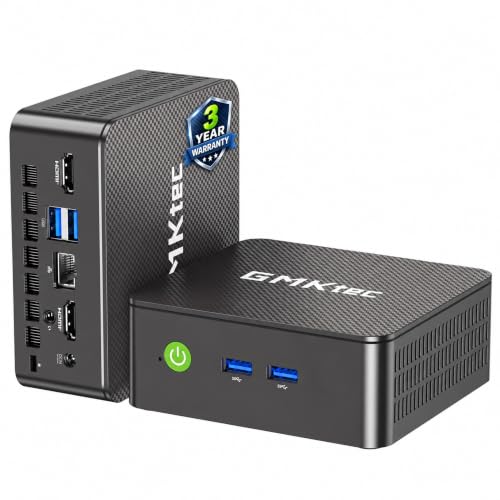
Fast File-Handling Pick – GMKtec G3 PRO Mini PC
If you are comparing mini desktop computers for large file storage, the GMKtec G3 PRO offers a useful mix of 512GB SSD capacity, dual-channel 16GB RAM, and an extra storage expansion slot. It is aimed at office and business use, with fast file transfers and strong connectivity that make it easy to plug into a shared workspace or storage-heavy setup.
Best For: Buyers who want a compact office PC with quick storage access and a second expansion slot.
Pros:
- 512GB M.2 SSD and secondary M.2 2242 SATA slot provide storage flexibility.
- 2.5GbE Ethernet is a strong match for faster wired network use.
- Dual HDMI 2.0 outputs support efficient 4K dual-screen setups.
- WiFi 6, Bluetooth 5.2, and four USB 3.2 ports add versatile connectivity.
Cons:
- Internal storage starts at 512GB, so larger file libraries may still need expansion.
- Core i3-10110U is positioned for light productivity rather than demanding workloads.
In practical terms, this mini PC is a good fit when you want decent local storage today and the option to add more later without moving to a bigger desktop.
How We Picked These Mini Desktop Computers for Large File Storage
We prioritized systems that can comfortably handle large local file libraries, whether that means a roomy internal SSD, a bundled second drive, or strong expansion options. We also looked at CPU efficiency, memory capacity, and connectivity that supports fast external storage.
For Mini Desktop Computers for Large File Storage, the most important question is not just speed. It is whether the machine can keep your documents, photos, video projects, or backups accessible without becoming cramped after a few months.
Quick Comparison
For straightforward storage needs, models with 1TB SSDs or combined SSD plus HDD setups are the easiest fit. Business mini PCs often stand out for stability and upgrade headroom, while newer consumer mini PCs may offer better efficiency and quieter operation. If you plan to archive media or use external drives, look closely at USB and network options.
Key Buying Factors for Mini Desktop Computers for Large File Storage
Storage Type and Capacity
Start with total usable storage. A 512GB drive can work for light use, but 1TB is a much safer baseline if you store photos, downloads, project files, or local backups. Hybrid setups can be especially useful when you want fast SSD performance plus extra capacity.
Upgrade Potential
Check whether the mini PC has an extra M.2 slot, room for a 2.5-inch drive, or support for larger RAM configurations. Upgradeability matters because storage needs usually grow faster than expected.
Ports and Connectivity
Fast USB ports, dual display support, and Wi-Fi 6 or wired Ethernet can make file access and transfers easier. If you use external drives or a NAS, strong networking is a major advantage.
CPU and Memory
A capable processor and at least 16GB of RAM help keep indexing, syncing, and multitasking responsive. If you work with large spreadsheets, photo libraries, or compressed archives, avoid underpowered entry-level chips unless your workload is very light.
Who Should Buy Which Mini Desktop Computers for Large File Storage?
Choose a storage-focused mini PC if you want a compact home office machine, a family media hub, or a small business desktop that can also hold large local files. Pick a business-class model if stability, security, and easier serviceability matter most. Go with a newer consumer model if you want better efficiency and everyday responsiveness in a smaller, quieter package.
If your files are mostly cloud-based, you can prioritize performance over capacity. If you keep data local, make storage and expandability your first filter before anything else.