BrosTrend’s AC1200 WiFi to Ethernet Adapter is a practical answer when a wired device needs internet but a cable run is awkward.
This BrosTrend AC1200 WiFi to Ethernet Adapter review focuses on the AC7P bridge design, the Gigabit port, and the setup path it offers for home and office gear.
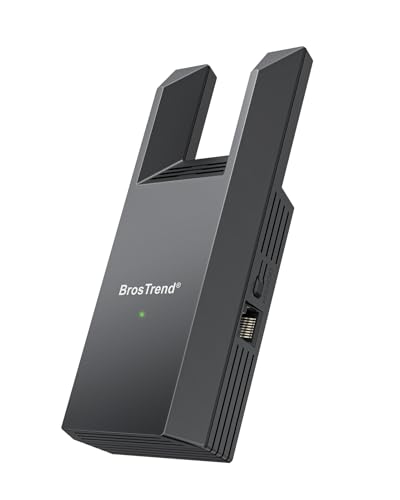
BrosTrend AC1200 WiFi to Ethernet Adapter Review Summary
If you need a simple way to put a single Ethernet-only device onto WiFi, this adapter is easy to understand and easy to justify.
It is especially appealing for buyers who want a bridge between wireless internet and a wired port without replacing the device itself or running long cable routes.
The value here is narrow but clear: it turns WiFi into a wired connection for one device, and it does so with dual-band AC1200 wireless on the uplink side and a Gigabit Ethernet port on the device side.
That combination makes the product more convincing than cheap Fast Ethernet bridges that can bottleneck the wired link.
It also avoids driver installs, which matters for TVs, printers, consoles, and older desktop hardware.
Review Scorecard
| Category | Score | Rationale |
|---|---|---|
| Connectivity flexibility | 9/10 | Works with many wired devices, from smart TVs to printers and game consoles. |
| Speed potential | 8/10 | Gigabit Ethernet avoids the 100 Mbps ceiling of basic adapters. |
| Setup simplicity | 8/10 | WPS or web UI setup gives two reasonable paths for pairing. |
| Use-case fit | 9/10 | Strong fit for single-device rooms and spaces without easy Ethernet access. |
| Compatibility confidence | 8/10 | Listing emphasizes no driver or software installation requirement. |
| Value proposition | 8/10 | The feature set is focused and practical rather than overloaded. |
| Portability and placement | 7/10 | Small bridge-style hardware is convenient, but it still depends on WiFi signal quality. |
For buyers with a specific wired device and a solid router nearby, this is a straightforward, low-friction solution.
If you already have Ethernet in place everywhere, it is unnecessary; if you need to connect only one device, it looks well matched.
Key Features and Specifications of BrosTrend AC1200 WiFi to Ethernet Adapter
The core job of the BrosTrend AC1200 WiFi to Ethernet Adapter is simple: it connects to your WiFi router and outputs a wired Ethernet connection for one device.
That makes it relevant for setups where the end device has an Ethernet jack but no usable WiFi of its own.
The listing highlights a Gigabit Ethernet port rather than a 100 Mbps port, which is the main technical detail buyers should notice first.
In practical terms, that gives the wired side more headroom and reduces the chance that the adapter itself becomes the limiting factor in everyday use.
The wireless side uses dual-band AC1200 WiFi, with 5 GHz up to 867 Mbps and 2.4 GHz up to 300 Mbps.
Those are uplink figures, not guaranteed device throughput, but they do show that the adapter is meant to join a modern home network rather than act like a bare-bones legacy bridge.
Other important listing facts:
- Connects a single wired device to WiFi through Ethernet
- Compatible use cases include smart TVs, desktop PCs, laptops, printers, game consoles, Blu-ray players, and VoIP phones
- No driver or software installation required
- Setup can be completed with WPS or through a web-based interface
- Designed as a wireless bridge, not as a router replacement or mesh node
The biggest limitation is also built into the product category: the wired device still depends on the quality of the WiFi network it joins.
A Gigabit port does not create better internet than the router can deliver.
It only keeps the wired handoff from becoming the weak point.
Pros and Cons of BrosTrend AC1200 WiFi to Ethernet Adapter
Pros
- Versatile device support. The listing explicitly calls out TVs, printers, PCs, consoles, Blu-ray players, and VoIP phones.
- Gigabit Ethernet port. Better than the common 100 Mbps bridge class for buyers who want more headroom.
- Dual-band AC1200 wireless. Gives the adapter a modern WiFi uplink profile.
- No driver requirement. Useful for appliances and electronics that are awkward to configure with software.
- Two setup methods. WPS is fast when available, while web UI setup gives a fallback.
Cons
- Only solves one device at a time. This is not a general network expander for multiple Ethernet ports.
- Performance still depends on WiFi quality. A bridge cannot outperform the network it joins.
- Needs a router or access point nearby enough to pair reliably. Placement matters more than the spec sheet suggests.
- Not a substitute for native wired networking. If you can run Ethernet cleanly, that is still the simpler long-term answer.
The strongest point is not that it does something unusual.
It is that it does a common job with fewer compromises than ultra-cheap adapters.
The main tradeoff is that it remains a niche tool, so it is excellent only when the niche matches your room, device, and router layout.
Who Should Buy BrosTrend AC1200 WiFi to Ethernet Adapter?
Buy it if you have a wired-only device and want to place it where Ethernet is not available or not convenient.
That includes a TV across the room from the router, a printer in a better spot for day-to-day use, or a console in a location where cable runs would be messy.
It also makes sense if you want a simple bridge for a device that should stay on Ethernet for stability, but the room only has WiFi access.
The no-driver approach matters here, because many consumer devices are far easier to bridge than to reconfigure.
This is less compelling if you are trying to solve a whole-room networking problem.
If multiple devices need wired ports, a real switch plus a proper wired uplink is the better architecture.
It is also less attractive if your WiFi signal is weak where the adapter must sit, because the bridge will inherit that weakness.
If you already own a mesh node, router, or access point with Ethernet output available in the right place, this adapter may be redundant.
But if you need a small, dedicated bridge for one device, the proposition is clean.
Wireless Bridge Fit and Practical Use
For Smart TVs and Streaming Boxes
The adapter is a sensible fit for TVs that have Ethernet but are inconvenient to wire.
A wired handoff can help keep streaming devices off flaky WiFi while avoiding a long visible cable run.
For Printers and Office Devices
Printers, VoIP phones, and similar gear benefit from a setup that does not depend on drivers.
That makes the adapter useful in rooms where you want the device networked, but not necessarily moved near the main router.
For Consoles and Desktop PCs
Game consoles and desktop PCs are good examples of devices that still often include Ethernet ports but may sit far from network infrastructure.
The Gigabit port gives the adapter enough headroom to feel appropriate for these higher-demand use cases.
For Setup and Placement
WPS is the fastest pairing method when your router supports it, but the web UI fallback is important because not every home network makes WPS practical.
In either case, the adapter is only as good as its placement, so the best results will usually come from putting it where the WiFi signal is already usable.
Alternatives to BrosTrend AC1200 WiFi to Ethernet Adapter
If you want a different wireless bridge or network adapter, these Amazon-searchable alternatives are worth comparing:
- TP-Link WiFi to Ethernet adapter
- NETGEAR wireless bridge
- UGREEN WiFi Ethernet adapter
- D-Link wireless bridge
TP-Link is the most obvious comparison because buyers often look for a mainstream brand name in this category.
NETGEAR is worth checking if you want another established networking vendor.
UGREEN and D-Link can be reasonable comparison points when you are comparing form factor, setup style, and the exact way each bridge handles a single wired device.
Is BrosTrend AC1200 WiFi to Ethernet Adapter Worth It?
Yes, if your exact problem is “one wired device needs WiFi access without a long Ethernet run.” The BrosTrend AC1200 WiFi to Ethernet Adapter has a focused feature set that fits that job well: Gigabit wired output, dual-band AC1200 wireless uplink, and setup options that do not depend on drivers.
It is not a universal networking upgrade, and it should not be treated like one.
But for the right room and the right device, it looks like a sensible, practical bridge that can simplify a messy connectivity problem.
If you only need one wired endpoint online, this is the kind of adapter that earns its keep.