Choosing the right printer can make or break your custom transfer workflow, especially when you need bigger output, consistent color, and reliable day-to-day performance.
This roundup of the best wide format sublimation printers for 2026 focuses on practical options for hobbyists, small businesses, and high-volume creators.
Best 10 Wide Format Sublimation Printers Picks for 2026
Studio-Ready Wide Format
Epson SureColor F570 24-inch desktop sublimation printer

- 24-inch roll and sheet support
- Includes inks, paper, and remote install
- Epson Edge Print Pro software included
Best For: Small businesses needing wider desktop sublimation output
Wide-Format Ink Tank Value
Epson EcoTank Photo ET-8550 wide-format all-in-one
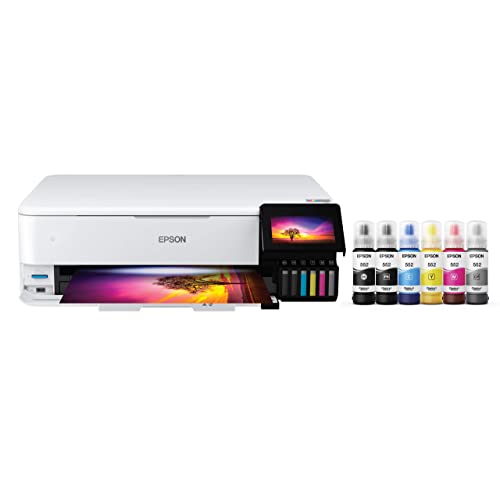
- Up to 13x19-inch media support
- Cartridge-free refillable ink system
- Includes scan and copy functions
Best For: Creators wanting wide-format photos and flexible home use
Compact Pro Sublimation
Sawgrass SG500 bundle with inks and paper

- Dedicated sublimation-only printer
- Includes SubliJet UHD inks and TruePix paper
- Bypass tray handles long 8.5x51 prints
Best For: Small businesses and home entrepreneurs
Wide-Format All-in-One Pick

- Prints up to 13 x 19 inches
- All-in-one with scan, copy, and fax
- Refillable ink tank with Wi-Fi and Ethernet
Best For: Home offices needing wide-format versatility
Dedicated Sublimation Printer
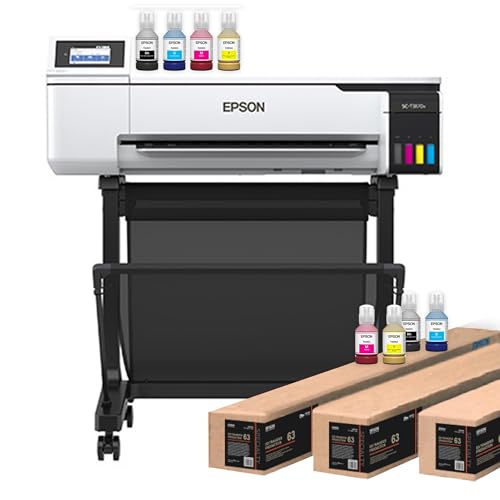
- Dedicated dye-sublimation model
- Supports rolls and sheets up to 24 inches
- Includes ink, paper, and remote install
Best For: Small shops needing a 24-inch sublimation setup
High-Speed Wide-Format Pick

- Prints up to 13 x 19 inches
- Fast 25 ppm black and 12 ppm color
- 500-sheet capacity with dual trays
Best For: Offices needing fast large-format printing
Entry-Level All-in-One Sublimation Starter
Cartridge-Free Super-Tank With Ink Bundle

- Cartridge-free super-tank design
- Includes 4-color sublimation ink bundle
- Scanner/copier plus Wi-Fi connectivity
Best For: Beginners and small shops needing a simple sublimation all-in-one
Compact Brand-Name Sublimation Printer
Epson SureColor F170 8.5 x 11 Compact

- Genuine Epson ink included
- PrecisionCore printhead for crisp output
- 150-sheet auto-feed tray
Best For: Users who want Epson support in a compact sublimation printer
True Wide-Format Sublimation Workhorse
13 x 19 Super-Tank Wide-Format Bundle

- Prints up to 13 x 19 inches
- 250-sheet tray with 2.7-inch touchscreen
- Scanner/copier plus ADF support
Best For: Large-format sublimation projects and small business production
Studio-Ready Wide Format – Epson SureColor F570 24-inch desktop sublimation printer
If you want a wide format sublimation printer for a small studio or production workspace, the Epson SureColor F570 is built around 24-inch output, strong media flexibility, and bundled starter supplies. It supports rolls and sheets up to 24" wide, includes a 50-sheet auto-feed tray, and pairs with Epson Edge Print Pro for job layout, nesting, and color control.
Best For: Small businesses and makers who need a 24-inch desktop sublimation printer with bundled inks and paper.
Pros:
- Prints on rolls and sheets up to 24" wide for larger sublimation projects
- Includes two full ink sets, sublimation paper, and free remote install support
- PrecisionCore MicroTFP printhead with Nozzle Verification Technology for reliable output
- Epson Edge Print Pro adds nesting, repeats, and advanced color controls
Cons:
- Print speed is listed at 1 ppm, so it is not built for fast volume production
- Large footprint and 151-pound weight make it less portable
- Single-purpose print-only design may not suit users wanting scanning or copying
For buyers prioritizing broader print width and a more professional desktop setup, the F570 stands out for its 24-inch capability and bundled consumables. It is a practical choice when you want a capable sublimation workflow without moving up to a large industrial system.
App-Driven Starter Pick – Brother SP-1 compact sublimation printer for DIY projects
The Brother SP-1 is a compact sublimation printer aimed at simple custom heat transfer projects rather than wide format sublimation printing. It works with the Artspira app, includes starter ink and paper, and is designed for users who want an easy path from design to heat pressing on smaller items.
Best For: Beginners and DIY users making small sublimation projects with app-based design tools.
Pros:
- Artspira app support helps you import, save, and create designs easily
- Includes Brother Genuine ink and a sublimation paper starter pack
- Compact size fits a home craft setup
- Designed for fast color printing on custom projects
Cons:
- Maximum media size is 8.5×11, so it is not a wide format printer
- Heat press is required and sold separately
- Project workflow depends on the Artspira app for setup and use
This is a good fit if your focus is entry-level sublimation rather than larger-format production. It offers a straightforward way to learn the process, but buyers needing wide format output should look elsewhere.
Wide-Format Ink Tank Value – Epson EcoTank Photo ET-8550 wide-format all-in-one
The Epson EcoTank Photo ET-8550 is a wide-format color all-in-one with a 13" x 19" maximum media size, making it useful for creative projects where larger prints matter. It is not a dedicated sublimation printer, but its cartridge-free ink tank system, scanner, and copier features make it a flexible option for users who want wide-format printing plus everyday utility.
Best For: Creators who want a wide-format photo printer with refillable inks and all-in-one convenience.
Pros:
- Supports up to 13" x 19" media for wide-format creative work
- Cartridge-free EcoTank system lowers ongoing ink costs
- Includes scanner and copier functions for more versatility
- Wireless connectivity and touchscreen control simplify use
Cons:
- It is an inkjet photo printer, not a dedicated sublimation model
- Requires ink refills rather than sublimation-specific consumables
- USB is listed for connectivity, so network flexibility is more limited than some business printers
If you need wider print sizes and value-focused operation more than a dedicated sublimation workflow, the ET-8550 is a strong all-around pick. Its wide-format support and refillable ink design make it appealing for hobbyists and home creators.
Compact Pro Sublimation – Sawgrass SG500 bundle with inks and paper
The Sawgrass SG500 is a purpose-built sublimation printer for small business and home-based production, with professional-grade output and a compact desktop footprint. It prints up to 8.5" x 14", or up to 8.5" x 51" through the bypass tray, and the bundle includes SubliJet UHD inks and TruePix paper to help you get started right away.
Best For: Small businesses that want a dedicated sublimation printer with reliable color tools and a starter bundle.
Pros:
- Designed exclusively for sublimation for a focused workflow
- Includes 31mL SubliJet UHD inks and TruePix paper
- Bypass tray supports prints up to 8.5" x 51" for longer designs
- MySawgrass platform and Print Utility help with design and color control
Cons:
- Not a true wide format printer in the 24-inch class
- Maximum standard media size is 8.5" x 14"
- Best suited to smaller projects and business use rather than large-format output
For buyers who want a dedicated sublimation machine with professional support tools, the SG500 is an efficient desktop choice. It is less about wide format volume and more about consistent results for small business applications.
Wide-Format All-in-One Pick – Epson EcoTank ET-15000
If you want one of the more versatile wide format sublimation printers that can also handle everyday office work, the Epson EcoTank ET-15000 is a practical all-in-one choice. It prints up to 13 x 19 inches, includes scanning, copying, and faxing, and uses a refillable ink tank system for lower-maintenance color printing.
Best For: Home offices and small teams that need wide-format printing plus scan/copy/fax functions.
Pros:
- Prints up to 13 x 19 inches for larger layouts and wide-format jobs
- All-in-one design adds scanner, copier, and fax capabilities
- Refillable ink tank system supports regular color printing more efficiently
- Wireless, Ethernet, and USB connectivity give you flexible setup options
Cons:
- It is an inkjet all-in-one, not a dedicated sublimation printer
- Color speed is modest at 9 ppm
- Maximum media handling tops out at 11 x 17 inches in the listed specs
For buyers who need a broad-use printer rather than a single-purpose production machine, the ET-15000 offers a strong mix of size, convenience, and office features. It is best viewed as a wide-format option that can support standard or sublimation ink use, depending on your workflow.
Dedicated Sublimation Printer – Epson SureColor F570 24-inch
The Epson SureColor F570 is a dedicated option for buyers comparing wide format sublimation printers for true dye-sublimation work. It supports rolls and sheets up to 24 inches wide, includes two full ink sets and sublimation paper, and adds professional tools like Epson Edge Print Pro for layout and color control.
Best For: Small shops and production users who need a 24-inch dye-sublimation printer.
Pros:
- Dedicated dye sublimation printer with 24-inch wide media support
- Includes two full ink sets, sublimation paper, and remote install support
- Built-in cutter and 50-sheet auto-feed tray improve workflow
- Epson Edge Print Pro adds nesting, repeats, and advanced color controls
Cons:
- Print-only design means no scanning, copying, or faxing
- Large at 200 pounds, so it needs dedicated space
- Top print resolution is listed at 720 dpi
If you need a printer aimed specifically at sublimation rather than general office use, the F570 is the most specialized machine in this lineup. Its wide media support and bundled supplies make it especially appealing for buyers ready to produce right away.
High-Speed Wide-Format Pick – Epson WorkForce Pro WF-7310
The Epson WorkForce Pro WF-7310 is a strong pick if you need a wide format printer that handles large office documents as well as creative prints. It supports output up to 13 x 19 inches, offers fast ISO speeds, and includes dual trays plus a rear feed for higher-volume use.
Best For: Offices and creators who want fast 13 x 19-inch printing with high paper capacity.
Pros:
- Wide-format printing up to 13 x 19 inches
- Fast 25 ppm black and 12 ppm color ISO speeds
- 500-sheet capacity with two 250-sheet trays and a rear feed
- Wireless, Wi-Fi Direct, and app control simplify setup and use
Cons:
- It is designed for office use, not as a dedicated sublimation printer
- Uses Epson genuine cartridges only, which may limit flexibility
- Max duplex size is listed at 11 x 17 inches
For users who need dependable wide-format output with strong everyday productivity features, the WF-7310 is an efficient choice. It is especially attractive if your priority is speed, paper capacity, and broad document handling rather than a dedicated sublimation workflow.
Entry-Level All-in-One Sublimation Starter – Cartridge-Free Super-Tank With Ink Bundle
If you want one of the more accessible wide format sublimation printers for everyday heat-transfer projects, this Pinckney bundle is built around simplicity. It gives you a cartridge-free super-tank setup, scanner/copier functions, and included sublimation ink, making it a practical pick for crafters who want to get started without a complicated refill process.
Best For: Beginners, hobby crafters, and small shops that want a simple all-in-one sublimation setup for shirts, mugs, and other transfer projects.
Pros:
- Cartridge-free super-tank design reduces ongoing ink-cartridge hassle.
- Includes sublimation ink bundle with easy-fill nozzle to help avoid mess.
- Built-in scanner and copier add everyday office-style convenience.
- High-resolution output up to 5760 x 1440 dpi.
Cons:
- Maximum media size is limited to 8.5 x 11 inches, so it is not a true wide-format machine.
- Sublimation prints can look dull on paper before heat transfer, which may confuse new users.
- Some ink may ship separately based on logistics.
This is a solid entry point if you want sublimation capability plus all-in-one features without stepping up to a larger pro-grade printer. It is best suited to smaller-format work and users who value an easier refill system over wide media support.
Compact Brand-Name Sublimation Printer – Epson SureColor F170 8.5 x 11 Compact
The Epson SureColor F170 is a compact option for buyers comparing wide format sublimation printers, but it is really aimed at smaller transfer sizes. It stands out for its OEM Epson ink, factory-sealed packaging, and PrecisionCore printhead, so it is a good fit if you want a trusted branded printer with straightforward sublimation output.
Best For: Hobbyists, crafters, and small businesses that prioritize Epson support and compact 8.5" x 11" sublimation printing.
Pros:
- Includes genuine Epson sublimation ink and full manufacturer warranty support.
- PrecisionCore printhead with Precision Droplet Control is designed for strong image clarity.
- 150-sheet auto-feed tray and closed paper path help support cleaner printing.
- Compact footprint makes it easier to place in a small workspace.
Cons:
- Maximum media size is only 8.5 inches wide, so it is not wide-format.
- Print-only design means no scanner or copier functions.
- Best suited to smaller projects rather than oversized transfer work.
If brand support and compact size matter more than large-format capability, this Epson bundle is an easy printer to justify. It is a strong match for users who want reliable 8.5" x 11" sublimation output from a major manufacturer.
True Wide-Format Sublimation Workhorse – 13 x 19 Super-Tank Wide-Format Bundle
For buyers specifically shopping for wide format sublimation printers, this Pinckney ET-15000 conversion bundle is the most capable option in the group. It supports printing up to 13" x 19", includes a front tray with higher capacity, and adds scanning with an ADF, making it better suited to larger transfer jobs and more demanding workflows.
Best For: Crafters and small businesses that need larger sublimation transfers up to 13" x 19" and want an all-in-one printer.
Pros:
- Wide-format printing up to 13" x 19" for bigger projects.
- Borderless printing up to 11" x 17" expands layout flexibility.
- 250-sheet front tray and 2.7" color touchscreen improve usability.
- Includes scanner/copier functions plus ADF for more versatile handling.
Cons:
- Larger and heavier than compact desktop models.
- Lower print resolution than the smaller Epson option in this roundup.
- Ink may ship separately depending on logistics.
This is the clear pick if your projects are outgrowing standard letter-size printing and you need a real wide-format sublimation setup. It balances bigger media support with all-in-one convenience, which makes it especially appealing for shop use and larger custom orders.
How We Picked These Wide Format Sublimation Printers
We focused on models that offer the strongest mix of print width, color output, setup simplicity, and long-term value. Since Wide Format Sublimation Printers can vary a lot in purpose, we favored options that suit different workspace sizes and production needs rather than only the highest specs on paper.
We also looked for bundle completeness, ink system efficiency, and whether each printer supports the kind of transfer work buyers actually do, from apparel and drinkware to signage and photo products.
Quick Comparison
If you need the largest output and are willing to invest more, a 24-inch desktop model is the most flexible choice. For many small shops, 13 x 19-inch printers strike the best balance between size, cost, and ease of use. Compact 8.5 x 11-inch units are better for tighter budgets, smaller items, or occasional use.
All-in-one supertank models can be attractive if you want a machine that also handles scanning and copying, while dedicated sublimation printers are better when transfer quality and workflow consistency matter most.
Key Buying Factors for Wide Format Sublimation Printers
Maximum Media Size
Start with the largest transfer size you realistically need. A wider print path gives you more design flexibility, but it also usually means a higher upfront cost and more desk space.
Ink System and Running Costs
Look for refillable tanks or bundled ink if you expect regular production. Lower ink cost per print can matter more than the initial purchase price over time.
Workflow and Connectivity
Wireless printing, Ethernet, USB, and easy setup can save time in busy environments. If you produce work often, a smooth workflow is just as important as resolution.
Use Case Fit
Some Wide Format Sublimation Printers are designed mainly for sublimation, while others are general-purpose printers that can be adapted for transfer work. Dedicated models usually make more sense for serious commercial use.
Who Should Buy Which Wide Format Sublimation Printers?
Choose a 24-inch printer if you want the most room for oversized transfers, banners, or high-production work. Pick a 13 x 19-inch model if you’re building a small shop and need strong versatility without moving into full commercial sizing.
Go with a compact sublimation printer if you’re just starting out, making smaller products, or testing demand before investing in a larger machine. If you need an all-in-one for mixed office and creative tasks, a supertank printer may be the most practical option.
For most buyers, the best Wide Format Sublimation Printers are the ones that match real production volume, preferred media size, and available workspace—not just the biggest specs.