Choosing among sublimation printers for beginners can feel overwhelming, especially when bundles, ink systems, and print sizes all look similar at first glance.
This roundup focuses on easy-to-start options that make setup simpler, reduce guesswork, and give new users a smoother path to custom shirts, mugs, and gifts.
Best 10 Sublimation Printers for Beginners Picks for 2026
Editor’s Pick
Epson SureColor F170 for Starter Sublimation

- Includes ink, guide, and power cable
- PrecisionCore printhead for sharp transfers
- Wi‑Fi, USB, and Ethernet connectivity
Best For: Beginners who want a compact, brand-backed sublimation printer
Factory-Sealed Choice
Epson F170 with OEM Ink Included

- Factory-sealed Epson product
- Includes genuine OEKO-TEX certified inks
- 150-sheet auto-feed tray
Best For: Beginners and hobbyists who want an OEM Epson bundle
Value All-in-One
Pinckney Super-Tank Sublimation Bundle

- Cartridge-free all-in-one with scanner/copier
- Includes easy-fill sublimation ink bottles
- Supports many paper sizes up to banner length
Best For: Beginners who want a cartridge-free all-in-one printer with included ink
Best All-in-One Starter
Brother SP-1 Sublimation Printer with CMYK Ink Set

- Includes CMYK inks, paper, and Artspira software
- Wi‑Fi and Ethernet connectivity
- Compact print-only design for craft spaces
Best For: Beginners who want a bundled starter printer for custom crafts
Best for Color Accuracy
Sawgrass SG500 Sublimation Printer Bundle

- Exclusive sublimation-focused printer
- Includes SubliJet UHD inks and TruePix paper
- MySawgrass software helps beginners design and print
Best For: Beginners who want a dedicated sublimation printer with software support
Best Value Starter Bundle
Brother SP-1 Sublimation Printer Starter Kit

- Includes printer, inks, paper, blanks, and tape
- Starter bundle reduces extra first-time purchases
- Wi‑Fi, Ethernet, and Artspira software included
Best For: Beginners who want a more complete all-in-one starter kit
Premium Beginner Pick
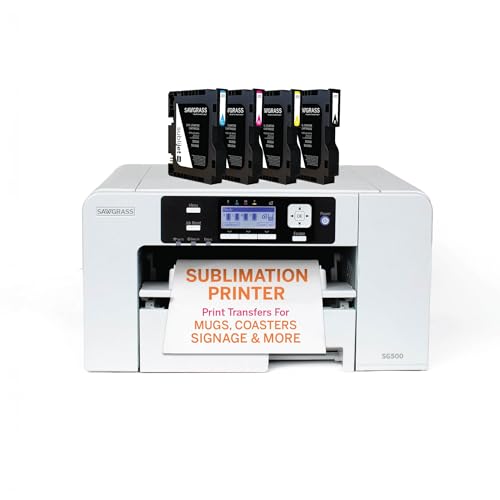
- Purpose-built sublimation printer with starter inks and paper
- Compact size with Wi-Fi and beginner-friendly software
- Auto-maintenance and support-focused bundle
Best For: Beginners who want a professional, ready-to-go sublimation setup
Budget Conversion Choice
A4 Sublimation Printer for Clothes

- Wireless super-tank design with refillable high-capacity tanks
- Includes 70mL black, magenta, cyan, and yellow inks
- Easy-fill nozzle aims to reduce mess and hassle
Best For: Beginners looking for a lower-cost, easy-refill starter option
Easy Setup Pick
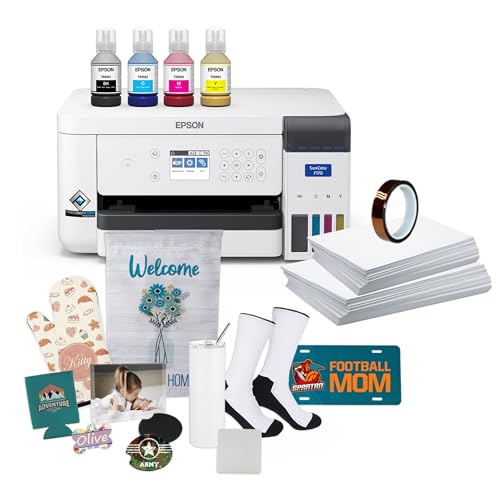
- Bundle includes ink, paper, tape, and starter accessories
- PrecisionCore head offers detailed image clarity
- 150-sheet tray and closed paper path help keep things tidy
Best For: Beginners who want a complete Epson bundle with cleaner handling
Editor’s Pick – Epson SureColor F170 for Starter Sublimation
If you’re comparing sublimation printers for beginners, the Epson SureColor F170 is an easy entry point thanks to its compact 8.5″ x 11″ format, included ink set, and straightforward Wi‑Fi/USB setup. It is built for color transfers with Epson’s PrecisionCore printhead and a closed, dust-resistant paper tray, which helps simplify day-to-day printing for new users.
Best For: Beginners who want a compact, brand-backed sublimation printer with starter supplies included.
Pros:
- Includes a full set of Epson sublimation ink, user guide, and AC power cable
- PrecisionCore printhead with Precision Droplet Control for sharp image clarity
- 150-sheet auto-feed tray and dust-resistant closed tray help streamline printing
- Wi‑Fi, USB, and Ethernet connectivity with Windows, macOS, and mobile app support
Cons:
- Maximum media size is limited to 8.5″ width
- Print-only design means no scanning or copying functions
For a beginner-focused sublimation setup, this model keeps the workflow simple while still offering the print quality and support most new crafters and small businesses need.
App-First Pick – Brother SP1 for Guided Sublimation
Among sublimation printers for beginners, the Brother SP1 stands out for users who want a guided, app-based workflow. It requires the Artspira app to get started, but that also gives you access to ready-made designs, image import and save options, and a simple path from design to heat pressing.
Best For: First-time users who like app-guided design creation and quick project setup.
Pros:
- Artspira app support with over 100 sublimation designs and image tools
- Includes Brother Genuine Sublimation Ink and a sublimation paper starter pack
- Fast printing speeds and vibrant color output for custom projects
- Designed for heat-press projects on items like mugs, shirts, bags, and hats
Cons:
- Heat press is required and sold separately
- Must download and use the Artspira app to begin
- Limited to 8.5″ x 11″ media size
If you want a beginner-friendly sublimation printer that leans on software guidance, the SP1 makes the workflow feel more structured without adding much setup complexity.
Factory-Sealed Choice – Epson F170 with OEM Ink Included
If you want sublimation printers for beginners with less guesswork, this Epson SureColor F170 bundle is set up around an original OEM product and factory-sealed packaging. It includes genuine Epson inks, the user guide, and the power cable, plus a 150-sheet auto-feed tray and a compact body that fits a small workspace.
Best For: Beginners and hobbyists who want an OEM Epson bundle with full manufacturer support.
Pros:
- Factory-sealed Epson product with full manufacturer warranty support
- Genuine Epson sublimation inks included, certified ECO PASSPORT by OEKO-TEX
- PrecisionCore printhead with 5760 x 1440 optimized DPI
- 150-sheet auto-feed tray and dust-resistant closed tray for cleaner prints
Cons:
- Print-only model with no scanner or copier
- Maximum media size is 8.5″ width
This bundle is a strong fit if you value verified OEM hardware and want a straightforward starting point for apparel, mugs, and other sublimation items.
Value All-in-One – Pinckney Super-Tank Sublimation Bundle
This Pinckney bundle is a practical option for sublimation printers for beginners who want an all-in-one machine with refillable tanks. It comes with a converted EcoTank ET-2800/ET2803 base, built-in scanner and copier, and a sublimation ink bundle designed for easy filling and high-resolution transfers.
Best For: Beginners who want a cartridge-free all-in-one printer with included sublimation ink.
Pros:
- Cartridge-free super-tank design with built-in scanner and copier
- Includes sublimation ink bottles with easy-fill auto-fill nozzle
- Supports a wide range of paper sizes, including letter, legal, A4, and banner lengths
- High-resolution output up to 5760 x 1440 dpi
Cons:
- Converted printer bundle may require extra attention to setup and maintenance
- Sublimation output looks dull on paper before heat transfer, per the notes
- Print speed is modest compared with some dedicated alternatives
For beginners who want more versatility than a print-only machine, this bundle offers a flexible path into sublimation with scanning, copying, and refillable ink tanks.
Best All-in-One Starter – Brother SP-1 Sublimation Printer with CMYK Ink Set
If you’re comparing sublimation printers for beginners, the Brother SP-1 is an easy entry point because it comes as a ready-to-use bundle with CMYK inks, sublimation paper, and Artspira design software. It’s a compact, print-only machine with Wi‑Fi and Ethernet, so you can set it up for crafting projects without needing a complex workflow.
Best For: Beginners who want a compact, bundled sublimation printer for crafting, mugs, tote bags, and other custom items.
Pros:
- Includes full CMYK 47ml inks plus 10 sheets of Brother sublimation paper
- Artspira software and 100 designs help you get started faster
- Wi‑Fi and Ethernet connectivity for flexible setup
- Compact size suits home crafting spaces
Cons:
- Print-only design, so it does not scan or copy
- Starter paper pack is limited to 10 sheets in the included bundle
- Resolution is listed at 1200 x 1200, which is solid but not the highest in this group
The Brother SP-1 is a practical starter choice if you want a straightforward bundle and basic connectivity without extra setup hassles. It’s geared toward hobbyists and small business projects that need reliable color output on common sublimation blanks.
Best for Color Accuracy – Sawgrass SG500 Sublimation Printer Bundle
The Sawgrass SG500 stands out in sublimation printers for beginners who want a more guided path into premium output. It’s designed exclusively for sublimation and includes SubliJet UHD inks, TruePix paper, and access to MySawgrass and Sawgrass Print Utility, which can make the learning curve feel more manageable.
Best For: Beginners who want a sublimation-focused printer with software support and a compact desktop footprint.
Pros:
- Designed exclusively for sublimation printing
- Includes SubliJet UHD inks and TruePix paper
- MySawgrass and Print Utility offer templates and color controls
- Wi‑Fi and auto-maintenance features support long-term use
Cons:
- Included print size is up to 8.5″ x 14″, with longer output requiring the bypass tray
- More of a focused sublimation tool than a general-purpose printer
- Smaller desktop format may not suit higher-volume needs
If you want a beginner-friendly printer built specifically for sublimation, the SG500 is a strong choice. Its bundled software and maintenance features add convenience, while the compact design keeps it practical for home or small-business use.
Best Value Starter Bundle – Brother SP-1 Sublimation Printer Starter Kit
For buyers looking at sublimation printers for beginners, this Brother SP-1 starter bundle packs in the supplies that usually slow first-time users down. Along with the printer and full CMYK inks, it adds 160 sheets of sublimation paper, 50 blanks, heat-resistant tape, and design resources, making it a more complete first-project kit.
Best For: Beginners who want a fuller starter bundle with extra blanks, paper, and accessories for immediate projects.
Pros:
- Includes full CMYK 47ml inks and a large supply of sublimation paper
- Comes with 50 blanks and heat-resistant tape for project setup
- Artspira software, 100 designs, and quick reference guide help with getting started
- Wi‑Fi and Ethernet connectivity add convenience
Cons:
- Still a print-only machine with no scanning or copying features
- Bundle extras are useful, but the printer itself remains a compact craft-focused model
- Resolution is listed at 600 x 600 in the supplied bundle details
This bundle is the easiest way to jump into sublimation with more of the basics already included. It’s especially appealing if you want to test multiple projects right away instead of buying paper, blanks, and tape separately.
Premium Beginner Pick – Sawgrass SG500 Starter Bundle
If you’re comparing sublimation printers for beginners and want a purpose-built setup, the Sawgrass SG500 Starter Bundle is a straightforward place to start. It pairs a compact desktop printer with SubliJet UHD inks, TruePix paper, Wi-Fi, and Sawgrass software tools, making it easier to move from setup to first prints without piecing everything together yourself.
Best For: Beginners who want a ready-to-use, professional-grade sublimation setup for home businesses or serious hobby use.
Pros:
- Purpose-built for sublimation with a starter bundle that includes 20mL CMYK SubliJet UHD inks and TruePix paper
- Compact footprint with support for media up to 8.5″ x 14″, plus bypass tray prints up to 8.5″ x 51″
- Wi-Fi enabled and supported by MySawgrass and Sawgrass Print Utility for easier design and color control
- Print head auto-maintenance and a 2-year warranty with lifetime education and support
Cons:
- Limited to smaller-format media compared with larger production printers
- Designed as a print-only device, so it doesn’t add scanning or copying
Overall, this bundle is aimed at users who want a polished, guided entry into sublimation rather than a conversion project. If you value support, software, and a printer built specifically for the workflow, it stands out as a beginner-friendly premium option.
Budget Conversion Choice – A4 Sublimation Printer for Clothes
For shoppers searching for sublimation printers for beginners on a tighter budget, this A4 conversion-style printer focuses on simplicity and low-setup convenience. The supplied notes highlight a wireless super-tank design with built-in scanner and copier, plus an easy-fill ink system that avoids syringes and ink leakage.
Best For: Beginners who want an affordable, easy-fill printer setup for trying sublimation at home.
Pros:
- Wireless super-tank design with high-capacity ink tanks, so you don’t have to rely on cartridges
- Includes 70mL each of black, magenta, cyan, and yellow sublimation ink
- Easy-fill nozzle is designed to fit the ink inlet directly, with no syringe needed
- Built-in scanner and copier add general-purpose convenience
Cons:
- The listing notes are light on detailed print-quality and media-spec information
- As a conversion-oriented product, setup may feel less turnkey than a purpose-built sublimation bundle
This model is best viewed as a practical entry point for buyers who want ink-tank convenience and a simpler fill process. If your priority is getting started without a high upfront bundle cost, it offers a basic but accessible path.
Easy Setup Pick – Epson SureColor F170 Bundle
The Epson SureColor F170 is a strong fit if you want one of the more approachable sublimation printers for beginners but still want Epson’s image quality and a clean workflow. This bundle includes the printer, full ink set, starter kit items, tape, and 8.5″ x 11″ plus 8.5″ x 14″ paper, so you can get going with fewer extra purchases.
Best For: Beginners who want a well-rounded sublimation printer bundle with straightforward media handling and genuine OEM inks.
Pros:
- Includes full Epson sublimation ink, paper, thermal tape, power cable, and starter blanks
- PrecisionCore printhead with Precision Droplet Control for detailed image clarity
- 150-sheet auto-feed tray and dust-resistant closed tray for cleaner paper handling
- Genuine OEM Epson inks are certified ECO PASSPORT by OEKO-TEX
Cons:
- Smaller maximum media size of 8.5″ width limits larger-format projects
- Print speed is listed at 1 ppm, so it is not aimed at high-volume output
For new users, the appeal here is the bundled accessories and the simplified paper path. It looks like a sensible starter option if you want brand-name reliability and a setup that keeps the learning curve manageable.
How We Picked These Sublimation Printers for Beginners
We looked for models and bundles that are more approachable for first-time users, with an emphasis on setup simplicity, starter supplies, and dependable print output. We also considered print size limits, ink accessibility, and whether a package includes useful extras like paper, transfer sheets, or design software.
For Sublimation Printers for Beginners, the best choice is usually the one that reduces the number of separate purchases and shortens the learning curve. That means clear instructions, compatible inks, and a format that matches the projects you actually want to make.
Quick Comparison: Which Type Fits Your First Project?
Compact 8.5" x 11" printers are a smart fit if you want a simple entry point for small apparel graphics, drinkware, labels, and craft items. Starter bundles are better if you want to print immediately without hunting for paper, tape, and blanks.
If your priority is the most guided experience, bundled systems from brands with established sublimation workflows tend to be easier to manage. If you want more all-in-one convenience, super-tank or starter-kit packages can offer strong value, especially when the included accessories are useful to you.
Key Buying Factors for Sublimation Printers for Beginners
1. Print Size and Project Scope
Beginners should match printer size to their projects. Smaller formats are easier to handle and usually cost less to start, while larger or more specialized setups make sense only if you already know you need them.
2. Starter Bundle Value
Look closely at what is included. A bundle with ink, transfer paper, and basic supplies can save time and money, but only if the extras are actually usable and not just padding.
3. Ink System and Maintenance
Reliable ink delivery matters. Easy-fill tanks, genuine ink support, and clog-resistant design features can help new users avoid common frustrations. For Sublimation Printers for Beginners, lower maintenance usually means a better first experience.
4. Software and Workflow
Design tools and print setup matter more than many shoppers expect. If the printer comes with beginner-friendly software or a simple workflow, it can reduce mistakes and make your first projects faster.
5. Support and Documentation
Clear user guides, setup help, and readily available supplies are important when you are learning. A printer that is easy to refill and easy to troubleshoot is often worth more than one with a slightly lower upfront price.
Who Should Buy Which Sublimation Printers for Beginners?
If you want the simplest first step, choose a compact printer bundle with ink and essential accessories included. If you plan to make shirts, gifts, and small custom items regularly, prioritize a model with strong print consistency and easy supply access.
If your goal is to start fast with minimal extra buying, pick the most complete starter bundle. If you want a cleaner, more controlled learning curve, choose a printer known for straightforward setup and stable maintenance. In short, the best Sublimation Printers for Beginners are the ones that match your project size, budget, and patience for setup.