The right development headset depends on what you’re building. A standalone mixed-reality app, a SteamVR experience, and a smartphone-based demo call for different hardware and testing workflows.
These seven options span current standalone devices, PC VR headsets, a renewed model, and a simple phone viewer. Use the guide below to match your target platform and budget before choosing.
Best 7 Vr Headsets for Developers Picks for 2026
Standalone Mixed-Reality Pick

- Full-color passthrough for mixed reality
- 512GB storage and 8GB RAM
- Untethered; 2.2-hour listed battery life
Best For: Standalone VR and mixed-reality testing
High-Resolution PC VR Pick

- 3840 × 3840 resolution per eye
- Listed 140° field of view
- Wired PC VR with eye tracking
Best For: High-detail PC VR and simulator evaluation
Compact-Storage Standalone Pick

- Standalone Meta Horizon OS headset
- Full-color passthrough via dual RGB cameras
- 128GB storage; 2.5-hour listed battery life
Best For: Standalone testing with modest storage needs
Renewed SteamVR Pick

- PC and SteamVR-focused
- Listed 120Hz refresh rate
- Verify renewed contents and warranty
Best For: SteamVR testing with an existing PC setup
Mixed Reality Pick

- Android XR with passthrough video
- Eye and hand tracking
- Two-hour average battery life
Best For: Android XR interaction and mixed reality exploration
Phone VR Starter
Topmaxions DIY Cardboard Headset
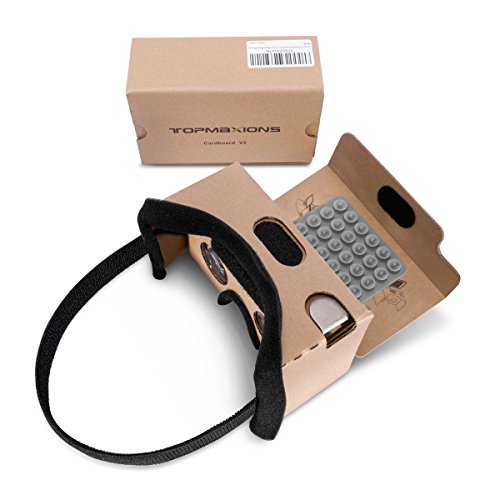
- Fits 3.5- to 6-inch phones
- Padded nose and forehead areas
- Uses a phone as its display
Best For: Basic smartphone VR viewing and presentation checks
Standalone VR Pick

- 256 GB standalone headset
- Hand tracking and controllers
- 90-day limited warranty
Best For: Standalone VR testing with hand or controller input
Standalone Mixed-Reality Pick – Meta Quest 3 512GB
For developers comparing vr headsets for developers, the Meta Quest 3 offers a standalone way to evaluate mixed-reality experiences without a tethered PC. Its dual RGB cameras provide full-color passthrough, while 512GB of storage leaves room for apps and test builds.
Best For: Developers testing standalone VR and mixed-reality experiences on Meta Horizon OS.
Pros:
- Full-color passthrough supports testing virtual content alongside a physical space.
- 2064 × 2208 resolution per eye and a listed 120Hz refresh rate offer a detailed display.
- 512GB of storage, 8GB of RAM, and untethered operation suit on-device testing.
Cons:
- Listed average battery life is 2.2 hours, so long sessions may need a charging break.
- The Gorilla Tag bundle adds game items rather than development accessories.
Choose this model if standalone mixed reality and generous onboard storage matter more to your workflow than continuous, wired operation.
High-Resolution PC VR Pick – Pimax Crystal Super Ultrawide
Among vr headsets for developers, the Pimax Crystal Super is a PC VR option for inspecting fine visual detail and wide-field scenes. It combines 3840 × 3840 resolution per eye with a listed 140° field of view, using a wired DisplayPort and USB connection.
Best For: PC VR developers evaluating high-resolution visuals and wide-field simulator experiences.
Pros:
- QLED and Mini-LED display with local dimming supports detailed visual review.
- 140° field of view provides broad peripheral coverage for flight and racing scenes.
- Eye tracking, inside-out tracking, and adjustable IPD expand evaluation options.
Cons:
- Wired PC connection limits untethered movement.
- High per-eye resolution may make GPU capability an important consideration; dynamic FOV adjustment can help balance performance.
This is the specialist choice when display clarity and peripheral vision take priority over the portability of a standalone headset.
Compact-Storage Standalone Pick – Meta Quest 3S 128GB
The Meta Quest 3S is a standalone option for teams comparing vr headsets for developers and testing Meta Horizon OS experiences without a PC cable. It pairs 8GB of RAM with dual RGB cameras for full-color passthrough, while its 128GB storage calls for more deliberate app management than the 512GB Quest 3.
Best For: Developers checking standalone VR and mixed-reality behavior on a 128GB Meta headset.
Pros:
- Untethered operation makes room-scale checks easier to set up.
- Dual RGB cameras enable full-color passthrough testing.
- Snapdragon XR2 Gen 2 processor and 8GB of RAM support on-device experiences.
Cons:
- 128GB of storage offers less space for apps and test builds than the listed Quest 3.
- Listed average battery life is 2.5 hours, which may interrupt longer sessions.
Pick the Quest 3S when standalone platform testing is the goal and you can work within its smaller onboard storage.
Renewed SteamVR Pick – Valve Index VR Headset
For developers focused on PC-based SteamVR experiences, this renewed Valve Index is a platform-specific entry in a list of vr headsets for developers. The supplied listing describes PC integration, adjustable fit, and 1440 × 1600 resolution with a listed 120Hz refresh rate.
Best For: Developers testing PC VR experiences on SteamVR who are comfortable buying renewed hardware.
Pros:
- Designed for PC and SteamVR use.
- Listed 120Hz refresh rate supports evaluation of motion-heavy experiences.
- Adjustable head strap and face gasket allow fit adjustments during extended sessions.
Cons:
- This is a renewed listing rather than a new headset.
- Warranty information conflicts: the title and bullets mention CPS one-year coverage, while the details state a 90-day limited warranty; confirm terms before buying.
- The supplied contents list only a headstrap, so verify which other components are included.
Its SteamVR focus may suit an existing PC VR workflow, but confirm package contents and warranty coverage before committing to this particular renewed offer.
Mixed Reality Pick – Samsung Galaxy XR
Among vr headsets for developers, the Samsung Galaxy XR is worth considering for Android XR projects involving mixed reality, hand tracking, eye tracking, and passthrough video. Its stated 3840 × 2160 resolution and 109-degree field of view give you a defined display and viewing specification to assess for your work.
Best For: Developers exploring Android XR interactions and mixed reality experiences.
Pros:
- Supports eye tracking, hand tracking, and passthrough video.
- High-resolution display, spatial audio, and precision motion tracking.
- Adjustable strap and soft facial cushion for a more comfortable fit.
Cons:
- Stated average battery life is two hours.
- At 545 g, headset weight may matter during longer sessions.
The Galaxy XR offers the broadest set of stated interaction features in this group, but plan around its battery life if you expect extended testing sessions.
For developers looking at simple smartphone-based vr headsets for developers, this Topmaxions DIY viewer accommodates phones from 3.5 to 6 inches. Its cardboard-style approach makes more sense for checking phone VR presentations than for work requiring built-in displays or advanced headset tracking.
Best For: Basic smartphone VR viewing and early phone-based presentation checks.
Pros:
- Fits a stated range of 3.5- to 6-inch phones.
- Sponge nose and forehead pads plus a lengthened headband address fit.
- Suction cups help hold the phone, and triangular wings provide screen contact.
Cons:
- Relies on a smartphone for its display.
- Supplied uses focus on home entertainment and mobile gaming, not advanced development features.
Choose this viewer when you need a straightforward way to inspect phone-based VR content; its listed features do not suggest a substitute for a standalone XR headset.
If you are comparing standalone vr headsets for developers, this renewed Meta Quest 2 provides 256 GB of storage, a stated 1832 × 1920 resolution per eye, and 90 Hz refresh rate. The listing also notes hand tracking and motion-sensing controllers, giving you two interaction methods to consider.
Best For: Standalone VR testing that uses hand tracking or motion controllers.
Pros:
- Standalone platform with 256 GB of storage.
- Hand tracking and motion-sensing controllers support different interactions.
- Included grip covers and adjustable knuckle straps help secure the controllers.
Cons:
- Renewed unit comes with a stated 90-day limited warranty.
- Its listed 90-degree field of view is narrower than the Galaxy XR’s stated 109 degrees.
This is a practical standalone option if its listed display and input features fit your testing needs; account for the shorter warranty when weighing a renewed device.
How We Picked These Vr Headsets for Developers
We focused on the development jobs each option could reasonably serve: standalone app testing, mixed-reality prototyping, PC VR development, simulator visuals, or inexpensive viewing experiments. We also considered resolution, tracking approach, platform access, setup requirements, and whether the listing is for renewed hardware. The products are not interchangeable: a phone viewer cannot validate a tracked VR app, while a PC-only headset is a poor substitute for testing a standalone build.
Quick Comparison
Meta Quest 3 is the most versatile starting point here for standalone VR and mixed-reality work. Quest 3S offers a lower-cost route into the same general Quest ecosystem, while a renewed Quest 2 is more appropriate when you specifically need to check behavior on older hardware. For SteamVR development, consider the renewed Valve Index; the Pimax Crystal Super is aimed at developers who need to assess high-resolution PC VR and wide-field visuals. Galaxy XR is relevant if its supported software platform matches your project. The Google Cardboard-compatible viewer is for basic phone-based experiences, not full-motion VR testing.
Key Buying Factors for Vr Headsets for Developers
Target Platform and Tools
Start with your intended runtime, not the display specification. Confirm that your engine, SDK, deployment method, and debugging tools support the headset and the version you plan to test. If you are shipping across platforms, budget for more than one device: testing on your primary development headset alone will not reveal every platform-specific issue.
Tracking, Inputs, and Mixed Reality
Check whether your app needs tracked controllers, hand tracking, eye tracking, passthrough, or spatial features. Feature availability can differ by device and software version, so verify the current documentation before committing to a workflow. A Cardboard-style viewer is useful for checking simple stereoscopic presentation but cannot replace testing six-degree-of-freedom interactions.
PC Requirements, Comfort, and Condition
PC VR adds graphics-card, connection, and tracking-setup considerations; high-resolution rendering can be especially demanding. For longer development sessions, assess fit, weight balance, and whether corrective lenses are practical. With renewed headsets, check the seller’s warranty, included controllers and accessories, lens condition, and return terms before buying.
Who Should Buy Which Vr Headsets for Developers?
Choose Quest 3 for a flexible standalone and mixed-reality development device, or Quest 3S when cost matters more than the premium display experience. Keep a Quest 2 only if testing that older device is important. Pick Valve Index for a SteamVR-focused setup, or Pimax Crystal Super when visual clarity in demanding PC VR scenarios is the priority. Consider Galaxy XR only after confirming platform and tool compatibility. Buy the Cardboard-compatible viewer for inexpensive phone VR experiments—not as your sole development test headset.