If you’re new to mobile video, the right gimbal can make shaky footage look instantly more polished. The best models for beginners are easy to balance, simple to control, and light enough to carry anywhere.
In this roundup, we focus on smartphone gimbals for beginners that make it easier to shoot smoother clips, record yourself, and create content with less learning curve.
Best 10 Smartphone Gimbals for Beginners Picks for 2026
Beginner-Friendly All-Rounder
DJI Osmo Mobile 7 3-Axis Phone Gimbal

- 3-axis stabilization for smooth footage
- Built-in tripod and foldable design
- ShotGuides and One-Tap Edit for easy starts
Best For: new creators who want simple setup and guided filming
Compact Starter Gimbal
AOCHUAN Smart XE 3-Axis Stabilizer
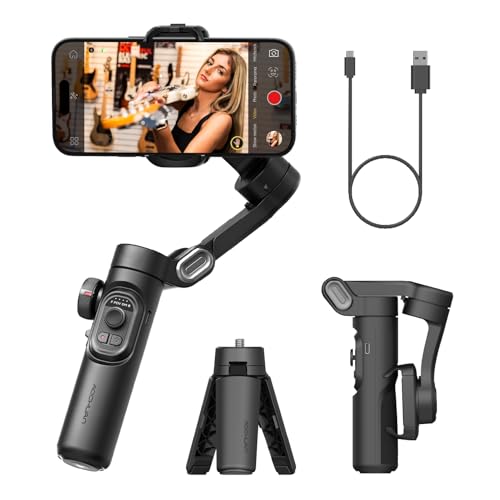
- Foldable palm-size design for easy carry
- One-click vertical/horizontal switching
- Focus wheel and zoom slide add control
Best For: first-time creators who want a compact gimbal for short-form video
Feature-Packed Creator Choice
DJI Osmo Mobile 8 Phone Gimbal

- Native tracking with audio and lighting
- Built-in extension rod and tripod
- Easy tutorials plus one-tap editing
Best For: beginners who want more creative features and room to grow
Beginner-Friendly Compact Gimbal
hohem iSteady X3 SE 3-Axis Stabilizer

- Detachable remote for solo filming and selfies
- Lightweight foldable design for travel
- 11-hour battery life with beginner-friendly controls
Best For: First-time users wanting a portable, budget-friendly starter gimbal
All-in-One Smart Pick
DJI Osmo Mobile 7P Gimbal Stabilizer

- Fast setup with magnetic mount and unfold-to-power-on design
- ShotGuides and One-Tap Edit help beginners create quickly
- Built-in tripod, extension rod, tracking, and lighting module
Best For: Beginners who want guided filming and extra creative features
Budget-Friendly Extendable Gimbal
hohem iSteady X3 SE Plus Stabilizer

- Detachable remote for solo shooting from up to 32 feet
- Built-in 8-inch extendable rod for more angles
- Foldable 3-axis stabilization with 11-hour battery life
Best For: Beginners who want extra framing flexibility without a steep learning curve
Premium All-in-One Creator Pick
DJI Osmo Mobile 7P + Mic Mini TX

- 3-axis stabilization with automatic power-on
- Includes tracking, lighting, and mic reception
- Built-in extension rod and tripod for easy shooting
Best For: Beginners who want an all-in-one gimbal for video, audio, and simple content creation
Budget-Friendly 4-in-1 Starter Pick

- 4-in-1 design: stabilizer, selfie stick, holder, and more
- AI tracking works without an app
- Includes remote control and RGB fill light
Best For: Beginners who want a compact, multi-use gimbal for casual content and travel
Easy-Use 3-Axis Starter Gimbal
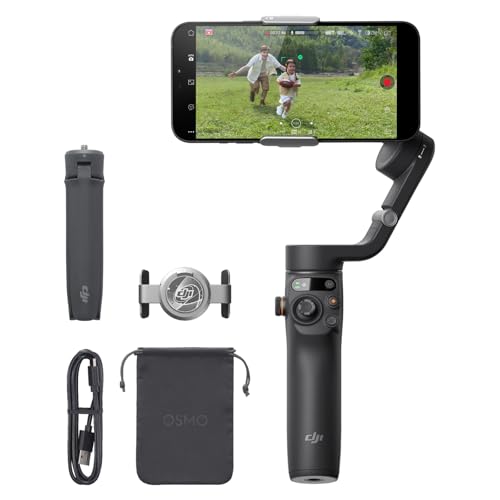
- 3-axis stabilization with quick unfold-to-power-on setup
- ShotGuides helps beginners capture better shots
- Built-in extension rod adds creative flexibility
Best For: New users who want a lightweight gimbal with simple setup and guided shooting
Beginner-Friendly All-Rounder – DJI Osmo Mobile 7 3-Axis Phone Gimbal
If you are looking at smartphone gimbals for beginners, the DJI Osmo Mobile 7 is a strong place to start because it keeps setup simple while still offering serious stabilization. Its built-in tripod, lightweight 300 g body, and guided DJI Mimo features make it easier to capture smoother clips without needing a steep learning curve.
Best For: New creators who want a lightweight, easy-to-carry gimbal with guided shooting and editing help.
Pros:
- 3-axis stabilization helps keep handheld footage smooth and steady.
- Built-in tripod and foldable design make solo shooting and storage easier.
- ActiveTrack 7.0, ShotGuides, and One-Tap Edit help beginners get usable results fast.
- 10-hour battery life and phone charging support are useful for longer sessions.
Cons:
- DJI Mimo must be downloaded from DJI’s official website, not Google Play.
- The phone clamp and setup may still take a little practice for first-time users.
Overall, the Osmo Mobile 7 balances beginner-friendly tools with practical portability, which makes it a smart first gimbal for everyday filming, travel, and casual vlogging.
Wide-Angle Creative Pick – hohem iSteady Mobile Plus Gimbal
For shoppers comparing smartphone gimbals for beginners, the hohem iSteady Mobile Plus stands out if you want a little more creative flexibility right away. The ultra-wide-angle mode helps reduce motor interference in your frame, while the Hohem Joy app adds one-click templates and effects that can make early videos feel more polished.
Best For: Beginners who want wide-angle shooting and easy app-based creative modes.
Pros:
- Ultra-wide-angle mode helps avoid motor obstruction in shots.
- iSteady 7.0 stabilization and stronger motor torque support smoother video.
- Hohem Joy app includes one-click tools like timelapse, dolly zoom, and clone effects.
- 13-hour battery life and power-bank charging add flexibility for longer shoots.
Cons:
- Large phones may still face wide-angle limitations because of motor interference.
- Manual balancing is recommended before use.
This is a good fit if you want a beginner-friendly gimbal that also offers more advanced-looking shots without requiring complicated manual control.
Compact Starter Gimbal – AOCHUAN Smart XE 3-Axis Stabilizer
If you want a compact option in smartphone gimbals for beginners, the AOCHUAN Smart XE is built around portability and simple shooting controls. Its foldable design, one-click horizontal-to-vertical switching, and included tripod make it easy to use for vlogs, shorts, and everyday clips.
Best For: First-time users who want a small foldable gimbal for social video and casual content creation.
Pros:
- Foldable, palm-size design is easy to carry and store.
- One-click mode switching makes vertical and horizontal shooting simple.
- Focus wheel and zoom slide add more control without complex gear.
- Up to 10 hours of battery life supports longer shooting sessions.
Cons:
- Payload is limited to 250 g, so very heavy phones may be a concern.
- The app-based features may take time to learn for complete beginners.
As a starter gimbal, the Smart XE is a practical choice if you want something lightweight that still offers tools for vertical video, tracking, and smooth handheld shots.
Feature-Packed Creator Choice – DJI Osmo Mobile 8 Phone Gimbal
Among smartphone gimbals for beginners, the DJI Osmo Mobile 8 is the most feature-rich option here, but it still includes simple tools like tutorials and one-tap editing. It adds native tracking with audio and lighting, plus a built-in extension rod and tripod, so new users can experiment with more types of shots without buying extra accessories.
Best For: Beginners who want an easy start now and room to grow into more advanced content.
Pros:
- Native tracking with audio and lighting support adds more production value.
- Built-in extension rod and tripod help with low-angle, group, and selfie shots.
- 3-axis stabilization and 360° pan rotation support smooth, flexible filming.
- Easy tutorials and one-tap editing help new users get started quickly.
Cons:
- At 370 g, it is heavier than some beginner-focused alternatives.
- Its extra features may be more than casual users need.
This model makes sense if you want a beginner-friendly gimbal that can also handle more ambitious filming setups as your skills improve.
Beginner-Friendly Compact Gimbal – hohem iSteady X3 SE 3-Axis Stabilizer
If you’re shopping for smartphone gimbals for beginners, the hohem iSteady X3 SE is a straightforward pick that balances ease of use with practical features. It folds down small, includes a detachable remote, and offers app-based tools like AI tracking and gesture control without feeling overly complicated.
Best For: First-time gimbal users who want a portable, budget-friendly stabilizer for everyday videos, travel, and casual vlogging.
Pros:
- Detachable magnetic remote makes selfies and solo filming easier from up to 32.81 feet away.
- 3-axis iSteady 8.0 stabilization is designed for smooth footage during walking, jogging, or jumping.
- Lightweight, foldable design makes it easy to pack for travel.
- 11-hour battery life supports longer shooting sessions and events.
Cons:
- 0.66 lb payload means it is limited to phones within its supported weight range.
- App features may feel unnecessary if you only want basic stabilization.
This is a strong beginner option if you want a simple gimbal that still leaves room to grow into AI tracking and creative shooting modes. It is especially appealing for users who want a compact tool they can carry every day.
All-in-One Smart Pick – DJI Osmo Mobile 7P Gimbal Stabilizer
Among smartphone gimbals for beginners, the DJI Osmo Mobile 7P stands out for its quick setup and guided shooting tools. It unfolds to power on, uses a magnetic phone clamp, and pairs with DJI Mimo for ShotGuides and One-Tap Edit, which helps new users get usable results fast.
Best For: Beginners who want a feature-rich gimbal with fast startup, built-in tracking support, and helpful app guidance.
Pros:
- Unfold-to-power-on design and magnetic mount make it quick to start filming.
- 3-axis stabilization and dual-lens enhanced tracking help keep footage steady.
- Built-in extension rod and tripod add flexibility for selfies and vlogs.
- Multifunctional Module includes intelligent tracking, lighting, and mic reception.
Cons:
- The DJI Mimo app is no longer available on Google Play, so setup may require downloading from DJI directly.
- More advanced features may be more than casual users need.
If you want a beginner-friendly gimbal that also feels like an all-in-one content tool, this is the most capable option here. It is best suited to users who value speed, guidance, and extra shooting features in one package.
Budget-Friendly Extendable Gimbal – hohem iSteady X3 SE Plus Stabilizer
If you want smartphone gimbals for beginners with a little more flexibility, the hohem iSteady X3 SE Plus is built around simple operation and an extendable 8-inch rod. It keeps the same beginner-friendly approach as the base model while adding more framing options for selfies, low angles, and group shots.
Best For: New creators who want an easy-to-use gimbal with a built-in selfie stick and remote control for more varied shots.
Pros:
- Detachable controller lets you trigger shots remotely from up to 32 feet away.
- Built-in 8-inch extendable rod expands framing options for different angles.
- 3-axis iSteady 8.0 stabilization supports smooth footage during movement.
- Foldable, lightweight design makes it convenient to carry around.
Cons:
- Extended rod should be retracted after use to avoid deformation.
- 0.66 lb payload limits you to compatible smartphones within the supported weight range.
This model is a good fit if you like the idea of a starter gimbal but want more shooting versatility than a basic compact option. The extendable rod and remote make it especially useful for solo recording and casual creator setups.
Premium All-in-One Creator Pick – DJI Osmo Mobile 7P + Mic Mini TX
If you want smartphone gimbals for beginners that can do more than just steady video, the DJI Osmo Mobile 7P is built to simplify the whole process. It powers on when unfolded, uses a magnetic phone clamp, and works with DJI Mimo features like ShotGuides and One-Tap Edit to help you start filming and editing faster.
Best For: Beginners who want an easy-to-use gimbal with tracking, audio reception, and built-in creative tools.
Pros:
- 3-axis stabilization for smooth, stable footage
- Built-in extension rod and tripod for selfies and vlogs
- Multifunctional module adds intelligent tracking, mic reception, and lighting
- Up to 10 hours of operating time
Cons:
- DJI Mimo is not available on Google Play, so setup may require downloading from DJI directly
- More features than a basic starter gimbal, which may be more than some beginners need
This is a strong pick if you want a beginner-friendly smartphone gimbal that still leaves room to grow into more polished content. The all-in-one design reduces add-on clutter, while the tracking and editing tools make it easier to get useful results from day one.
Budget-Friendly 4-in-1 Starter Pick – AOCHUAN M2PRO White
The AOCHUAN M2PRO is a practical choice if you’re comparing smartphone gimbals for beginners and want something that does multiple jobs without a complicated setup. It combines a phone stabilizer, selfie stick, and phone holder, and it even includes AI tracking without requiring an app.
Best For: Beginners who want a lightweight, multi-use stabilizer for casual filming, selfies, and travel.
Pros:
- 4-in-1 design works as a stabilizer, selfie stick, phone holder, and more
- AI tracking works without downloading an app
- Wireless remote reaches up to 10 meters
- RGB fill light offers 7 color temperatures and 3 brightness levels
Cons:
- Battery standby time is shorter than some competitors at 4-7 hours
- Supports phones sized 4.0-6.2 inches, which limits compatibility
- It uses a 1-axis gimbal design, not a full 3-axis system
For beginners who want simple controls and extra shooting flexibility, this model is easy to understand and carry. It makes sense for travel, live streaming, and casual social content where portability and convenience matter more than advanced stabilization.
Easy-Use 3-Axis Starter Gimbal – DJI Osmo Mobile 6
If you’re shopping for smartphone gimbals for beginners, the DJI Osmo Mobile 6 focuses on making the learning curve feel small. It unfolds and powers on quickly, uses 3-axis stabilization for smoother clips, and includes ShotGuides to suggest shot sequences for different scenes.
Best For: New users who want a lightweight, foldable gimbal with guided shooting features.
Pros:
- 3-axis stabilization helps reduce shaky footage
- ShotGuides offers scene-based shooting help for beginners
- Built-in extension rod adds more creative angles and selfie reach
- Lightweight, foldable design makes it easy to carry
Cons:
- Some features depend on the DJI Mimo app
- Apple Watch remote support is useful, but only for users in that ecosystem
- Fewer bundled extras than the more premium OM 7P package
This is a straightforward option if you want a dependable starter gimbal without unnecessary complexity. The combination of quick setup, guided shooting, and solid stabilization makes it especially appealing for first-time creators.
How We Picked the Best Smartphone Gimbals for Beginners
We focused on Smartphone Gimbals for Beginners that prioritize ease of use, stable 3-axis performance, reliable app features, and practical portability. We also looked for models that suit common beginner use cases like travel clips, social content, casual vlogging, and family videos.
Fast setup, intuitive controls, battery life, and phone compatibility mattered more than advanced pro-only features.
Quick Comparison
The best choice depends on how you plan to shoot. DJI models in this group generally lean toward polished software, strong tracking, and smooth handling. hohem options often stand out for value and beginner-friendly controls. AOCHUAN models can appeal to buyers who want a simpler, budget-conscious entry point with useful stabilization features.
Key Buying Factors for Smartphone Gimbals for Beginners
Ease of Setup
A beginner-friendly gimbal should balance quickly, connect without frustration, and offer controls that are easy to understand on day one.
Stabilization and Axis Design
Most buyers should look for 3-axis stabilization, which does the best job of reducing walking shake and hand movement in everyday filming.
Portability
Foldable designs and lighter builds are easier to pack and more likely to get used often, especially for travel or spontaneous shooting.
Tracking and Smart Features
Features like subject tracking, gesture control, and mode switching can be especially helpful for solo creators and first-time users.
Compatibility and Accessories
Check that the gimbal supports your phone size and camera setup, including wider phones, cases, and any accessories you plan to use.
Who Should Buy Which Smartphone Gimbals for Beginners?
If you want the easiest all-around experience, choose a mainstream 3-axis model with strong app support and straightforward controls. If you care most about value, a simpler hohem or AOCHUAN option may be enough for casual content and learning the basics.
Creators who film themselves often should prioritize tracking and hands-free features. Travelers and everyday users may prefer a compact foldable model that is quick to carry and quick to deploy. For Smartphone Gimbals for Beginners, the best pick is usually the one you’ll actually bring with you and use regularly.