If you want to use a DSLR as a webcam, stream in higher quality, or record clean video into a computer, the right capture card makes the setup simple.
This roundup focuses on HDMI capture cards for DSLR cameras that balance compatibility, latency, and resolution support for real-world use.
Best 10 HDMI Capture Cards for DSLR Cameras Picks for 2026
Premium DSLR Webcam Pick

- USB 3.0 capture for DSLR and mirrorless cameras
- 1080p60 and up to 4K60 support
- Ultra-low latency for streaming and calls
Best For: Creators wanting a polished, low-latency webcam upgrade
Budget USB 2.0 Capture Option

- Plug-and-play USB 2.0 capture card
- HDMI input up to 4K 60 FPS, output up to 1080p30
- Works with DSLR cameras and major streaming apps
Best For: Budget buyers who need simple DSLR capture
Portable USB-C Value Pick
Guermok 4K USB3.0 Capture Card

- Compact USB 3.0 HDMI-to-USB-C capture card
- 1080p60 output with real-time preview
- Wide compatibility with OBS, Zoom, and more
Best For: Portable users needing broad compatibility and easy setup
High-Resolution Creator Pick
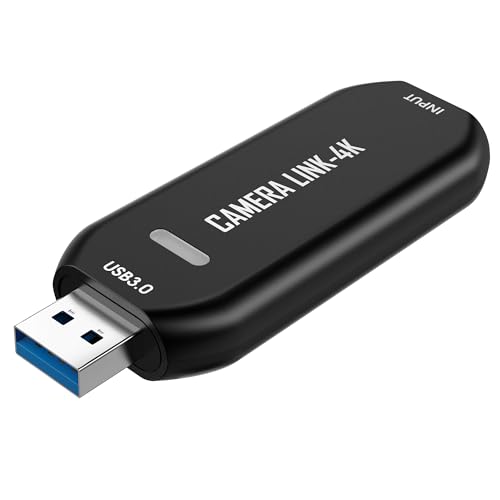
- USB capture card with 1080p120 and up to 4K60
- Ultra-low latency for streaming and calls
- Plug-and-play on Windows and macOS
Best For: Creators who want high frame rate capture from a DSLR
Flexible DSLR Capture
2K 30Hz, 1080p60 with USB-A/USB-C
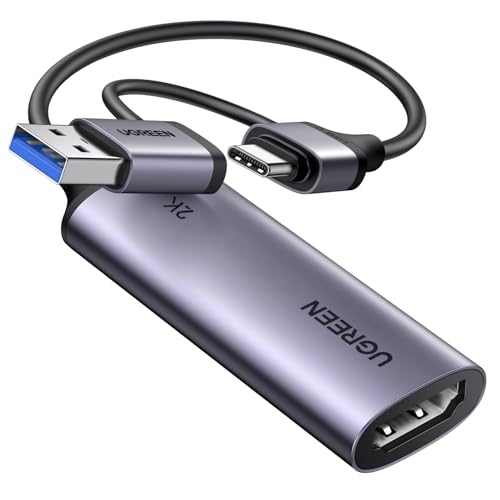
- 4K@30Hz input with 2K@30Hz output and 1080p60 support
- USB-A and USB-C connections widen device compatibility
- USB 3.0 low-latency capture works with OBS and common players
Best For: Creators who need one capture card for DSLR footage, streaming, and mixed devices
Simple Camera Capture
Plug-and-play 1080p60 for DSLR and HDMI sources
- Captures smooth 1080p60 and up to 2K50
- Works with DSLR cameras, microscopes, and action cams
- No-driver setup for OBS, Zoom, and similar apps
Best For: Anyone who wants a simple, stable DSLR capture card with minimal setup
Monitor-Ready Capture
4K loop-out with 1080p60 capture and mic-in

- 4K 60Hz pass-through with 1080p60 or 2K30 capture
- Mic-in support is useful for commentary and interviews
- USB-A/USB-C design works with DSLR and other HDMI devices
Best For: Camera users who want 4K pass-through, live preview, and mic-in support
Budget USB 2.0 Pick
Compact HDMI-to-USB Capture for DSLR Basics

- USB 2.0 plug-and-play design
- Works with DSLR, camcorder, and action cam
- 1080p output with real-time preview
Best For: Beginners needing a simple, compact capture adapter for basic DSLR streaming
Best All-Around USB 3.0 Pick
1080p60 Capture for DSLR Creators

- USB 3.0 capture with 1080p60 recording
- 4K@30Hz HDMI input support
- Compatible with OBS, VLC, and Zoom
Best For: Creators needing smoother DSLR capture with broad compatibility
Simple 1080p Option
Basic DSLR Capture with Lifetime Warranty
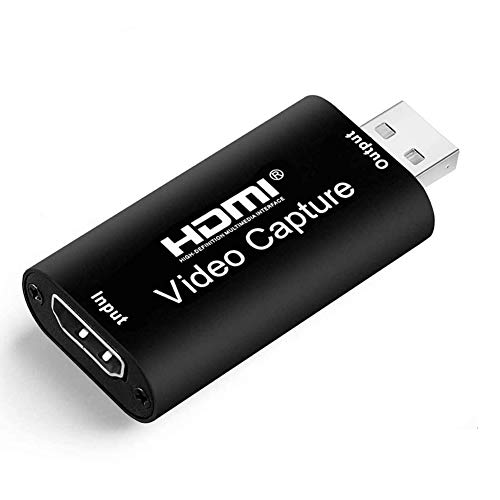
- USB 2.0 plug-and-play setup
- 4K input with 1080p30 output
- Works with Windows, Mac, and Linux
Best For: Users wanting a basic capture card for simple DSLR recording
Premium DSLR Webcam Pick – Elgato Cam Link 4K
If you want a dependable HDMI capture card for DSLR cameras, the Elgato Cam Link 4K is built for turning a camera into a polished webcam with minimal fuss. It connects over USB 3.0 and is aimed at creators who want smooth live streaming, recording, and real-time monitoring without lag.
Best For: Creators who want a compact, low-latency DSLR capture solution for streaming, calls, and monitoring.
Pros:
- Supports 1080p60 and up to 4K60 capture, depending on camera and model support
- Ultra-low latency keeps audio and video in sync for live use
- Works with DSLRs, camcorders, action cams, and even iPhone use cases
- Can preview shots on an iPad with USB-C as a field monitor
Cons:
- Full 4K60 support requires a compatible camera and the latest Cam Link 4K model
- Designed for USB 3.0 rather than lower-bandwidth connections
For users who want a streamlined, creator-friendly setup, this is the most polished option in the group. It is especially appealing if you value strong compatibility, very low latency, and a small form factor.
Budget USB 2.0 Capture Option – Audio Express AXHDCAP 4K
For HDMI capture cards for DSLR cameras on a tighter budget, the Audio Express AXHDCAP 4K focuses on simple plug-and-play recording and streaming. It accepts HDMI input up to 4K 60 FPS at 30 Hz and outputs up to 1080p30 over USB 2.0, making it a straightforward choice for basic capture workflows.
Best For: Users who want an inexpensive, easy-to-use DSLR capture card for streaming, teaching, or conferencing.
Pros:
- Plug-and-play design with no drivers or external power supply needed
- Supports real-time preview with ultra-low latency transmission
- Works with DSLR cameras, camcorders, and action cameras
- Compatible with Windows, macOS, and Linux, plus OBS, Zoom, Twitch, YouTube, and more
Cons:
- USB 2.0 output limits capture to 1080p30
- Not intended for adding HDMI output to a computer or laptop
- Best suited to basic capture needs rather than higher-resolution USB 3.0 workflows
This model makes sense if your priority is simplicity over top-end quality. It covers the essentials well, but the USB 2.0 design is the biggest limiter if you want higher frame rates or sharper capture.
Portable USB-C Value Pick – Guermok 4K USB3.0 Capture Card
If you need HDMI capture cards for DSLR cameras that are easy to carry and broadly compatible, the Guermok 4K USB3.0 model is a strong value pick. It offers USB 3.0 capture, a compact aluminum body, and one-way HDMI-to-USB-C/USB video capture for streaming, recording, and meetings.
Best For: People who want a portable DSLR capture card for streaming, travel, and everyday use.
Pros:
- Captures up to 1080p60 from HDMI input up to 4K30
- Ultra-low latency and real-time preview for live use
- Very broad compatibility with Windows, Mac, Linux, Android, OBS, Zoom, VLC, and more
- Compact, lightweight, plug-and-play design with no external power required
Cons:
- One-way HDMI-to-USB-C transmission only
- Requires capture software to function
- Performance depends on using a proper USB 3.0 connection
Its biggest strengths are portability and flexibility across devices and software. If you want a grab-and-go capture card for a DSLR setup, this is one of the more practical options here.
High-Resolution Creator Pick – VIXLW Cam Link 4K
For creators shopping HDMI capture cards for DSLR cameras, the VIXLW Cam Link 4K leans into higher frame rates and broader device support. It connects over USB and is designed for turning a DSLR, camcorder, or action cam into a high-quality webcam for streaming, calls, and recording.
Best For: Users who want a high-refresh capture card for DSLR streaming, teaching, and precision work.
Pros:
- Supports smooth 1080p120 and up to 4K60 capture
- Ultra-low latency is suitable for livestreams and video calls
- Works with Windows and macOS plus many HDMI devices, including microscopes and game consoles
- Plug-and-play setup with no drivers and no external power required
Cons:
- Uses a Windows-based system requirement in the supplied details
- Some output modes depend on the encoding format used
This is a good choice if you care about frame rate as much as resolution. The combination of 1080p120 support, low latency, and broad compatibility makes it useful beyond a standard webcam upgrade.
Flexible DSLR Capture – 2K 30Hz, 1080p60 with USB-A/USB-C
If you want an HDMI capture cards for DSLR cameras option that can also handle gaming and mobile setups, this UGREEN model is built around broad compatibility and low-latency USB 3.0 capture. It supports 4K@30Hz input, outputs up to 2K@30Hz, and also works at 1080p60, making it practical for recording camera footage with a clean balance of detail and ease of use.
Best For: Creators who want a flexible, driver-free capture card for DSLR, streaming, and mixed-device setups.
Pros:
- Supports 4K@30Hz input and 2K@30Hz output, with 1080p60 backward compatibility.
- USB-A and USB-C interfaces make it easier to use with laptops, desktops, tablets, and phones.
- USB 3.0 low-latency design is suited to OBS, VLC, PotPlayer, and live streaming.
- Aluminum alloy casing helps with heat dissipation and EMI shielding.
Cons:
- Requires HDMI input sources only; signal flow is unidirectional.
- 2K support depends on both source device and capture device compatibility.
- iPadOS compatibility needs version 17 or later for USB-C use.
This is a strong all-rounder if you need one capture device for DSLR footage plus gaming or mobile content. Its dual USB connectivity and broad OS support make it especially useful when your workflow moves between different computers and devices.
Simple Camera Capture – Plug-and-play 1080p60 for DSLR and HDMI sources
For HDMI capture cards for DSLR cameras, this Cam Link-style device focuses on straightforward plug-and-play recording rather than extra features. It is designed for stable capture from DSLR cameras, microscopes, action cams, and similar HDMI devices, with smooth 1080p60 output and support for up to 2K50 when your workflow calls for more detail.
Best For: Users who want a simple, stable, driver-free capture card for DSLR recording and live streaming.
Pros:
- Supports smooth 1080p60 capture, with up to 2K50 available.
- Compatible with DSLR cameras, microscopes, action cams, and other HDMI devices.
- Plug-and-play setup requires no drivers and works with OBS and Zoom.
- Positioned for stable performance in recording, teaching, and precision viewing.
Cons:
- Does not advertise extra I/O like loop-out or microphone input.
- Feature set is intentionally basic compared with more multi-port capture cards.
- Best suited to HDMI source capture rather than more advanced studio routing.
This is the easiest pick if your priority is dependable camera capture without setup hassle. It keeps the feature list focused on stable video acquisition, which is exactly what many DSLR users need for streaming or recording.
Monitor-Ready Capture – 4K loop-out with 1080p60 capture and mic-in
If you need HDMI capture cards for DSLR cameras with extra monitoring flexibility, this XIIXMASK model adds 4K 60Hz loop-out while capturing at 1080p60 or 2K30. That makes it useful when you want to record camera video, preview in real time, or keep an external display in the chain during streaming and live production.
Best For: Camera users who want 4K pass-through, live preview, and mic-in support for streaming or interviews.
Pros:
- 4K 60Hz HDMI input and loop-out, with 1080p60 or 2K30 capture.
- Mic-in support lets you add commentary or an external microphone.
- USB-A and USB-C connectivity increases compatibility with different setups.
- Works with DSLR cameras, webcams, PS5, Switch, and common apps like OBS and VLC.
Cons:
- Mic-in does not record party chats.
- Requires a Windows operating system according to the listed minimum system requirements.
- Audio setup in OBS may require a restart after configuration.
This model makes the most sense if your camera workflow benefits from pass-through monitoring and optional voice commentary. The added loop-out and microphone input set it apart from more basic capture devices aimed only at recording.
Budget USB 2.0 Pick – Compact HDMI-to-USB Capture for DSLR Basics
If you want an entry-level option among HDMI capture cards for DSLR cameras, this USB 2.0 model keeps things simple: plug it into a computer, connect your camera’s HDMI output, and start capturing at up to 1080p. It’s aimed at basic live streaming, teaching, conferencing, and recording where ease of use matters more than advanced frame rates.
Best For: Beginners who need a compact, plug-and-play capture card for DSLR, camcorder, or action cam use.
Pros:
- Supports DSLR, camcorder, and action cam inputs over HDMI.
- No driver or external power supply required.
- Works with OBS, VLC, and Amcap on Windows, Android, and MacOS.
- Real-time preview helps you check framing and recording results quickly.
Cons:
- USB 2.0 connection is not as fast as USB 3.0 options.
- Maximum output is 1080p at 30fps.
- Best suited to straightforward capture, not higher-end performance needs.
Overall, this is a practical low-friction choice if you mainly need a small capture adapter for basic DSLR streaming or recording. Its simplicity is the main selling point, while the USB 2.0 design keeps expectations grounded.
Best All-Around USB 3.0 Pick – 1080p60 Capture for DSLR Creators
For HDMI capture cards for DSLR cameras, this USB 3.0 model stands out if you want smoother 1080p recording and a more modern setup. It accepts up to 4K@30Hz input and records at 1080p@60fps, making it a strong fit for streaming, webinars, and camera-based content where motion clarity matters.
Best For: Creators who want a fast, plug-and-play USB 3.0 capture card for DSLR streaming and recording.
Pros:
- Records at 1080p60 with 4K@30Hz input support.
- USB 3.0 interface is better suited to low-latency capture.
- Native USB-A connection simplifies setup on compatible computers.
- Works with OBS Studio, VLC, Zoom, and multiple operating systems.
Cons:
- Requires an available USB 3.0 port for best performance.
- Not intended for direct HDMI display output.
- Performance depends on the computer and system setup.
This is the most balanced option in the group if you care about smoother DSLR capture and broad compatibility. The combination of 1080p60 recording, plug-and-play setup, and software support makes it versatile for content creation.
Simple 1080p Option – Basic DSLR Capture with Lifetime Warranty
If you need a straightforward pick among HDMI capture cards for DSLR cameras, this USB 2.0 model covers the basics without extra setup. It supports up to 4K@30Hz input and 1080p@30fps output, so it fits casual recording, live streaming, teaching, and conference use.
Best For: Users who want a basic USB 2.0 capture card for DSLR recording and simple streaming.
Pros:
- Supports DSLR, camcorder, and action camera connections over HDMI.
- No external driver or power supply needed.
- Compatible with Windows, Mac, and Linux.
- Works with OBS, PotPlayer, VLC, Twitch, and YouTube workflows.
Cons:
- USB 2.0 limits it to 1080p30 output.
- More basic than USB 3.0 capture options.
- Best for simple setups rather than higher-frame-rate capture.
As a no-fuss DSLR capture card, this one focuses on compatibility and simplicity rather than speed. The lifetime warranty is a nice extra, but the main appeal is its easy plug-and-play use for everyday recording tasks.
How We Picked the Best HDMI Capture Cards for DSLR Cameras
We looked for capture cards that are easy to set up, widely compatible with common camera models, and dependable for live streaming, recording, and webcam-style use. Priority went to models with stable USB connections, low latency, and the right mix of HDMI input support and software compatibility.
Quick Comparison
Most buyers will choose between compact USB 2.0 cards for basic 1080p use and USB 3.0 cards for smoother, lower-latency performance. If you plan to stream in OBS, Zoom, or similar apps, USB 3.0 models are usually the safer choice. If you only need casual recording or occasional webcam use, a simpler option can still work well.
Key Buying Factors for HDMI Capture Cards for DSLR Cameras
Resolution and Frame Rate
Match the card to your workflow. For standard streaming and meetings, 1080p at 60fps is often enough. If you want more flexibility for future camera upgrades or sharper preview quality, look for 4K input support even if your final output is still 1080p.
Latency
Lower latency matters if you monitor your camera feed live, present on camera, or sync video with audio. USB 3.0 capture cards generally offer better responsiveness than older USB 2.0 designs.
Camera and Device Compatibility
Check that your DSLR’s HDMI output is supported and that your computer, tablet, or streaming setup can recognize the card. Many HDMI Capture Cards for DSLR Cameras work with Windows and macOS, while some also support USB-C devices or additional sources like camcorders and action cams.
Power, Cables, and Clean Output
A camera with clean HDMI output is ideal because it removes on-screen overlays from the feed. Also confirm the right cable type, whether the card uses USB-A, USB-C, or both, and whether your camera can stay powered during longer sessions.
Who Should Buy Which HDMI Capture Cards for DSLR Cameras?
If you are a beginner, choose a plug-and-play capture card with broad compatibility and simple setup. Streamers and content creators should favor USB 3.0 models with 1080p60 support for smoother performance. Buyers who want extra flexibility for mixed devices, portable setups, or future upgrades should look for cards with 4K input support, dual USB connectivity, or loop-out features.
In short, the best choice depends on how often you stream, how important latency is, and whether you need a basic webcam solution or a more flexible capture setup.