A document camera with HDMI output lets you show books, worksheets, objects, and live demonstrations on a compatible display without routing the picture through a computer. That makes it useful for classrooms, training rooms, and presentations where a simple setup matters.
These six picks cover straightforward HDMI/USB models, higher-resolution options, and cameras with optical zoom. The right choice depends on what you need to show—and whether you also need USB for remote teaching or recording.
Best 6 Document Cameras with Hdmi Output Picks for 2026
Flexible Classroom Pick
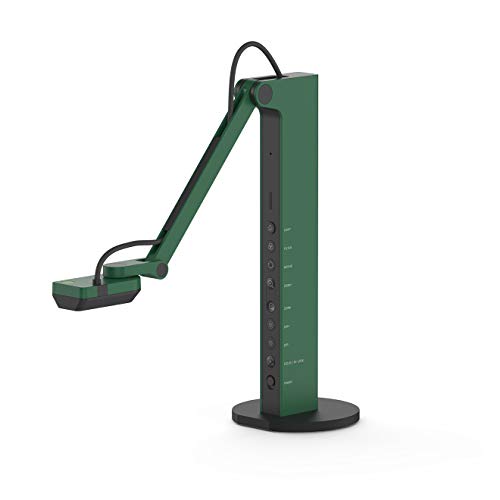
- Direct HDMI or computer-connected USB
- Up to 1080p HDMI output
- Adjustable stand and built-in LED
Best For: Switching between classroom projection and online lessons
Microscope-Friendly Pick
Epson DC-13 1080p Document Camera

- 1080p HDMI output at 30 fps
- Microscope adapter included
- Microphone and one-touch A/V recording
Best For: Microscope demonstrations and recorded lessons
4K Projection Pick
IPEVO VZ-R Ultra 13MP HDMI/USB

- Up to 4K HDMI output
- 13MP camera with USB mode
- Tactile live-image controls
Best For: High-resolution classroom projection and online teaching
Best for Optical Zoom

- 10x optical zoom with autofocus
- Direct HDMI output and USB webcam connection
- A3 capture area with LED light
Best For: Classroom demonstrations that need optical magnification
Best for High-Resolution USB Video

- USB video up to 4K/15 fps
- Direct HDMI connection to a display
- A3 coverage and TF card image storage
Best For: Detailed presentations and remote classes
Best for Flexible Display Connections

- HDMI, VGA, and USB connection options
- 8 MP sensor with autofocus
- Three-level dimmable LED light
Best For: Classrooms using varied displays and computers
Flexible Classroom Pick – IPEVO VZ-R 8MP HDMI/USB
Among document cameras with HDMI output, the IPEVO VZ-R is a practical choice when you want to switch between direct projection and computer-based lessons. HDMI connects to a display without a computer, while USB supports Mac, Windows PC, and Chromebook use.
Best For: Educators who alternate between in-room projection and online teaching.
Pros:
- Outputs up to 1080p over HDMI; its 8MP camera captures up to 3264 x 2448 in USB mode.
- Swiveling head and multi-jointed stand accommodate different angles and orientations.
- Built-in LED and tactile controls help with lighting and live image adjustments.
Cons:
- HDMI cable and wall power adapter are not included.
- HDMI output is limited to 1080p rather than the camera’s full USB capture resolution.
Choose this model for its two connection modes and adjustable stand, particularly if 1080p direct projection meets your needs.
Microscope-Friendly Pick – Epson DC-13 1080p Document Camera
Epson DC-13 High-Definition Document Camera with HDMI, 16x Digital Zoom and 1080p Resolution,White
Check Price On AmazonThe Epson DC-13 stands out among document cameras with HDMI output if your lessons include close-up demonstrations. It delivers 1080p video at 30 fps and includes a microscope adapter for sharing magnified images.
Best For: Classrooms that present microscope views and record narrated demonstrations.
Pros:
- HDMI, USB, and VGA connections offer display and computer options.
- Included microscope adapter supports many standard microscopes.
- Built-in microphone and one-touch A/V recording support lesson capture.
- 16x digital zoom helps enlarge details on screen.
Cons:
- At 5.6 pounds, it is heavier than the two IPEVO models in this roundup.
- Zoom is digital, so enlargement does not add captured detail.
The DC-13 is worth considering when microscope support and recording matter more than a lightweight setup.
4K Projection Pick – IPEVO VZ-R Ultra 13MP HDMI/USB
If you are comparing document cameras with HDMI output for high-resolution displays, the IPEVO VZ-R Ultra offers up to 4K over HDMI without a computer. Its USB mode captures up to 4096 x 3072 and works with software for online teaching.
Best For: Educators who want detailed direct-to-display images and a USB option for online lessons.
Pros:
- 13MP camera supports up to 3840 x 2160 output over HDMI.
- Connects directly to interactive flat panels, TVs, monitors, or projectors.
- Tactile buttons provide live rotation, exposure, filter, and refocus controls.
- Built-in LED and glass fiber-reinforced stand suit frequent classroom use.
Cons:
- No zoom is listed, unlike the other two models in this roundup.
- The scanner upgrade module is an optional purchase, not a standard feature.
Pick the Ultra when 4K direct projection is the priority; check whether its lack of zoom fits your demonstration style.
Best for Optical Zoom – INEBIZ IB280 Document Camera
Among document cameras with HDMI output, the INEBIZ IB280 stands out for its 10x optical zoom. It connects directly to a display without a computer, while its flexible gooseneck and 180° flip lens help frame documents or 3D objects.
Best For: Teachers who need optical zoom and direct projection for classroom demonstrations.
Pros:
- 10x optical zoom, 30x digital zoom, and autofocus with manual focus available.
- Captures up to an A3 area and includes an LED light for dim settings.
- Offers HDMI display output, USB webcam connectivity, and an SD card slot.
Cons:
- Video recording tops out at 1080p, and the stated still resolution is 2 MP.
- Software-based annotation and editing require a computer.
The IB280 is a practical choice when magnifying small details matters more than high-resolution stills. Its remote, freeze function, and split-screen comparison add useful controls for live teaching.
Best for High-Resolution USB Video – TreasLin 15MP Document Camera
The TreasLin is one of the document cameras with HDMI output that also supports up to 4K at 15 fps or 1080p at 30 fps over USB. Its 15 MP sensor and A3-size coverage suit presentations of textbooks, artwork, and larger documents.
Best For: Presenters who want high-resolution USB video alongside a direct HDMI display connection.
Pros:
- Supports USB video at up to 4K/15 fps or 1080p/30 fps.
- Connects directly by HDMI to a TV, monitor, or projector.
- Includes an LED light and a TF card slot for storing images in HDMI mode.
Cons:
- 4K video is limited to 15 fps.
- Mac USB use may require a USB-C adapter, according to the supplied notes.
Choose this model if detailed USB capture and broad document coverage are priorities. For smoother motion, its listed 1080p/30 fps mode is the more suitable setting than 4K/15 fps.
Best for Flexible Display Connections – JOYUSING V508 Document Camera
The JOYUSING V508 offers HDMI, VGA, and USB connection options, making it a versatile pick among document cameras with HDMI output. Its 8 MP sensor, autofocus, and adjustable LED lighting support live classroom projection without requiring a computer.
Best For: Teachers switching between different display connections and computer-based lessons.
Pros:
- Supports HDMI, VGA, and USB connection modes.
- Has autofocus, 100x digital zoom, and three-level dimmable LED lighting.
- Includes an HDMI cable, USB cable, power adapter, and remote.
Cons:
- The advertised 100x zoom is digital, not optical, according to the product bullets.
- Computer software must be downloaded separately.
The V508 makes sense when connection flexibility is more important than optical magnification. Its included cables and remote help with setup and live adjustments, while digital zoom is best treated as a framing tool rather than a substitute for optical detail.
How We Picked the Best Document Cameras with Hdmi Output
We focused on cameras listed with HDMI output, then compared the features that affect everyday use: HDMI and USB connection options, stated camera resolution, zoom type, autofocus, lighting, and display compatibility. The six models cover different needs, from direct classroom projection to close-up demonstrations and hybrid lessons. Listed specifications are a starting point, not a guarantee of image quality in every room; check the current seller listing and your display’s input requirements before buying.
Quick Comparison
For a simple HDMI/USB setup, the IPEVO VZ-R is a starting point. The VZ-R Ultra offers a stated 13MP camera and 4K capability for shoppers prioritizing higher-resolution capture. Epson’s DC-13 lists 1080p output and 16x digital zoom. The INEBIZ IB280 stands out for its listed 10x optical zoom, which is more useful than digital enlargement when you need to frame small details. TreasLin’s 15MP model is another option to consider for high-resolution capture, while the JOYUSING V508 adds VGA alongside HDMI and USB for rooms with older equipment. Confirm the exact outputs and supported modes on the version you purchase.
Key Buying Factors for Document Cameras with Hdmi Output
Check the Connection Path
HDMI is useful when you want a direct connection to a TV, monitor, projector, or compatible interactive display. USB matters if you also plan to use the camera with meeting software or capture video on a computer. Do not assume HDMI and USB work simultaneously, or that a USB-C port supports video output; verify both in the manual.
Match Resolution to the Display
Megapixels describe the camera sensor, while HDMI resolution describes the signal sent to the screen. A higher megapixel count does not mean your projector will receive 4K video. For readable worksheets, also consider lighting, focus, and how much of the page fits in the frame.
Choose Zoom and Controls for Your Material
Optical zoom changes framing without relying solely on digital cropping; digital zoom enlarges the image and may make fine text look softer. Autofocus can help when switching between flat pages and three-dimensional objects. An adjustable light is useful for dim rooms, though glossy paper may produce glare. Check the camera’s working area and arm reach if you regularly present large books or objects.
Who Should Buy Which Document Cameras with Hdmi Output?
Choose a straightforward HDMI/USB model such as the VZ-R if direct projection and occasional computer use are your priorities. Consider the VZ-R Ultra or TreasLin if higher-resolution capture is important, but confirm the HDMI output mode you need. Look at the INEBIZ IB280 for demonstrations that benefit from optical zoom, or the JOYUSING V508 if VGA compatibility could save an adapter. The Epson DC-13 suits shoppers seeking a listed 1080p HDMI option. Before ordering any model, match its ports, power requirements, and supported output resolution to the equipment already in your room.