A well-chosen monitor riser can improve viewing comfort, reclaim desk space, and create a cleaner editing setup without replacing your entire workstation.
These 10 options cover single- and dual-monitor desks, adjustable-height designs, storage-focused stands, and larger risers for wide timelines and accessories.
Best 10 Desktop Monitor Risers for Video Editing Picks for 2026
Adjustable Metal Pick
BoYata Height-Adjustable Monitor Riser

- Twist-knob height adjustment
- 33.1-pound metal load capacity
- Open storage space underneath
Best For: Editors seeking a sturdy, adjustable single-monitor riser
Simple Aluminum Pick
VIVO 16-Inch Aluminum Monitor Riser
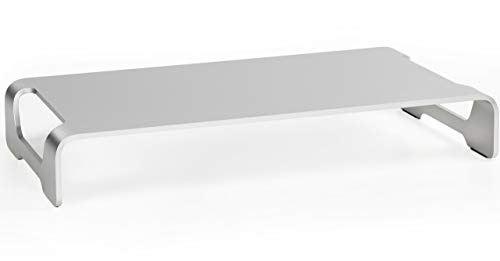
- 44-pound load capacity
- Zero-assembly aluminum design
- Anti-slip silicone desk protection
Best For: Editors wanting a compact, ready-to-use single-monitor stand
Dual-Display Organizer
BONTEC Adjustable Monitor Stand Riser

- Width adjusts from 31.5 to 42.5 inches
- Swivel shelves support multiple layouts
- Three storage compartments plus cable opening
Best For: Dual-monitor editors needing flexible organization and storage
Sit-Stand Workstation
FLEXISPOT 35-Inch Electric Desk Riser

- Electric lift from 5.7 to 19.7 inches
- 55-pound total support capacity
- 35-inch surface with keyboard tray
Best For: Editors wanting a spacious motorized sit-stand workstation
Best Adjustable Budget Pick
Amazon Basics Height-Adjustable Monitor Riser

- Three height settings from 2.87 to 4.8 inches
- Supports up to 22 pounds
- Compact, lightweight ABS design
Best For: A single monitor or laptop on a compact editing desk
Best for Dual-Monitor Setups
YAOHUOO 39-Inch Dual Monitor Riser

- 38.6-inch platform fits two monitors
- 100-pound capacity with steel legs
- Storage space underneath for accessories
Best For: Wide, heavy-duty dual-monitor editing stations
Best Cooling and Adjustability

- Three settings from 3.94 to 5.51 inches
- Ventilated platform supports laptop cooling
- 44-pound capacity with no-tool assembly
Best For: Adjustable monitor or laptop editing setups
Best for Dual-Monitor Organization
AMERIERGO Adjustable Dual Monitor Riser

- Fits two monitors with length adjustment up to 40.9 inches
- Raises screens 3.9 inches for improved viewing height
- Three under-shelf storage areas help clear desk clutter
Best For: Wide dual-monitor editing workstations
Best Heavy-Duty Option
Across-Star Adjustable Dual Monitor Riser

- Adjustable 32- to 40-inch length for flexible setups
- Stated capacity of about 80 pounds
- Wood-and-metal shelf with space for a full-size keyboard
Best For: Large dual-monitor editing setups with heavier equipment
Adjustable Metal Pick – BoYata Height-Adjustable Monitor Riser
For shoppers comparing desktop monitor risers for video editing, the BoYata offers adjustable height, sturdy metal construction, and open storage beneath the display. Its twist-knob adjustment helps you position a monitor at a more comfortable viewing level, while the 33.1-pound capacity suits many single-monitor setups.
Best For: Editors who want a durable, height-adjustable riser with room underneath for a keyboard or notebooks.
Pros:
- Twist-knob height adjustment supports a more personalized viewing position.
- Metal construction supports up to 33.1 pounds.
- Open space underneath provides convenient desk storage.
- Includes a screwdriver for assembly.
Cons:
- Requires assembly, unlike zero-assembly alternatives.
- Its single-level design is intended for one raised platform rather than a multi-monitor organizer.
The BoYata is a practical choice when height flexibility and a strong metal frame matter more than elaborate desk organization. Its compact rectangular footprint and underside clearance make it well suited to a focused editing station.
Simple Aluminum Pick – VIVO 16-Inch Aluminum Monitor Riser
The VIVO STAND-V000H is a streamlined option among desktop monitor risers for video editing. Its 16-inch-wide aluminum platform raises a display, adds clearance for a keyboard and mouse, and arrives fully assembled, making it a convenient fit for a clean, uncluttered workstation.
Best For: Editors who prefer a low-profile, ready-to-use riser with a modern aluminum finish.
Pros:
- Supports up to 44 pounds.
- Anti-slip silicone padding helps protect the desk and keep the stand steady.
- Zero assembly is required.
- Three-year warranty is included.
Cons:
- Height is not listed as adjustable.
- The 16-inch width may be limiting for larger or multiple-display arrangements.
This VIVO riser emphasizes simplicity and a small footprint rather than customization. It is a sensible pick for a single-monitor editing setup where quick installation and space beneath the screen are priorities.
Dual-Display Organizer – BONTEC Adjustable Monitor Stand Riser
For video editors working with two screens, the BONTEC is one of the more flexible desktop monitor risers for video editing. Its width adjusts from 31.5 to 42.5 inches, and the side shelves can swivel for straight, angled, or corner layouts. Three open compartments add useful room for peripherals and supplies.
Best For: Dual-monitor editing desks that need adjustable width, layout flexibility, and integrated storage.
Pros:
- Adjustable width accommodates different desk and monitor arrangements.
- Swivel shelves support straight, angled, or corner configurations.
- Three compartments provide storage for keyboards, files, and accessories.
- Includes a smartphone holder and cable-management opening.
Cons:
- Wood construction may not suit shoppers specifically seeking a metal riser.
- Assembly is required, even though the supplied instructions describe it as quick.
The BONTEC is best viewed as a wide desktop organizer as well as a monitor riser. Its 44-pound capacity and flexible side sections make it useful for a multi-display workflow, provided your desk has enough available width.
Sit-Stand Workstation – FLEXISPOT 35-Inch Electric Desk Riser
The FLEXISPOT goes beyond a basic display platform, functioning as a motorized workstation among desktop monitor risers for video editing. Its electric lift moves from 5.7 to 19.7 inches, while the 35-inch surface, keyboard tray, and 55-pound total capacity provide room for a monitor-and-laptop setup.
Best For: Editors who want to alternate between sitting and standing while keeping a spacious workstation surface.
Pros:
- Quiet electric height adjustment uses one-touch controls.
- 35-inch desktop and wide keyboard tray provide generous working space.
- Supports up to 55 pounds across the desktop and tray.
- Arrives nearly assembled and requires no tools for setup.
Cons:
- At 38 pounds, it is substantially heavier than a basic monitor riser.
- Its 16.3-inch depth and 35-inch width require adequate desk space.
- The product is a full standing desk converter rather than a compact display-only stand.
This FLEXISPOT model is the strongest fit for an editing workflow that benefits from frequent posture changes. It costs desk space and weight in exchange for powered height transitions, a large surface, and support for a broader workstation setup.
Best Adjustable Budget Pick – Amazon Basics Height-Adjustable Monitor Riser
If you need desktop monitor risers for video editing without adding much weight to your desk, this Amazon Basics model offers three height options and a compact, lightweight design. Its 22-pound capacity suits a standard monitor, laptop, or other small equipment, but the tapered 11.6-by-11-inch top should be checked against your setup before buying.
Best For: Editors seeking a portable, budget-friendly riser for one standard monitor or laptop.
Pros:
- Three adjustable heights: 2.87, 4.2, and 4.8 inches.
- Supports up to 22 pounds.
- Anti-slip feet help keep it stable on flat surfaces.
- Lightweight ABS construction is easy to reposition.
Cons:
- The tapered platform may be too small for some larger monitors.
- Detachable legs are designed for adjustment rather than a fixed-lock configuration.
- Plastic construction may feel less substantial than wood or metal.
This is a practical choice for a compact editing desk, especially when adjustable height and easy portability matter more than a heavy-duty build or large storage area.
Best for Dual-Monitor Setups – YAOHUOO 39-Inch Dual Monitor Riser
For video editors working across two screens, the YAOHUOO provides a 38.6-inch-wide surface designed to hold two monitors, a laptop, or a TV. Its steel legs support up to 100 pounds, while the open space underneath can hold a keyboard and accessories.
Best For: Dual-monitor editing stations that need broad desk coverage and substantial weight capacity.
Pros:
- 39-inch-wide platform accommodates two monitors.
- Heavy-duty steel legs support up to 100 pounds.
- Open storage area helps organize keyboards and accessories.
- Non-slip pads help protect the desk from scratches.
Cons:
- The wide footprint requires considerable desk space.
- It has a fixed 5-inch height rather than adjustable levels.
- Assembly takes about 10 minutes.
This riser is the strongest fit for a spacious, multi-monitor workflow. Choose it when width and load capacity are priorities, but confirm that your desk can accommodate its nearly 39-inch length.
Best Cooling and Adjustability – HUANUO 3-Level Monitor Riser
The HUANUO is a versatile option among desktop monitor risers for video editing, combining three height settings with a ventilated platform. Its powder-coated steel construction supports up to 44 pounds, and the space beneath the platform provides room for office accessories.
Best For: Editors who want adjustable viewing height, airflow for a laptop, and moderate storage space.
Pros:
- Three height settings from 3.94 to 5.51 inches.
- Ventilated platform promotes heat dissipation for laptops.
- Supports monitors, laptops up to 15.6 inches, printers, and consoles up to 44 pounds.
- Assembly requires no tools.
Cons:
- The platform is narrower than a dual-monitor riser.
- Laptop compatibility is limited to models up to 15.6 inches and under 9.25 inches wide.
- Its storage area may be limited for larger accessories.
With height adjustment, airflow vents, and a 44-pound capacity, this stand balances ergonomic positioning with everyday versatility. It is especially useful when a laptop is part of the editing setup.
Best Adjustable Pick – Klearlook Foldable Monitor Riser
For video editors who need flexible desk organization, this desktop monitor riser for video editing raises a display to a more comfortable viewing height while adding adjustable width and built-in storage. Its foldable design makes it practical for changing workstations or desks with limited space.
Best For: Single-monitor editing setups, compact workstations, and users who want storage for a phone, tablet, or small office essentials.
Pros:
- Three adjustable widths from 16.5 to 20.5 inches accommodate different desk layouts.
- Raises the monitor for a more ergonomic viewing position and includes non-slip legs.
- Built-in tablet/phone holder, storage drawer, and space underneath for a keyboard.
- Supports up to 55 pounds and requires no assembly.
Cons:
- The 20.5-inch maximum width may be limiting for larger ultrawide or dual-monitor arrangements.
- Its ABS construction may be less substantial than wood-and-metal alternatives.
The Klearlook is a versatile choice when adjustability and desktop organization matter more than supporting a broad multi-monitor layout. It offers useful features for a streamlined editing desk without requiring assembly.
Best for Dual-Monitor Organization – AMERIERGO Adjustable Dual Monitor Riser
This AMERIERGO desktop monitor riser for video editing is designed for two-screen workflows, with an adjustable length that can extend to 40.9 inches. It lifts monitors by 3.9 inches and creates multiple storage areas beneath the shelf for keyboards, files, and editing accessories.
Best For: Dual-monitor editors who need a wide, adjustable riser and extra organization for a busy home or office desk.
Pros:
- Accommodates two monitors and adjusts from 29.13 to 40.9 inches.
- Raises screens by 3.9 inches to support a more comfortable viewing position.
- Three storage spaces underneath can hold a keyboard, files, and office accessories.
- Supports up to 55 pounds and includes slots for devices and cable management.
Cons:
- Its 41-inch overall dimension requires substantial desk width.
- The supplied notes do not specify the construction material, so material durability is harder to assess.
For a two-monitor editing setup, the AMERIERGO offers useful width adjustment and substantial under-shelf organization. It is most suitable for users with enough desk depth and width to take advantage of its large footprint.
Best Heavy-Duty Option – Across-Star Adjustable Dual Monitor Riser
For editors using two screens or heavier equipment, the Across-Star is a desktop monitor riser for video editing with a 32- to 40-inch adjustable length and a stated load capacity of about 80 pounds. Its wood-and-metal shelf design leaves room underneath for a full-size keyboard and desk accessories.
Best For: Dual-monitor setups that need a sturdy, wide riser with flexible sizing and generous weight support.
Pros:
- Adjusts from 32 to 40 inches for single- or dual-monitor configurations.
- Supports about 80 pounds, offering more stated capacity than the other listed options.
- Scratch-resistant, water-resistant shelf materials and four wood legs promote stability.
- Under-shelf space fits a full-size keyboard and other desk items.
Cons:
- Assembly is required using the included hardware.
- The wide 40-inch size may not suit smaller desks.
- The supplied notes do not mention cable-management features or device slots.
The Across-Star stands out when load capacity and a broad dual-monitor platform are priorities. Its adjustable wood-and-metal construction is practical for larger editing setups, though buyers should allow time for assembly and confirm available desk space.
How We Picked the Best Desktop Monitor Risers for Video Editing
We focused on the requirements that matter during long editing sessions: dependable stability, useful height adjustment, sufficient surface area, sensible cable and accessory organization, and compatibility with common monitor layouts. We also considered whether each riser suits a single display, dual monitors, a laptop-and-monitor setup, or a sit-stand workflow.
Because video-editing desks often hold speakers, drives, controllers, and other peripherals, usable space matters as much as the stand’s headline weight rating. A riser should raise the screen without making the workspace feel cramped or top-heavy.
Quick Comparison
| Best For | Look For |
|---|---|
| Single-monitor editing | Adjustable height, broad platform, and sturdy metal or aluminum construction |
| Dual-monitor timelines | Long width, a reinforced center, and room to position screens independently |
| Small desks | Compact footprint, storage, or a foldable design |
| Standing workflows | Motorized height adjustment and a platform large enough for the keyboard |
| Accessory organization | Drawers, shelves, phone slots, or space beneath the riser |
Key Buying Factors for Desktop Monitor Risers for Video Editing
Width, Depth, and Weight Capacity
Measure your monitor bases and leave room for speakers or a control surface. Dual-monitor users should prioritize a riser that supports the combined footprint rather than relying only on the listed maximum weight. A deep platform also helps prevent larger displays from overhanging the desk.
Height and Viewing Angle
The top of the screen should sit near eye level when you are seated. Stackable or multi-position risers offer inexpensive adjustment, while adjustable metal models provide more precise positioning. If you frequently switch between sitting and standing, a fixed riser may be less practical than a powered converter.
Stability and Construction
Editing involves frequent keyboard, mouse, and controller movement, so wobble is distracting. Look for a wide base, non-slip feet, rigid supports, and a platform that does not flex. Metal and aluminum generally provide a more substantial feel, while plastic designs can be lighter and easier to reposition.
Storage and Airflow
Open space beneath the stand can hold a keyboard, audio interface, or external drive. Ventilated surfaces are useful for laptops and compact computers, but do not block the vents with accessories. Built-in drawers and phone or tablet slots are convenient when desk organization is a priority.
Who Should Buy Which Desktop Monitor Risers for Video Editing?
Choose a compact adjustable riser if you edit on one monitor and want a simple ergonomic lift. Pick a wide dual-monitor shelf when your workflow depends on a long timeline, scopes, or reference footage across two screens. A storage-oriented model is best for smaller desks, while a motorized converter makes the most sense for editors who alternate between sitting and standing. Before ordering, confirm the platform dimensions, monitor weight, desk depth, and the space needed for cables and peripherals.