A good monitor riser can make a gaming desk feel more comfortable and controlled by lifting your screens toward eye level while creating useful space underneath. For dual-monitor setups, the right shelf can also reduce clutter and keep accessories within reach.
We selected 10 desktop monitor risers for gaming with practical features such as adjustable widths, storage drawers, USB hubs, RGB lighting, phone slots, and sturdy wood-and-steel construction. The best choice depends on your monitor size, desk depth, preferred setup, and how much organization you need.
Best 10 Desktop Monitor Risers for Gaming Picks for 2026
Best for Dual-Screen Flexibility
Across-Star Adjustable Dual Monitor Riser

- Adjusts from 32 to 40 inches
- Supports up to 80 pounds
- Open shelf fits keyboards and accessories
Best For: Expanding dual-monitor gaming desks
Best Compact Organizer
Simple Trending Monitor Stand with Drawer

- Raises screens by 5.8 inches
- Includes drawer and pen holders
- Suction cups help keep it in place
Best For: Compact single-monitor gaming desks
Best for Angled Dual Displays
BONTEC Adjustable Dual Monitor Riser

- Adjusts from 31.5 to 42.5 inches
- Swivel shelves support corner layouts
- Includes storage and cable management
Best For: Flexible dual-monitor gaming configurations
Best RGB Feature Set
Petify Monitor Riser with USB Hub

- 10 RGB lighting modes
- Four front-facing USB ports
- Adjusts from 16.1 to 21.7 inches
Best For: Single-monitor gaming desks with RGB accessories
Best Heavy-Duty Pick

- 7-inch ergonomic elevation
- Ventilated metal platform
- Up to 100-pound capacity
Best For: Large dual-monitor gaming setups needing storage and stability
Best Rustic Dual-Monitor Pick
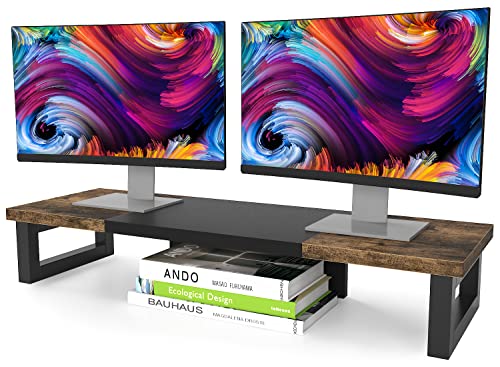
- Supports two monitors
- Steel legs with anti-slip pads
- Rustic brown wood finish
Best For: Dual-screen desks that need open storage and decorative style
Best Organizer Pick

- 5-inch monitor elevation
- Drawer and adjustable organizer tray
- Extends up to 45 inches wide
Best For: Organized dual-monitor gaming desks with accessories to store
RGB Desktop Upgrade

- Two height settings for a more comfortable viewing position
- 24 colors and four LED lighting effects
- 33-pound capacity with a 31.5-inch platform
Best For: Gamers who want customizable desk lighting and adjustable elevation
Organized Gaming Desk
Foldable Adjustable Monitor Riser

- Three adjustable widths accommodate different setups
- Includes a storage drawer and tablet/phone holder
- 55-pound capacity with stability-focused construction
Best For: Gamers who prioritize flexible sizing and accessory storage
Dual-Screen Command Center

- Accommodates two monitors with a 55-pound capacity
- Adjusts from 29.13 to 40.9 inches in length
- Adds 3.9 inches of elevation and built-in organization
Best For: Gamers building wide dual-monitor desk setups
Best for Dual-Screen Flexibility – Across-Star Adjustable Dual Monitor Riser
For shoppers seeking desktop monitor risers for gaming with room for two screens, the Across-Star offers adjustable length from 32 to 40 inches. Its open shelf design provides space for a keyboard and accessories while raising monitors for a more comfortable viewing position.
Best For: Dual-monitor gaming or workstations that need adjustable width and substantial storage underneath.
Pros:
- Adjusts from 32 to 40 inches for single- or dual-monitor setups.
- Supports up to 80 pounds according to the supplied specifications.
- Four wood legs and a metal-and-wood construction are designed for stability.
- Open space underneath accommodates a full-size keyboard and desk accessories.
Cons:
- Its 40-inch maximum length may be too large for compact desks.
- The dual-monitor design takes up more space than a single-screen riser.
The Across-Star is a practical choice when flexibility and load capacity matter most. Its adjustable shelf can adapt as your setup changes, though smaller desks may benefit from a more compact option.
Best Compact Organizer – Simple Trending Monitor Stand with Drawer
The Simple Trending stand is a compact option among desktop monitor risers for gaming, measuring 20 inches wide and raising a screen 5.8 inches. Its lower tier, drawer, pen holders, and mesh platform help organize a smaller desk.
Best For: Gamers and home-office users who want a single-monitor riser with built-in organization.
Pros:
- 5.8-inch height can help place a monitor at a more comfortable viewing level.
- Lower tier holds a gaming keyboard, Xbox console, or cable box.
- Drawer and two pen holders provide dedicated storage.
- Four suction cups help limit sliding and wobbling.
Cons:
- Its 33-pound load capacity is lower than some larger risers.
- The 20-inch width is intended for compact, single-screen setups.
This stand prioritizes desk organization over expansive monitor coverage. It is a sensible fit for smaller gaming stations, especially where a drawer and accessory storage are more useful than dual-screen capacity.
Best for Angled Dual Displays – BONTEC Adjustable Dual Monitor Riser
For desktop monitor risers for gaming that need more layout flexibility, the BONTEC adjusts from 31.5 to 42.5 inches and includes swivel side shelves. The three open compartments, phone slot, and cable opening also help keep a dual-screen desk organized.
Best For: Dual-monitor gaming desks that may use straight, angled, or corner arrangements.
Pros:
- Adjustable length accommodates smaller and larger desks.
- Swivel shelves support straight, angled, or corner layouts.
- Three open compartments provide room for keyboards, devices, and supplies.
- Includes a smartphone holder and cable-management opening.
Cons:
- Its 44-pound load capacity is more limited than some heavy-duty alternatives.
- The white finish may not match every gaming setup.
The BONTEC stands out for gamers who want to change monitor positioning without replacing the riser. Its storage-focused wooden design is especially useful when a dual-screen setup also needs room for controllers and other accessories.
Best RGB Feature Set – Petify Monitor Riser with USB Hub
The Petify combines several gaming-friendly features in a compact desktop riser: adjustable width from 16.1 to 21.7 inches, RGB lighting, a storage drawer, and a front-facing four-port USB hub. It fits one wide monitor or a laptop beside a display.
Best For: Gaming desks that need RGB lighting and convenient front-access USB ports in a single-monitor riser.
Pros:
- Adjustable width fits a wide monitor or a laptop beside a display.
- Offers 10 RGB lighting modes, including music rhythm effects.
- Four front-facing USB ports include three USB 2.0 and one USB 3.0 port.
- Drawer, phone/tablet slot, and keyboard clearance add useful organization.
Cons:
- Its 21.7-inch maximum width is suited to single-monitor setups rather than dual displays.
- The USB ports are USB 2.0 and USB 3.0, not higher-speed standards.
The Petify is a feature-rich pick for a gaming setup where lighting and easy peripheral access are priorities. Its adjustable footprint and under-shelf storage keep it practical, while the RGB modes add visual customization.
Best Heavy-Duty Pick – Dual Monitor Mesh Riser
For shoppers comparing desktop monitor risers for gaming, this metal dual-monitor stand emphasizes stability, cooling, and generous storage. Its 7-inch height, ventilated mesh platform, and two-tier design help organize a larger gaming setup.
Best For: Gamers who need a sturdy riser for dual monitors, a large keyboard, and accessories such as an Xbox console.
Pros:
- 7-inch elevation supports a more comfortable viewing position.
- Metal mesh platform promotes airflow around equipment.
- 30.5-inch-wide lower tier accommodates keyboards, consoles, cable boxes, or printers.
- Listed load capacity is up to 100 pounds, with non-slip suction cups for stability.
Cons:
- The 7-inch height may be too tall for some desks or seating positions.
- Its wide, two-tier footprint may be more than compact setups require.
Choose this model when load capacity and open storage matter more than a minimalist footprint. The included 32-by-10-inch mouse pad is a useful extra for broad mouse movement across a gaming desk.
Best Rustic Dual-Monitor Pick – Wood and Steel Riser
This wood-and-steel option is a practical choice among desktop monitor risers for gaming when you want dual-screen support with a warmer desk aesthetic. It also provides open space underneath for office or gaming accessories.
Best For: Dual-monitor users who want a rustic brown finish, steel support, and multipurpose storage under the screens.
Pros:
- Designed to hold two monitors and can also serve as a laptop, printer, or TV stand.
- Thick steel legs provide a strong support structure.
- Anti-slip pads help limit sliding on the desk.
- Pre-drilled parts, tools, and instructions are included for assembly.
Cons:
- Its 35.8-inch width requires substantial desk space.
- The single-level design offers less compartmentalized storage than a drawer or two-tier riser.
This riser suits shoppers who want a straightforward dual-monitor platform with an attractive wood finish. Its broad surface and open lower area make it flexible, though it is best matched with a desk that can accommodate its width.
Best Organizer Pick – Extendable Riser with Drawer
For desktop monitor risers for gaming with built-in organization, this engineered-wood stand combines a 5-inch lift with a drawer, side caddies, and device holders. Its width can extend from about 33.3 to 45 inches to fit changing desk layouts.
Best For: Gamers or multitaskers who want dual-monitor support plus dedicated places for a phone, tablet, cables, and small desk supplies.
Pros:
- Raises monitors or a laptop by 5 inches to support a more comfortable viewing position.
- Six removable tray dividers create up to nine organizer compartments.
- Includes a sliding drawer, two side caddies, and a phone/tablet holder.
- Extendable design reaches up to 45 inches wide for broader setups.
Cons:
- At full extension, the 45-inch width needs considerable desk space.
- The engineered-wood construction may be less suitable for shoppers specifically seeking a metal riser.
This is the most storage-focused choice of the three. Its adjustable width and removable dividers are useful when keeping a gaming or work surface tidy is as important as raising the screens.
RGB Desktop Upgrade – Adjustable LED Monitor Riser
For shoppers comparing desktop monitor risers for gaming, the AFOOYO combines adjustable height, a wide 31.5-inch platform, and colorful LED lighting. Its wood-and-acrylic construction supports up to 33 pounds while creating useful space beneath the display.
Best For: Gamers who want adjustable monitor height and customizable desk lighting.
Pros:
- Two height options—2.75 inches or 1.57 inches—help tailor viewing position.
- LED strip offers 24 colors and four lighting effects.
- Supports up to 33 pounds and can hold monitors, laptops, printers, or other devices.
- Pre-drilled holes and included instructions simplify assembly.
Cons:
- The LED connector may need to be reversed if the strip does not light initially.
- Assembly is required.
- The fixed 31.5-inch length may not suit smaller desks.
The AFOOYO is a practical choice when appearance matters as much as monitor elevation. Its lighting and two height settings add gaming appeal, while the broad platform helps organize larger desktop setups.
Organized Gaming Desk – Foldable Adjustable Monitor Riser
The Klearlook stands out among desktop monitor risers for gaming with adjustable width, a foldable design, and built-in storage. It raises the screen while leaving room for a full-sized mechanical keyboard and keeping smaller devices within reach.
Best For: Gamers who need flexible sizing and convenient storage for phones, tablets, and desk essentials.
Pros:
- Adjusts to three widths: 16.5, 18.5, or 20.5 inches.
- Built-in tablet/phone holder and storage drawer help organize accessories.
- Supports up to 55 pounds, including heavier monitors and office equipment.
- Rubberized legs and an internal metal plate improve stability.
Cons:
- It is made from ABS rather than wood or metal throughout.
- Its adjustable width may provide less continuous surface area than a fixed wide riser.
- The supplied notes do not indicate LED lighting.
Choose the Klearlook when desk organization and adaptability are priorities. Its foldable, width-adjustable frame is especially useful for changing setups, while the drawer and device holder reduce desktop clutter.
Dual-Screen Command Center – Adjustable Dual Monitor Riser
For multi-display setups, the AMERIERGO is one of the more capable desktop monitor risers for gaming. Its adjustable 29.13- to 40.9-inch length accommodates two monitors, while the shelf and slots provide room for keyboards, devices, and small accessories.
Best For: Gamers using two monitors who need a wide, adjustable riser and extra desk organization.
Pros:
- Designed to accommodate two monitors and supports up to 55 pounds.
- Length adjusts from 29.13 to 40.9 inches, with an adjustable angle.
- Raises monitors by 3.9 inches for a more elevated viewing position.
- Slots and storage areas organize tablets, phones, cables, stationery, and keyboards.
Cons:
- Its wide maximum length requires substantial desk space.
- The supplied notes do not mention LED lighting.
- A dual-monitor setup may leave less usable room for other desktop equipment.
The AMERIERGO is the strongest fit for a two-screen gaming station. Its adjustable span and 55-pound capacity offer useful flexibility, while the raised shelf helps reclaim space beneath the monitors.
How We Picked These Desktop Monitor Risers for Gaming
We focused on risers that address the main needs of a gaming workstation: reliable support, improved viewing height, useful storage, and compatibility with one or two displays. We also considered adjustable designs for changing monitor sizes, multi-purpose shelves for laptops or consoles, and extras such as drawers, USB ports, lighting, tablet holders, and mouse pads.
Because desk layouts vary, the selection includes compact single-monitor options as well as wide dual-monitor shelves. Materials, footprint, stated adjustability, and overall practicality were weighed more heavily than decorative features alone.
Quick Comparison
| Best For | Features to Look For |
|---|---|
| Dual-monitor gaming | Wide platform, strong center support, and adjustable length |
| Small desks | Compact footprint, vertical storage, and foldable legs |
| Accessory organization | Drawer, shelf space, phone slot, or tablet holder |
| Connected setups | Built-in USB hub and accessible cable routing |
| Atmospheric setups | RGB or LED lighting with enough usable surface area |
Key Buying Factors for Desktop Monitor Risers for Gaming
Size, Weight, and Monitor Layout
Measure your monitors, stands, and available desk width before ordering. A dual-monitor riser should provide enough surface area for both bases without crowding the edges. Check the manufacturer’s weight rating, especially if you use large displays, a heavy speaker, or a laptop alongside your monitor.
Height and Adjustability
The ideal riser raises the top of the screen closer to eye level without forcing you to tilt your neck upward. Adjustable legs or length-changing platforms are useful when monitors, chairs, and desks differ. Foldable designs can also make it easier to change between work and gaming layouts.
Storage and Connectivity
Drawers and open shelves help keep controllers, keyboards, documents, and accessories organized. A USB hub can be convenient, but it should supplement—not replace—a properly powered hub when you need to connect several demanding devices. Leave room for cables and airflow around electronics.
Stability and Construction
Wood, steel, and acrylic components can all work well when the riser sits flat and has adequate support. Look for non-slip feet, reinforced legs, and a platform that does not flex under load. Avoid placing a monitor near an unsupported overhang.
Who Should Buy Which Desktop Monitor Risers for Gaming?
Choose an adjustable dual-monitor riser if you use two screens or expect your setup to grow. Pick a drawer-equipped model if your desk is cluttered with small accessories. A USB or RGB model suits gamers who value integrated convenience and lighting, while a simple wood-and-steel shelf is often the better choice for durability and a cleaner appearance.
For smaller workspaces, prioritize a compact or foldable riser with vertical storage. Before buying, confirm the platform dimensions, height range, weight capacity, and return policy against your exact monitors and desk. The best Desktop Monitor Risers for Gaming are the ones that improve posture and organization without sacrificing stability or usable desk space.