A good monitor arm can reclaim valuable desk space, improve screen positioning, and make a compact workstation feel far less crowded. The challenge is finding a model that fits your monitor, desk, and available clearance without sacrificing stability.
We compared 10 monitor arms across compatibility, weight capacity, adjustability, mounting styles, and space-saving features to help you choose the right fit for a small desk.
Best 10 Computer Monitor Arms for Small Desks Picks for 2026
Best Adaptability
HUANUO FlowLift Single Monitor Arm

- Supports 13- to 32-inch monitors up to 19.8 lb
- Offers extensive tilt, swivel, and rotation adjustment
- Includes clamp and grommet mounting options
Best For: Flexible single-monitor setups on compatible desks
Best Cable Organization

- Fits 13- to 32-inch monitors up to 17.6 lb
- Uses a 15.75-inch steel support pole
- Includes detachable cable clips
Best For: Tidy single-monitor workstations with extra height
Best Dual-Monitor Value

- Supports two monitors up to 30 inches
- Holds up to 22 lb per screen
- Enables portrait or landscape orientation
Best For: Compact two-screen workstations
Best Heavy-Duty Single Arm

- Supports flat screens up to 34 inches and 26.4 lb
- Extends 19.3 inches from the base
- Includes cable management and dual mounting options
Best For: Large monitors on compact desks
Heavy-Duty Space Saver
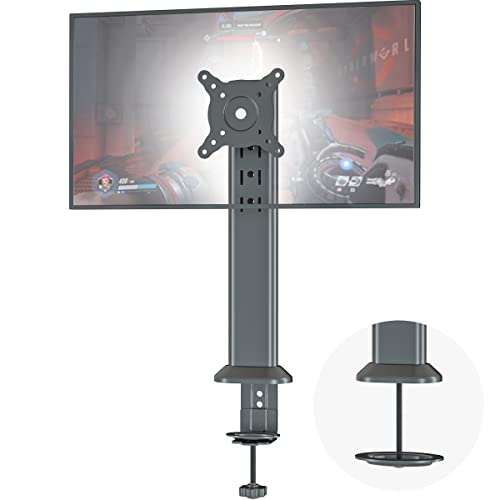
- Supports screens up to 32 inches and 77 pounds
- Full articulation with height adjustment
- Steel build with cable clips
Best For: Small desks needing a high-capacity single-monitor mount
Hybrid Workspace Pick
HUANUO Monitor Arm with Laptop Tray
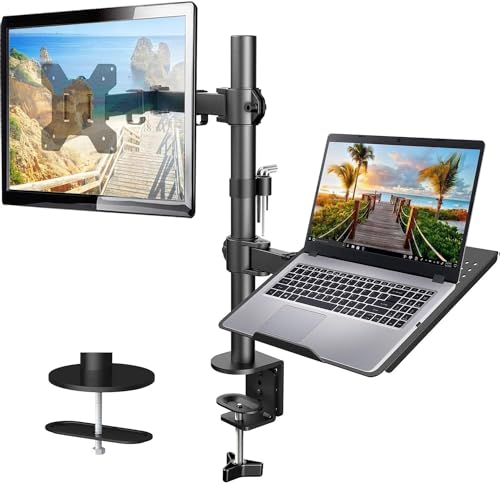
- Combines a monitor arm and ventilated laptop tray
- Supports 13- to 32-inch monitors up to 22 pounds
- Offers C-clamp and grommet mounting options
Best For: Compact workstations using a monitor and laptop together
Fast-Setup Flexibility

- Fits monitors up to 34 inches and 19.8 pounds
- Tool-free VESA mounting simplifies installation
- Wide height, reach, tilt, swivel, and rotation range
Best For: Small desks prioritizing quick setup and precise positioning
Ultrawide Desk-Space Pick

- Supports up to 22 pounds
- Fits monitors up to 38 inches
- Includes clamp and grommet bases
Best For: Heavier monitors and compatible ultrawide displays
Simple Value Choice
Amazon Basics Single Monitor Arm

- Supports up to 22 pounds
- Fits 13- to 30-inch screens
- Includes cable management
Best For: Standard single-monitor office setups
Precision Adjustment Pick

- Supports 13- to 32-inch screens
- Uses a tool-free VESA plate
- Includes visible tension adjustment
Best For: Lighter monitors and frequent repositioning
Best Adaptability – HUANUO FlowLift Single Monitor Arm
For shoppers comparing computer monitor arms for small desks, the HUANUO FlowLift stands out for its broad adjustment range and two mounting options. It supports 13- to 32-inch monitors weighing 4.4 to 19.8 pounds and uses standard 75x75mm or 100x100mm VESA patterns.
Best For: Users who want flexible positioning, one-handed height adjustment, and a choice between clamp and grommet installation.
Pros:
- Full motion with -50° to +85° tilt, ±90° swivel, and 360° rotation
- Raises the screen up to 39.6 cm from the desktop
- Includes C-clamp and grommet mounting options
- One-piece design and included hardware are intended to simplify setup
Cons:
- Monitor weight must be at least 4.4 pounds
- Installation works best with a wooden desk and unobstructed underside
- Some desk surfaces may not suit the 0.59- to 3.54-inch mounting range
With its wide movement range and sturdy, tested construction, this is a versatile choice when a small desk needs both usable workspace and precise monitor positioning.
Best Cable Organization – ErGear Single Monitor Mount
The ErGear single monitor mount is a practical option among computer monitor arms for small desks, combining a tall steel support pole with integrated cable clips. It fits 13- to 32-inch monitors up to 17.6 pounds with 75x75mm or 100x100mm VESA mounting holes.
Best For: Small workspaces where organized cables, added monitor height, and drill-free clamp installation are priorities.
Pros:
- Supports 13- to 32-inch screens up to 17.6 pounds
- Provides 360° rotation, ±45° tilt, and ±90° swivel
- 15.75-inch steel pole offers multiple height positions
- Detachable cable clips help keep power and AV cables tidy
Cons:
- Monitor compatibility depends on the specified weight and VESA limits
- Desk underside must be clear of beams or panels
- Recommended desk thickness is limited to 0.39 to 3.54 inches
The combination of a tall pole, broad positioning range, and cable management makes the ErGear a sensible space-saving mount for a tidy single-screen workstation.
Best Dual-Monitor Value – VIVO STAND-V002 Dual Mount
For a small desk that needs two screens, the VIVO STAND-V002 is a dual-monitor alternative to single computer monitor arms for small desks. Its steel frame supports two 13- to 30-inch monitors weighing up to 22 pounds each and accommodates 75x75mm or 100x100mm VESA patterns.
Best For: Dual-screen users who need portrait or landscape positioning, substantial per-monitor capacity, and flexible desk mounting.
Pros:
- Holds two monitors up to 30 inches and 22 pounds each
- Supports +90° to -90° tilt, 180° swivel, and 360° rotation
- Allows height adjustment along the center pole
- Includes C-clamp, grommet option, cable clips, and detachable VESA plates
Cons:
- Uses more desk and mounting space than a single-monitor arm
- Maximum supported screen size is 30 inches
- C-clamp fits desks up to 3.25 inches thick
This mount is a strong fit when two displays are essential but desk space is limited, offering generous capacity and orientation flexibility in a single steel stand.
Best Heavy-Duty Single Arm – WALI Adjustable Monitor Arm
The WALI adjustable arm is designed for larger, heavier displays while still freeing valuable desktop space. Among computer monitor arms for small desks, it supports flat screens up to 34 inches and 26.4 pounds, or curved screens up to 19.8 pounds, with standard 75x75mm or 100x100mm VESA mounting.
Best For: Users with larger monitors who want extensive reach, strong weight capacity, and built-in cable routing.
Pros:
- Supports flat screens up to 34 inches and 26.4 pounds
- Extends up to 19.3 inches and raises the screen up to 17.3 inches
- Offers ±180° swivel, +70°/-45° tilt, and 360° rotation
- Includes cable management and C-clamp or grommet mounting
Cons:
- Curved screens have a lower 19.8-pound maximum
- Mounting is specified for desks 0.39 to 2.76 inches thick
- Installation is recommended on a wooden desk without an obstructing crossbeam
Its higher capacity and long reach make the WALI especially useful for large-screen setups where reclaiming desk surface is more important than choosing the smallest possible arm.
Heavy-Duty Space Saver – HEMUDU Single Monitor Arm
For shoppers comparing computer monitor arms for small desks, the HEMUDU Single Desk Monitor Arm is a sturdy option for one flat or curved screen. Its articulating design lifts the monitor off the desktop while providing multiple adjustment points for a more comfortable viewing position.
Best For: Small desks needing a high-capacity single-monitor mount.
Pros:
- Supports 13- to 32-inch monitors weighing up to 77 pounds.
- Offers 360-degree rotation, plus tilt, swivel, and height adjustment.
- Cold-rolled steel construction and cable clips help keep the setup stable and organized.
- Includes installation accessories and is designed for setup in about 10 minutes.
Cons:
- Only supports one monitor.
- Requires a compatible 75x75mm or 100x100mm VESA pattern.
The HEMUDU stands out when stability and weight capacity matter more than a minimalist build. It can free valuable surface area on a compact desk, provided your monitor has the required VESA mounting holes.
Hybrid Workspace Pick – HUANUO Monitor Arm with Laptop Tray
The HUANUO Adjustable Monitor Arm combines a monitor mount and laptop tray, making it a practical choice among computer monitor arms for small desks. The two-in-one layout can move both displays off the desktop while offering flexible positioning and cable management.
Best For: Compact workstations that use one monitor and one laptop together.
Pros:
- Supports 13- to 32-inch monitors up to 22 pounds.
- Includes a ventilated 14-by-12-inch laptop tray with a bottom lip.
- Provides tilt, swivel, rotation, and up to 17 inches of height adjustment.
- Works with either a C-clamp or grommet mount for compatible wooden desks.
Cons:
- The C-clamp and grommet mounts are specified for wooden desks.
- Monitor support is limited to 22 pounds.
- Angle-adjustment screws need to be tightened securely.
This model is especially useful when a small desk needs to accommodate a laptop alongside a monitor. Check your desk material, thickness, monitor weight, and VESA pattern before installation.
Fast-Setup Flexibility – ErGear Single Monitor Arm
The ErGear Single Monitor Arm is designed for shoppers seeking computer monitor arms for small desks with quick installation and broad positioning range. Its tool-free VESA mount, height and reach adjustments, and integrated cable clips help create a cleaner, more adaptable workspace.
Best For: Small desks where quick setup and precise monitor positioning are priorities.
Pros:
- Supports 13- to 34-inch flat or curved monitors up to 19.8 pounds.
- Provides up to 17.5 inches of height adjustment and 18.1 inches of reach.
- Offers +80/-50-degree tilt, 90-degree swivel, and 360-degree rotation.
- Uses tool-free VESA mounting and includes C-clamp and grommet options.
Cons:
- Supports less weight than the HEMUDU model.
- Requires a compatible 75x75mm or 100x100mm VESA pattern.
- C-clamp and grommet mounting are limited to specified desk thickness ranges.
With compatibility up to 34 inches and a wide adjustment range, the ErGear is a flexible choice for a compact setup. Its 19.8-pound limit makes checking your monitor’s weight especially important before buying.
Ultrawide Desk-Space Pick – VIVO STAND-V001 Monitor Arm
For shoppers comparing computer monitor arms for small desks, the VIVO STAND-V001 is a flexible single-monitor mount that can help clear space beneath your screen. It supports compatible displays up to 22 pounds, including many monitors up to 32 inches and ultrawide screens up to 38 inches.
Best For: Small-desk setups using a heavier monitor or compatible ultrawide display.
Pros:
- Supports screens from 13 to 32 inches and ultrawide monitors up to 38 inches, with a 22-pound capacity.
- Offers tilt, swivel, rotation, and up to 16 inches of height adjustment for portrait or landscape positioning.
- Includes both C-clamp and grommet mounting options, plus detachable cable clips.
- Detachable VESA plate and included hardware simplify installation.
Cons:
- Monitor must use a compatible 75x75mm or 100x100mm VESA pattern.
- The desk clamp is intended for desks up to 3.25 inches thick.
With its higher weight capacity, broad motion range, and ultrawide compatibility, this VIVO arm is a strong choice when a small desk needs more usable surface area without limiting monitor positioning.
Simple Value Choice – Amazon Basics Single Monitor Arm
The Amazon Basics single monitor arm is a straightforward option for computer monitor arms for small desks. Its steel desk mount fits compatible 13- to 30-inch screens weighing up to 22 pounds while providing height adjustment, rotation, tilt, and cable management.
Best For: Everyday single-monitor workstations that need an uncomplicated, adjustable mount.
Pros:
- Supports most 13- to 30-inch monitors weighing up to 22 pounds.
- Rotates 360 degrees for landscape or portrait viewing.
- Adjustable height ranges from 7.9 to 14.2 inches, with tilt from -15 to +85 degrees.
- Fits desks 0.8 to 3.9 inches thick and includes cable management, tools, and hardware.
Cons:
- Maximum supported screen size is 30 inches, so it is not intended for larger ultrawide displays.
- Compatibility requires a 75x75mm or 100x100mm VESA pattern.
This mount focuses on the essentials: a sturdy steel construction, useful adjustment range, and broad desk-thickness compatibility. It is a practical fit for a compact office setup using a standard-size monitor.
Precision Adjustment Pick – HUANUO FlowLift Pro Arm
Among computer monitor arms for small desks, the HUANUO FlowLift Pro stands out for its tool-free setup and visible tension adjustment. It is designed for compatible 13- to 32-inch monitors weighing 4.4 to 15.4 pounds and includes both C-clamp and grommet bases.
Best For: Users who frequently fine-tune a lighter monitor or want a quick, minimalist installation.
Pros:
- Supports compatible 13- to 32-inch monitors weighing 4.4 to 15.4 pounds.
- Provides tilt, swivel, and rotation adjustments for ergonomic positioning.
- Features a tool-free InstaMount VESA plate and simplified installation.
- Uses a visible PrecisionView tension indicator and includes C-clamp and grommet mounting options.
Cons:
- Its 15.4-pound maximum load is lower than some competing monitor arms.
- Compatibility requires a 75x75mm or 100x100mm VESA pattern.
- The manufacturer recommends wood desks from 0.59 to 3.54 inches thick and advises caution with irregular edges.
The FlowLift Pro is best suited to a lighter display and users who value easy installation and repeatable adjustments. Its visible tension feedback can make setup less guesswork-heavy than a conventional arm.
How We Picked the Best Computer Monitor Arms for Small Desks
We focused on the specifications that matter most in compact workspaces: monitor-size compatibility, supported weight, VESA support, mounting footprint, range of adjustment, and installation flexibility. The selection includes single- and dual-monitor arms, laptop-compatible designs, options for ultrawide screens, and models with clamp or grommet mounting.
We also considered practical details such as cable management, tool-free VESA attachment, vertical height range, tilt and swivel control, and whether the arm can fold back when desk space is needed. A high weight rating alone does not guarantee a good fit; the desk surface, monitor dimensions, and arm design all affect stability.
Quick Comparison
| Best For | Recommended Type | What to Prioritize |
|---|---|---|
| One standard monitor | Single monitor arm | Easy adjustment, compact clamp, correct weight rating |
| Two screens | Dual monitor mount | Desk depth, total load, independent adjustment |
| Monitor and laptop | Arm with laptop tray | Tray dimensions, ventilation, combined weight capacity |
| Large or ultrawide display | Heavy-duty wide-range arm | Screen width, VESA pattern, reinforced support |
| Maximum flexibility | Gas-spring or mechanical arm | Smooth movement and secure tension adjustment |
Key Buying Factors for Computer Monitor Arms for Small Desks
Desk Size and Mounting Space
Measure the desk depth, rear clearance, and distance from the wall before buying. C-clamps need enough room to grip the back edge, while grommet mounts require a suitable hole. For very shallow desks, choose an arm that folds compactly and does not extend far behind the screen.
Monitor Compatibility and Capacity
Check the monitor’s VESA pattern, usually 75 x 75 mm or 100 x 100 mm, along with its weight without the factory stand. The arm’s rated capacity should exceed the actual monitor weight, especially for curved or ultrawide screens. Confirm the advertised screen-size range as well as the weight limit.
Adjustment and Stability
Look for height adjustment, tilt, swivel, and screen rotation if you regularly change between landscape and portrait orientation. Spring-assisted arms are convenient for frequent repositioning, while fixed or mechanical designs may suit users who prioritize rigidity. A solid clamp and a properly tightened tension mechanism are essential for preventing sag.
Cable Management and Installation
Integrated cable channels help keep a small desk clear. Tool-free VESA plates can make installation easier, but verify that the monitor can be safely lifted into place. If your desk has a fragile, hollow, or glass top, check the manufacturer’s mounting guidance before using a clamp.
Who Should Buy Which Computer Monitor Arms for Small Desks?
Choose a compact single-monitor arm if you use one standard display and want the simplest way to free up desk surface. A dual mount is better for productivity users who need two screens, but it requires more rear clearance and careful weight balancing. A laptop-tray model suits hybrid workstations that alternate between a laptop and external monitor. For large curved or ultrawide displays, select a model with a generous size range and capacity above the screen’s measured weight. If you frequently reposition your display, prioritize smooth adjustment; if it stays in one position, a stable, simpler arm may offer better value.