If you’re looking to enhance your workspace, adjustable standing desks for dual monitors could be the solution you need. These desks not only promote better posture but also boost productivity by allowing you to customize your setup. With options ranging from manual to electric adjustments, finding the right fit for your environment is essential. Curious about which models stand out regarding design and functionality? Let’s explore the top choices available.
VIVO 32 inch Height Adjustable Desk Converter (DESK-V000K)

If you’re juggling dual monitors and need a workspace that promotes both comfort and productivity, the VIVO 32 inch Height Adjustable Desk Converter (DESK-V000K) is an excellent choice. With a top surface of 31.5” x 15.7”, it fits perfectly for your tech setup. Its strong 33 lbs lift assist and simple touch height locking mechanism let you adjust from 4.5 to 20 inches effortlessly, ensuring smooth changes from sitting to standing. Minimal assembly is required—just place it on your existing desk and attach the keyboard tray. Plus, it’s backed by a 3-Year Warranty for peace of mind.
Best For: Individuals who work with dual monitors and seek a height-adjustable workstation to enhance comfort and productivity.
Pros:
- Strong lift assist allows for easy height adjustments from sitting to standing.
- Minimal assembly required, making it user-friendly right out of the box.
- Backed by a 3-Year Warranty, ensuring durability and reliability.
Cons:
- May be too small for larger setups or extensive workspaces.
- Limited adjustment range compared to more expensive models.
- The keyboard tray size might not accommodate all keyboard types comfortably.
VIVO Height Adjustable Standing Desk Converter with Dual Monitor Stand
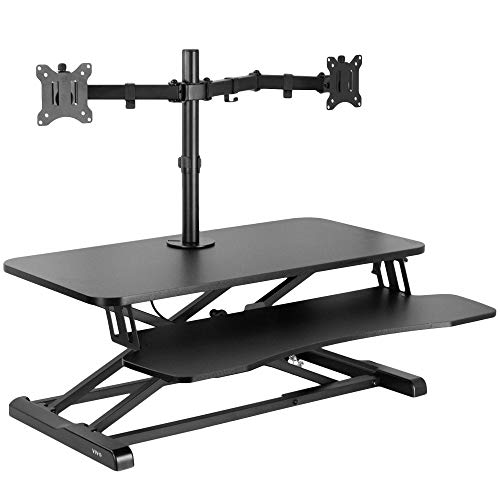
The VIVO Height Adjustable Standing Desk Converter with Dual Monitor Stand is ideal for professionals seeking an ergonomic workspace that accommodates two monitors. With a spacious top surface of 31.5” x 15.7”, it supports dual monitors up to 17.6 lbs each. The innovative height lock mechanism allows you to smoothly adjust from sitting to standing, ranging from 4.5” to 20”. Plus, the full-motion monitor stand offers versatile positioning, enabling you to tilt, swivel, and rotate your screens as needed. Assembly is minimal, and the solid steel frame guarantees durability while protecting your desk surface from scuffs. Enhance your productivity effortlessly!
Best For: Professionals seeking an ergonomic workspace that accommodates dual monitors for enhanced productivity.
Pros:
- Spacious top surface supports two monitors up to 17.6 lbs each, providing ample space for multitasking.
- Innovative height lock mechanism allows for smooth adjustment between sitting and standing positions, promoting better posture.
- Full-motion monitor stand enables versatile positioning with tilt, swivel, and rotation capabilities for optimal screen visibility.
Cons:
- Limited weight capacity may not accommodate larger or heavier monitors beyond the specified limit.
- Minimal assembly required, but some users may still find it challenging to set up initially.
- Adjustment range may not be suitable for very tall individuals wanting higher standing positions.
VIVO Height Adjustable Stand Up Desk Converter (DESK-V000S)

For those seeking an efficient way to enhance their workspace, the VIVO Height Adjustable Stand Up Desk Converter (DESK-V000S) stands out with its quick sit-to-stand functionality. This 32-inch converter lets you easily switch between sitting and standing, helping to relieve muscle tension and boost productivity. Its 31.5” x 15.8” top surface accommodates dual monitors or laptop setups while the sturdy steel frame supports up to 26 lbs. You’ll appreciate the minimal assembly—just place it on your existing desk, attach the keyboard tray, and start organizing your workstation for an improved working experience.
Best For: Those looking to improve their workspace ergonomics and increase productivity with an easy-to-use sit-to-stand desk converter.
Pros:
- Quick and easy transition between sitting and standing to enhance comfort and productivity.
- Sturdy construction supports up to 26 lbs, accommodating dual monitor setups effectively.
- Minimal assembly required, making it convenient to set up and start using right away.
Cons:
- Limited height adjustment range (4.9” to 19.7”), which may not suit all users’ preferences.
- The 32-inch width might be too small for some extensive workstation setups.
- May require additional space on the existing desk to accommodate the converter comfortably.
VIVO Height Adjustable Stand Up Desk Converter (DESK-V000V)

Looking for a versatile solution to enhance your workspace? The VIVO Height Adjustable Stand Up Desk Converter (DESK-V000V) is perfect for you. With a spacious 36-inch surface, it supports dual monitor setups while relieving muscle tension and boosting productivity. Its strong lift assist allows you to adjust the height from 17cm to 43cm effortlessly. Weighing 38.7 pounds, it’s made of durable alloy steel and can hold up to 33 pounds. Assembly is minimal—just place it on your existing desk and attach the keyboard tray. Plus, it comes with a 3-year warranty for peace of mind.
Best For: Individuals seeking a flexible workspace solution that promotes standing while working, particularly those using dual monitors.
Pros:
- Spacious Surface: Accommodates both single and dual monitor setups with a generous desktop size.
- Easy Height Adjustment: Effortless lift assist feature allows for quick changes in height from 17cm to 43cm.
- Minimal Assembly Required: Almost ready to use out of the box, making setup quick and hassle-free.
Cons:
- Weight Limit: Maximum load capacity of 33 pounds may not be sufficient for heavier equipment.
- Size: The 36-inch width might not fit well in smaller workspaces.
- Weight: At 38.7 pounds, it may be cumbersome to move or adjust frequently.
VIVO Electric Standing Desk (DESK-KIT-1B7B)
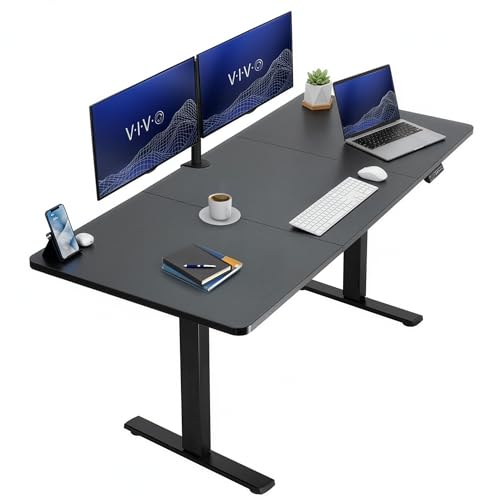
If you’re searching for a spacious and sturdy workspace for dual monitors, the VIVO Electric Standing Desk (DESK-KIT-1B7B) is an excellent choice. With a generous 71 x 30-inch surface, it provides ample room for your monitors, supplies, and decor. The powerful electric motor allows height adjustment from 29.2” to 48.4”, ensuring a perfect fit for your needs. Plus, you can save your favorite heights with the memory controller’s four presets. Built from all-steel construction, it supports up to 176 lbs, offering stability and strength. Say goodbye to long hours of sitting and enjoy enhanced productivity with this adjustable desk!
Best For: Individuals seeking a spacious and adjustable workspace for dual monitor setups to enhance productivity.
Pros:
- Ample Surface Area: The 71 x 30-inch workspace accommodates multiple monitors and office supplies comfortably.
- Customizable Height Settings: The electric motor allows for a height range from 29.2” to 48.4”, with memory presets for easy adjustments.
- Sturdy Construction: Made with all-steel materials, it supports up to 176 lbs, ensuring stability for various setups.
Cons:
- Limited Color Options: The desk only comes in a black top and frame, which may not suit all aesthetic preferences.
- Electric Dependence: Requires a power source for height adjustment, which may limit placement options.
- Assembly Required: The desk may require some time and effort to assemble before use.
Mount-It! Double Monitor Electric Standing Desk Converter

The Mount-It! Double Monitor Electric Standing Desk Converter is designed to elevate your workspace with ease. It accommodates dual screens up to 32 inches, ensuring you have ample space for your laptop, keyboard, and mouse. With customizable mounts and a convenient phone or tablet slot, you can enhance your productivity effortlessly. The desk tilts 45 degrees for ideal viewing angles, while its ergonomic design promotes better posture and reduces discomfort. Plus, the sleek black finish and integrated cable management keep your setup looking sharp and organized. Transform any desk into a standing workstation and enjoy the flexibility you deserve.
Best For: Individuals seeking an ergonomic and flexible workspace solution for dual monitors in home, office, or school environments.
Pros:
- Customizable dual-monitor setup allows for personalized productivity arrangements.
- Ergonomic design helps improve posture and reduce discomfort from prolonged sitting.
- Integrated cable management keeps workspace organized and clutter-free.
Cons:
- Limited to dual screens up to 32 inches, which may not accommodate larger setups.
- Electric mechanism may require occasional maintenance or troubleshooting.
- Higher price point compared to traditional desk converters without electric features.
Mount-It! Standing Desk Converter for Dual Monitors
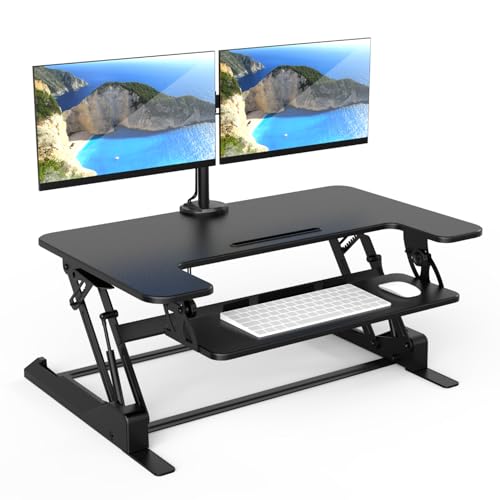
For professionals who rely on dual monitors to enhance productivity, the Mount-It! Standing Desk Converter is an excellent choice. This 36-inch wide riser features a manual lift gas spring for smooth sit-stand changes. It supports two monitors up to 32 inches with adjustable tilt, swivel, and rotation for ideal viewing angles. With height adjustments from 6.5 to 16.3 inches, you’ll promote better posture and reduce back pain. Plus, its built-in cable management keeps your workspace organized, while nonskid pads protect your desk. With a lifetime warranty and U.S.-based support, you can work confidently and comfortably.
Best For: Professionals who use dual monitors and seek an ergonomic workspace to enhance productivity and comfort.
Pros:
- Built-in dual monitor mount supports two monitors up to 32 inches, offering adjustable viewing angles for improved ergonomics.
- Height adjustable from 6.5 to 16.3 inches, promoting better posture and reducing back pain during extended use.
- Easy assembly and built-in cable management keep your workspace organized and free from clutter.
Cons:
- Limited weight capacity of 33 lbs on the desktop may restrict use with heavier equipment.
- Manual lift gas spring may require more effort compared to electric height adjustment options.
- Some users may find the 36-inch width too narrow for larger setups or additional accessories.
Mount-It! Height Adjustable Standing Desk Converter (48” Wide)

Designed with a spacious 48” wide tabletop, the Mount-It! Height Adjustable Standing Desk Converter is perfect for your dual monitor setup. You can easily adjust the height from 6” to 19.5” using gas spring handles, promoting a healthier work routine by allowing you to alternate between sitting and standing. With a load capacity of 33 pounds, it accommodates two monitors or laptops seamlessly. The integrated device cradle streamlines your workflow, while its hassle-free assembly means you can start using it right away. Enjoy a 100% satisfaction guarantee, ensuring your investment is secure and supported.
Best For: Individuals looking for a versatile and ergonomic solution for a dual monitor workspace that promotes healthy working habits through height adjustment.
Pros:
- Spacious 48” tabletop accommodates dual monitors or laptops, enhancing productivity.
- Height adjustable from 6” to 19.5” allows users to alternate between sitting and standing easily.
- Hassle-free assembly means it’s ready to use right out of the box.
Cons:
- Load capacity of 33 pounds may limit heavier setups or additional equipment.
- Weight of 20 pounds may be cumbersome for some users to reposition.
- Size may not fit in smaller workspaces or desks with limited surface area.
32 Inch Adjustable Standing Desk for Home Office

If you’re looking for a compact yet versatile workspace solution, the 32 Inch Adjustable Standing Desk is perfect for home offices, especially for users with dual monitor setups. Its spacious surface accommodates both monitors or a laptop and monitor, giving you flexibility. You can easily adjust the height from 4.3 to 20 inches, promoting a healthy mix of sitting and standing throughout your day. With a sturdy design supporting up to 30 lbs, it guarantees stability while you work. Plus, it requires no tools for setup, making it ideal for small spaces, offices, or study rooms.
Best For: Home office users looking for a compact and adjustable workspace that accommodates dual monitor setups.
Pros:
- Spacious surface supports single or dual monitor and laptop setups.
- Easy height adjustment promotes ergonomic working styles.
- No tools required for setup, making it user-friendly for small spaces.
Cons:
- Maximum weight capacity of 30 lbs may limit equipment choices.
- Height adjustment may not suit all user preferences.
- Limited surface area may not accommodate larger setups comfortably.
VIVO Electric Height Adjustable Standing Desk Converter (DESK-KIT-VE36B2)

The VIVO Electric Height Adjustable Standing Desk Converter (DESK-KIT-VE36B2) is an ideal choice for professionals juggling dual monitors, as it effortlessly supports screens ranging from 13 to 30 inches. With a spacious 36” x 15.7” surface, you can easily set up two monitors weighing up to 16.5 lbs each. The electric lift allows for smooth height adjustments from 5.7” to 19.5” at the push of a button. Plus, the full motion stand offers tilt, swivel, and rotation options, so you can customize your viewing angle. Minimal assembly is required, and a warranty is available upon request for peace of mind.
Best For: Professionals who need to maximize productivity with dual monitors while enjoying the flexibility of sitting or standing.
Pros:
- Electric height adjustment for a smooth transition between sitting and standing.
- Supports dual monitors with customizable tilt, swivel, and rotation options.
- Minimal assembly required for quick setup.
Cons:
- Maximum weight limit of 28.6 lbs may not accommodate heavier monitors.
- Limited adjustment range might not suit all user heights.
- Warranty information must be requested, which may not be convenient for users.
Factors to Consider When Choosing Adjustable Standing Desks for Dual Monitors
When choosing an adjustable standing desk for dual monitors, you should consider several key factors. Think about the height adjustment mechanism, surface area dimensions, and how much weight the desk can support. Additionally, check for monitor mount compatibility and ergonomic design features to guarantee a comfortable setup.
Height Adjustment Mechanism
Choosing the right height adjustment mechanism for your adjustable standing desk is vital, especially if you’re using dual monitors. You’ll find options like manual lift systems, gas springs, and electric motors, each with its pros and cons. Electric systems offer smooth shifts and often have programmable memory settings, perfect for multiple users. In contrast, manual adjustments require more effort, which can be inconvenient if you frequently switch between sitting and standing. Consider the adjustment range, ideally between 4.5 to 20 inches, to guarantee you find your ideal height. Stability during height changes is significant too; a well-constructed desk prevents wobbling or tipping, keeping your monitors secure while you adjust your workspace.
Surface Area Dimensions
Finding the right height adjustment mechanism is just the beginning; surface area dimensions play a significant role in optimizing your workspace for dual monitors. When selecting an adjustable standing desk, guarantee the top surface dimensions are adequate, typically ranging from 31.5” x 15.7” to 36” x 15.7”. A wider surface area, like 36 inches, gives you room for dual monitors and extra space for a laptop or accessories. Don’t overlook the keyboard tray dimensions, which should ideally be around 31.3” x 11.8” for comfortable typing. Also, consider the desk’s height adjustment range; many offer between 4.5” to 20” of elevation. This guarantees ergonomic positioning, catering to different users and monitor setups.
Weight Capacity Support
Weight capacity support is essential for guaranteeing your adjustable standing desk can handle the demands of dual monitors. You’ll want to check that the desk can support the combined weight of your monitors, which typically ranges from 17.6 lbs to 33 lbs each. Most desks designed for dual monitors have a total weight capacity between 30 lbs and 176 lbs, giving you flexibility for additional accessories or laptops. Make sure to verify the VESA compatibility for secure mounting, with common patterns being 75x75mm and 100x100mm. Also, consider the height adjustment mechanism; desks with solid steel frames generally provide better stability for heavier setups. Finally, check the desk surface dimensions to guarantee it accommodates your dual monitor configuration effectively.
Monitor Mount Compatibility
How do you guarantee your dual monitors are securely mounted on your adjustable standing desk? First, confirm your desk supports VESA mounting compatibility, typically 75x75mm or 100x100mm, which is essential for attaching your monitors safely. Check the desk converter’s weight capacity; it should handle the combined weight of both monitors, generally up to 17.6 lbs each. Look for desks that provide full motion capabilities, allowing for tilt, swivel, and rotation for ideal viewing angles. Verify the adjustment range to confirm the desk can elevate to a comfortable height for both monitors. Finally, consider the top surface size; it should be around 36 inches or wider to accommodate both monitors and extra workspace effectively.
Ergonomic Design Features
When selecting an adjustable standing desk for dual monitors, consider the ergonomic design features that will enhance your comfort and productivity. Look for a height adjustment range that allows smooth changes between sitting and standing, ideally between 4.5 inches and over 20 inches. Models with keyboard trays that rise with the desktop guarantee your monitors and keyboard are at the right levels, reducing strain on your neck and wrists. Full motion monitor stands let you adjust tilt, swivel, and rotation for best viewing angles, minimizing eye strain. A sturdy frame is essential for supporting dual monitors while reducing wobble. Finally, effective cable management keeps your workspace organized, reducing clutter and distractions, contributing to a more ergonomic setup.
Assembly Requirements
As you explore adjustable standing desks for dual monitors, it’s important to reflect on the assembly requirements, since a straightforward setup can save you time and frustration. Many desks require minimal assembly, often just attaching components like keyboard trays and monitor mounts. Some models come ready to use right out of the box, needing no tools, which is perfect for immediate use. The assembly process is usually simple—just place the desk converter on an existing desk and secure any additional elements. Look for models with clear instructions to avoid confusion. Don’t forget to check the weight capacity and sturdiness, as these factors can impact stability and overall ease of use once you’ve set everything up.
Stability and Durability
Stability and durability are essential factors to evaluate when selecting an adjustable standing desk for dual monitors. You’ll want a desk with robust construction, typically made of high-grade materials like steel, to support the weight of your monitors and any additional equipment without wobbling or tipping. Confirm the weight capacity can handle your setup, often ranging from 26 lbs to over 176 lbs, depending on the model. Look for features like non-skid pads that protect the desk’s surface and enhance stability during height adjustments. A wide base and low center of gravity can prevent tipping as you switch between sitting and standing. Finally, opt for a desk with a scratch-resistant finish to maintain its integrity over time.
Cable Management Solutions
A tidy workspace can greatly enhance your productivity, making effective cable management solutions essential when choosing an adjustable standing desk for dual monitors. Look for desks with integrated cable management systems, like built-in trays or grommets, which securely hold and route cables from your devices to power outlets. Utilizing cable ties or clips can further organize your setup by bundling multiple cables together, preventing tangling, and simplifying identification. Additionally, consider desks equipped with cable management sleeves that hide cables along the legs or underside, creating a clean aesthetic and reducing trip hazards. Proper cable management not only elevates your workstation’s visual appeal but also protects cables from wear and tear, extending their lifespan and functionality.