Hybrid meetings work best when remote participants can see faces clearly, hear every speaker, and follow the conversation without distraction. The right camera can make a small huddle room feel more natural and inclusive.
Below, we’ve rounded up the best options for different room sizes, budgets, and workflow needs, from simple all-in-one webcams to advanced PTZ systems.
Best 10 AI Conference Cameras for Hybrid Meetings Picks for 2026
360° Room Camera

- 360° all-in-one design with 4K capture
- AI speaker tracking with intelligent zoom
- 8 mics and USB plug-and-play setup
Best For: Hybrid meeting rooms needing full-room coverage and local AI processing
4K Auto-Framing Camera
Yealink UVC34 Conference Camera

- 4K USB camera for PC meetings
- AI auto framing and face enhancement
- Low-light optimization for dim rooms
Best For: PC-based conference rooms that need smart framing and clear video
Wide-Angle Meeting Camera
KanDao Meeting S Smart Conference Camera

- 180° view for small room coverage
- AI speaker tracking with auto focus
- 8 mics, HiFi speaker, and plug-and-play setup
Best For: Huddle rooms and small hybrid spaces needing an all-in-one device
3-in-1 Hybrid Webcam
TONGVEO 3-in-1 Webcam with Speaker
- 4K webcam with built-in mic and speaker
- AI auto-framing and voice tracking
- 3 FOV modes plus 5x digital zoom
Best For: Compact hybrid setups that need a webcam, mic, and speaker in one
Portable All-in-One Meeting Cam
NUROUM C10 for Small Hybrid Spaces

- 1080p webcam with 90° wide-angle view
- Built-in 4-mic array and speaker
- USB plug-and-play with no driver needed
Best For: Small hybrid rooms and home offices
PTZ Tracking Room System

- 20x zoom 4K PTZ camera with AI tracking
- HDMI, USB3.0, and LAN outputs
- Includes Bluetooth speakerphone with 4-mic array
Best For: Large conference rooms and live hybrid events
360-Degree Collaboration Cam
- 360° camera coverage for group meetings
- 1080p HD video with AI tracking
- 4 mics, speaker, and USB plug-and-play
Best For: Shared rooms needing whole-room visibility
Pro Collaboration Pick
4K AI Room Camera for Medium & Large Teams

- AI auto framing for group meetings
- Speaker and presenter tracking support
- Built-in 4-mic array and dual speakers
Best For: Medium to large conference rooms with hybrid meeting needs
Panoramic Meeting Pick
360° All-in-One Camera for Small Teams
- 360° capture with dual vision modes
- Integrated speaker and 3-mic array
- Local microSD recording and plug-and-play use
Best For: Small to medium rooms needing panoramic coverage
Balanced Room Pick
2K Conference Webcam with AI Framing

- 2K video with 120° ultra-wide view
- AI auto framing and 5X zoom
- 4-mic noise-canceling audio with speaker
Best For: Teams wanting an easy plug-and-play conference webcam
360° Room Camera – COOLPO 4K Smart Huddle Pana
For AI conference cameras for hybrid meetings, the COOLPO 360 Camera is built for rooms where you want everyone visible without juggling multiple devices. Its 360-degree all-in-one design and 4K capture are aimed at making meetings feel more natural for remote attendees, while the built-in AI speaker tracking and noise cancellation help keep the conversation centered and clear.
Best For: Small to medium meeting rooms that want a true all-in-one 360° setup with local processing.
Pros:
- 360° capture with 4K resolution avoids stitching and helps keep the whole room in frame.
- AI speaker tracking and intelligent zoom follow active speakers automatically.
- 8 microphones capture voices clearly up to 15 ft.
- USB plug-and-play setup keeps installation simple and driver-free.
Cons:
- Physical 360° room cameras are better suited to dedicated meeting spaces than quick laptop use.
- May be more camera than you need for solo calls or very small desks.
The COOLPO stands out if you want a privacy-conscious room camera with edge processing and an easy setup. It is best viewed as a purpose-built hybrid meeting solution rather than a general webcam.
4K Auto-Framing Camera – Yealink UVC34 Conference Camera
If you are comparing AI conference cameras for hybrid meetings, the Yealink UVC34 is a straightforward 4K option for PC-based conference rooms. It focuses on practical meeting features like auto framing, AI face enhancement, and low-light optimization, so participants stay visible even when room lighting is not ideal.
Best For: Teams that need a simple 4K USB conference camera with smart framing and better low-light performance.
Pros:
- 4K video gives meetings a sharper, more professional look.
- AI auto framing keeps participants centered during calls.
- Low-light optimization and face enhancement help in dim or backlit rooms.
- USB connectivity makes it easy to use with PC meeting setups.
Cons:
- It is a more traditional wide-angle room camera rather than a 360° solution.
- Best suited to PC meetings, so it may not fit every standalone room workflow.
The UVC34 is a sensible choice when you want reliable 4K meeting quality without a complicated setup. Its strength is dependable framing and visibility, especially in less-than-perfect lighting.
Wide-Angle Meeting Camera – KanDao Meeting S Smart Conference Camera
Among AI conference cameras for hybrid meetings, the KanDao Meeting S is designed as an all-in-one room device for smaller group spaces. Its 180-degree coverage, AI speaker tracking, and auto focus are aimed at making it easier for remote participants to follow the conversation without constant manual camera changes.
Best For: Small conference rooms, huddle spaces, and hybrid teams that want a wide-angle all-in-one camera with built-in audio.
Pros:
- 180° wide-angle view captures entire tables and small group meetings.
- AI speaker tracking and auto focus keep attention on whoever is talking.
- 8-mic array plus HiFi speaker support clearer two-way audio.
- Plug-and-play design and privacy protection make deployment easier.
Cons:
- 1080P resolution is lower than the 4K options in this roundup.
- Better matched to compact rooms than larger boardrooms.
The KanDao Meeting S is a practical pick if you want one device to handle framing, audio, and collaboration in a small room. It balances meeting-room convenience with smart tracking features.
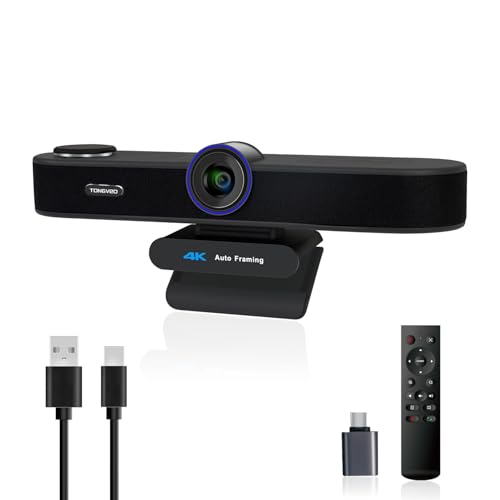
3-in-1 Hybrid Webcam – TONGVEO 3-in-1 Webcam with Speaker
If you want AI conference cameras for hybrid meetings in a compact form, the TONGVEO 3-in-1 webcam combines video, microphones, and a speaker in one unit. It is built for calls where you need flexible framing, with AI auto-framing, voice tracking, and three adjustable field-of-view modes that help tailor the image to the meeting.
Best For: Teams and individuals who want a compact 4K webcam with built-in audio and flexible framing controls.
Pros:
- 4K resolution with a 1/2.8-inch sensor supports sharper video quality.
- AI auto framing and voice tracking help keep speakers centered.
- 3 adjustable FOV modes and 5x digital zoom give extra control.
- Built-in dual mics and 3W speaker reduce the need for extra audio gear.
Cons:
- Digital zoom may be less flexible than optical zoom in larger rooms.
- More suited to desk or small-room setups than bigger conference spaces.
The TONGVEO is a strong fit when you want an all-in-one device for video, audio, and framing without adding accessories. It is especially useful for flexible meeting use across office, home, and teaching setups.
Portable All-in-One Meeting Cam – NUROUM C10 for Small Hybrid Spaces
If you need AI conference cameras for hybrid meetings in a compact room, the NUROUM C10 is built around simplicity: a 1080p webcam, 90° lens, 4-mic array, and integrated speaker in one portable unit. It is a practical fit for huddle rooms, focus rooms, and home offices where you want clear video and room-filling audio without adding separate peripherals.
Best For: Small teams, huddle rooms, and mobile hybrid setups that want an all-in-one camera and speaker solution.
Pros:
- All-in-one design combines 1080p camera, noise-canceling mics, and a speaker.
- 90° wide-angle lens is suited to individuals and small teams.
- Full duplex audio and AGC help keep conversations clear from up to about 10 ft.
- Plug-and-play USB setup with no driver or power adapter required.
Cons:
- 90° field of view is better for smaller groups than large rooms.
- Fixed-focus design is less flexible than motorized PTZ systems.
- Not intended for advanced room coverage or large meeting spaces.
Overall, the C10 is a straightforward choice when you want a compact conference camera that handles both sight and sound well. It emphasizes everyday meeting-room usability over advanced tracking or zoom features.
PTZ Tracking Room System – TONGVEO 4K for Large Meetings
For AI conference cameras for hybrid meetings in bigger spaces, the TONGVEO 4K PTZ system focuses on reach, tracking, and output flexibility. It pairs a 20x zoom 4K PTZ camera with AI auto-tracking and a Bluetooth speakerphone, making it a stronger fit for conference rooms, lectures, worship spaces, and live-streamed events.
Best For: Large meeting rooms and professional hybrid events that need zoom, tracking, and multiple connection options.
Pros:
- 4K/30fps camera with 20x optical zoom for larger rooms.
- AI auto-tracking and face/humanoid recognition help keep speakers framed.
- HDMI, USB3.0, and LAN outputs support flexible setups.
- Speakerphone includes 4-mic array, full duplex audio, and wireless/Bluetooth connectivity.
Cons:
- More than a basic plug-and-play webcam, so setup is less simple.
- Best suited to larger spaces rather than casual desk use.
- Overkill if you only need a small-room meeting camera.
This is the most capable option in the group when your meetings demand stronger room coverage and presentation-grade video. The combination of PTZ zoom, AI tracking, and multi-interface output makes it especially versatile for mixed in-room and remote audiences.
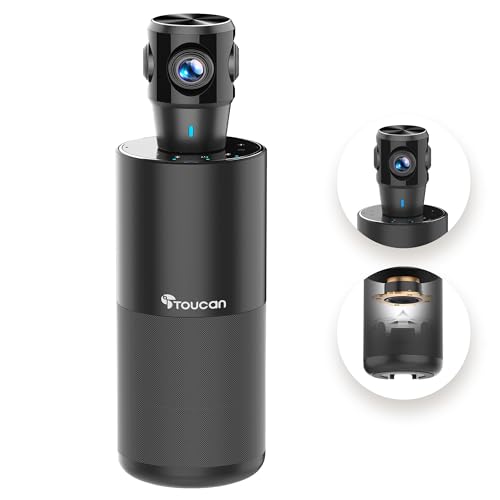
360-Degree Collaboration Cam – TOUCAN SC360 for Shared Rooms
The TOUCAN SC360 is a practical pick if you want AI conference cameras for hybrid meetings with full-room visibility. Its 360° shooting, 1080p HD video, 4 noise-reduction mics, speaker, and AI tracking are aimed at office rooms where multiple people need to be seen and heard without constant camera repositioning.
Best For: Shared conference rooms and team meetings where 360° coverage is more useful than zoom.
Pros:
- 360° viewing helps capture everyone in the room.
- 1080p HD video supports clear meeting visuals.
- Four microphones and a built-in speaker support group conversations.
- USB plug-and-play setup keeps installation simple.
Cons:
- 1080p resolution is more modest than 4K systems.
- Not a PTZ camera, so it does not offer optical zoom.
- Best suited to room-wide coverage rather than speaker close-ups.
The SC360 stands out for rooms where the goal is to include the whole group in one frame. If you prioritize broad coverage and easy setup over advanced zoom features, it is a sensible hybrid-meeting choice.
Pro Collaboration Pick – 4K AI Room Camera for Medium & Large Teams
If you need AI conference cameras for hybrid meetings in a medium or large room, this all-in-one 4K system is built to keep people visible and voices clear. It combines auto framing, speaker tracking, a wide 120° view, and integrated audio so you can cover the room without adding extra hardware.
Best For: Medium to large conference rooms that need automatic framing and built-in audio in one device.
Pros:
- AI auto framing keeps groups centered without manual camera control.
- Speaker and presenter tracking helps with training sessions, demos, and discussions.
- 120° wide-angle lens plus 5X zoom gives flexibility for full-room or close-up views.
- 4-mic array and built-in dual speakers reduce the need for separate audio gear.
Cons:
- Designed around room installations, so it may be more camera than smaller huddle spaces need.
- No image stabilization is listed.
Overall, this is a strong pick when you want a single conference room device to handle framing, tracking, and audio for regular hybrid meetings. It is especially appealing for teams that value simplicity and consistent room coverage.
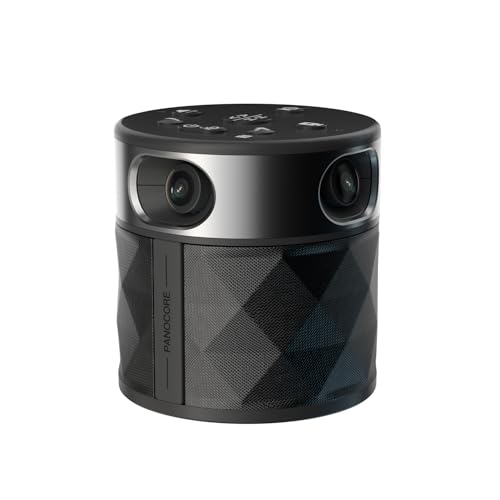
Panoramic Meeting Pick – 360° All-in-One Camera for Small Teams
For teams shopping for AI conference cameras for hybrid meetings in compact rooms, this 360° all-in-one unit focuses on simplicity and full-room visibility. It combines four cameras, an integrated speaker, and a 3-mic array, then outputs a 1080p stream that is easy to use with common meeting platforms.
Best For: Small to medium meeting rooms with up to 12 participants that need a panoramic view and simple plug-and-play setup.
Pros:
- 360° capture with dual vision modes shows both the active speaker and the whole room.
- Integrated speaker and omnidirectional mic array support clearer hybrid conversation.
- Local recording to microSD adds flexibility for archiving meetings.
- Driver-free operation works with Zoom, Teams, Webex, and Google Meet.
Cons:
- Outputs 1080p, so it is not the highest-resolution option in this roundup.
- Best suited to smaller rooms rather than larger conference spaces.
This is a practical choice if you want full-room coverage without piecing together separate camera and audio components. The panoramic design is especially useful when the main goal is keeping everyone in view during everyday hybrid meetings.
Balanced Room Pick – 2K Conference Webcam with AI Framing
NEARITY C45 2K Video Conference Webcam with Microphone and Speaker | All in One Conference Webcam
Check Price On AmazonIf you want AI conference cameras for hybrid meetings with a balance of video quality, audio features, and straightforward setup, this NEARITY model is an easy fit. It pairs a 120° ultra-wide lens and 2K output with AI auto framing, 5X zoom, four noise-canceling microphones, and a built-in loudspeaker for conference-room use.
Best For: Teams that want a plug-and-play conference webcam with strong framing, zoom, and integrated audio.
Pros:
- 2K@30fps and 1080p@60fps output provide flexible video quality.
- AI auto framing keeps one or multiple participants properly framed.
- 4 AI noise-canceling microphones and a loudspeaker support clear room audio.
- Privacy controls, remote control, and top buttons make it easier to manage meetings.
Cons:
- The speaker reaches up to 15 offline participants within 16 ft, so larger rooms may need more audio support.
- No image stabilization is listed.
This model stands out for teams that want a conference camera system with useful AI features but do not need a full 4K room bar. It is a solid middle-ground option for everyday hybrid collaboration and presentations.
How We Picked the Best AI Conference Cameras for Hybrid Meetings
We focused on features that matter in real meeting spaces: AI speaker tracking, auto-framing, pickup quality, field of view, audio performance, and connection flexibility. We also considered how easy each camera is to deploy in a home office, huddle room, or larger conference space.
Because AI Conference Cameras for Hybrid Meetings are often used by non-technical teams, we favored models that reduce setup friction and keep image and audio handling automatic.
Quick Comparison
All-in-one conference webcams are best for small rooms and desks, while PTZ and room systems are better for larger tables, presenters who move around, or spaces that need tighter shot control. Wide-angle cameras help cover everyone at once, while 360-degree models are useful when participants sit around a table and need equal visibility.
Key Buying Factors for AI Conference Cameras for Hybrid Meetings
Framing and Tracking
Look for AI auto-framing, speaker tracking, or presenter tracking if your team moves during meetings. These features help keep remote attendees focused on the active speaker instead of an empty room.
Audio Quality
Built-in microphones, noise reduction, and speakerphone functions can be a major advantage in smaller rooms. In larger spaces, a dedicated audio solution may still be helpful, but strong onboard audio remains a plus.
Resolution and Field of View
1080p is often enough for basic conferencing, while 2K and 4K models can improve detail and cropping flexibility. Wider lenses work well for group tables; tighter zoom is better when you need to highlight presenters or whiteboards.
Connectivity and Compatibility
Check for support with Zoom, Microsoft Teams, Google Meet, USB, HDMI, or LAN depending on your setup. The best camera is the one your team can use consistently without software headaches.
Room Size and Mounting
Match the camera to the room. Portable all-in-one models suit personal desks and small huddle rooms, while mounted PTZ cameras are a stronger fit for boardrooms and training spaces.
Who Should Buy Which AI Conference Cameras for Hybrid Meetings?
If you want the simplest setup, choose an all-in-one webcam with mic and speaker for a small team. If you run recurring meetings in a medium room, prioritize AI framing and speaker tracking. If your space is large or multi-purpose, a PTZ system with more optical control is usually the smartest investment.
For most buyers, the best AI Conference Cameras for Hybrid Meetings are the ones that balance hands-free automation with reliable audio, good compatibility, and enough image flexibility to cover every seat in the room.