Choosing the right label printer can save time on every shipment, return, and inventory task. If you print 4×6 shipping labels regularly, the best wide format thermal label printers deliver speed, clarity, and low ongoing costs.
This roundup focuses on practical options for home sellers, growing eCommerce brands, and busy office workflows, with a close look at connectivity, compatibility, and print performance.
Best 10 Wide Format Thermal Label Printers Picks for 2026
Wireless Business Pick
Brother QL-1110NWB Wide-Format Wireless Label Printer

- Supports labels up to 4 inches wide
- Bluetooth, Ethernet, and Wi‑Fi connectivity
- Barcode crop and Plug & Label tools
Best For: Shipping desks and offices needing flexible wireless wide-label printing
Fast Shipping Pick
Rollo USB 4x6 Thermal Shipping Label Printer

- Prints a 4x6 label at up to 150mm/s
- Works with Windows and Mac over USB
- Supports major shipping platforms and marketplaces
Best For: Ecommerce sellers who want fast, simple shipping label printing
Compact Desktop Pick
Brother QL-1100 Wide-Format USB Label Printer

- Prints wide labels up to 4 inches
- USB host interface supports a scanner
- Compatible with Windows, Linux, and Mac
Best For: Compact packing stations that need wide labels and barcode printing
Bluetooth Flexible Pick
MUNBYN 130B Bluetooth 4x6 Shipping Label Printer

- Bluetooth support for iOS and Android
- Handles label widths from 1.57 to 4.3 inches
- Chrome-based PC printing with no install
Best For: Mobile-friendly shipping and custom label printing across devices
Commercial USB Workhorse
Westinghouse 4x6 Shipping Label Printer

- 203 DPI direct thermal printing
- USB and Ethernet connectivity
- Supports 4x6 rolls and fanfold labels
Best For: Fixed shipping stations and small business ecommerce setups
Wireless Shipping Specialist
Rollo Wi‑Fi Thermal Label Printer

- AirPrint and Wi‑Fi printing support
- 203 DPI at 150 mm/s
- Works with major shipping platforms
Best For: Multi-device sellers who want wireless shipping label printing
Mobile Bluetooth Pick
Phomemo 241BT 4x6 Shipping Label Printer

- Bluetooth printing with Labelife app
- USB support for major desktop OSs
- Prints labels from 1 to 4.6 inches wide
Best For: Phone-first sellers and small businesses needing wireless flexibility
Compact Space-Saver
D450BT 4x6 Bluetooth Shipping Label Printer

- Built-in bin holds up to 250 labels
- Bluetooth and USB across major platforms
- 203 DPI thermal printing with auto-alignment
Best For: Small businesses that need a compact 4x6 shipping label printer
Wireless Shipping Staple
JADENS Bluetooth Thermal Label Printer

- 203 DPI thermal printing with no ink or toner
- Supports fanfold and roll labels up to 4.1 inches
- Works with Amazon, Shopify, Etsy, USPS, and more
Best For: Online sellers who want a simple, compatible 4x6 label printer
Customizable Portable Pick
KNAON Bluetooth Thermal Shipping Label Printer
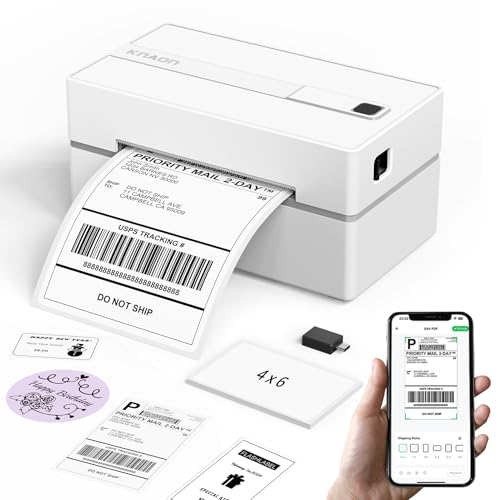
- 3,000+ templates plus icons and fonts
- Bluetooth and USB with broad platform support
- Supports 1.5 to 4.2 inch label widths
Best For: Shippers who want a compact printer with strong customization options
Wireless Business Pick – Brother QL-1110NWB Wide-Format Wireless Label Printer
If you want a wide format thermal label printer that can handle shipping, address, postage, and badge labels without a lot of setup friction, the Brother QL-1110NWB is built for that workflow. It supports labels up to 4 inches wide, adds Bluetooth, Ethernet, and Wi‑Fi connectivity, and includes barcode cropping tools for Windows users who print from templates or databases.
Best For: Small businesses and shipping stations that need flexible wireless printing, barcode support, and 4-inch-wide labels.
Pros:
- Prints on wide format labels up to 4 inches for shipping and postage
- Wireless options include Bluetooth, Ethernet, and Wi‑Fi
- Barcode crop function helps print barcodes and UPCs from templates
- Plug & Label feature lets Windows users print without installing software
Cons:
- Barcode crop support is Windows only
- Uses monochrome output only
- Best label length and database features may be more advanced than casual users need
Overall, this is the most feature-rich pick in the group if you need broad connectivity and business-oriented label tools. It is especially useful when your label printer needs to fit into a networked office or warehouse setup.
Fast Shipping Pick – Rollo USB 4×6 Thermal Shipping Label Printer
The Rollo USB is a strong pick if your goal is a straightforward wide format thermal label printer for 4×6 shipping labels and other everyday business stickers. It focuses on speed, USB simplicity, and broad platform support, making it a practical choice for sellers who want to print from Windows or Mac without dealing with ink or toner.
Best For: Small businesses and ecommerce sellers who want a fast USB shipping label printer with wide platform compatibility.
Pros:
- Prints at 150mm/s, or about one 4×6 label per second
- Compatible with Windows and Mac
- Supports shipping, warehouse, barcode, sticker, and custom labels
- Works with major platforms and marketplaces like USPS, Shopify, Etsy, and Amazon
Cons:
- USB-only connection may be limiting for wireless workflows
- Maximum media width is 4.1 inches
- Resolution is 203 DPI, which is fine for shipping but not premium graphics
For users who care more about dependable output and simple setup than advanced networking, the Rollo keeps the focus on fast label production. It is best viewed as a high-speed shipping tool rather than a feature-heavy office printer.
Compact Desktop Pick – Brother QL-1100 Wide-Format USB Label Printer
The Brother QL-1100 is a practical wide format thermal label printer for shipping labels, barcode work, and general packing station use. It prints on labels up to 4 inches wide, includes a barcode crop feature for Windows, and adds a USB host interface that can support peripheral devices like a scanner.
Best For: Users who want a compact, wide-label printer for shipping stations, barcode printing, and desktop packing workflows.
Pros:
- Prints labels up to 4 inches wide
- Barcode crop function simplifies barcode and UPC printing on Windows
- USB host interface supports peripheral devices such as a scanner
- Compatible with Windows, Linux, and Mac
Cons:
- Uses USB connection only
- Barcode crop function is Windows only
- No wireless connectivity listed
This model is a good fit when you want Brother’s wide-format label support without moving up to a wireless network setup. It is especially appealing for compact packing areas where USB simplicity and desktop reliability matter most.
Bluetooth Flexible Pick – MUNBYN 130B Bluetooth 4×6 Shipping Label Printer
If you need a wide format thermal label printer that can move between mobile, tablet, and desktop workflows, the MUNBYN 130B is designed for flexible everyday printing. It supports Bluetooth for iOS and Android, browser-based printing on Chrome for PCs, and USB backup for desktops without Bluetooth, while handling labels from 1.57 inches up to 4.3 inches wide.
Best For: Sellers and home-office users who want Bluetooth convenience, wide label support, and easy mobile printing.
Pros:
- Bluetooth printing for iPhone, iPad, Android, and tablet use
- Supports labels from 1.57 inches to 4.3 inches wide
- Chrome-based design and printing for PC without software installation
- Includes templates, fonts, OCR import, and multi-language support
Cons:
- Best results are recommended with genuine Munbyn labels
- May have issues with UPS thermal paper
- Still prints monochrome only
The 130B stands out for convenience and customization, especially if you like designing labels from a phone or tablet. It is a flexible option for shipping, branding, and organization tasks, but it works best when paired with the brand’s own media.
Commercial USB Workhorse – Westinghouse 4×6 Shipping Label Printer
If you want a no-frills option in the wide format thermal label printers category, this Westinghouse model focuses on dependable 4×6 shipping output for ecommerce and warehouse use. It supports Windows, macOS, and Linux, works with ZPL software, and is built around direct thermal printing so there are no ribbons or toner to manage.
Best For: Small businesses and shipping workflows that need a straightforward USB/Ethernet thermal printer for packages.
Pros:
- Prints at up to 6 inches per second with 203 DPI for clear labels.
- Supports 4×6 labels, fanfold labels, and rolls with a 4.25-inch max print width.
- Includes starter labels, label holder, USB flash drive, USB cable, and power accessories.
- Ethernet and USB connectivity suit desktop shipping setups.
Cons:
- Not Bluetooth-capable.
- Ethernet cable and USB-C cable/adapter are sold separately.
- Requires proper driver installation during setup.
This is a practical commercial-grade choice if you mainly need reliable, high-speed 4×6 label printing from a fixed workstation. It is less flexible than wireless models, but the included accessories and wide OS support make it easy to fit into a basic shipping desk.
Wireless Shipping Specialist – Rollo Wi‑Fi Thermal Label Printer
Among wide format thermal label printers, this Rollo stands out for wireless convenience and broad platform support. It prints via AirPrint from iPhone, iPad, and Mac, or over Wi‑Fi for Android, Windows, Chromebook, and Linux, making it a flexible fit for mixed-device shipping teams.
Best For: Users who want Wi‑Fi label printing without relying on Bluetooth or constant driver hassles.
Pros:
- AirPrint and Wi‑Fi support cover Apple, Android, Windows, Chromebook, and Linux.
- Direct thermal printing at 150 mm/s with 203 DPI output.
- Works with major shipping platforms like USPS, UPS, FedEx, ShipStation, Shippo, and ShipWorks.
- Rollo Ship Manager app adds shipping tools and access to discounted rates.
Cons:
- Maximum media width is 4.1 inches, so it is a bit narrower than some 4×6-focused models.
- No Bluetooth support.
- App-based workflow may not suit everyone.
If wireless printing matters more than a barebones desktop setup, this Rollo is a strong candidate. Its broad compatibility and label-making flexibility make it especially useful for sellers who print from multiple devices or want one printer for shipping and custom labels.
Mobile Bluetooth Pick – Phomemo 241BT 4×6 Shipping Label Printer
This Phomemo model is a good fit if you want a compact wide format thermal label printer that can print from phones, tablets, and computers. It supports Bluetooth printing through the Labelife app on iOS and Android, and it also works over USB with Windows, Mac, Chrome OS, and Linux.
Best For: Small sellers and home businesses that want mobile Bluetooth printing with a USB backup.
Pros:
- Bluetooth printing through the Labelife app for iOS and Android.
- USB support extends compatibility to Windows, Mac, Chrome OS, and Linux.
- Handles label widths from 1 to 4.6 inches for shipping and custom labels.
- Fast direct thermal printing at 150 mm/s with black-and-white output only.
Cons:
- PC setup requires the correct driver download.
- Bluetooth workflow depends on the Labelife app.
- Color labels require separate compatible thermal color paper.
For buyers who want phone-first convenience, this Phomemo offers a good blend of portability and broad compatibility. It is especially appealing for smaller shipping operations that value Bluetooth access but still want a wired fallback for desktop use.
Compact Space-Saver – D450BT 4×6 Bluetooth Shipping Label Printer
If you want a wide format thermal label printer that fits easily on a crowded desk, the D450BT is built around efficiency. It prints 4×6 shipping labels with Bluetooth and USB support, works across major desktop and mobile platforms, and includes a built-in label bin that helps reduce clutter.
Best For: Small businesses and home shippers who want a compact 4×6 printer with wireless convenience.
Pros:
- Built-in label compartment holds up to 250 4×6 labels without extra holders
- Supports Bluetooth and USB on Android, iPhone, Windows, macOS, Linux, and ChromeOS
- Prints 1-4.6 inch labels for shipping, barcode, warehouse, and pricing tasks
- Claims 203 DPI output and up to 72 labels per minute with auto-alignment
Cons:
- Designed for monochrome thermal labels only
- Best fit is 4×6 and similar label workflows, not general document printing
The D450BT stands out if space-saving design matters as much as label quality. Its built-in paper bin and broad platform support make it a practical pick for everyday shipping and organization work.
Wireless Shipping Staple – JADENS Bluetooth Thermal Label Printer
The JADENS model is a straightforward wide format thermal label printer for everyday shipping work. It handles 4×6 labels, supports both fanfold and roll media, and is aimed at sellers using common platforms like Amazon, Shopify, Etsy, and USPS.
Best For: Online sellers who want a dependable 4×6 label printer with simple setup and wide marketplace compatibility.
Pros:
- 203 DPI Japanese thermal print head with no ink or toner required
- Works with fanfold labels and roll labels up to 4.1 inches wide
- Bluetooth support for Windows 8+ and Mac, plus USB for Windows and Mac
- Compatible with major shipping and marketplace platforms including Amazon, eBay, Shopify, and USPS
Cons:
- Android and iPhone users must print through the Jadens printer app
- Label size calibration is needed when changing labels
For sellers who want a proven shipping-label setup, this JADENS printer keeps the feature set focused and practical. It is less about extras and more about reliable label output for routine fulfillment.
Customizable Portable Pick – KNAON Bluetooth Thermal Shipping Label Printer
The KNAON printer is a flexible wide format thermal label printer for sellers who also want customization options. It supports 1.5 to 4.2 inch paper widths, offers app-based design tools, and works with major marketplaces for shipping and labeling tasks.
Best For: Users who want a compact label printer with strong app-based customization and broad platform support.
Pros:
- Supports Bluetooth and USB, with app-based printing for mobile and desktop use
- Includes 3,000+ templates, 5,000+ icons, and 100+ fonts in the app
- Handles a wide range of label jobs, from shipping labels to thank-you labels and price tags
- Compact body with fast printing up to 180 mm/s and support for 1.5 to 4.2 inch widths
Cons:
- Mobile and many desktop workflows rely on the FlashLabel Pro app
- Setup may require using the app, extension, or driver depending on device
Among wide format thermal label printers, KNAON is the most design-forward option here. It suits users who want more creative control over labels without giving up core shipping compatibility.
How We Picked These Wide Format Thermal Label Printers
We focused on the features that matter most for daily labeling: reliable 4×6 output, easy setup, broad platform compatibility, and strong value over time. We also weighed connectivity options, including USB, Bluetooth, Wi-Fi, and mobile printing support, since those details can make a major difference in real-world use.
Quick Comparison: Which Type Fits Your Workflow?
Not every buyer needs the same setup. USB-only models are often ideal for a fixed shipping station, while Bluetooth and Wi-Fi models are better if you print from phones, tablets, or multiple devices. If you work mostly with marketplaces like Amazon, Shopify, USPS, UPS, or FedEx, look for dependable driver support and easy integration rather than extra features you may never use.
Key Buying Factors for Wide Format Thermal Label Printers
Label Size and Print Width
Most buyers want 4×6 labels for shipping, but some workflows also need address labels, barcodes, or custom sticker formats. Make sure the printer supports the label sizes you use most often.
Connectivity and Device Compatibility
Confirm whether the printer works with Windows, Mac, iPhone, iPad, and Android if you expect to print across devices. Wireless convenience is helpful, but only if the app, drivers, and pairing process are dependable.
Print Speed and Volume
If you ship in batches, print speed and feed reliability matter more than flashy extras. A faster printer with fewer misfeeds can improve fulfillment efficiency and reduce wasted labels.
Software and Marketplace Support
Strong software support can simplify label creation, order imports, and scaling. For sellers, compatibility with popular shipping platforms is often just as important as raw hardware specs.
Size, Portability, and Workspace Fit
Some Wide Format Thermal Label Printers are compact enough for a desk or packing station, while others are better suited to higher-volume setups. Consider where the printer will live before choosing a model.
Who Should Buy Which Wide Format Thermal Label Printers?
If you want the simplest setup for a single workstation, USB models are usually the easiest choice. If you print from phones or need more flexibility, choose Bluetooth or Wi-Fi. Small businesses with steady shipping volume should prioritize speed, compatibility, and dependable feed performance over cosmetic extras. In short, the best Wide Format Thermal Label Printers are the ones that match your shipping volume, device ecosystem, and workflow—not just the highest spec sheet.