If you want fast, low-maintenance black-and-white printing, monochrome laser printers with automatic duplexing are a smart upgrade. They help cut paper use, speed up everyday jobs, and keep office workflows moving.
In this roundup, we focus on models that balance print speed, reliability, connectivity, and overall value, so you can choose a printer that fits your space and workload.
Best 10 Monochrome Laser Printers with Automatic Duplexing Picks for 2026
Home Office Value Pick

- 36 ppm black-and-white printing
- Automatic duplex printing
- Wi‑Fi, Ethernet, and USB connectivity
Best For: home offices and small teams
Office Security Pick

- Auto 2-sided black-and-white printing
- Up to 35 ppm single-sided speed
- HP Wolf Pro Security included
Best For: small offices that value secure printing
High-Volume Business Pick

- 50 ppm monochrome printing
- Automatic duplex capability
- 520-sheet tray, expandable to 1,660
Best For: busy offices with heavy print volumes
Compact Wired Pick

- Automatic two-sided printing
- Compact USB-only design
- 150-sheet input tray
Best For: small spaces and simple wired setups
High-Output Office All-in-One
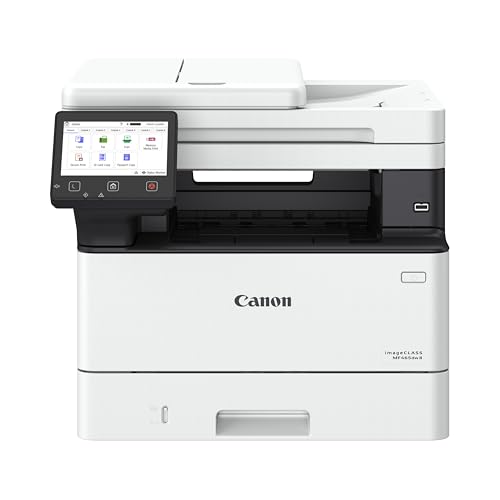
- Prints up to 42 ppm
- Automatic duplex and duplex ADF
- Expandable to 900-sheet capacity
Best For: Busy small offices that need speed and strong paper handling
Small-Team Workhorse

- Prints up to 35 ppm black
- Auto two-sided printing with 50-sheet ADF
- 250-sheet tray with broad wireless support
Best For: Small teams that need a dependable monochrome office MFP
Balanced Duplex Office MFP
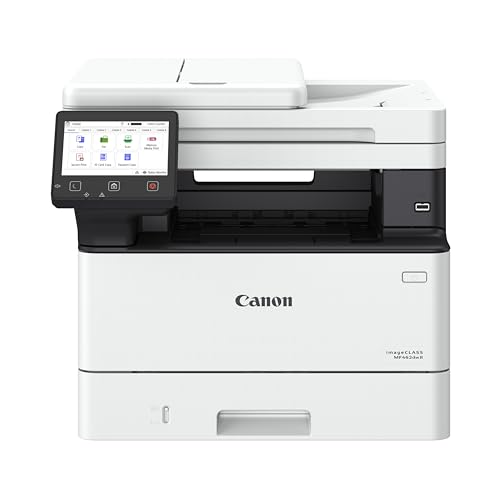
- Prints up to 37 ppm
- Automatic duplex with duplex ADF
- Expandable to 800-sheet capacity
Best For: Offices that want a balanced duplex all-in-one with room to grow
Compact Home Office Pick

- 30 ppm black-and-white printing
- Automatic duplex and wireless support
- Compact print-only design
Best For: Home offices that want simple duplex laser printing
Small Business Workhorse

- 3-in-1 print, copy, and scan
- 36 ppm with automatic duplexing
- Dual-band Wi-Fi, Ethernet, and ADF
Best For: Busy offices needing a versatile monochrome all-in-one
Fast Print-Only Option

- 35 ppm black-and-white output
- Automatic duplex and Wi-Fi printing
- 250-sheet cassette for more capacity
Best For: Users who want a faster duplex print-only laser printer
Home Office Value Pick – Brother HL-L2460DW
If you want one of the most practical monochrome laser printers with automatic duplexing for a home office or small team, the Brother HL-L2460DW hits a very balanced sweet spot. It combines fast black-and-white output, wired and wireless connectivity, and automatic two-sided printing in a compact footprint.
Best For: Home offices and small teams that need reliable everyday document printing with flexible connection options.
Pros:
- Prints up to 36 ppm for quick everyday jobs.
- Automatic duplexing helps reduce paper use and speed up multi-page printing.
- Built-in dual-band Wi‑Fi, Ethernet, and USB support flexible setup.
- 250-sheet paper tray is useful for regular black-and-white printing.
Cons:
- Print-only design means no scanning or copying functions.
- Starter toner is included, so larger-volume users may need replacements sooner.
Overall, this Brother is a solid all-around pick if you value simple operation, dependable output, and a compact design that still handles busy document workflows well.
Office Security Pick – HP LaserJet Pro 3001dw
HP Laserjet Pro 3001dw Wireless Black & White Printer, Best-for-Office (3G65OF)
Check Price On AmazonThe HP LaserJet Pro 3001dw is a straightforward option if you’re comparing monochrome laser printers with automatic duplexing for a small office. It focuses on fast black-and-white printing, dependable wireless connectivity, and built-in security features for shared business use.
Best For: Small teams and office users who want fast duplex printing and security-focused features.
Pros:
- Auto 2-sided printing helps streamline multi-page document jobs.
- Up to 35 ppm single-sided print speed supports busy office use.
- HP Wolf Pro Security adds customizable protection settings.
- Works with Wi‑Fi, Ethernet, Bluetooth, and multiple device types.
Cons:
- Uses original HP-chip cartridges, which limits third-party cartridge flexibility.
- Print-only design may not suit users needing scanning or copying.
For a compact office laser printer, this model stands out more for reliability, connectivity, and security than for extra features. It’s a practical fit when black-and-white document output is the main priority.
High-Volume Business Pick – Brother HL-L6210DW
Among monochrome laser printers with automatic duplexing, the Brother HL-L6210DW is clearly built for heavier business workloads. With a 50 ppm rating, large paper capacity, and advanced networking options, it is aimed at users who need efficient high-volume document output.
Best For: High-volume offices that need fast duplex printing, larger paper capacity, and business-grade networking.
Pros:
- Fast 50 ppm output is well suited to large print queues.
- Automatic duplexing helps save paper on two-sided documents.
- 520-sheet main tray plus 100-sheet multipurpose tray support bigger jobs.
- Gigabit Ethernet and dual-band wireless make sharing easier in business settings.
Cons:
- Heavier and larger than compact desktop printers.
- Full business setup may be more than casual home users need.
This is the strongest fit when speed and capacity matter more than size. If your office prints constantly, the HL-L6210DW is built to keep up.
Compact Wired Pick – HP LaserJet M209d
If you want a compact option in monochrome laser printers with automatic duplexing, the HP LaserJet M209d is designed for simple home office use. It keeps the focus on black-and-white document printing, fast two-sided output, and a space-saving wired setup.
Best For: Home offices and small workspaces that want a compact, USB-only duplex laser printer.
Pros:
- Automatic duplex printing speeds up multi-page jobs and cuts paper use.
- Compact design makes it easier to place in tight spaces.
- USB cable included for straightforward wired setup.
- 150-sheet input tray is enough for light to moderate document printing.
Cons:
- USB-only connectivity means no built-in Wi‑Fi or Ethernet.
- 30 ppm is solid, but not as fast as higher-end office models.
For users who prefer a simple, no-fuss printer and do not need wireless access, this HP keeps the essentials tight and practical. It’s a good fit when space and simplicity matter more than advanced networking.
High-Output Office All-in-One – Canon imageCLASS MF465dw II
If you want monochrome laser printers with automatic duplexing for a busy office, the Canon imageCLASS MF465dw II is built around speed and versatility. It prints up to 42 ppm, includes print, copy, scan, and fax functions, and adds automatic two-sided printing plus a 50-sheet duplex ADF to keep multi-page jobs moving.
Best For: Small offices that want a fast black-and-white all-in-one with strong paper handling and easy wireless use.
Pros:
- Fast output up to 42 ppm with a quick first print time of 4.9 seconds
- Automatic duplex printing and a duplex ADF for efficient two-sided workflows
- Expandable paper capacity up to 900 sheets for heavier office use
- Wireless, Ethernet, USB, and mobile printing support
Cons:
- Monochrome only, so it is not suited for color document needs
- Larger footprint than a basic desktop printer
- Uses Canon Genuine Toner 070, which may limit flexibility in consumables
The MF465dw II is the most speed-focused option in this group, especially if your workflow depends on duplex printing and lots of scanned or copied pages. It makes the most sense where a fast, connected office all-in-one matters more than compact size.
Small-Team Workhorse – HP LaserJet Pro MFP 3101sdw
Among monochrome laser printers with automatic duplexing, the HP LaserJet Pro MFP 3101sdw is aimed squarely at small teams that need dependable everyday output. It delivers up to 35 ppm black, includes scanning and copying, and adds auto two-sided printing along with a 250-sheet input tray and 50-sheet ADF.
Best For: Small teams that want a reliable black-and-white all-in-one with straightforward wireless office printing.
Pros:
- Up to 35 ppm black for steady office throughput
- Auto two-sided printing to reduce paper use
- 50-sheet auto document feeder for scan and copy tasks
- Wireless, Ethernet, USB, AirPrint, and Mopria connectivity
Cons:
- Monochrome output only
- Standard paper capacity is 250 sheets, so high-volume users may need frequent refills
- One-year limited warranty is shorter than some office-focused alternatives
This HP model balances speed, duplexing, and simple team connectivity without adding unnecessary complexity. It is a practical choice if you want a business-ready MFP that handles black-and-white documents efficiently.
Balanced Duplex Office MFP – Canon imageCLASS MF462dw II
If you are comparing monochrome laser printers with automatic duplexing and want a balanced office pick, the Canon imageCLASS MF462dw II sits between speed and paper handling. It prints up to 37 ppm, offers print, scan, copy, and fax functions, and includes automatic two-sided printing plus a 50-sheet duplex ADF.
Best For: Offices that want a well-rounded black-and-white all-in-one with duplexing, wireless support, and expandable paper capacity.
Pros:
- Up to 37 ppm with a quick first print time of about 4.9 seconds
- Automatic duplex printing and a 50-sheet duplex ADF
- Expandable paper capacity up to 800 sheets
- Wireless, Ethernet, USB, and mobile printing support
Cons:
- Monochrome only
- Uses Canon Genuine Toner 070, so consumables are tied to that cartridge family
- Heavier and larger than a simple desktop printer
The MF462dw II is a good middle-ground choice when you need office features without jumping to the fastest model. It is especially appealing if duplex scanning and expandable paper capacity are high priorities.
Compact Home Office Pick – Canon imageCLASS LBP122dw
If you’re shopping for monochrome laser printers with automatic duplexing for a small workspace, the Canon imageCLASS LBP122dw is a straightforward print-only option that keeps costs and complexity down. It pairs 30 ppm black-and-white output with automatic two-sided printing, Wi-Fi, USB, and mobile printing support, making it a practical fit for everyday documents at home.
Best For: Home users and solo workers who want a compact black-and-white printer with automatic duplexing and mobile printing.
Pros:
- Automatic duplex printing helps save paper on everyday jobs.
- Fast 30 ppm black-and-white speed suits routine document printing.
- Wireless and mobile-ready, with support for the Canon PRINT app and more.
- Compact footprint is designed to fit almost anywhere in a home office.
Cons:
- Print-only design means no scan or copy functions.
- 150-sheet input capacity is modest for heavier workloads.
- Single-function use may be limiting for shared office needs.
Overall, this model makes sense if you want dependable monochrome laser printing with automatic duplexing and don’t need extra all-in-one features. It’s especially appealing when compact size and simple wireless setup matter more than advanced document handling.
Small Business Workhorse – Brother DCP-L2640DW
For buyers comparing monochrome laser printers with automatic duplexing, the Brother DCP-L2640DW stands out as a compact 3-in-1 choice with print, copy, and scan functions. It combines 36 ppm black-and-white printing, automatic duplexing, a 50-page ADF, and dual-band Wi-Fi plus Ethernet, so it is built to handle busy document workflows.
Best For: Small businesses and home offices that need duplex printing plus scanning and copying in one machine.
Pros:
- 3-in-1 design adds scanning and copying beyond basic printing.
- Automatic duplex printing helps reduce paper usage.
- Fast 36 ppm output and a 50-page ADF support heavier document tasks.
- Dual-band Wi-Fi, Ethernet, and USB offer flexible connectivity.
Cons:
- Bulkiest option here at 25 pounds, so it is less portable.
- Print resolution is listed at 300 x 300 for the scanning/print specs in the notes.
- Starter toner is included, so replacement costs will matter over time.
This is the most versatile choice in the group if you want a monochrome laser printer with automatic duplexing and office-friendly features. It’s a strong fit when speed, scanning, and network flexibility matter more than keeping things ultra-simple.
Fast Print-Only Option – Canon imageCLASS LBP172dw
If your priority is a fast monochrome laser printer with automatic duplexing, the Canon imageCLASS LBP172dw is a strong print-only option to consider. It delivers up to 35 ppm black-and-white output, automatic two-sided printing, Wi-Fi, and mobile printing support, while keeping the setup focused on document printing.
Best For: Offices and home users who want a faster print-only duplex laser printer with wireless convenience.
Pros:
- 35 ppm black-and-white speed makes it the fastest Canon option in this group.
- Automatic duplex printing helps cut paper use on standard documents.
- Wi-Fi, Canon PRINT app support, Apple AirPrint, and Mopria add mobile flexibility.
- 250-sheet cassette offers more capacity than the smaller home-office model.
Cons:
- Print-only design means no scanning or copying.
- Uses a proprietary toner system, so replacement cartridges are specific to the model.
- Single-function layout may not suit users who want an all-in-one device.
Among monochrome laser printers with automatic duplexing, this model is best for users who want speed and wireless printing without extra functions. It is a clean fit for document-heavy environments where the printer’s main job is to print quickly and efficiently.
How We Picked the Best Monochrome Laser Printers with Automatic Duplexing
We prioritized Monochrome Laser Printers with Automatic Duplexing that offer a strong mix of print speed, ease of setup, wireless or wired connectivity, and real-world value. We also looked at duty-cycle suitability, paper handling, mobile printing support, and whether a model makes sense for a home office, small team, or busier workgroup.
Quick Comparison
Single-function printers are usually the best choice if you only need reliable document output and want to keep costs and size down. All-in-one models add copy, scan, and sometimes fax features for users who handle forms, archiving, or occasional document management. If you print frequently, choose a model with faster pages per minute and a larger paper capacity; if you print lightly, compact footprint and simple controls may matter more.
Key Buying Factors for Monochrome Laser Printers with Automatic Duplexing
Duplex Speed and Workflow
Automatic two-sided printing saves paper, but not all duplex systems are equally fast. If you print long reports or multi-page handouts, look for a printer that maintains good duplex throughput instead of slowing down sharply on double-sided jobs.
Connectivity
Wireless printing is convenient for mixed-device households and shared offices, while USB-only or wired-only models can be a better fit for a dedicated workstation. Also check for mobile printing support if you expect to print from phones or tablets.
Function Type
Consider whether you need just printing or a multifunction device. For scanning contracts, copying IDs, or faxing paperwork, an MFP can replace multiple machines. If your needs are straightforward, a single-function printer is often simpler and more compact.
Paper Handling and Capacity
Higher input capacity means fewer interruptions, especially in busy environments. If you print in bursts or share the device with several users, expandable paper handling can be a meaningful advantage.
Who Should Buy Which Monochrome Laser Printers with Automatic Duplexing?
Home office users should usually start with a compact wireless printer that includes automatic duplexing and mobile support. Small teams and busy offices may benefit more from a faster MFP with larger paper capacity and better sharing features. If security, speed, or simple black-and-white document output are your top priorities, a business-focused single-function model is often the best value.
For most buyers, the right choice comes down to balancing speed, features, and ongoing convenience. Narrow your options by deciding whether you need scanning and copying, how much you print each month, and whether wireless flexibility matters more than a smaller, more direct setup.